Release 2025.09
Release versions and dates
| Name | Description | Availability | Build number |
|---|---|---|---|
| Collibra Platform | Collibra 2025.09.4 | October 3, 2025 (on demand only) | |
| Collibra Platform | Collibra 2025.09.3 | September 28, 2025 (all environments) | |
| Collibra Platform | Collibra 2025.09.3 | September 26, 2025 (on demand only) | |
| Collibra Platform | Collibra 2025.09.2 | September 19, 2025 (on demand only) | 2025.09.424 |
| Collibra Platform | Collibra 2025.09.1 | September 12, 2025 (on demand only) | 2025.09.422 |
| Collibra Platform | Collibra 2025.09.0 | September 7, 2025 (pre-production environments) | 2025.09.419 |
| Collibra Platform | Documentation Center and release notes | September 2, 2025 | |
| Edge | Edge 2025.6.259 | March 8, 2026 | |
| Edge | Edge 2025.6.252 | March 1, 2026 | |
| Edge | Edge 2025.6.245 | February 22, 2026 | |
| Edge | Edge 2025.6.238 | February 15, 2026 | |
| Edge | Edge 2025.6.231 | February 8, 2026 | |
| Edge | Edge 2025.6.224 | February 1, 2026 | |
| Edge | Edge 2025.6.217 | January 25, 2026 | |
| Edge | Edge 2025.6.210 | January 18, 2026 | |
| Edge | Edge 2025.6.203 | January 11, 2026 | |
| Edge | Edge 2025.6.168 | November 23, 2025 | |
| Edge | Edge 2025.6.161 | November 16, 2025 | |
| Edge | Edge 2025.6.154 | November 9, 2025 | |
| Edge | Edge 2025.6.147 | November 2, 2025 | |
| Edge | Edge 2025.6.140 | October 26, 2025 | |
| Edge | Edge 2025.6.133 | October 19, 2025 | |
| Edge | Edge 2025.6.126 | October 12, 2025 | |
| Edge | Edge 2025.6.119 | October 5, 2025 | |
| Edge | Edge 2025.6.112 | September 28, 2025 | |
| Edge | Edge 2025.6.105 | September 21, 2025 | |
| Edge | Edge 2025.6.98 | September 14, 2025 | |
| Edge | Edge 2025.6.91 | September 7, 2025 | |
| Edge | Edge 2025.6.77 | August 24, 2025 | |
| Edge | Edge 2025.6.70 | August 17, 2025 | |
| Edge | Edge 2025.6.64 | August 11, 2025 | |
| Edge | Edge 2025.6.63 | August 10, 2025 | |
| Edge | Edge 2025.6.56 | August 3, 2025 | |
| Edge | Edge 2025.6.49 | July 27, 2025 | |
| Edge | Edge 2025.6.42 | July 20, 2025 | |
| Edge | Edge 2025.6.35 | April 27, 2025 | |
| Edge | Edge 2025.6.28 | April 13, 2025 | |
| Edge | Edge 2025.6.21 | April 6, 2025 | |
| Edge | Edge 2025.6.14 | March 30, 2025 | |
| Edge | Edge 2025.6.7 | February 9, 2025 | |
| Data Lineage | Data Lineage 2025.10.4 | October 27, 2025 | |
| Data Lineage | Data Lineage 2025.10.3 | October 20, 2025 | |
| Data Lineage | Data Lineage 2025.10.2 | October 13, 2025 | |
| Data Lineage | Data Lineage 2025.10.1 | October 6, 2025 | |
| Data Lineage | Data Lineage 2025.09.5 | September 29, 2025 | |
| Data Lineage | Data Lineage 2025.09.4 | September 22, 2025 | |
| Data Lineage | Data Lineage 2025.09.3 | September 15, 2025 | |
| Data Lineage | Data Lineage 2025.09.2 | September 8, 2025 | |
| Data Lineage | Data Lineage 2025.09.1 | September 1, 2025 |
| Ticket | Product | Area | Type | Version | Content | UI | Release Stage | Deployment Type | Related topic | Idea |
|---|---|---|---|---|---|---|---|---|---|---|
| DEV-142003 | Administrative | Collibra Console | New and improved | Configuration is now always included when creating a console export file to ensure consistency and improve resiliency. Although configuration is automatically included in your export file, you have full control over including it when applying a console export file. | Commercial, GovCloud | Console export files | ||||
| DEV-140790 | Administrative | Fixed | A platform upgrade that affects the operating model no longer fails when some statuses are unexpectedly missing from the environment. | Commercial, GovCloud, CPSH | ||||||
| DEV-140498 | Administrative | New and improved | We added a new asset type Managed Control. This is added in anticipation of Control Tower, a new product which will be available in a future Collibra release. As such, this asset type is visible, but not yet functional. | latest | Commercial, GovCloud, CPSH | |||||
| DEV-139164 | Administrative | Fixed | The placeholder text in the “Add new value” field shown when editing the allowed values of a selection attribute type is now clearer and independent of any operating system terminology. | latest | Commercial, GovCloud, CPSH | |||||
| DEV-139135 | Administrative | Workflows | Fixed | Links to asset pages with a task ID parameter now always open the task sidebar. | latest | Commercial, GovCloud, CPSH | ||||
| DEV-138855 | Administrative | Import and export | Fixed | Asset type groups are applied only once to an asset type during an import, preventing migration import failures. | latest | Commercial, GovCloud, CPSH | ||||
| DEV-138446 | Administrative | New and improved | When adding a responsibility, the list of available resource roles shows again roles without resource permissions. | latest | Commercial, GovCloud, CPSH | View and edit responsibilities | ||||
| DEV-137992 | Administrative | Collibra Console | Fixed | Restarting an environment no longer resets the "Workflow engine configuration" console options to the default values. | Commercial, GovCloud, CPSH | |||||
| DEV-136767 | Administrative | Workflows | Fixed | A global workflow with multiple subsequent user tasks assigned to the same user no longer fails to show the second task as a dialog box, following the start form and the first user task. | latest | Commercial, GovCloud, CPSH | ||||
| DEV-134311 | Administrative | New and improved | The AI Base Model, AI Project, and Azure AI Foundry Project asset types are now added to the operating model in preparation for the upcoming enhancements to the Azure AI Foundry integration via Edge. | latest | Commercial, GovCloud, CPSH | |||||
| DEV-134311 | Administrative | New and improved | The AI Model and AI Agent asset types and their subtypes have moved from the Business Asset Type category to the Technology Asset Type category. Existing AI Model and AI Agent assets located in Business Asset domains will remain accessible. However, any new AI Model and AI Agent assets should be created in Technology Asset domains from 2025.09. Custom asset types won't be affected by this change. For more information, go to the "AI Governance" section of the release notes. | latest | Commercial, GovCloud, CPSH | |||||
| DEV-130415 | Administrative | Workflows | Fixed | Editing the process variables set by custom drop-down start form properties with a "multiValue" form value set to "true" no longer prevents the workflow form from starting. | latest | Commercial, GovCloud, CPSH | ||||
| DEV-130413 | Administrative | Import and export | New and improved | You can now use the new "Asset unique identifier" field on the Import Asset page to select the mechanism for mapping the import file. This enhancement simplifies the import process and ensures accurate mapping of assets. | latest | Commercial, GovCloud, CPSH | Import assets | |||
| DEV-117665 | Administrative | Import and export | Fixed | On the Import page, the "Display Name" and "Domain ID" fields were removed for relation assets. Additionally, the "Domain ID" field was removed from the primary asset in the Mapped Items list, simplifying the interface. | Commercial, GovCloud, CPSH | |||||
| DEV-100521 | Administrative | Users and subscriptions | New and improved | You can now sort the "Users" table in "Settings" → "Users and Subscriptions" by the online status column. | latest | Commercial, GovCloud, CPSH | View users that are logged in | DIP-I-174 | ||
| DEV-136448 | AI Governance | Fixed | When registering an AI Use Case, text that you enter in the "Description" field in the “Register AI use case” dialog box is no longer deleted if you change the asset type. | latest | Commercial, GovCloud, CPSH | |||||
| DEV-134311 | AI Governance | New and improved |
The AI Model asset type is now renamed AI Model Version. We also added a new AI Base Model asset type. We did this to better reflect real-world distinctions between AI Base Models, which serve as versatile, pre-trained models, and AI Model Versions, which are tailored and operationalized for specific use cases in production. When you upgrade to Collibra 2025.09, all AI Model assets in your environment are automatically converted to AI Model Version assets. The AI Model Version and AI Agent asset types (and child asset types) have migrated from the Business Asset Type category to the Technology Asset Type category. Existing AI Model assets (now AI Model Version assets) and AI Agent assets stored in Business Asset domains remain accessible. Custom asset types are not affected by this change; however, ensure that new assets can only be created in Technology Asset domains. Go to "Required actions” below. We have also included a new out-of-the-box community named AI Governance. This new community comes with two domains:
Required actions If you have any AI Model Version or AI Agent assets in Business Asset domains, you need to:
|
latest | Commercial, GovCloud, CPSH | AI Governance operating model | ||||
| DEV-130131 | AI Governance | New and improved | AI use case Owners now receive email notifications when an AI use case is using an unauthorized AI model, meaning AI Model assets that have the status Rejected or Archived. | latest | Commercial, GovCloud, CPSH | |||||
| API | New and improved | OAuth 2.0 support is now available for Collibra Platform for Government providing a more secure and efficient integration with Collibra. | Commercial, GovCloud, CPSH | OAuth Applications settings page | ||||||
| DEV-135146 | API | New and improved | You can no longer use the "/responsibilities" endpoint of the REST Core API v2 to add a resource role that has been disabled as a responsibility. | Commercial, GovCloud, CPSH | Edit a resource role | |||||
| DEV-139291 | Assessments | New and improved | The default value in the "Maximum number of files" setting for the "File Upload" field in a template is now 100, which is also the maximum value allowed. | latest | Commercial, GovCloud, CPSH | |||||
| DEV-136887 | Assessments | New and improved | You can now retake an assessment using a direct link in the following format: [your Collibra environment]/assessments/retake?id=[ID of the original assessment]. | Commercial, GovCloud, CPSH | Conduct an assessment with URL | |||||
| DEV-139650 | Data Catalog and Data Source Integrations | New and improved | Assets that are not resynchronized after 30 days no longer show a popularity score. | latest | Commercial, GovCloud, CPSH | Popularity score calculation (in preview) | ||||
| DEV-139456 | Data Catalog and Data Source Integrations | Fixed | When a Google Dataplex Catalog integration is set up to synchronize metadata and allow profiling and classification, the "Metadata Synchronization" tab is now hidden in the resulting Database asset. This ensures that resynchronization of such integrated Dataplex Catalog data source starts from the Google Dataplex Catalog capability. | latest | Commercial, GovCloud, CPSH | |||||
| DEV-139454 | Data Catalog and Data Source Integrations | New and improved | Google Dataplex Catalog integration now supports the new "DataSourceType" attribute for the "Database" asset. | Commercial, GovCloud, CPSH | ||||||
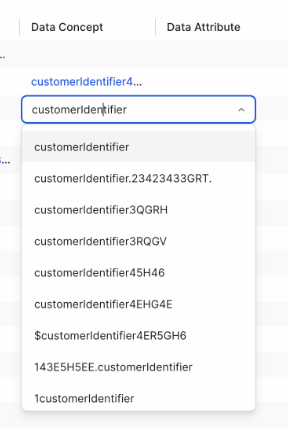
| DEV-137563 | Data Catalog and Data Source Integrations | Fixed | When you search for data concepts, data attributes, or data categories on the "Data Classification" page in Stewardship, the search results now appear in the following order: exact matches first, followed by matches that start with your search term, and then matches that contain your search term. Previously, only matches that contained your search term were shown. This change ensures that exact matches are always available for selection. | latest | Commercial, GovCloud, CPSH | Connect data classes to data layers | ||||
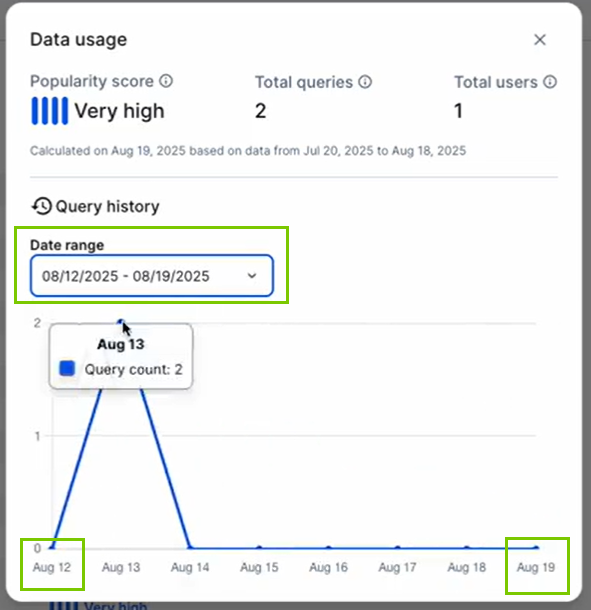
| DEV-130511 | Data Catalog and Data Source Integrations | Fixed | The query history chart for data now correctly reflects the selected dates in the "Date range" drop-down list. You can access this chart by clicking "Show details" for a popularity score in the "At a glance" sidebar or by clicking the "Popularity Score" value in a view. | latest | Commercial, GovCloud, CPSH | View data usage statistics and popularity score (in preview) | ||||
| DEV-135528 | Data Lineage | New and improved | You can now access the new technical lineage viewer UI in public preview. This modernized UI offers the same features as the previous version but introduces a refreshed design. Future updates will enhance its functionality. | latest | Commercial, GovCloud, CPSH | Technical lineage viewer | ||||
| DEV-136678 | Data Quality & Observability | Fixed | Assets with data on the Quality tab now reflect the correct quality scoring thresholds when you open the “At a glance” sidebar. | latest | Commercial, GovCloud, CPSH | |||||
| DEV-133500,DEV-133501 | Data Quality & Observability | New and improved | We optimized the performance of the Quality tab, resulting in faster load times. | latest | Commercial, GovCloud, CPSH | |||||
| DEV-128355 | Data Quality & Observability | New and improved | You can now browse your data by connection using the data source explorer on the Monitoring Overview page. The first connection is expanded by default, while others remain collapsed until selected. | latest | Commercial, GovCloud, CPSH | About the Monitoring Overview page | ||||
| DEV-128355 | Data Quality & Observability | New and improved | On the Monitoring Overview page, the name of the connection you are using is now hyperlinked to the Connections page. Additionally, the technical breadcrumb starts with the name of the connection instead of "Data sources." | latest | Commercial, GovCloud, CPSH | About the Monitoring Overview page | ||||
| DEV-126055 | Data Quality & Observability | New and improved | You can now cancel all queued or running jobs directly from the Monitoring Overview page. This helps prevent overloading your Edge site, especially when too many jobs are created via quick monitoring. | latest | Commercial, GovCloud, CPSH | Explore data sources and schemas | ||||
| DEV-122178 | Data Quality & Observability | New and improved | When you create a job with back runs, the back runs are now referenced in the job summary on the “Review” step of the job creation process. | latest | Commercial, GovCloud, CPSH | About Data Quality Jobs | ||||
| DEV-141599 | Edge | New and improved | You can now manually restore unhealthy Edge sites, that have at least one connection, after a reinstallation without a backup. Reinstalling an Edge site without a backup updates the Edge site key, causing the Edge site to become unhealthy due to a mismatch with the original key. To restore the Edge site to a healthy state, you must first delete the Edge site key to generate a new key. Then, you must re-enter the connection credentials to ensure the credentials are encrypted with the newly created Edge site key. | latest | Commercial, GovCloud, CPSH | Reinstall an Edge site | ||||
| DEV-141598 | Edge | New and improved | When you reinstall an Edge site that has no connections or capabilities, a backup is no longer required. For example, this applies to brand new Edge sites that need to be reinstalled.
Note For Edge sites that have connections or capabilities, and have been active at any point, you must create a backup of the Edge site before reinstalling it. |
Commercial, GovCloud, CPSH | Reinstall an Edge site | |||||
| DEV-135479 | Edge | New and improved | We improved Content Security Policies in Edge Management and removed the unsafe-eval errors that previously appeared in the browser. |
Commercial, GovCloud, CPSH | ||||||
| DEV-139497 | General | Diagrams | Fixed | When you hover your pointer over an asset type icon in the asset preview, the asset type information is now shown. | latest | Commercial, GovCloud, CPSH | ||||
| DEV-139449 DEV-141581 | General | Diagrams | Fixed | You can now view and edit all diagram views, as the previous limit of 100 was removed. | latest | Commercial, GovCloud, CPSH | ||||
| DEV-139205 | General | Diagrams | Fixed | The complex relation symbol type no longer triggers an error. | latest | Commercial, GovCloud, CPSH | ||||
| DEV-138790 | General | Diagrams | Fixed | Diagrams widgets on the asset page are now scrollable only when you explicitly focus on them by clicking them or pressing the Tab key. | latest | Commercial, GovCloud, CPSH | ||||
| DEV-138786 | General | Diagrams | Fixed | The "Business Qualifier" drop-down in the toolbar of the Diagram tab is now aligned with the other buttons on the "Diagram" tab. | latest | Commercial, GovCloud, CPSH | ||||
| DEV-138784 | General | Diagrams | Fixed | In the overview of a picture, clicking the link in the "Original View" column opens the diagram from which the picture was made. | latest | Commercial, GovCloud, CPSH | ||||
| DEV-138765 | General | Diagrams | Fixed | The Notebook icon in the diagram's node now shows correctly for diagrams with custom asset types. | latest | Commercial, GovCloud, CPSH | ||||
| DEV-138762 | General | Asset management | Fixed | When editing a relation type section on an asset page, characteristic types from unrelated asset types are no longer shown. | Commercial, GovCloud, CPSH | |||||
| DEV-138000 | General | Diagrams | Fixed | The "No view permission" message is no longer shown in the diagram and asset preview panes if you have view permissions. | latest | Commercial, GovCloud, CPSH | ||||
| DEV-137446 | General | Diagrams | Fixed | If you edit the node properties in a diagram view, the resulting diagram now shows the correct Display Name. | latest | Commercial, GovCloud, CPSH | ||||
| DEV-137086 | General | Notifications | New and improved | Icons are now shown for resources in the Notification Center. This visual enhancement helps you quickly identify resource types. | Commercial, GovCloud, CPSH | |||||
| DEV-136820 | General | Diagrams | Fixed | When you add a diagram filter in the Node Properties pane, clicking the "Characteristic" drop-down without selecting a value no longer adds a new filter. | latest | Commercial, GovCloud, CPSH | ||||
| DEV-135914 | General | Diagrams | New and improved | The diagram legend is now sorted alphabetically. | latest | Commercial, GovCloud, CPSH | About the diagram editor | |||
| DEV-133820 | General | Asset management | New and improved | Line breaks are now respected in asset table views for both rich text and plain text. | Commercial, GovCloud, CPSH | |||||
| DEV-132710 | General | Asset management | Fixed | Asset pages now load faster because the number of people shown in responsibilities in the "At a Glance" sidebar is limited to 10. | Commercial, GovCloud, CPSH | |||||
| DEV-132329 | General | Diagrams | New and improved | In the context menu for a diagram's node, the "Start Here" options now include external link icons that indicate they will open in a new browser tab. | latest | Commercial, GovCloud, CPSH | Open another node's diagram | |||
| DEV-130924 | General | Diagrams | New and improved | You can now search diagrams for text that is hidden due to long names or maximum text length. | latest | Commercial, GovCloud, CPSH | Find node in a diagram | |||
| DEV-117914 | General | Asset management | New and improved | You can now filter on multiple column headings in asset tables and relation tables, helping you refine your search results with more flexibility. | latest | Commercial, GovCloud, CPSH | ||||
| PUX-4674 | General | Dashboards | New and improved | You can now hide the padding and border of the Dashboard Search widget. This can improve the visual display and alignment of your Dashboard widgets. | latest | Commercial, GovCloud, CPSH | ||||
| PUX-4661 | General | Dashboards | Fixed | When you click a task from the homepage, you are now redirected to the correct domain or community. | latest | Commercial, GovCloud, CPSH | ||||
| PUX-4243,PUX-4239,PUX-4218 | General | Dashboards | New and improved | We improved the accessibility of the Collibra Platform for screen readers. For example, screen readers can now read content change notifications, such as "All Filters cleared successfully". | latest | Commercial, GovCloud, CPSH | ||||
| DEV-127477 | Identity and Access Management | Fixed | You can now delete users consistently when views or workflows are linked to the deleted user. This improvement ensures a more reliable and seamless user management experience. | Commercial, GovCloud, CPSH | ||||||
| DEV-138066 | Insights Data Access | New and improved | Beginning on September 28, 2025, all Insights Data Access downloads will include the pricing v4 values in the user_licensetype column of the Responsibilities table. | Commercial, GovCloud, CPSH | ||||||
| DEV-111699 | Insights Data Access | New and improved | Beginning on September 28, 2025, all Insights Data Access downloads will include assets in the Data Usages domain. | Commercial, GovCloud, CPSH | ||||||
| DEV-145747 | Patch releases and hotfixes | Collibra 2025.09.4 | Fixed | An Assessments administrator can again change the owner of an assessment. | latest | Commercial, GovCloud, CPSH | Assessment permissions | |||
| DEV-144117 | Patch releases and hotfixes | Collibra 2025.09.3 | Fixed | In the standalone Data Marketplace, saved filters that include asset type criteria again use the asset type UUID in the URL. This change ensures that bookmarks and other incoming links remain supported. | Commercial, GovCloud, CPSH | |||||
| DEV-144041 | Patch releases and hotfixes | Collibra 2025.09.2 | Fixed | You can now proceed with importing an Excel file with complex relations when all required columns are mapped. The "Next" button is enabled, ensuring a smoother and more intuitive import process. | Commercial, GovCloud, CPSH | |||||
| DEV-143650 | Patch releases and hotfixes | Collibra 2025.09.1 | Fixed | You no longer see the "Unsaved changes" message when leaving the browser after opening a Catalog asset with a Catalog widget if you don't have edit rights. | Commercial, GovCloud, CPSH | |||||
| DEV-134087 | Patch releases and hotfixes | Collibra 2025.09.1 | Fixed | You no longer receive a view permission error when registering a data source for Data Quality & Observability. | Commercial, GovCloud, CPSH | |||||
| DEV-140497 | Protect | New and improved | The "No masking" option is now also available for data protection standards, giving you more flexibility when controlling access to data. For example, if you want to mask data in Snowflake for everyone but allow a specific group to see unmasked data for a data class, set default masking for everyone in the Protect for Snowflake capability and create a standard for that group and data class with the "No masking" option selected. This ensures that data remains masked for everyone except the group you specified. | Commercial, GovCloud, CPSH | Data protection types, Create data protection standard | |||||
| DEV-136747 | Search | Fixed | The “Similar Data” tab in an asset preview on the search page for a Data Marketplace tab again shows similar data when switching between tabs. | latest | Commercial, GovCloud, CPSH | |||||
| DEV-129036 | Search | New and improved | You can now make communities and domains more prominent in search results with the new "Increased relevance for Communities and Domains" search setting. | latest | in preview | Commercial, GovCloud, CPSH | ||||
| DEV-126934 | Search | New and improved | You can now customize the search page experience to support diverse audiences and use cases with the new "Search tabs by audience" setting. This feature enables you to show the "Business Glossary" and "Catalog" tabs on the search page, limit the visibility of Data Marketplace subtabs to specific groups or roles, rename the "Data Marketplace" tab, and reorder the "All results" and "Data Marketplace" tabs. These options help you tailor the visibility and organization of search tabs for various personas, creating a more focused and user-specific search experience. Note
|
latest | in preview | Commercial, GovCloud, CPSH |
Edge and Data Lineage updates
March 8, 2026 (collibra-edge-2025.6.259)
Collibra Data Lineage Service
- Collibra Data Lineage now properly processes linked datasets in Google BigQuery. Previously, encountering a linked dataset could cause synchronization jobs to fail.
- You can now upload source configuration JSON files larger than 256KB through the technical lineage capability settings. Previously, large source configuration in the Source Configuration field could cause synchronization failures due to memory constraints.
March 1, 2026 (collibra-edge-2025.6.252)
Security
- We improved internal system stability and performed routine maintenance.
February 22, 2026 (collibra-edge-2025.6.245)
Security
- We improved the security of capabilities via Edge and Collibra Cloud sites.
Collibra Data Lineage Service
- You can now complete the synchronization process when creating technical lineage for Dataplex, even if the request to retrieve SQL code fails with a 503 error.
February 15, 2026 (collibra-edge-2025.6.238)
Security
- We improved the security of capabilities via Edge and Collibra Cloud sites.
Collibra Data Lineage Service
- The issue that caused an error when creating custom technical lineage with an S3 bucket source storage is now resolved.
- We resolved a bug that caused Collibra Data Lineage to incorrectly flag certain valid URLs as invalid when creating technical lineage with OpenLineage data sources.
- The standalone CLI Lineage Harvester is now compatible with Java 21.
- Edge on bundled K3S now supports EC2 role-based authentication for Collibra Data Lineage with AWS connections.
- When ingesting Power BI, longer delays between API calls are now implemented to avoid potential timeouts and integration failures.
February 8, 2026 (collibra-edge-2025.6.231)
Security
- We improved the security of Edge and Collibra Cloud sites.
February 1, 2026 (collibra-edge-2025.6.224)
Metadata integrations
- We upgraded the Databricks Unity Catalog metadata and lineage integrations. Metadata ingestion now works when using Edge with proxy support.
Collibra Data Lineage Service
- You no longer encounter a "500 Internal Server Error" during the Power BI authentication flow.
January 25, 2026 (collibra-edge-2025.6.217)
Collibra Data Lineage Service
- The OpenLineage integration now properly copies all files from the S3 bucket.Additionally, the logging for actor system termination is enhanced to simplify troubleshooting.
- The Snowflake API call to read from ACCESS_HISTORY is now optimized, improving query performance when creating technical lineage for Snowflake.
- The field-level lineage for Power BI in preview now processes workspaces with more than 300 reports.
January 18, 2026 (collibra-edge-2025.6.210)
Security
- We improved the security of Edge and Collibra Cloud sites.
- We improved the security of capabilities via Edge and Collibra Cloud sites.
Metadata integrations
- The SAP Datasphere Catalog integration now correctly ingests both the business name and technical name for supported SAP Datasphere Catalog asset types. These include Table, Database View, Column, SAP Datasphere Data Attribute, SAP Datasphere Analytic Model, SAP Datasphere Perspective, and SAP Datasphere Intelligent Lookup.
Collibra Data Lineage Service
- A timeout is now configured for actor system termination when creating technical lineage. Additionally, the logging for actor system termination is enhanced to simplify troubleshooting.
- Collibra Data Lineage now extracts transformation logic from Databricks notebooks, jobs, and dashboards when creating technical lineage for Databricks.
January 11, 2026 (collibra-edge-2025.6.203)
Security
- We improved the security of Edge and Collibra Cloud sites.
- We improved the security of capabilities via Edge and Collibra Cloud sites.
Metadata integrations
- The Dataplex Universal Catalog integration now skips entries with spaces in the aspect name. This prevents errors like "Resource name violates RFC 3986" and ensures compliance with Dataplex API requirements.
- The SAP Datasphere Catalog integration now correctly ingests both the business name and technical name for supported SAP Datasphere Catalog asset types. These include Table, Database View, Column, SAP Datasphere Data Attribute, SAP Datasphere Analytic Model, SAP Datasphere Perspective, and SAP Datasphere Intelligent Lookup.
November 23, 2025 (collibra-edge-2025.6.168)
Metadata integrations
- The Knowledge Catalog integration has been optimized to prevent an "out of memory" error during synchronization. Assets are now ingested successfully.
- The Knowledge Catalog integration does not ingest aspects or columns for tables or views that contain diacritics.
- The Databricks Unity Catalog synchronization no longer fails when a catalog contains a foreign key (FK) constraint that references a column with the same Schema > Table > Column name in a different catalog.
- You can now update the System asset for the Databricks Unity Catalog integration and resynchronize the integration to use the new System asset.
November 16, 2025 (collibra-edge-2025.6.161)
Lineage Harvester (CLI and Edge)
- Collibra Data Lineage now supports Tableau Site and Project names containing special characters, except for the ">" character. The ">" character is reserved for domain mapping and cannot be used in Site or Project names during Tableau integration.
- The API call used to retrieve data during Tableau integration has been enhanced to include additional metadata, enabling Collibra Data Lineage to generate lineage for Custom SQL Tables.
November 9, 2025 (collibra-edge-2025.6.154)
Metadata integrations
- When you synchronize Dataplex Universal Catalog via Edge, column aspects are once again correctly mapped to Collibra Attributes.
- When you register ServiceNow using the Catalog connector via Edge, the job ID and logs are now available again, and ingested assets have the correct Status.
November 2, 2025 (collibra-edge-2025.6.147)
Metadata integrations
- The capability name for Dataplex Universal Catalog integration has been updated to "Dataplex Universal Catalog," replacing "Google Dataplex Catalog synchronization."
October 27, 2025 (data-lineage-2025.10.4)
Collibra Data Lineage Service
- When ingesting Informatica PowerCenter data sources, Collibra Data Lineage now takes into consideration the “session extension” parameter, to generate more accurate lineage.
- When integrating Power BI, Collibra Data Lineage now supports the Power Query M literals "#date" and "#datetime".
- The technical lineage graph generation for the new UI no longer fails because of multiple Looker Tile Asset entries that contain a “table_id” but no “column_id.”
October 26, 2025 (collibra-edge-2025.6.140)
Security
- We have improved the security of capabilities via Edge and Collibra Cloud sites.
Protect
- When you create a Protect for BigQuery capability, the “Ignore non-existing GCP principals” checkbox, which is selected by default, is now correctly applied.
October 20, 2025 (data-lineage-2025.10.3)
Collibra Data Lineage Service
- The performance of the "Browse" tree in the new technical lineage viewer UI is now improved.
- Collibra Data Lineage service is now updated to prevent failures when generating the technical lineage graph for the new technical lineage viewer.
- When ingesting any of the supported JDBC data sources, Collibra Data Lineage now correctly processes simple RETURN and EXECUTE statements.
- When ingesting metadata from Informatica Intelligent Cloud Services (IICS), Collibra Data Lineage now skips all “Source filename” parameters if the data adapter's connection type is not CSV, FTP, or SFTP. This ensures the lineage is generated accurately and avoids misinterpretation of unsupported connection types.
- When a Looker dashboard is not assigned to a folder, Collibra Data Lineage now skips the dashboard and the metadata processing continues.
- Collibra Data Lineage now fully supports the analysis of stored procedures, including variable-tracking across SQL statements, when ingesting Amazon Redshift data sources. This allows for complete lineage from stored procedures.
- Collibra Data Lineage now supports MERGE statements when ingesting PostgreSQL or Amazon Redshift data sources.
October 19, 2025 (collibra-edge-2025.6.133)
Security
- We have improved the security of capabilities via Edge and Collibra Cloud sites.
Lineage Harvester (CLI and Edge)
- Cloud storage Edge capabilities now correctly handle directory structures for Azure Data Lake Storage connections, when the “Enable hierarchical namespace” feature is enabled on the storage container in the associated Azure storage account.
October 13, 2025 (data-lineage-2025.10.2)
Collibra Data Lineage Service
- When ingesting MySQL data sources, Collibra Data Lineage now accurately analyzes:
- STRAIGHT_JOIN statements.
- Synonyms when using DBlinks that point to other systems.
- Statements that use the TIMESTAMPDIFF function, correctly interpreting time units (for example SECOND and MICROSECOND) as keywords rather than columns, for the MySQL dialect.
- When ingesting Redshift data sources, Collibra Data Lineage now correctly analyzes COPY statements that load data from AWS S3 files by treating the target table as schemaless when the schema of the S3 file is unknown.
- When integrating Power BI data sources, metadata processing no longer fails if the "ResultAbstractTable" object is present.
- When ingesting Informatica Intelligent Cloud Services (IICS) data sources, technical lineage generation no longer fails if an adapter connection is not supported. Instead, the unsupported adapter is skipped, an analysis error is raised, and the process continues.
- Because Collibra Data Lineage does not support the 'duckdb' dialect, when ingesting dbt data sources, any 'duckdb' dialect encountered is automatically mapped to the 'postgresql' dialect instead.
- When ingesting SQL Server Integration Services (SSIS) data sources, if two nodes in an SSIS package have the same name, Collibra Data Lineage appends their respective IDs to avoid duplication in the package list.
- When ingesting Teradata data sources, Collibra Data Lineage now supports the IMPORT DATA command.
October 12, 2025 (collibra-edge-2025.6.126)
Metadata integrations
- The Snowflake synchronization no longer fails when the Data Usage Statistics feature is enabled.
Protect
- Protect for Snowflake now updates your standards and rules instead of recreating them, ensuring that your data remains protected throughout synchronization.
October 6, 2025 (data-lineage-2025.10.1)
Collibra Data Lineage Service
- Metadata processing for Azure Data Factory data sources is optimized to prevent memory leaks caused by redundant recursions.
- When ingesting Azure Data Factory data sources, Collibra Data Lineage now distinguishes between Pipeline Runs and Pipeline Triggers, and segregates individual objects based on the attributes date, ID, and name.
- Collibra Data Lineage now provides improved accuracy when parsing UNTIL activities during the ingestion of Azure Data Factory data sources.
- In the technical lineage browser, objects with no technical lineage are now assigned to the “Unused” branch.
- We fixed an issue that caused missing entries in the exported technical lineage files. This improvement ensures that exported files accurately reflect the complete technical lineage.
- You can no longer create sources with special characters, such as "/", in their names. This change ensures that Collibra Data Lineage functions as expected.
- We resolved an issue that caused the technical lineage graph from being generated for large graphs.
October 5, 2025 (collibra-edge-2025.6.119)
Security
- We improved the security of capabilities via Edge and Collibra Cloud sites.
Metadata integrations
- You can now integrate a Databricks Unity Catalog asset into a specific domain.
Lineage Harvester (CLI and Edge)
- You can now integrate your Qlik instances in Collibra Data Catalog. The Qlik integration enables you to ingest metadata and create Qlik-specific assets in Data Catalog; however, technical lineage is not yet available.
- When integrating Tableau, the authentication flow is optimized to avoid any potential race condition that was causing token refresh failure.
- When integrating Power BI, the “description” property in the “filters” section of the source configuration is no longer mandatory.
September 29, 2025 (data-lineage-2025.09.5)
Collibra Data Lineage Service
- When integrating Informatica Intelligent Cloud Services (IICS) data sources, Collibra Data Lineage now:
- Correctly resolves parameterized source tables (“$$Src_table_nm”) used in SQL Overrides, thereby restoring the expected technical lineage flow.
- Raises an error if the source configuration is incorrectly formatted, thereby preventing integration failure.
- Accurately processes ScheduleTrigger pipelines, ensuring lineage creation for this specific pipeline type.
- When ingesting SQL Server Integration Services (SSIS) data sources, Collibra Data Lineage now uses “mssql” as the default dialect for parsing any SQL code that is present in the SSIS packages.
- When ingesting PostgreSQL data sources, Collibra Data Lineage now supports the “json_table” function for the “postgres” dialect.
- In case of an error when ingesting Snowflake data sources via the SQL-API integration method, Collibra Data Lineage now returns the query ID in the logs, making it easier to identify which query is causing the error.
September 28, 2025 (collibra-edge-2025.6.112)
Security
- We improved the security of Edge and Collibra Cloud sites.
- We improved the security of capabilities via Edge and Collibra Cloud sites.
Metadata integrations
- All capabilities that use the Azure connection, except for Azure AI Foundary, now automatically manage the DNS resolution independent of where the proxy configuration is set, on the Edge proxy or master node.
- The following enhancements are made to Dataplex Catalog integration:
- Dataplex Catalog integration now supports asset mappings for columns.
- You can now remove an Aspect from your Dataplex source and re-synchronize the data without issues. The Aspect value is now correctly removed from the asset in Collibra after synchronization.
- You can now establish a GCP connection for Dataplex Catalog integration by using Workload Identity Federation (WIF) without encountering the "Failed to retrieve AWS region" error.
Protect
- Protect for Snowflake now clears all references to its policies before dropping and recreating them. This resolves an issue where cloning a table in Snowflake applied the Protect policy to the cloned table, causing policy recreation to fail due to uncleared references.
Lineage Harvester (CLI and Edge)
- Collibra Data Lineage for Databricks Unity Catalog now calculates date ranges correctly with the "Time Frame" parameter.
September 22, 2025 (data-lineage-2025.09.4)
Collibra Data Lineage Service
- Collibra Data Lineage now leverages the “nativeName” field when ingesting Informatica Intelligent Cloud Services (IICS) data sources, ensuring accurate lineage identification and mapping.
- When ingesting PostgreSQL data sources, Collibra Data Lineage now accurately analyzes 'SELECT a INTO x FROM t' statements when 'x' is a variable (not a table) within functions or procedure blocks.
- Collibra Data Lineage now supports incremental indexing of database object IDs when ingesting Snowflake data sources. This prevents ID collisions and ensures values stay within the maximum integer limit.
September 21, 2025 (collibra-edge-2025.6.105)
Security
- We improved the security of Edge and Collibra Cloud sites.
September 15, 2025 (data-lineage-2025.09.3)
Collibra Data Lineage Service
- Collibra Data Lineage no longer crashes when processing Snowflake metadata that includes SQL queries with lengthy UNPIVOT clauses.
- When ingesting Snowflake data sources, Collibra Data Lineage now successfully handles stored procedures defined without a “BEGIN … END” block.
- Collibra Data Lineage now accurately resolves synonyms defined in CREATE SYNONYM statements for the Microsoft SQL Server dialect.
- Enhanced memory management in the Power BI Integration to prevent memory-related issues.
- When integrating Tableau data sources, Collibra Data Lineage now shows the source configuration file validation results in the technical lineage Sources tab.
- Collibra Data Lineage now supports incremental indexing of database object IDs when ingesting Snowflake data sources. This prevents ID collisions and ensures values stay within the maximum integer limit.
- When OpenLineage events don’t provide information about the event type, Collibra Data Lineage now performs additional steps to identify the correct event type.
- When integrating Power BI data sources, Collibra Data Lineage now supports the Power Query M function "Text.Trim", "Text.TrimStart", and "Text.TrimEnd".
- The "UNUSED" branch is now available in the navigation tree on the "Browse" pane of the latest technical lineage viewer UI. This branch contains data objects detected by Collibra Data Lineage that are not included in any technical lineage.
September 14, 2025 (collibra-edge-2025.6.98)
Infrastructure
- When you uninstall an Edge site, a backup is now automatically created. This ensures that your credentials are preserved and the reinstallation of your Edge site does not fail. If you prefer not to create a backup, you can use the
--no-backupflag when running the uninstall command.
Security
- We have improved the security of capabilities via Edge and Collibra Cloud sites.
Protect
- Standards and rules no longer fail due to missing groups in BigQuery. Protect now ignores such groups when granting access to tables or columns. If you want a standard or rule to fail when it includes a missing group, clear the new "Ignore non-existing GCP principals" checkbox in the Protect for BigQuery capability.
- Protect for Snowflake now supports column names that contain a dot (.).
September 8, 2025 (data-lineage-2025.09.2)
Collibra Data Lineage Service
- When ingesting Redshift data sources, Collibra Data Lineage now offers improved handling of INSERT statements when no data models are provided and subsequent queries refer to the inserted tables.
- When ingesting Teradata data sources, Collibra Data Lineage now supports column aliasing in WHERE clauses.
- Fixed an issue where certain error cases caused source code highlights in the DATA_FLOW_COLUMNS table to show incorrectly, instead of showing proper syntax highlighting.
- When ingesting OpenLineage:
- The “schema” value is now used as the default schema, when it is not explicit.
- The “database” value is now used for database mapping.
September 7, 2025 (collibra-edge-2025.6.91)
Lineage Harvester (CLI and Edge)
- When integrating Tableau data sources, the lineage harvester no longer includes invalid source configurations in the source ZIP files.
- When the lineage harvester invokes Azure Data Factory endpoints, it now sanitizes the request URLs to optimize harvesting.
- When integrating MicroStrategy data sources, the lineage harvester now properly terminates its session and logs out of the data source upon completing its operations.
September 1, 2025 (data-lineage-2025.09.1)
Collibra Data Lineage Service
- We fixed a bug that caused the "Browse" tree in the technical lineage viewer to generate twice. As a result, the "Browse" tree now loads faster.
- We optimized the synchronization process to better support large technical lineage graphs.
- When ingesting Microsoft SQL Server data sources, Collibra Data Lineage now correctly handles Common Table Expressions (CTEs) that reference tables with the same name.
- When analyzing Snowflake procedures, Collibra Data Lineage now supports Data Definition Language (DDL) operations in RESULTSET queries.
- When ingesting Snowflake data sources, Collibra Data Lineage now correctly processes SQL queries with trailing commas in FROM clauses.
- When integrating Power BI data sources, metadata processing no longer fails when encountering:
- A "ResultUnknown" object without a “value” attribute.
- Dynamic query constructions that use the Power Query M function “Value.NativeQuery”.
- When ingesting PostgreSQL data sources, Collibra Data Lineage now supports SELECT INTO variables.
August 31, 2025 (collibra-edge-2025.6.84)
Security
- We improved the security of Edge and Collibra Cloud sites.
- We improved the security of capabilities via Edge and Collibra Cloud sites.
August 25, 2025 (data-lineage-2025.08.4)
Collibra Data Lineage Service
- When integrating Power BI, if the Power Query M function “SapHana.Database” is used, the query passed as a parameter is now correctly sent to the SQL extension with “hana” as the dialect. Previously, “mssql” dialect was used, which is not compatible with SAP HANA's syntax.
- When ingesting DataStage data sources:
- Collibra Data Lineage now retrieves column names from the stage definition to ensure accuracy and prevent incorrect values caused by character casing discrepancies.
- Column look-up for SQL columns is no longer case-sensitive.
- Collibra Data Lineage now correctly handles queries where the “AS” keyword is omitted, automatically inferring and inserting it as needed to ensure accurate query parsing and improved processing.
- When ingesting Microsoft SQL Server data sources, Collibra Data Lineage now:
- Correctly handles WITH statements used in MERGE statements.
- Generates correct lineage for UPDATE statements that have Common Table Expressions (CTEs) as targets.
- When ingesting Snowflake data sources,Collibra Data Lineage now supports the ARRAY_MIN() and ARRAY_MAX() functions.
August 24, 2025 (collibra-edge-2025.6.77)
Security
- We improved the security of Edge and Collibra Cloud sites.
Metadata integrations
- Integration synchronization errors are now handled more effectively, ensuring that jobs no longer get stuck during synchronization.
- The Databricks Unity Catalog ingestion process no longer creates duplicate Primary Key assets. These duplicates occurred when multiple foreign keys referenced the same primary key in a parent table. Schema names are now accurate, and Primary Key assets are created correctly.
Lineage Harvester (CLI and Edge)
- You can now export technical lineage via the Technical Lineage Admin Edge connection and capability. The result is a ZIP file that contains JSON lineage files and transformations, formatted as described in Custom technical lineage JSON file details (batch definition). You can download the ZIP file from the Activities results on your profile page. This feature is in preview.Note This command is not dependent on or specific to custom technical lineage. You can export the lineage of any supported data source. The reference to custom technical lineage is only to express the formatting of the exported files.
August 18, 2025 (data-lineage-2025.08.3)
Collibra Data Lineage Service
- When ingesting metadata via the OpenLineage Edge integration, Collibra Data Lineage now provides clearer explanations of naming violations, including the specific values that cause the issues.
- We improved memory management in the Power BI integration to avoid issues caused by memory overflow.
- When an Informatica Intelligence Cloud Services (IICS) expression references a variable, Collibra Data Lineage now creates a lineage from the variable to the output.
- When ingesting Power BI reports, you can use the new "createAppReports" filtering parameter to control when an App Report object is created. For example, if you set this parameter to "false", an "[App] Report name" object won't be created for reports that are a part of Apps.
- When you ingest Snowflake queries that use a function as a source, Collibra Data Lineage now analyzes and includes these sources in the technical lineage.
- When processing DataStage metadata, DataStage jobs that don’t use containers no longer cause errors.
August 17, 2025 (collibra-edge-2025.6.70)
Data Quality & Observability
- The DQ Pushdown Edge capability is now upgraded to version 1.48.0 to ensure compatibility with Collibra Platform version 2025.08.
Protect
- Policies created in Snowflake now include the names of the associated standards or rules, making them easier to identify.
Lineage Harvester (CLI and Edge)
- When integrating Tableau data sources, Collibra Data Lineage now handles scenarios where the Tableau API returns an unexpected 400 Bad Request response instead of the expected 401 Unauthorized response when a token expires. This improvement helps to ensure seamless token refresh and an uninterrupted synchronization processes.
August 11, 2025 (collibra-edge-2025.6.64)
Metadata integrations
- We improved the DQ Pushdown Edge capability for a Data Quality & Observability private preview. No action is required.
August 10, 2025 (collibra-edge-2025.6.63)
Infrastructure
- We now support the following versions for our managed Kubernetes clusters:
- AKS 1.33
- AWS Fargate using EKS 1.33
- EKS 1.33
- GKE 1.33
- OpenShift 4.19
- New edge sites installed on bundled k3s are now installed on k3s 1.33. No action is required.
Metadata integrations
- Mapping Google Dataplex labels to attributes in Data Catalog now respects each attribute’s max cardinality.
- The Databricks Unity Catalog integration has been updated to ensure all data is ingested from data sources.
- When you synchronize an AWS Bedrock AI capability, the integration now ingests AI models configured in us-west-1 region.
- To allow profiling and classification for Dataplex Catalog integrations, you can now link a Google BigQuery JDBC connection in the "JDBC GCP Connection" field of the Dataplex Catalog capability. If you already ingested assets via a Google BigQuery JDBC connection and later synchronize Dataplex Catalog, the existing assets are reused. (in preview).Note Don't use the "Metadata Synchronization" tab in Database assets ingested via the Dataplex Catalog integration to synchronize the Dataplex Catalog data. The tab will be removed in a future release. Instead, synchronize the data through the capability.
August 4, 2025 (data-lineage-2025.08.1)
Collibra Data Lineage Service
- When ingesting BigQuery data sources, Collibra Data Lineage now supports INSERT ROW statements.
- When ingesting Oracle data sources, Collibra Data Lineage now correctly resolves database links used by synonyms, regardless of the casing used.
- When integrating Power BI with DAX analysis enabled, measures that are used in DAX queries are now shown in the technical lineage.
- When ingesting SQL Server Integration Services (SSIS) data sources, artificial -RES tables no longer break end-to-end lineage.
- When ingesting Informatica Intelligent Cloud Services (IICS) data sources with multiple rules applied in IICS, Collibra Data Lineage now applies all such rules to successfully generate technical lineage.
- When the unsupported dialect 'Trino' is detected, Collibra Data Lineage now automatically uses the 'PostgreSQL' dialect for more successful parsing.
August 3, 2025 (collibra-edge-2025.6.56)
Infrastructure
- You can now add labels and annotations in the
edge-cdpod of your Edge site.
Security
- We improved the security of Edge and Collibra Cloud sites.
Lineage Harvester (CLI and Edge)
- If you experience errors when integrating SQL Server Reporting Services (SSRS) data sources, Collibra Data Lineage now provides more detailed error logging, to help resolve issues.
- When ingesting any of the supported data sources via Edge, the “Analyze Only” (deprecated) and “Delete Raw Metadata After Processing” fields are now correctly cleared by default.
- Source configuration is no longer relevant when ingesting Snowflake data sources. As such, the “Source Configuration” field is now deleted from the “Technical Lineage for Snowflake” Edge capability template.
- Resolved an issue during Snowflake metadata harvesting that caused a 'Fail to retrieve row count for first arrow chunk' error.
- When ingesting BigQuery data sources, Collibra Data Lineage:
- Now correctly harvests stored procedures that do not have parameters.
- No longer harvests irrelevant objects from JavaScript user-defined functions (UDFs).
- When ingesting dbt Cloud data sources, Collibra Data Lineage now correctly harvests all jobs and projects.
July 28, 2025 (data-lineage-2025.07.4)
Collibra Data Lineage Service
- When creating a custom technical lineage via the batch definition method, if you use the “props “property in your lineage files to specify the full names and domain IDs of assets, Collibra Data Lineage now checks the validity of the “domain_id” value, to mitigate synchronization failure.
- Collibra Data Lineage now also uses the '$XX' notation for columns in files when creating technical lineage for Azure Data Factory data sources.
July 27, 2025 (collibra-edge-2025.6.49)
Security
- We improved the security of capabilities via Edge and Collibra Cloud sites.
Metadata integrations
- You can again classify data and get samples via the
cdata.jdbc.oracleoci.OracleOciDriverdriver on Edge. - You can now download the input metadata from the Databricks Unity Catalog integration "Synchronization Results" dialog box.
- You can now use "Workload Identity Federation (WIF) authentication with GKE" for Google Dataplex integrations.
- You can now download the input metadata from the Databricks Unity Catalog integration "Synchronization Results" dialog box.
- You can now download the input metadata from the GCS "Synchronization Results" dialog box.
Protect
- You can now mask data for roles that aren't part of standards and rules, using the new "Default masking for everyone" option in the Protect for Snowflake Edge capability. This can help protect data by default and reduce the risk of unauthorized access.
July 21, 2025 (data-lineage-2025.07.3)
Collibra Data Lineage Service
- When creating technical lineage for Snowflake, Collibra Data Lineage now processes SQL queries from the access history without failing due to parsing errors caused by the "query_tag."
- When ingesting DataStage data sources, ingestion and synchronization processes no longer fail if “stage.outputpins”, meaning output links from a specific stage in a DataStage job, are empty.
- Microsoft recently announced that “datasets” have been renamed to “semantic models” in Power BI. This change is now reflected in the Collibra Data Lineage user interface.
- When integrating MicroStrategy data sources, Collibra Data Lineage now creates the relevant relations between metrics in the business lineage, as well as in the technical lineage.
- Collibra Data Lineage can now create lineage for the UNPIVOT clause in Snowflake.
July 20, 2025 (collibra-edge-2025.6.42)
Metadata integrations
- Profiling with random sampling on Databricks driver version 2.7.3 no longer requires manual configuration. The
EnableNativeParameterizedQuery=0property is now automatically set at runtime when this driver version is detected.
Protect
- Protect for Snowflake now excludes columns from shared databases.
- The correct row filter is now applied in Snowflake when Protect rules result in a combination of "Show Everything" and "Show Some" row filters on the same table.
July 14, 2025 (data-lineage-2025.07.2)
Collibra Data Lineage Service
- When integrating MicroStrategy data sources, Collibra Data Lineage now creates lineage between metrics.
- When ingesting Microsoft SQL Server data sources, Collibra Data Lineage now supports ALTER TABLE … DROP CONSTRAINT constructs.
- When ingesting OpenLineage sources, Collibra Data Lineage automatically recognizes the data source type when not provided in the "Source Configuration" field in the technical lineage for OpenLineage capability,
- Technical lineage for Azure Data Factory now derives dataset columns directly from the source "SELECT * FROM" SQL query, when query is available. This enhancement improves end-to-end column-level lineage.
July 13, 2025 (collibra-edge-2025.6.35)
Security
- We improved the security of capabilities via Edge and Collibra Cloud sites.
Metadata integrations
- We implemented a code change to fix a persistent failure of “refresh enhance schema" jobs when using the “SAP Datasphere Catalog synchronization” capability. The failing jobs were UI refresh jobs, not data synchronization or ingestion jobs. Now, when ingesting SAP Datasphere metadata, Collibra no longer triggers “refresh enhance schema" jobs.
- You can now use the ADLS connection to integrate with the government-specific Microsoft Entra ID, formerly Azure Active Directory. The new "Azure US Government Cloud Host" checkbox allows you to specify that authentication must go through the government-specific Microsoft Entra authentication endpoint.
- You can now use the Azure Entra ID service principal authentication method to connect to Databricks when integrating Databricks Unity Catalog.
- When some tables are not ingested during Databricks integration, you can now use the JVM argument field of the Databricks Unity Catalog synchronization capability to ensure all tables are ingested. Use this field only if recommended by Collibra support.
Protect
- Protect for Snowflake now supports creating masking policies and row filtering on the same columns.
Lineage Harvester (CLI and Edge)
- When you create technical lineage for Databricks Unity Catalog, synchronization no longer fails if the username and password fields in the Collibra Console are empty, provided the Technical Lineage Admin connection is used.
- When the lineage harvester is harvesting Azure Data Factory metadata, the process no longer gets stuck in a loop if an incorrect client ID or client secret is provided.
- When ingesting dbt Cloud data sources, Collibra Data Lineage now correctly harvests all jobs and projects.
July 7, 2025 (data-lineage-2025.07.1)
Collibra Data Lineage Service
- When ingesting Oracle data sources, Collibra Data Lineage now ensures that synonyms use the correct schema when accessed via DB links.
- When ingesting Microsoft SQL Server data sources:
- SQL queries that take a long time to process no longer result in out-of-memory errors.
- SQL queries with a large number of constant values are now processed more quickly and generate accurate highlights.
- When creating technical lineage for dbt data sources, nested CREATE OR REPLACE statements no longer cause parsing errors.
- Collibra Data Lineage now correctly generates lineage for Microsoft SQL Server and SQL Server Integration Services (SSIS) data sources that use stored procedures with SELECT statements. The lineage is created with accurate name casing, ensuring correct representation of object names.
- When ingesting Microsoft SQL Server data sources, Collibra Data Lineage now supports the parameter "OPTIMIZE_FOR_SEQUENTIAL_KEY" in CREATE statements.
July 6, 2025 (collibra-edge-2025.6.28)
Infrastructure
- When you update an Edge site, the OTEL pods now have more time to startup. Previously, the OTEL pods were unable to startup in time, resulting in unhealthy Edge sites.
- We fixed an issue where Edge sites with forward proxies that used special characters became unhealthy when they were updated.
Security
- We improved the security of capabilities via Edge and Collibra Cloud sites.
Metadata integrations
- You can now integrate with Azure AI Foundry on Edge sites that have been installed with a Man-in-the-Middle (MITM) proxy.
- When you add custom AI metric mappings for an Azure ML synchronization, the Metric field is now a dropdown list of available and supported Azure ML metrics.
- When you add custom AI metric mappings for an Vertex AI synchronization, the Metric field is now a dropdown list of available and supported Vertex AI metrics.
- We expanded the list of custom metrics that can be ingested when you synchronize an Azure AI Foundry integration.
Protect
- Protect now supports Databricks Unity Catalog metadata integration.
Lineage Harvester (CLI and Edge)
- When creating technical lineage for Dataplex, Collibra Data Lineage now supports the "Processing Level" capability parameter.
- You can now use the Azure Entra ID service principal authentication method to connect to Databricks when creating technical lineage for Databricks Unity Catalog.
June 30, 2025 (data-lineage-2025.06.4)
Collibra Data Lineage Service
- Technical lineage for OpenLineage, including Apache Airflow and AWS Glue via OpenLineage, is now generally available.
- When ingesting Snowflake data sources, Collibra Data Lineage now correctly tags external stages that are loaded from dependent metadata as schema-less tables, which allows for correct downstream consumption.
- When ingesting Microsoft SQL Server, Oracle, Snowflake, or Teradata data sources, Collibra Data Lineage now accurately generates lineage for SQL queries that include INSERT INTO combined with a SELECT statement that contains a wildcard (*).
- When integrating Power BI, Collibra Data Lineage now supports the Power Query M function "Table.Group".
- When integrating one of the supported BI tools, synchronization no longer fails if you change the specified target domain in Collibra.
June 29, 2025, 2025 (collibra-edge-2025.6.21)
Metadata integrations
- The JDBC database synchronization now correctly uses the first synchronization rule to create Schema assets in the target domain.
- The performance issue during the Databricks JDBC synchronization of empty schemas has been resolved.
June 22, 2025 (collibra-edge-2025.6.14)
Infrastructure
- We improved the installation checks for Edge sites with custom certificates. This ensures a smoother Edge site installation process when using Man-in-the-Middle proxies.
- You can now use one of the following custom Docker Helm registries to mirror the Collibra JFrog image registry for your Edge site:
- Amazon Elastic Container Registry
- Azure Container Registry
- Google Container Registry
Protect
- When adding the Protect for BigQuery capability, you can now grant table-level permissions using the new "Grant access to tables" checkbox. When enabled, Protect assigns the BigQuery Data Viewer role to tables instead of assigning the Fine-Grained Reader role to columns. This feature applies only to rules that contain row filters and have "Grant Access to Data Linked to Selected Assets" enabled. To use this feature, ensure the GCP service account configured for Protect has the "bigquery.tables.getIamPolicy" and "bigquery.tables.setIamPolicy" permissions.
Lineage Harvester (CLI and Edge)
- When creating technical lineage for Databricks Unity Catalog, Collibra Data Lineage now supports the "Processing Level" capability parameter.
- You can now include external locations in technical lineage for Databricks Unity Catalog. This allows you to visualize the lineage between a Databricks table and the external location it was created from, such as an S3 file.
- When creating a technical lineage via Edge, you can now use a new Edge Cloud Connection to access SQL and data source files in an AWS S3 bucket, a Google Cloud Storage bucket, or a Azure Data Lake Storage container. This new connection option is available for all data sources for which a Shared Storage connection is available, meaning:
- All supported JDBC data sources
- Apache Airflow (via OpenLineage)
- AWS Glue (via OpenLineage)
- Custom technical lineage
- DataStage
- dbt Core
- Informatica PowerCenter
- OpenLineage
- SSIS
New Edge capabilities, per data source, are required and are now available when you choose to connect via a Cloud Connection.
June 16, 2025 (data-lineage-2025.06.3)
Collibra Data Lineage Service
- When creating technical lineage for Azure Data Factory (ADF), Collibra Data Lineage now identifies and avoids potential duplicates caused by invoking certain ADF pipelines multiple times.
- When ingesting Microsoft SQL Server data sources, Collibra Data Lineage now supports SQL queries with large WHERE clauses containing thousands of repetitive OR/AND conditions, for example: OR Counter_Replaced_Indicator='X' AND measuring_point='...'.
- When integrating Power BI with DAX analysis enabled, synchronization no longer fails if the input token count exceeds the maximum token allowed limit. Instead, an analysis error is generated and processing continues.
- When integrating Power BI, Collibra Data Lineage now processes workspaces in shared capacities.
June 15, 2025 (collibra-edge-2025.6.7)
Infrastructure
- We fixed an issue which resulted in wildcards not being accepted in the no_proxy or no_host properties of the proxy.proprerties.
- We fixed an issue where connections and capabilities couldn't be created and jobs weren't able to run on healthy Edge sites.
Security
- We improved the security of capabilities via Edge and Collibra Cloud sites.
Metadata integrations
- When you synchronize Databricks Unity Catalog, new schemas are now ingested under new domain.
- When you ingest MLflow AI via Edge, the MLflow model tags are now ingested as key value pairs under the characteristic "Source Tags".
- When you ingest Azure AI Foundry via Edge, the agent description is now ingested and mapped to the Azure AI Foundry agent asset description.
- You can now use the ADLS connection to integrate with the Azure Government-specific Azure AD endpoint for authentication.
Lineage Harvester (CLI and Edge)
- You can now specify a range of days to collect data when creating technical lineage for Databricks Unity Catalog.
- When ingesting Snowflake data sources, Collibra Data Lineage now provides improved lineage for:
- The "COPY INTO TABLE FROM <snowflake_stage>" operation. Lineage shows the flow from the underlying cloud storage to the stage and then to the table.
- The “COPY INTO <snowflake_stage> FROM <table>” operation. Lineage shows the flow from the table to the stage to the underlying cloud storage.
In the technical lineage Browse tab pane, the files are shown in accordance with the following hierarchies:
- For Azure: “AZURE” > Account > Container > Directory > Directory (n levels) > File
- For GCS: “GCS” > Bucket > Directory > Directory (n levels) > File
- For S3: “S3" > Bucket > Directory > Directory (n levels) > File
June 9, 2025 (data-lineage-2025.06.2)
Collibra Data Lineage Service
- When ingesting SAP HANA data sources with calculation views, Collibra Data Lineage now creates lineage between a synonym in one schema and a CUBE in another schema, based on the ID of the calculation tag.
- When ingesting Teradata data sources:
- Collibra Data Lineage now supports TD_UNPIVOT clauses.
- The FOR column in an UNPIVOT clause is now treated as an output column.
June 2, 2025 (data-lineage-2025.06.1)
Collibra Data Lineage Service
- When ingesting Azure Data Factory data sources, Collibra Data Lineage now
- Supports the Until activity type.
- Separates "Pipeline Runs" and "Pipeline Triggers". Additionally, individual objects are separated based on date, ID, or name.
- When ingesting Informatica Intelligent Cloud Services data sources, Collibra Data Lineage now supports recursive parameter resolution.
- When ingesting BigQuery data sources, Collibra Data Lineage now supports SQL queries that include the “GROUP BY ALL” clause.