AI Command Center helps you to monitor and manage your AI landscape from centralized dashboards. AI Decision Makers and AI Governors benefit from immediate visibility into the health, compliance, and value of your organization's AI ecosystem.
- Product evolution: From AI Governance to AI Command Center
- While the core features, operating models, roles, and assessment workflows remain nearly identical between the two products, AI Command Center introduces a much more centralized and streamlined user experience. The primary difference is that AI Command Center replaces the fragmented product pages of AI Governance, which separated the Overview, AI Legal Reviews, AI Use Cases, Model registry, and Agent registry into different tabs. AI Command Center offers a unified landing page featuring a consolidated registry, a Business dashboard for tracking overall governance health and metrics like the AI Trust Score, and an Agents dashboard for monitoring operational signals from deployed agents.
Collibra University training courses
Be sure to check out the following AI Governance courses in Collibra University:
- Getting started with AI governance
- Rock the AI Command Center
- The ABC's of AI Command Center for Data Scientists
- A human-centered intro to AI integrations
Two entry paths
How you get started with AI Command Center depends on where your organization is in its AI journey.
- Build AI that scales safely without rework
- Your organization is new to AI governance, your AI projects are in their early stages, and your priority is building structure, confidence, and control from the ground up.
- Regain control over AI you already have
- Your organization's AI is already mature. Your models are running in production and delivering real value. Your priority now is bringing governance up to speed: surfacing what you have, understanding the risks it carries, and establishing the control and confidence to match your technical maturity.
Click the following tabs to view path-specific product walk-throughs.
Design priorities
| Design priority | Objective |
|---|---|
| Centralize Project Intelligence | Eliminate the overhead of scattered tool-specific inventories by providing a unified model registry. Detailed asset pages serve as a living source of truth, preventing redundant work and documentation rot. |
| Automate Lifecycle Management | Streamline critical milestones by integrating automated assessments and approval checkpoints directly into the product flow. This ensures every asset is tracked from initial ideation through to active monitoring. |
| Empower AI Producers | Provide AI Engineers and Data Scientists with the high-level visibility needed to drive business value through more effective AI implementation. |
Process flow walk-through
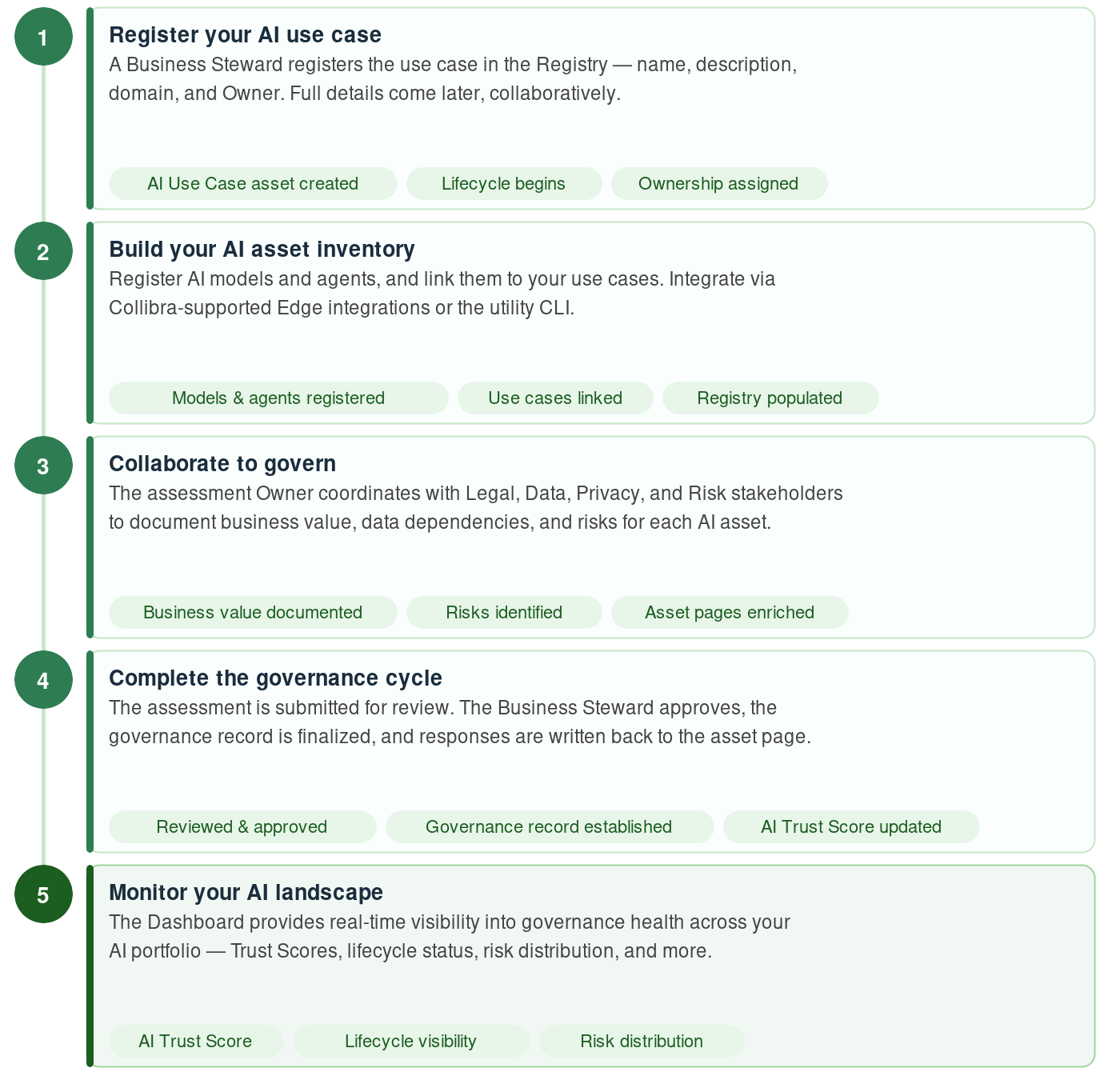
This section describes how you use AI Command Center to build a governed AI program from the ground up: registering AI assets, establishing clear ownership, and progressively documenting business value and risk. The goal is governed AI: assets that are owned, understood, and trusted.
Registering an AI use case
A Business Steward kicks off the process by registering the use case. AI Command Center aims to remove the burden and the intimidation for business users who want to register AI use cases. This first step is often the biggest hurdle. The objective at this point is simply to register the use case. Don't worry if you don't know all of the details relative to the use case. Once the use case is registered, providing the details of the business value and associated risks is a collaborative effort.
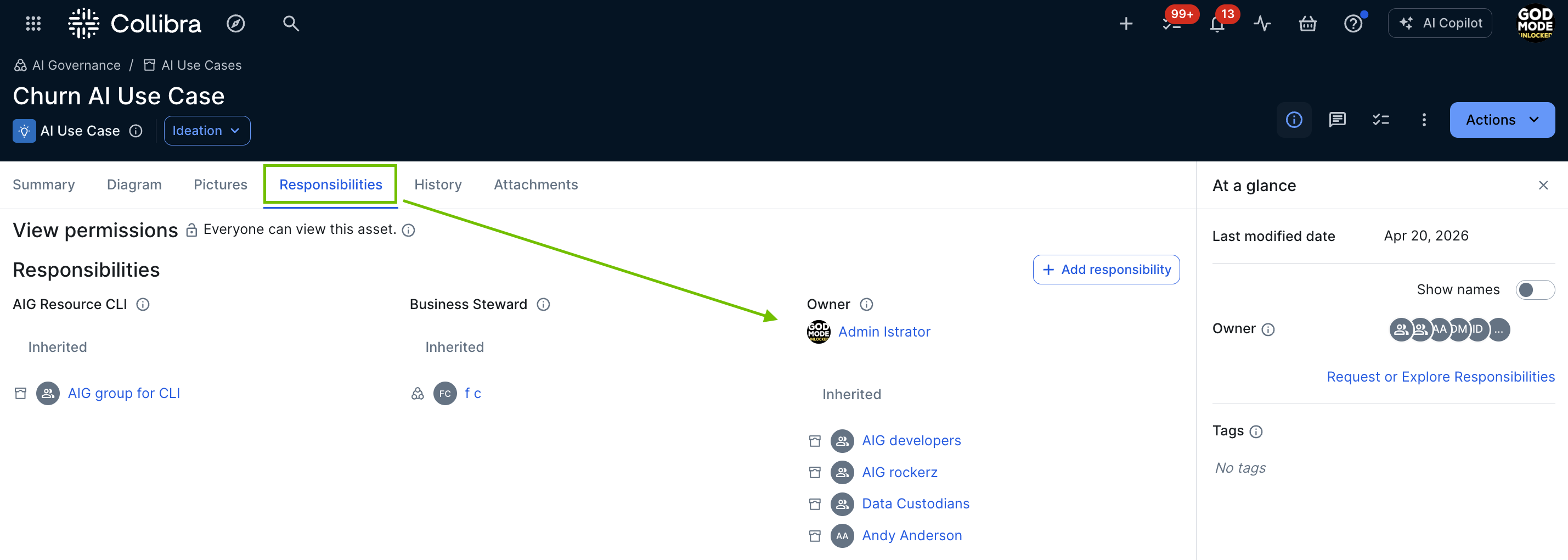
When you register a new AI use case, an AI Use Case asset is created in the specified domain. You can view the Owner and all other assigned responsibilities in the Responsibilities tab on the AI Use Case asset page.
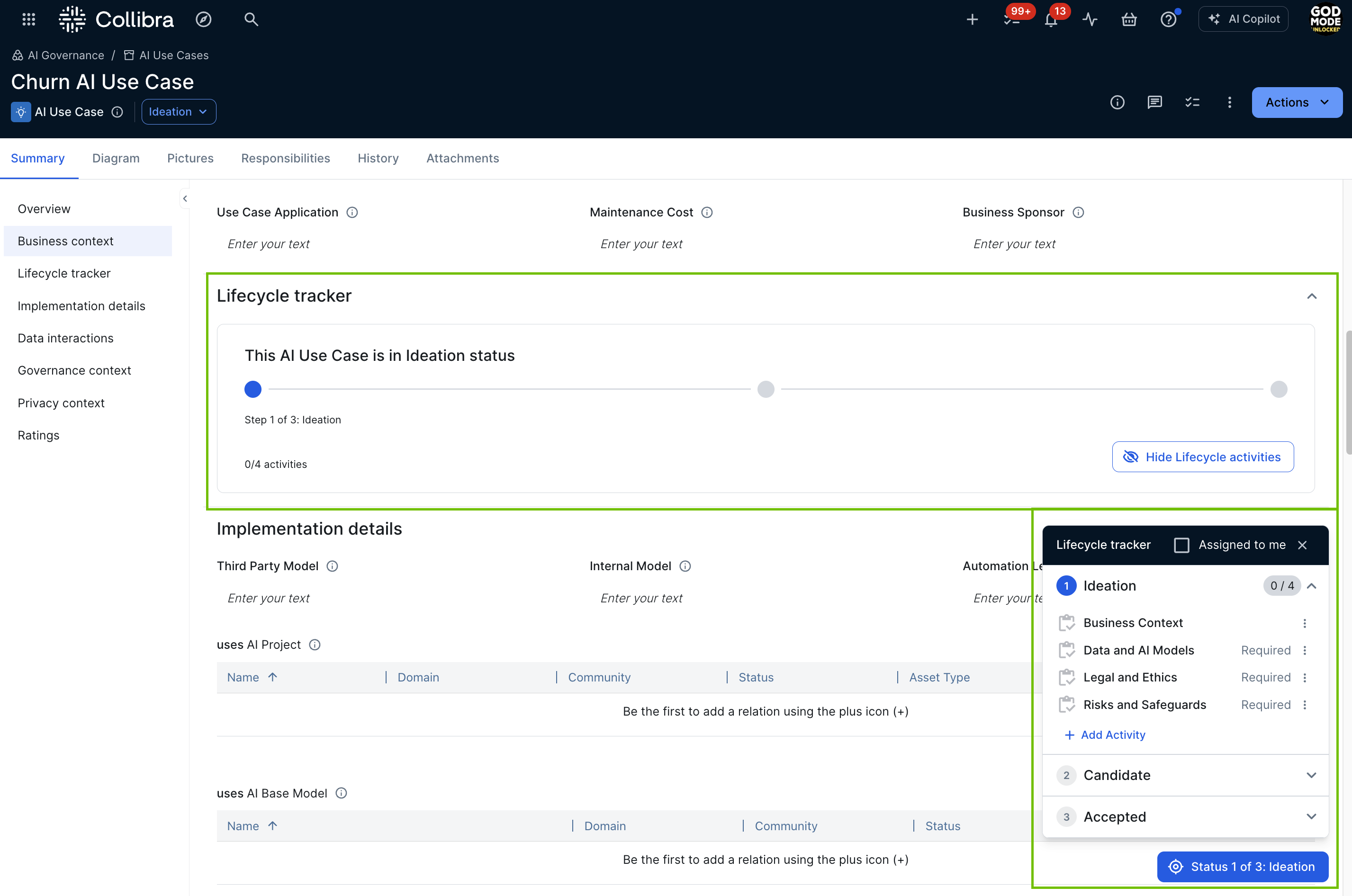
By default, the following out-of-the-box assessment templates are added to the Lifecycle tracker on the AI Use Case asset page.
- Business Context
- Data and AI Models
- Legal and Ethics
- Risks and Safeguards
The user who starts an assessment is automatically assigned the Owner of the assessment.
You can configure which assessment templates and sign-off activities are automatically added to the Lifecycle tracker when a new AI Use Case, AI agent, AI model version or AI Base Model is registered. For complete information, go to Configure lifecycle activities for an asset type.
AI asset pages: your sources of truth
The AI Command Center asset pages are working records where stakeholders can collaborate as your AI use cases, AI agents, and AI models evolve, to capture critical details as they become known. The asset pages are intended to be a single source of truth, where all stakeholders can quickly identify the business value and all associated risks.
When it's time to review and approve the AI use case, all stakeholders involved in the project have easy access to the business and technical information needed to complete the evaluation, including:
- The business case.
- The business value description.
- Information about the training and inference datasets, their categories, sources, quality and lineage.
- The AI agents and AI models at the center of the AI use case.
- Legal and Privacy teams' insights on associated risks.
- Links to the assessments conducted for the use case.
- The stakeholder roles associated with the use case, for example Legal Steward, Privacy Steward and Data Protection Officers.
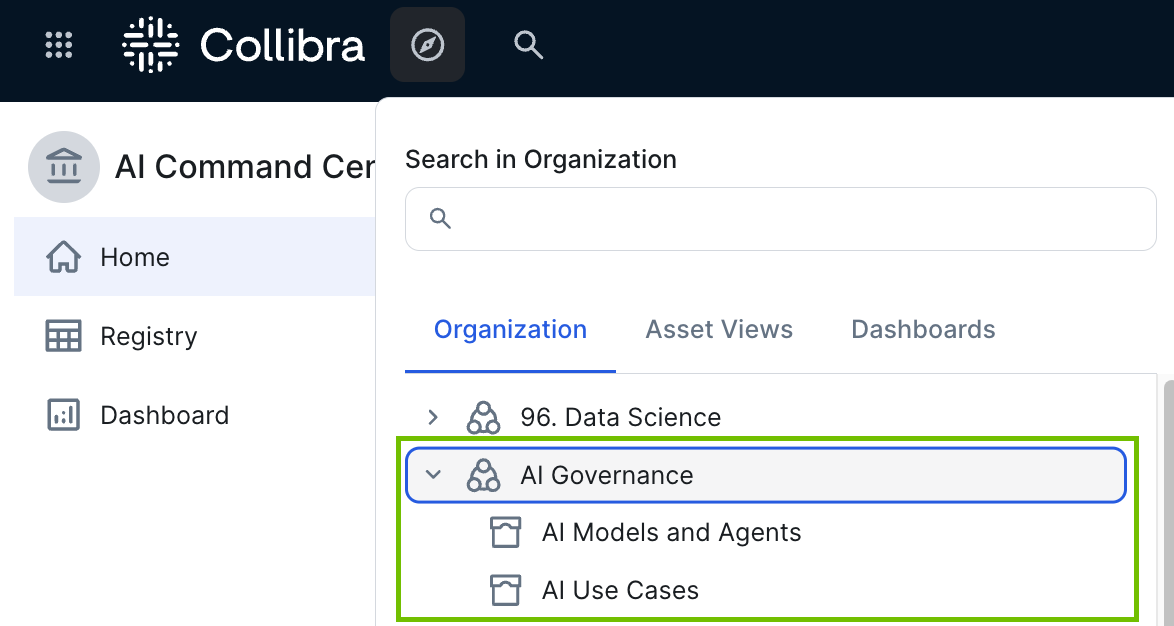
The out-of-the-box AI Governance community
The out-of-the-box AI Governance community comes with two domains:
- The "AI Models and Agents" domain is a Technology Asset Domain that you can use to store your AI Model Version, AI Base Model, AI Project, and AI Agent assets.
- The "AI Use Cases" domain is a Business Asset Domain that you can use as your AI use case register.
You're free to create new domains or use other existing domains to store your AI-related assets. Just be aware of the different domain types: Business Asset Domain type for AI Use Case assets; Technology Asset Domain type for other AI-related assets.
Govern AI assets in the registry
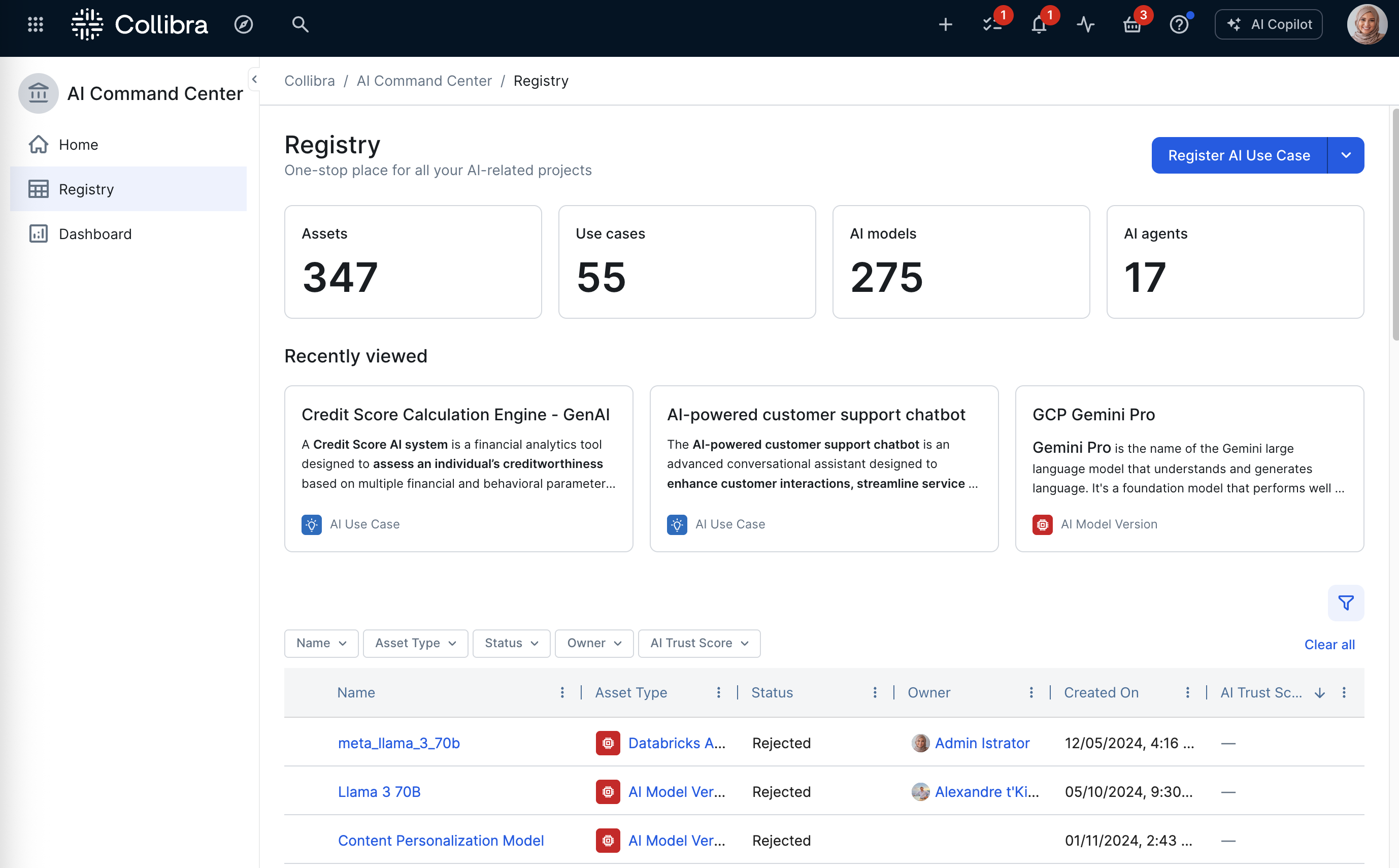
The AI Command Center registry serves as your organization’s centralized, one-stop repository for all AI-related assets. It consolidates AI Use Case, AI Model, and AI Agent assets into a single, unified view to facilitate governance and strategic oversight. It minimizes the burden on model developers and governance professionals by providing a structured framework for tracking asset maturity and compliance.
Integrate and manage your AI models
Collibra offers out-of-the-box integrations that ingest machine learning (ML) model and AI agent metadata from the following AI platforms:
- Anthropic AI
- AWS Bedrock AI
- AWS SageMaker AI
- Azure AI Foundry
- Azure ML
- Databricks AI
- Gemini Enterprise Agent Platform
- MLflow AI
- OpenAI
- SAP AI Core
- Snowflake Cortex AI
If our Collibra-supported integrations don't suit your needs, you can perform a custom integration. On the Collibra Developer Portal, you can find a tutorial explaining how to use Python to create and synchronize AI Models in Collibra.
The CLI
The CLI is a unified command-line tool that allows you to manage AI model versions directly from your terminal or automation workflows. This method is ideal for developers who want to:
- Automatically detect frameworks and libraries: The CLI scans local projects for AI frameworks (for example TensorFlow, PyTorch, and scikit-learn) and libraries (for example pandas and numpy).
- Manage manifests: It creates a "collibra.yaml" manifest file to track registered models and prevent redundant entries.
- Streamline registration: Use a single command to scan code and link model versions to use cases and base models.
For complete information, including setup instructions and guidance through the interactive registration, go to:
Link your AI use cases to the AI models and AI agents they use
Linking your AI use cases to the AI models and AI agents they use gives all stakeholders a clear understanding of which components power which business initiatives. This is essential for effective governance: it enables accurate risk assessment, faster troubleshooting, and better-informed decisions about the AI assets your organization depends on.
The AI Governance assessments are designed, in part, to automatically link your AI agents and AI models to the AI use cases that use them. For example, when you conduct a Data and AI Models assessment of an AI use case, you are prompted to specify any AI models used by the use case. Likewise, the Model Business Context assessment prompts you to specify which AI use cases use the AI model that you are assessing. Collibra then adds the relevant relations, effectively linking the assets.
Manually link assets
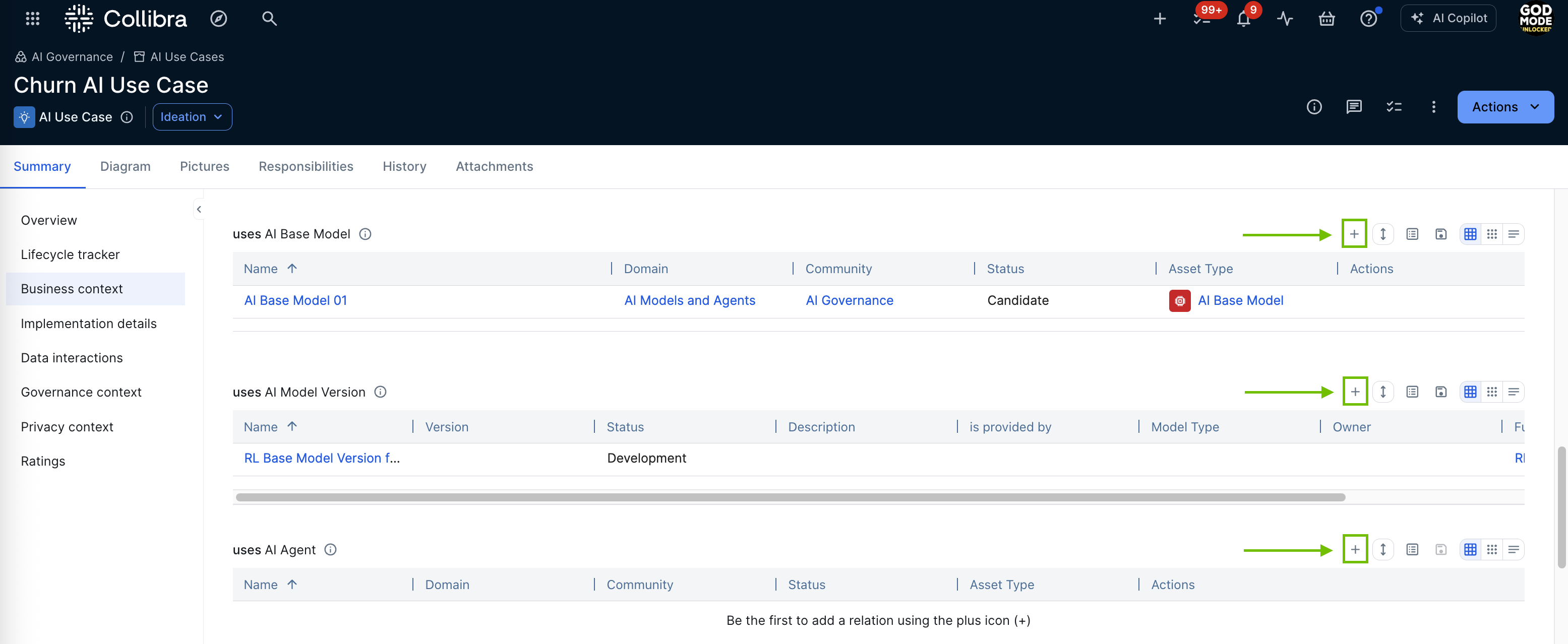
You can also manually add relations via asset pages.
Governing your AI assets
The goal of AI Command Center is governed AI: assets that are properly owned, documented, and assessed for risk. Assessments are currently the primary mechanism for achieving this: they bring the right stakeholders together, surface critical details about business value and risk, and create a formal record of the governance decisions made for each AI asset. Over time, many of these governance actions will become increasingly automated.
AI Command Center uses the Collibra Assessments app and features to enable stakeholders to add essential details to your AI use cases and document associated risks.
Collibra comes with the following out-of-the-box assessments:
| Type | Template | Associated asset type* | Description |
|---|---|---|---|
| AI governance | Business Context | AI Use Case | Allows you to provide details about how your AI use case will impact the business. Your organization will use this information to understand the business needs and requirements associated with implementing your AI use case. |
| AI governance | Data and AI Models | AI Use Case | Allows you to provide details about the AI model versions and data that will be used for the AI use case. Your organization will use this information to understand the potential workload and risks associated with implementing your AI use case. |
| AI governance | Legal and Ethics | AI Use Case | Helps you to identify potential legal and ethical risks associated with the AI use case. Answers will become a part of the AI use case definition. |
| AI governance | Risks and Safeguards | AI Use Case | Helps you to identify and document potential business-related risks associated with the AI use case, as well as available safeguards. This will help your organization determine the overall risk of this Use Case. |
| AI governance | EU AI Act Assessment | AI Use Case | Helps you to determine the applicability of the European Union's Artificial Intelligence Act to a proposed AI use case. |
| AI governance | NIST AI Risk Management Framework | Business Asset | Helps you align with the NIST AI Risk Management Framework by evaluating AI systems across its core functions — Govern, Map, Measure, and Manage — to support responsible and trustworthy AI use. |
| AI governance |
Model Business Context |
AI Model Version | Helps you to define business context, estimate resources, identify stakeholders, and ensure alignment with goals and organizational constraints. |
| AI governance |
Model Information Collection |
AI Model Version | Allows you to provide details about the AI model version you'll be training and using. |
| AI governance |
Model Data Collection |
AI Model Version | Allows you to provide details on the data you will use and collect with the deployed AI model that is being assessed. |
| AI governance | AIUC-1 Compliance Assessment | AI Agent | Help you to determine the compliance of an AI agent or system with the AIUC-1 standard (the "AIUC-1") and, to the extent it applies, to assist with evaluating your AI use case against the technical, operational, and legal safeguards required for secure, safe, and reliable enterprise adoption of AI agents. |
* For information about associated asset types, go to Asset type in a template.
These templates were designed with insights obtained from extensive research and interviews with Collibra users and data professionals, to elicit critical input and considerations from the key stakeholders in your organization.
Completing the governance cycle
When an assessment is complete and the Owner clicks Submit for Review, the governance record is finalized:
-
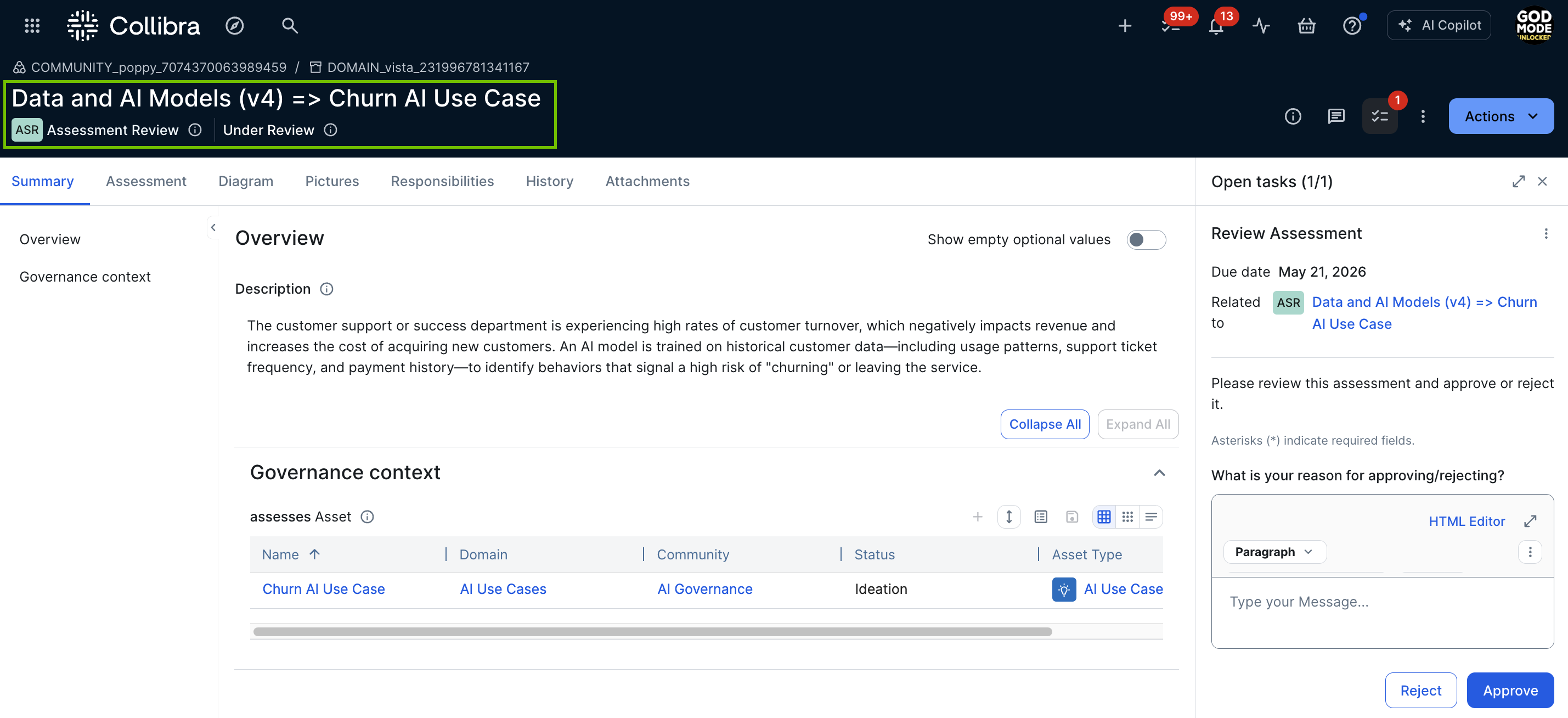
An Assessment Review asset with the status Under Review is created in your Collibra environment (if the Review is required option was selected in the template that was used to conduct the assessment), in the specified domain.
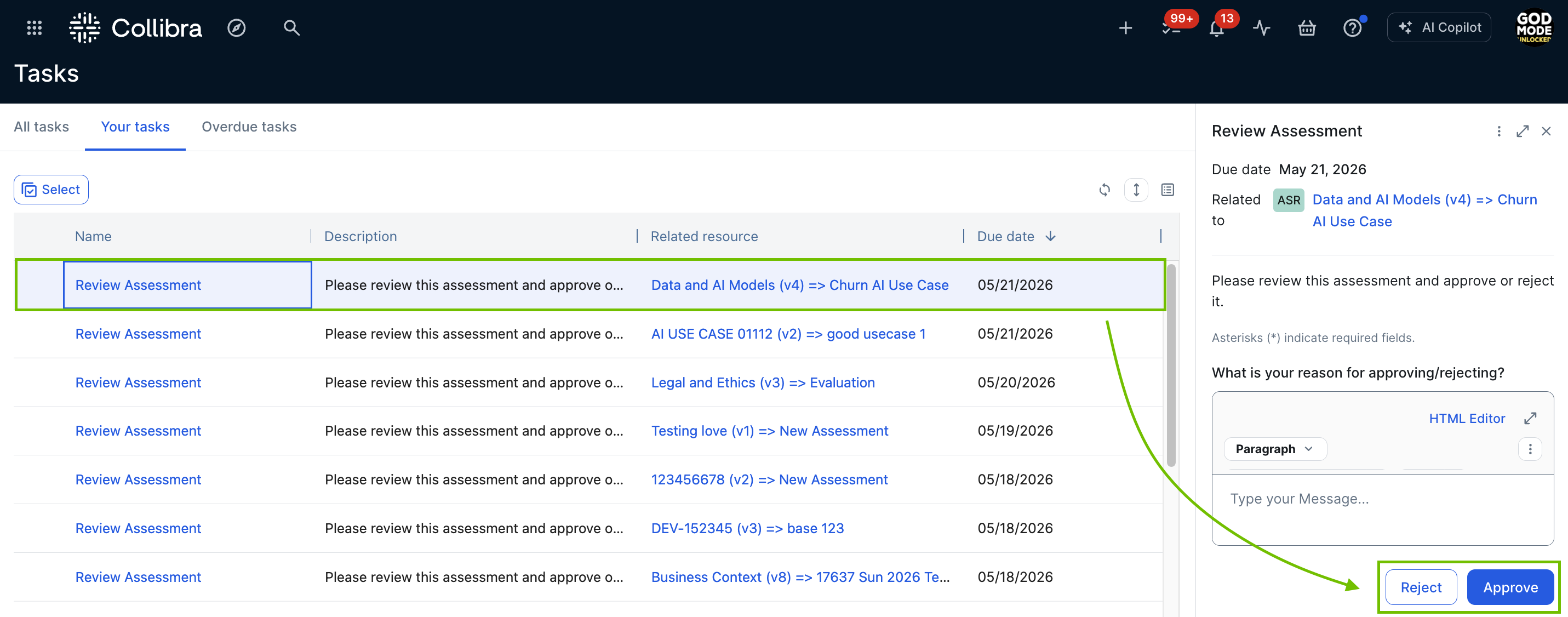
- The Assessments Approval workflow is triggered and the Business Steward for the domain receives a task to approve or reject the Assessment Review asset.
When the assessment is approved, depending on the assessment template, certain assessment responses are copied to the relevant asset page. The following table shows the conditions under which responses are copied to the asset page.
| If the assessment template is... | Then... |
|---|---|
| One of the out-of-the-box AI Governance assessment templates |
Certain assessment responses are automatically copied over to the asset page. For a complete list of questions for which responses are copied to the asset page, and how they map to the characteristics on the asset page, go to Mapping of copied assessment responses and asset characteristics. |
| Any custom assessment template |
The response to every question for which the "Copy Response to Assessed Asset" option is selected in the assessment template, are copied to the asset page. For complete information, go to Copy response to asset. |
Monitor your AI landscape
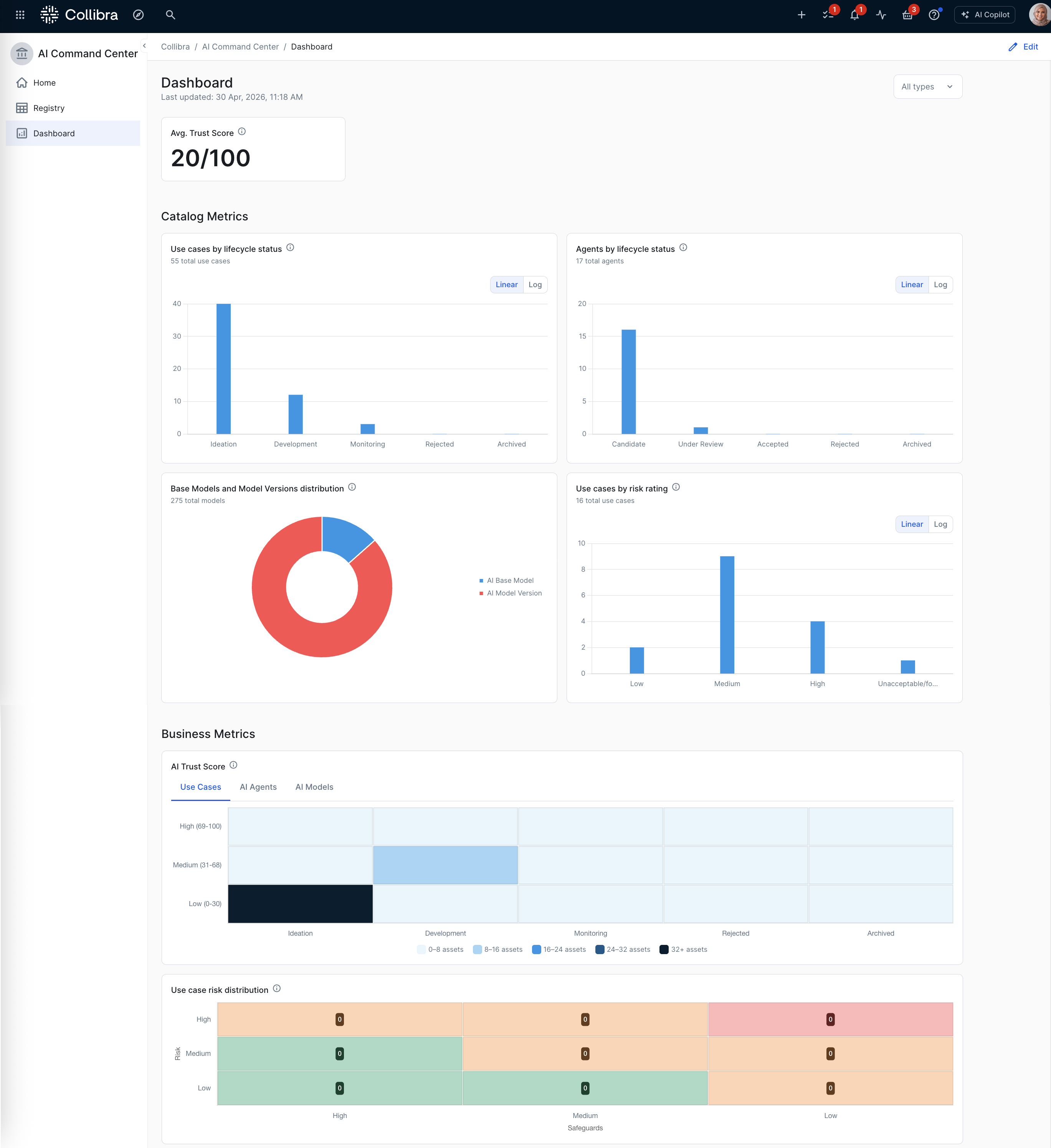
The AI Command Center Business dashboard provides a centralized, real-time overview of your organization's AI landscape, aggregating high-level metrics to monitor performance, risk, and governance health. The dashboard is an assembled collection of components, such as sections and widgets that administrators can configure to suit the needs of your organization.
As your AI agents move into production, the Agents dashboard gives you fleet-wide visibility into operational signals, including LLM judge pass rates and token consumption, to help you monitor agent quality as your AI program matures.
Design priorities
| Design priority | Objective |
|---|---|
| Surface what already exists | Replace fragmented, manual tracking with automated discovery. Connect to the platforms your engineers already use, and let Collibra build your AI inventory for you. |
| Automate traceability | Establish the relationships between your AI models, the data they consume, and the business use cases they serve, without relying on engineers to document them manually. |
| Govern at scale, immediately | Give governance, legal, and risk teams the ability to start assessing and prioritizing risk against a real inventory from day one, without waiting for bottom-up registration to complete. |
Process flow walk-through
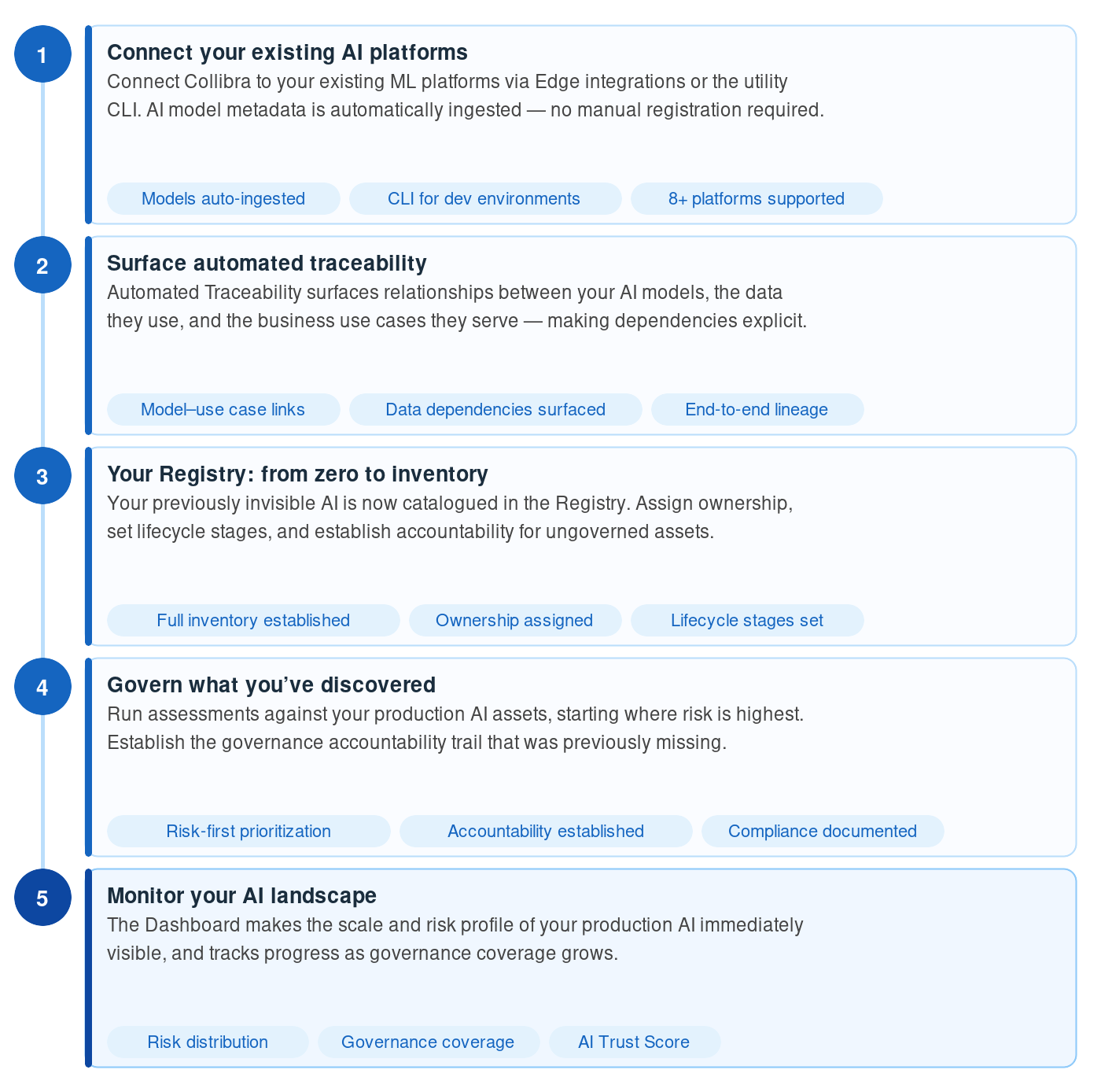
This section describes the AI Command Center process flow for organizations whose AI is already in production. Rather than starting with manual registration, this path begins with automated discovery and works toward governance maturity.
Connect your existing AI platforms
For most mature AI teams, the inventory problem is not that nothing exists, it's that what exists is invisible to governance stakeholders. The first step in this path is connecting Collibra to the platforms your engineers are already using.
Collibra's out-of-the-box Edge integrations automatically ingest AI model metadata as assets, without requiring engineers to manually register anything.
Collibra offers out-of-the-box integrations that ingest machine learning (ML) model and AI agent metadata from the following AI platforms:
- Anthropic AI
- AWS Bedrock AI
- AWS SageMaker AI
- Azure AI Foundry
- Azure ML
- Databricks AI
- Gemini Enterprise Agent Platform
- MLflow AI
- OpenAI
- SAP AI Core
- Snowflake Cortex AI
Once connected, AI model versions and AI base models from your production environments are automatically created as assets in your AI Command Center registry. What was invisible becomes cataloged.
For complete information, go to the relevant integration documentation for your platform.
The CLI
For developers who want to register AI models directly from their development environment, the CLI provides an immediate path into AI Command Center without waiting for a platform-level integration to be configured. This is particularly valuable for models built on frameworks that may not be covered by an out-of-the-box Edge integration, or for teams that want to bring governance into their existing CI/CD workflows from day one.
The CLI is a unified command-line tool that allows you to manage AI model versions directly from your terminal or automation workflows. This method is ideal for developers who want to:
- Automatically detect frameworks and libraries: The CLI scans local projects for AI frameworks (for example TensorFlow, PyTorch, and scikit-learn) and libraries (for example pandas and numpy).
- Manage manifests: It creates a "collibra.yaml" manifest file to track registered models and prevent redundant entries.
- Streamline registration: Use a single command to scan code and link model versions to use cases and base models.
For complete information, including setup instructions and guidance through the interactive registration, go to:
Understand your data lineage
With production AI, understanding what data your models were trained on and what data they consume at inference time is essential for regulatory compliance, risk assessment, and debugging. Collibra's Data Lineage capabilities let you trace the end-to-end flow of data into and through your AI models.
This provides your governance and legal teams with the data provenance information they need to evaluate risk, assess compliance with regulations like the EU AI Act, and respond to audit requests, without depending on the engineering team to reconstruct the picture from memory.
Your registry: from zero to inventory
With your integrations connected and traceability surfaced, your AI Command Center registry becomes an immediate, consolidated inventory of your production AI. AI Use Case, AI Model, and AI Agent assets, along with their relationships and lifecycle stages, are all visible in a single, unified view.
For governance teams, this is the foundation that makes everything else possible. For the first time, stakeholders can answer the question "what AI do we have running?" with confidence, and begin assigning ownership, responsibilities, and lifecycle stages to assets that have until now been ungoverned.
From the registry, you can also assign governance responsibilities and begin the process of formally linking your models to the business use cases they serve, supplementing what Automated Traceability has already surfaced.
Govern what you've discovered
With a populated inventory in hand, you can now run assessments against your production AI assets. Rather than waiting for a bottom-up registration process to complete, your governance and risk teams can begin immediately, prioritizing the assessments that matter most given your current risk exposure.
AI Command Center includes out-of-the-box assessments designed for exactly this situation. Start with Risks and Safeguards to understand your current risk profile, Legal and Ethics to identify potential legal exposure, or EU AI Act Assessment to evaluate regulatory applicability to systems already in production.
As assessments are completed and submitted for review, Assessment Review assets are created and routed to the appropriate Business Steward for approval, establishing the governance accountability trail that was previously missing.
For a complete list of out-of-the-box assessments, go to out-of-the-box assessments.
Monitor your AI landscape
The AI Command Center Business dashboard provides a centralized, real-time overview of your organization's AI landscape, aggregating high-level metrics to monitor performance, risk, and governance health. For teams coming from a starting point of no inventory, the dashboard makes the scale and risk profile of your production AI immediately visible, and tracks your progress as governance coverage grows over time.
Key metrics include the AI Trust Score across your asset portfolio, lifecycle distribution of your AI use cases and agents, risk ratings, and the Use case risk distribution matrix, which shows how your use cases are distributed across risk and safeguard levels. This view is particularly valuable in the early stages of the production-first path, where concentrations of high-risk, low-safeguard assets require urgent attention.
For teams with agents already in production, the Agents dashboard surfaces the operational signals that matter most: LLM judge pass rates and cycle-over-cycle changes by monitor and agent version, and fleet-wide token consumption. Use this dashboard to identify which agents are underperforming before issues reach your stakeholders.