Unified Data Classification (UDC) is the data classification method used at Collibra. It is enabled by default and has replaced previous data classification methods via Edge and data classification via the Cloud Data Classification Platform.
Unified Data Classification characteristics
-
With the correct permissions, data stewards can configure data classes and classify data in an environment.
-
Data stewards can create custom data classes or import optional, out-of-the-box data classes and adjust them based as needed, such as changing the name or classification rules.
-
The method includes an automatic data classification process.
-
The process works via Edge and requires specific setup.
Because the data doesn't leave your organization's network, the automatic data classification process is secure. The samples used during the automatic data classification process are temporarily added to the Edge site cache. They are not transferred to Collibra.Note If you're using a Collibra Cloud site, go the Collibra Cloud site documentation to check if your data source is supported.
-
The process relies on classification rules specified for each data class.
The process doesn't rely on machine learning, which makes issues and changes more transparent. Using classification rules also provides high flexibility and allows for customizations.Note The automatic data classification process remembers any rejected data class suggestions, meaning a data class will not be suggested again if you have rejected the data class for an asset. Also, once a data classification has been accepted for a column, the data classification won't be automatically updated if you run the data classification process again.
-
-
UDC is available in the user interface and through REST APIs: Data Classification REST API v2, Data Class Management REST API v1, Data Class Import REST API v1.
Important The Data Classification REST API v1 ClassificationMatches endpoints remain valid and can be used by UDC. The other endpoints in this API are deprecated.
Steps overview: Data classification
Data classification is available for registered JDBC data sources and for Databricks Unity Catalog and Knowledge Catalog data sources integrated via Edge.
|
Step |
Description |
|---|---|
|
|
Register a data source via Edge and synchronize one or more schemas. |
|
|
Make sure your environment is set up for Unified Data Classification via Edge. |
|
|
Configure your data classes in UDC. |
|
|
Classify the synchronized data. You can classify data in 2 ways.
|


|
Step |
Description |
|---|---|
|
|
Integrate the Databricks or Knowledge Catalog data sources. To allow for classification, add a JDBC connection in the Databricks Unity Catalog synchronization or Knowledge Catalog capability. During synchronization, a Catalog Data Classification capability is created automatically if it does not already exist. As a result, you do not need to create a separate Catalog Data Classification capability to classify data from integrations. For more information, go to Steps: Integrate Databricks Unity Catalog via Edge or Steps: Integrate Google Knowledge Catalog via Edge. |
|
|
Make sure your environment is set up for Unified Data Classification via Edge |
|
|
Configure your data classes in UDC. |
|
|
Classify the synchronized data. You can classify data in 2 ways.
|
Understanding the automatic data classification process
The following image demonstrates on a high level how the automatic classification system works.
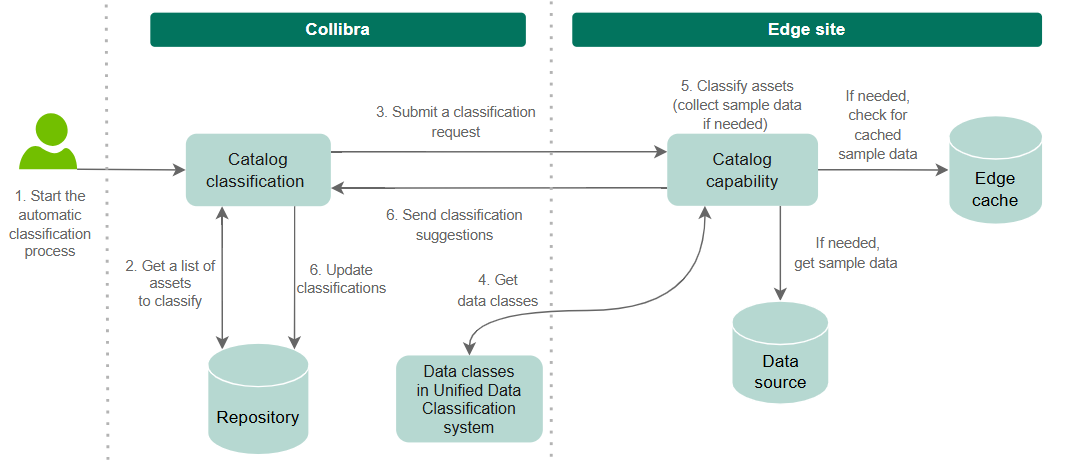
- A user starts the automatic classification process, which can be started from a Database, Schema, Table, or Column asset.
- Catalog classification in Collibra receives the request and queries the knowledge graph to get a list of all the columns that need to be classified. If the classification starts from an asset other than a Column asset, all the child Column assets in the hierarchy are classified.
- The classification job is submitted to the Edge or Collibra Cloud site and includes the list of columns to classify.
- The classification capability gets the valid data classes, which contain one or more classification rules and are enabled.
- The classification capability checks if sample data must be retrieved from the data source. Sample data is required only if the data classes include sample-based classification rules.
If no sample data is needed:
- For each column, the classification capability compares the metadata to each data class and calculates a confidence score.
- Classifications with a confidence score higher than 0 are returned to Collibra. If a data class specifies a minimum confidence threshold above 0, then the classification is returned only if that threshold is reached.
- If sample data is needed:
- The classification capability checks if the required sample data is available in the Edge cache.
- If no sample data is available, the classification capability requests sample data from the data source through the defined Edge connection. In this case:
- The classification capability requests up to 1,000 rows from the table.
- The sample data is taken randomly to ensure representative data.
If supported for the data source, source-driven random sampling is applied. - The sample data is temporarily stored in the Edge cache.
Note The sampling feature also stores sample data temporarily in the Edge cache. However, this does not impact the automatic data classification process, and vice versa.
- For each column, the classification capability compares the sample data to each data class and calculates a confidence score.
- Each sample is evaluated against the data classification rules for a data class. The confidence score for that data class increases proportionally to the number of matching samples if any of the rules match the evaluated sample.
- Classifications with a confidence score higher than 0 are returned to Collibra. If a data class defines a minimum confidence threshold above 0, then the classification is returned only if that threshold is reached.
- Finally, Catalog classification compares the results to the classifications stored in the repository. If necessary, the classifications are updated.
Tip Classifications in accepted or rejected states are never updated.
Set up Unified Data Classification
Related topics
- Required permissions Data Classification
- Create a data class
- Manually classify assets
- About automatically classifying assets
Helpful resources
Follow the Unified Data Classification elearning on Collibra University.