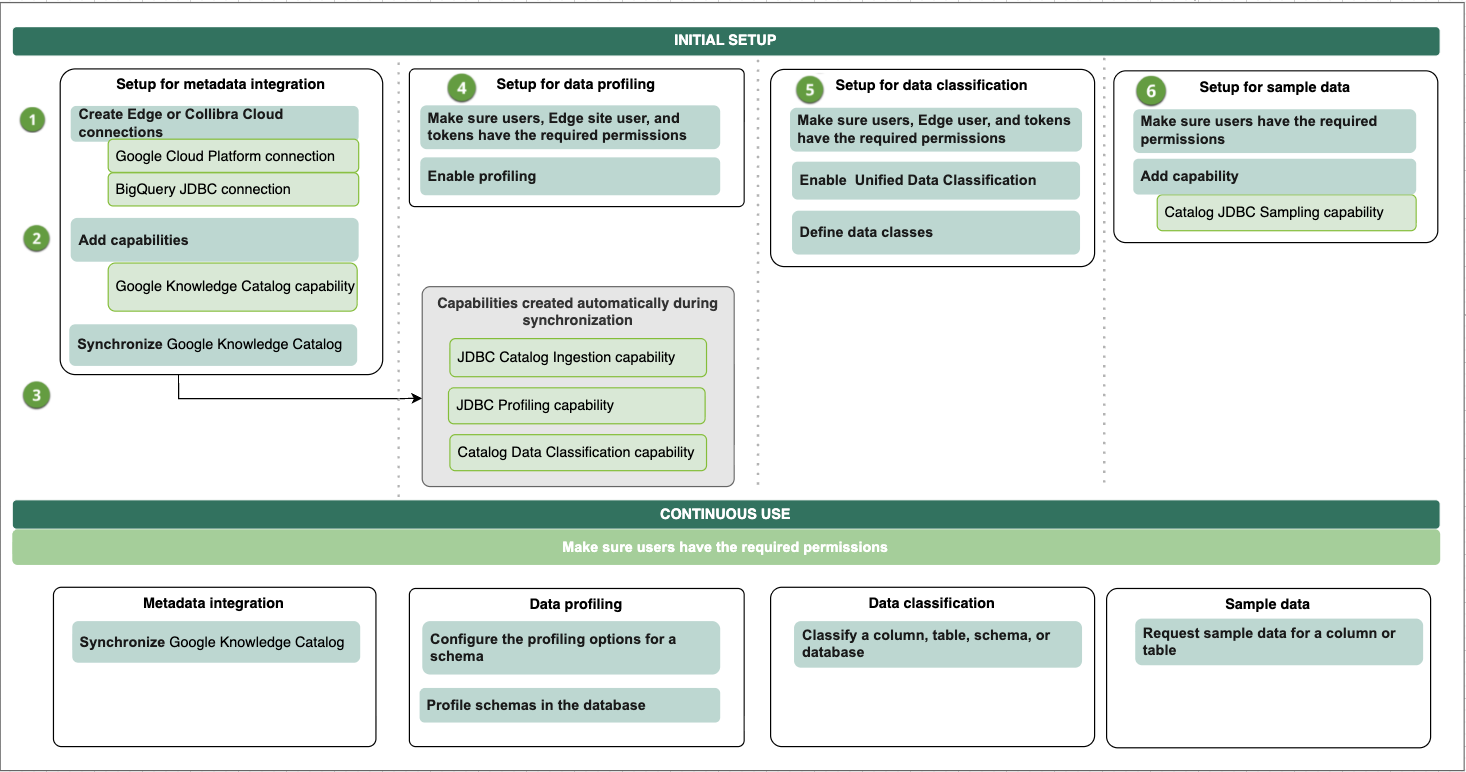
Complete the following steps to integrate Google Knowledge Catalog (formerly Dataplex Universal Catalog). You can also choose to set up the following:
- Send metadata from Collibra Platform to Knowledge Catalog (outbound synchronization).
- Sampling, profiling, and classification as needed.
- Ingest GCP Data Products and their ports, this feature is in preview.
If you previously used both the Knowledge Catalog integration to integrate BigQuery projects and BigQuery JDBC synchronization, and you want to use only the Knowledge Catalog integration, complete the steps in Migrating to use the Knowledge Catalog integration only.
Important
| No. | Step | Description |
|---|---|---|
| 1 | Create the required connections. | |
|
1a
|
Create a Google Cloud Platform connection. |
Creates a connection to the Google Cloud Platform (GCP) in an Edge or Collibra Cloud site. Make sure you have the appropriate permissions in Knowledge Catalog for inbound and outbound synchronization. |
|
1b
|
Creates a JDBC connection to BigQuery in an Edge or Collibra Cloud site. Create a BigQuery JDBC connection only if you want to profile and classify the integrated data. If you created a BigQuery JDBC connection, you can use that JDBC connection. |
|
|
2 |
Add the Knowledge Catalog capability to the Edge or Collibra Cloud site. |
Adds the Knowledge Catalog capability to the GCP Edge connection. The capability allows you to retrieve data from the Knowledge Catalog projects. If you want to profile and classify the integrated data, and request sample data, select the BigQuery JDBC connection on the Knowledge Catalog capability. |
| 3 | Synchronize inbound metadata via Knowledge Catalog integration. |
You can manually synchronize Knowledge Catalog or add a synchronization schedule to automatically synchronize it. If you selected a JDBC connection in the previous step, the synchronization process automatically creates the Catalog JDBC ingestion, JDBC profiling, and Catalog Data Classification capabilities if they do not already exist. When the synchronization is completed, assets are available, and the Profiling tab is available on the Database asset page. |
| 4 | Synchronize outbound metadata via Knowledge Catalog integration. | You can manually synchronize to push metadata from Collibra Platform to Knowledge Catalog. Any attribute changes in Collibra Platform are reflected for all supported asset types in the Knowledge Catalog integration. This includes Schema, Table, Database View, and Column assets. |
| 5 | Optionally, set up and configure data profiling. | Goes through the required permission and steps to prepare Edge and Collibra to profile columns in Knowledge Catalog. |
| 6 | Optionally, enable and set up Unified Data Classification. | Goes through the required permission and steps to prepare Edge and Collibra to classify columns in Knowledge Catalog via the Unified Data Classification method. |
| 7 | Optionally, set up and configure the use of sample data. | Goes through the required permissions and steps to prepare Edge and Collibra to show sample data for columns in Knowledge Catalog. |
| Result |
Users with the correct permissions can now configure the profiling options and profile the data, automatically classify the data, or request sample data. |
|
Integration workflow
The following graphic shows the process of integrating Knowledge Catalog, profiling and classifying the data, and requesting sample data.