Sample data is a set of randomly collected data from a data source. It provides examples of the data, helping data consumers understand what to expect when using the asset. For example, Data Analysts can use sample data to verify the content and format of a table before including it in a report.
Note If you're using a Collibra Cloud site, go the Collibra Cloud site documentation to check if your data source is supported.
Where sample data can be shown
Depending on your environment, sample data can be shown for Column, Table, Data Set, Data Product, and Data Product Port assets.
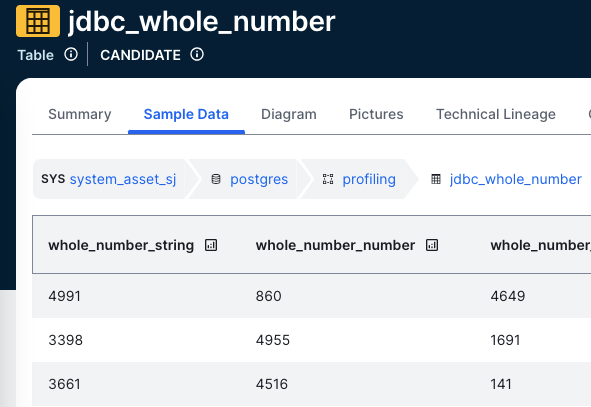
- In Column assets, if sample data is available, it is shown on the Summary tab in the Descriptive Statistics section.
- In Table, Data Set, Data Product, and Data Product Port assets, if sample data is available, it is shown on the Sample Data tab.
- In Table, Data Set, Data Product, and Data Product Port assets, you see sample data only for columns where you have the required permissions. If you don't have access, the column shows the text <sensitive> instead of sample data.
- Columns that show sample data in the asset include a chart icon next to the column name. Clicking the icon opens the Descriptive Statistics dialog box, which includes metadata and profiling information for the column, if available.
For all other asset types where sample data can be available, up to 1,000 columns are shown.
Conditions to show sample data
You can view sample data for an asset only if the following conditions are met:
- The sample data feature is active.
- You have the required permissions.
- Sample data is available for the asset.
- Depending on the method used to get the sample data, the asset must be a Table, Column, Data Set, Data Product, or Data Product Port asset.
Sample data in Collibra
The way Collibra handles sample data depends on how the assets are added to Collibra and how the sample data is collected.
Sample data for assets that are added via Edge
- If sample data for an asset is uploaded via the Catalog REST API - Profiling, the sample data is stored in the Collibra cloud repository and is shown to all users with the required permissions.
- Sample data can be manually requested for an asset if the asset is connected to an Edge or Collibra Cloud site via the related Database asset. This applies when the asset has been registered via the Edge Catalog data source registration process. In the latest UI, this is also available for integrated Databricks Unity Catalog and Dataplex Catalog assets.
If sample data is requested, the randomly collected sample data is cached on the Edge site. It isn't stored in the Collibra cloud repository. You can see sample data only if you have the required permissions and if the sample data has been requested. For more information, go to Configure the use of sample data via Edge: Steps.
Tip Sample data available through Edge isn't automatically anonymized or masked.
Anonymization hides data by replacing the original values with values that can't be traced back to the original data.
Masking hides data by replacing specific parts of the original values while retaining the format.
If you have permission to view sample data through Edge, the full value is visible. The sample data is collected and shown for a limited time and isn't stored in Collibra.You can apply masking by defining policies for the data source and the user assigned to the Edge data source connection, using Protect. When masking is applied at the data source, sample data is masked for all Collibra users, and profiling or classification is no longer possible for the masked data.
NoteRandom rows are collected from the data source. However, the data within the rows isn't switched around. All data for each randomly collected row is shown.
Sample data for assets that are manually added or imported
Sample data must be uploaded via the Catalog REST API - Profiling. In this case, the sample data is stored in the Collibra cloud repository and is shown to all users with the required permissions.
Sample data for assets that are added via Jobserver
- If sample data for an asset is uploaded via the Catalog REST API - Profiling, the sample data is stored in the Collibra cloud repository and is shown to all users with the required permissions.
- If sample data is collected and stored when the data source is registered via Jobserver, the sample data is stored in the Collibra cloud repository and is shown to all users with the required permissions. For more information, go to Configure the use of sample data via Jobserver.
Related topics
Understanding the process to show sample data
Sample data limitations and guidelines
Configure the use of sample data via Edge: Steps
Configure the use of sample data via Jobserver