Collibra AI Governance allows you to create a centralized repository for AI agents, AI models, and AI use cases, offering a holistic end-to-end view of all your organization's AI projects. It is designed to minimize the burden of model developers and governance professionals alike.
- Product evolution: From AI Governance to AI Command Center
- AI Governance has evolved into AI Command Center, which offers a more centralized and streamlined experience. The core features, operating models, roles, and assessment workflows remain nearly identical, but AI Command Center replaces the separate product pages of AI Governance with a unified landing page that brings together the registry, a governance dashboard, and the AI Trust Score. For more information, go to About AI Command Center.
| Design priority | Objective |
|---|---|
| Focus on developer needs. | Help AI producers, such as Data Scientists, achieve business value through AI initiatives more effectively. |
| Address documentation pain points. | Address common developer challenges, such as the initial aversion to cumbersome governance and the risk of performing duplicate work due to poor registries. Comprehensive asset pages help address the issue of minimal, outdated, and scattered documentation often found in collaborative documentation tools. |
| Promote efficient workflow activities. |
|
Collibra University training courses
Be sure to check out the following AI Governance courses in Collibra University:
- Getting started with AI governance
- The ridiculously easy guide to configuring CollibraAI Governance
- The ABC's of AI Governance for Data Scientists
- A human-centered intro to AI integrations
AI Governance process flow walk-through
This topic describes the Collibra AI Governance process flow, from registering an AI model or AI use case, to collaborating to assess the AI model or AI use case, and finally approving the Assessment Review asset.
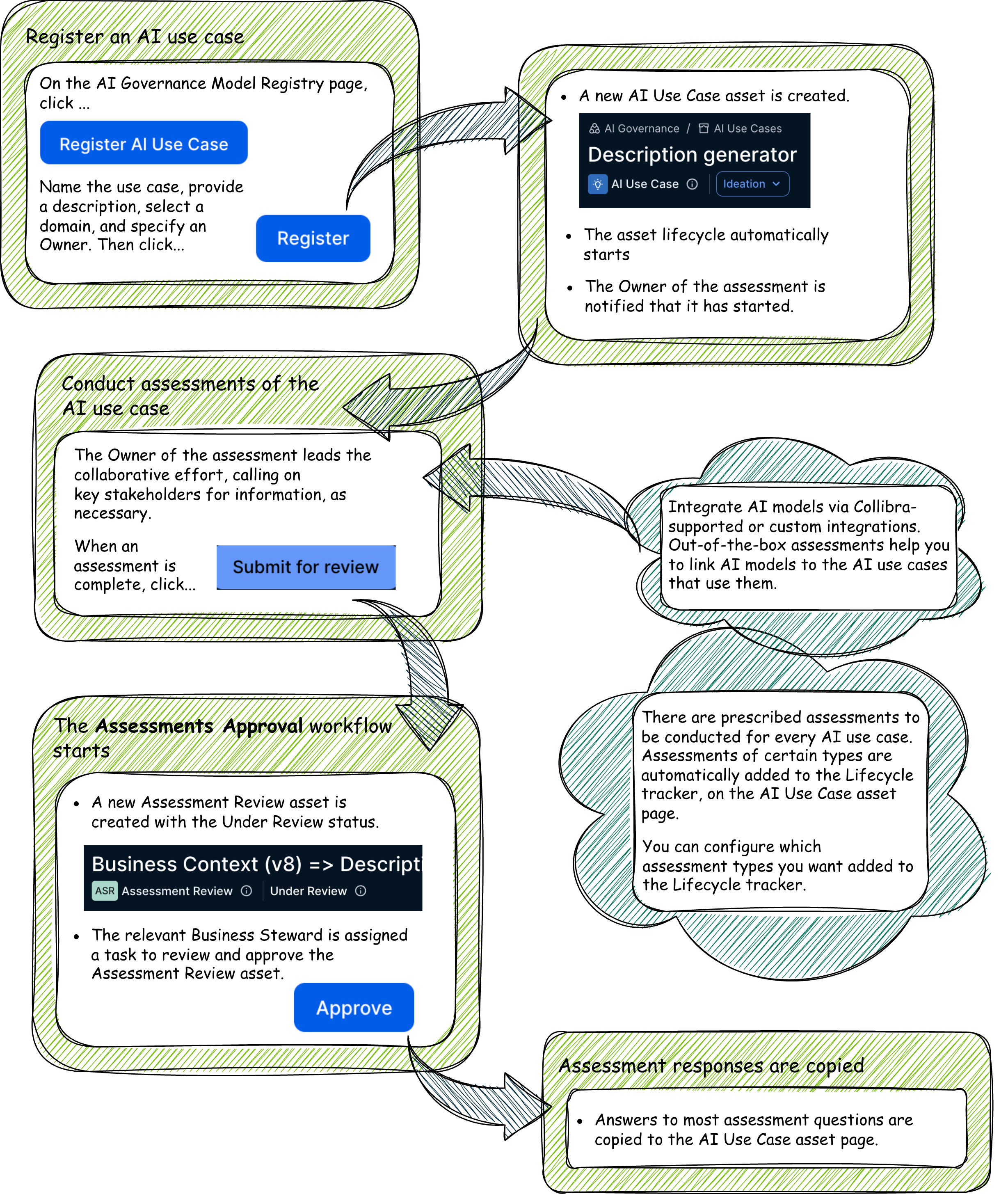
The process starts with an AI use case
A Business Steward kicks off the process by registering the use case. AI Command Center aims to remove the burden and the intimidation for business users who want to register AI use cases. This first step is often the biggest hurdle. The objective at this point is simply to register the use case. Don't worry if you don't know all of the details relative to the use case. Once the use case is registered, providing the details of the business value and associated risks is a collaborative effort.
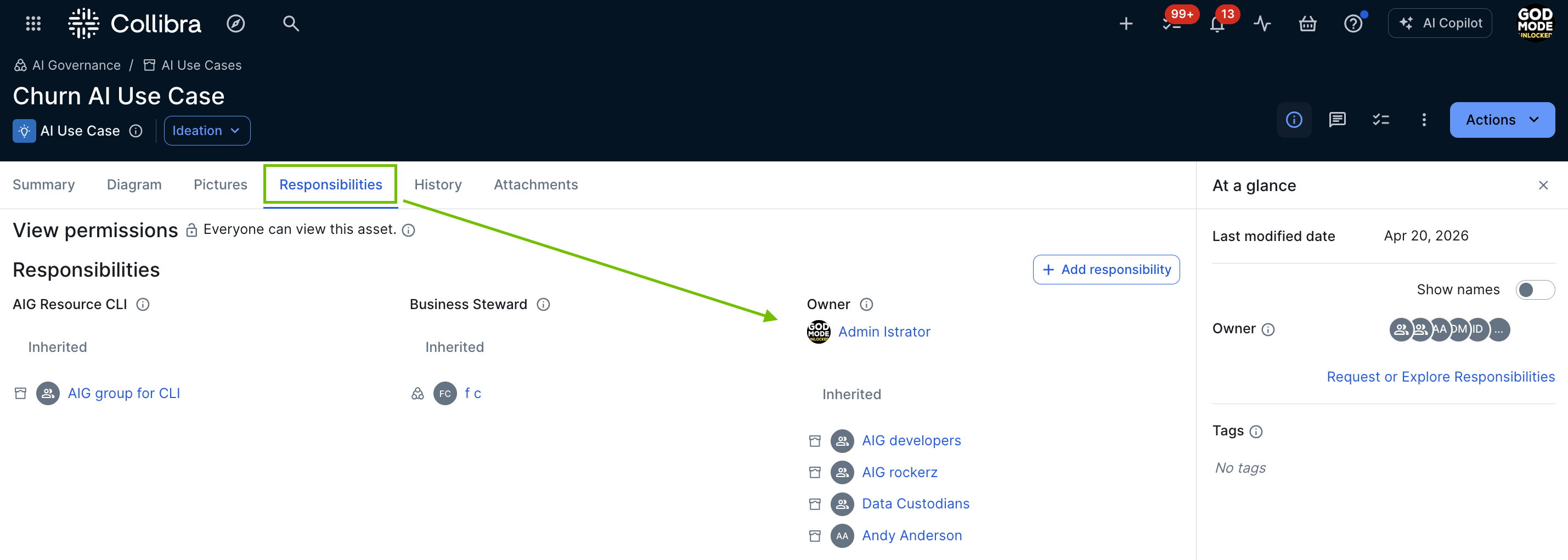
When you register a new AI use case, an AI Use Case asset is created in the specified domain. You can view the Owner and all other assigned responsibilities in the Responsibilities tab on the AI Use Case asset page.
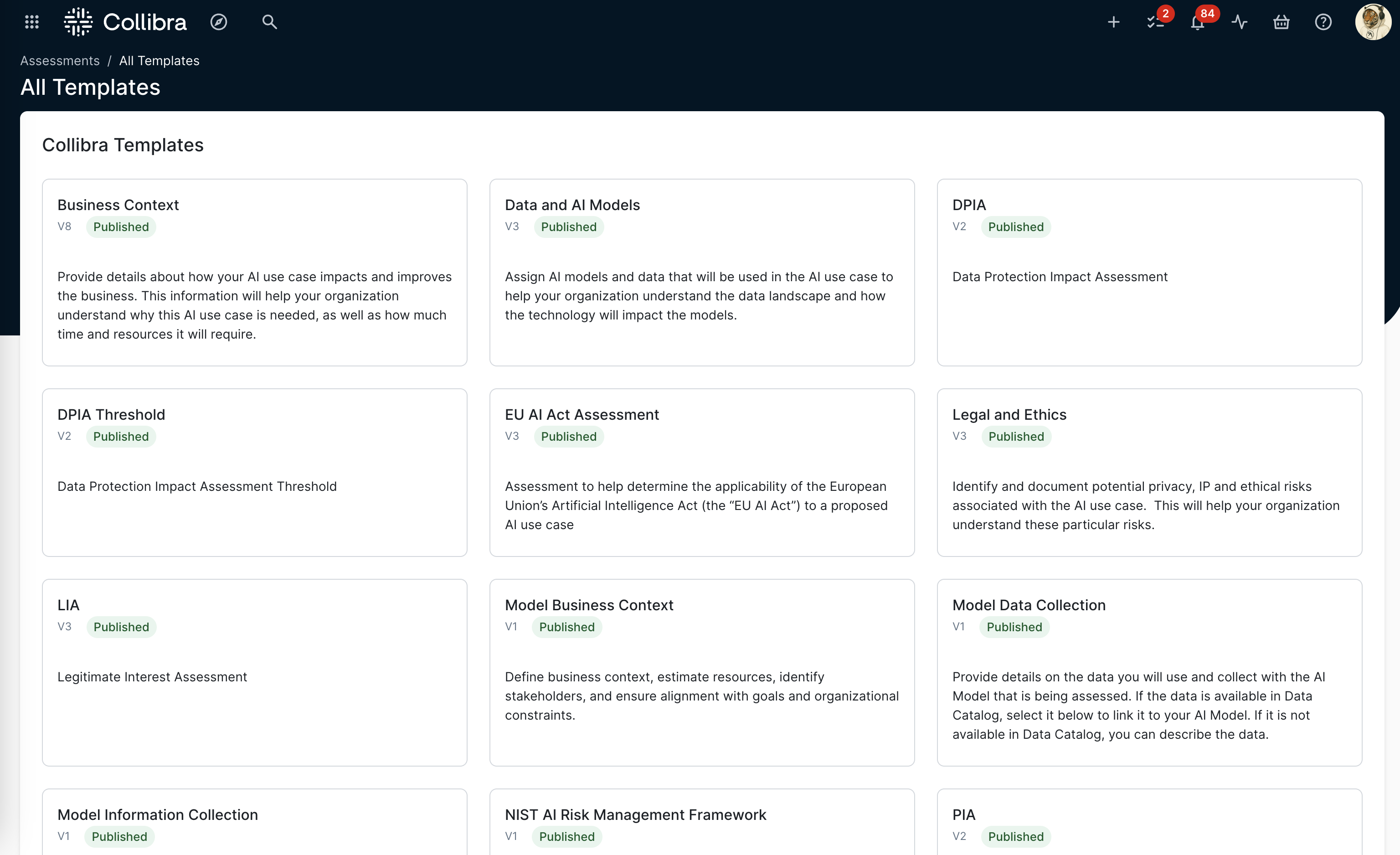
By default, the following out-of-the-box assessment templates are added to the Lifecycle tracker on the AI Use Case asset page.
- Business Context
- Data and AI Models
- Legal and Ethics
- Risks and Safeguards
The user who starts an assessment is automatically assigned the Owner of the assessment.
You can configure which assessment templates and sign-off activities are automatically added to the Lifecycle tracker when a new AI Use Case, AI agent, AI model version or AI Base Model is registered. For complete information, go to Configure lifecycle activities for an asset type.
AI asset pages: your sources of truth
The AI Governance asset pages are working records where stakeholders can collaborate as an AI agent, AI model, or AI use case evolves, to capture critical details as they become known. The asset pages are intended to be a single source of truth, where all stakeholders can quickly identify the business value and all associated risks.
When it's time to review and approve the use case, every stakeholder involved in the project has easy access to all of the business and technical information needed to complete the evaluation, including:
- The business case.
- The business value description.
- Information about the training and inference datasets, their categories, sources, quality and lineage.
- The AI agents and AI models at the center of the AI use case.
- Legal and Privacy teams' insights on associated risks.
- Links to the assessments conducted for the use case.
- The stakeholder roles associated with the use case, for example Legal Steward, Privacy Steward and Data Protection Officers.
The out-of-the-box AI Governance community
The out-of-the-box AI Governance community comes with two domains:
- The "AI Models and Agents" domain is a Technology Asset Domain that you can use to store your AI Model Version, AI Base Model, AI Project, and AI Agent assets.
- The "AI Use Cases" domain is a Business Asset Domain that you can use as your AI use case register.
You're free to create new domains or use other existing domains to store your AI-related assets. Just be aware of the different domain types: Business Asset Domain type for AI Use Case assets; Technology Asset Domain type for other AI-related assets.
Integrate and manage your AI models
Collibra offers out-of-the-box integrations that ingest machine learning (ML) model and AI agent metadata from the following AI platforms:
- Anthropic AI
- AWS Bedrock AI
- AWS SageMaker AI
- Azure AI Foundry
- Azure ML
- Databricks AI
- Gemini Enterprise Agent Platform
- MLflow AI
- OpenAI
- SAP AI Core
- Snowflake Cortex AI
If our Collibra-supported integrations don't suit your needs, you can perform a custom integration. On the Collibra Developer Portal, you can find a tutorial explaining how to use Python to create and synchronize AI Models in Collibra.
The Model Registry
AI model and AI agent lifecycle management is essential for organizations dealing with numerous AI models and AI agents running simultaneously across different departments. The Model Registry, which includes the Agent Registry product page, helps AI producers and other stakeholders:
- Manage AI models and AI agents through defined lifecycle stages.
- Maintain control over AI model and AI agent development.
- Ensure compliance with organizational policies, ethical principles, and AI regulations.
By addressing the challenges faced by Data Scientists and AI leaders in managing AI model and AI agent lifecycles, AI Governance enables them to effectively execute AI initiatives and deliver business value through collaboration between all stakeholders.
Note Collibra now uses the New app experience, which is enabled by default. This feature moves the navigation tabs from the top of the page to the left sidebar. The screenshots and steps in this topic might not reflect the new experience.

Link your AI use cases to the AI models and AI agents they use
Linking your AI use cases to the AI models and AI agents they use is critical for optimizing the effectiveness and efficiency of your AI project.
- Improved management
- Provides a clear understanding of which AI model versions and AI agents are responsible for specific tasks, to facilitate project management and resource allocation.
- Performance tracking
- Allows for precise tracking and evaluation of AI performance within specific use cases, making it easier to identify areas for improvement.
- Faster troubleshooting
- Simplifies the process of identifying and addressing issues by pinpointing the exact AI components involved in a use case.
- Better decision-making
- Enables more informed decision-making by providing insights into the effectiveness of different AI models and AI agents in various contexts.
- Scalability
- Scales AI applications by understanding which AI models and AI agents are most effective, and adapting them to new or expanding use cases.
- Continuous optimization
- Fosters a culture of ongoing refinement by regularly assessing the performance and relevance of AI models and AI agents in relation to their use cases.
The AI Governance assessments are designed, in part, to automatically link your AI agents and AI models to the AI use cases that use them. For example, when you conduct a Data and AI Models assessment of an AI use case, you are prompted to specify any AI models used by the use case. Likewise, the Model Business Context assessment prompts you to specify which AI use cases use the AI model that you are assessing. Collibra then adds the relevant relations, effectively linking the assets.
Manually link assets
You can also manually add the relations via asset pages.

Assessments: a tool for driving collaboration
The Owner is responsible for driving the assessment, but collaboration from Analytics, Data Offices, Legal, Privacy teams, and so forth, is essential to ensuring that all critical details and associated risks are identified and recorded in the assessments.
AI Governance uses the Collibra Assessments app and features to enable stakeholders to add essential details to your AI use cases and document associated risks.
Collibra comes with the following out-of-the-box assessments:
| Type | Template | Associated asset type* | Description |
|---|---|---|---|
| AI governance | Business Context | AI Use Case | Allows you to provide details about how your AI use case will impact the business. Your organization will use this information to understand the business needs and requirements associated with implementing your AI use case. |
| AI governance | Data and AI Models | AI Use Case | Allows you to provide details about the AI model versions and data that will be used for the AI use case. Your organization will use this information to understand the potential workload and risks associated with implementing your AI use case. |
| AI governance | Legal and Ethics | AI Use Case | Helps you to identify potential legal and ethical risks associated with the AI use case. Answers will become a part of the AI use case definition. |
| AI governance | Risks and Safeguards | AI Use Case | Helps you to identify and document potential business-related risks associated with the AI use case, as well as available safeguards. This will help your organization determine the overall risk of this Use Case. |
| AI governance | EU AI Act Assessment | AI Use Case | Helps you to determine the applicability of the European Union's Artificial Intelligence Act to a proposed AI use case. |
| AI governance | NIST AI Risk Management Framework | Business Asset | Helps you align with the NIST AI Risk Management Framework by evaluating AI systems across its core functions — Govern, Map, Measure, and Manage — to support responsible and trustworthy AI use. |
| AI governance |
Model Business Context |
AI Model Version | Helps you to define business context, estimate resources, identify stakeholders, and ensure alignment with goals and organizational constraints. |
| AI governance |
Model Information Collection |
AI Model Version | Allows you to provide details about the AI model version you'll be training and using. |
| AI governance |
Model Data Collection |
AI Model Version | Allows you to provide details on the data you will use and collect with the deployed AI model that is being assessed. |
| AI governance | AIUC-1 Compliance Assessment | AI Agent | Help you to determine the compliance of an AI agent or system with the AIUC-1 standard (the "AIUC-1") and, to the extent it applies, to assist with evaluating your AI use case against the technical, operational, and legal safeguards required for secure, safe, and reliable enterprise adoption of AI agents. |
* For information about associated asset types, go to Asset type in a template.
These templates were designed with insights obtained from extensive research and interviews with Collibra users and data professionals, to elicit critical input and considerations from the key stakeholders in your organization.
Notify assessment Owners and Assignees
You can use the notifications feature in your assessment templates to ensure that:
- Assessment Owners are notified when a new assessment is started.
- Assignees are notified when they are assigned to an assessment.
In the Properties sidebar of any assessment, you can identify the two resource role assignments: Owner and Assignees.
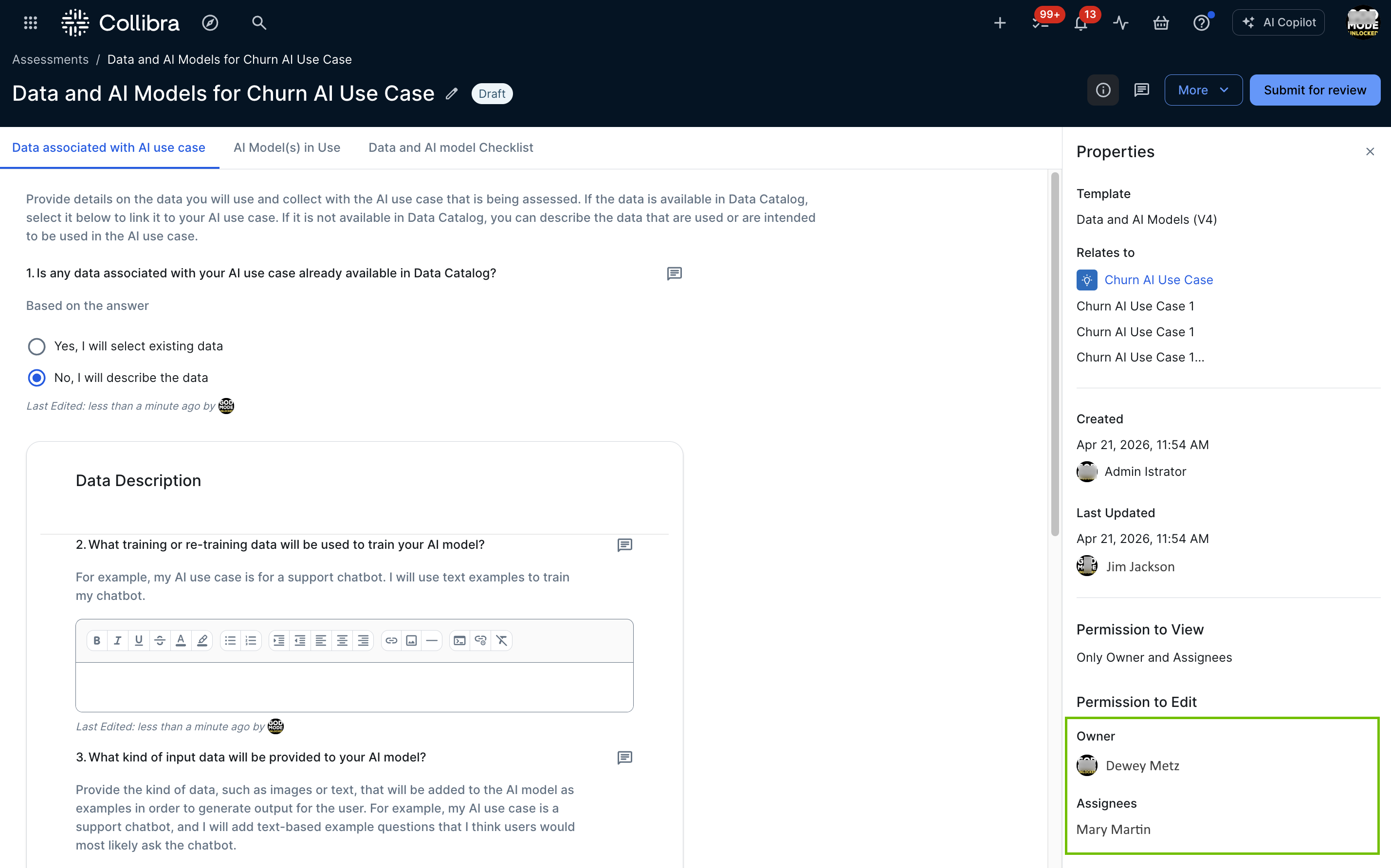
By default, notifications are switched on for the out-of-the-box assessments and any custom templates that were created as of the release of Collibra version 2024.10.
For more information on notifications, go to Assessment notifications.
Completing the process: Approving the assessments
When an assessment is complete and the Owner clicks Submit for Review:
-
An Assessment Review asset with the status Under Review is created in your Collibra environment (if the Review is required option was selected in the template that was used to conduct the assessment), in the specified domain.
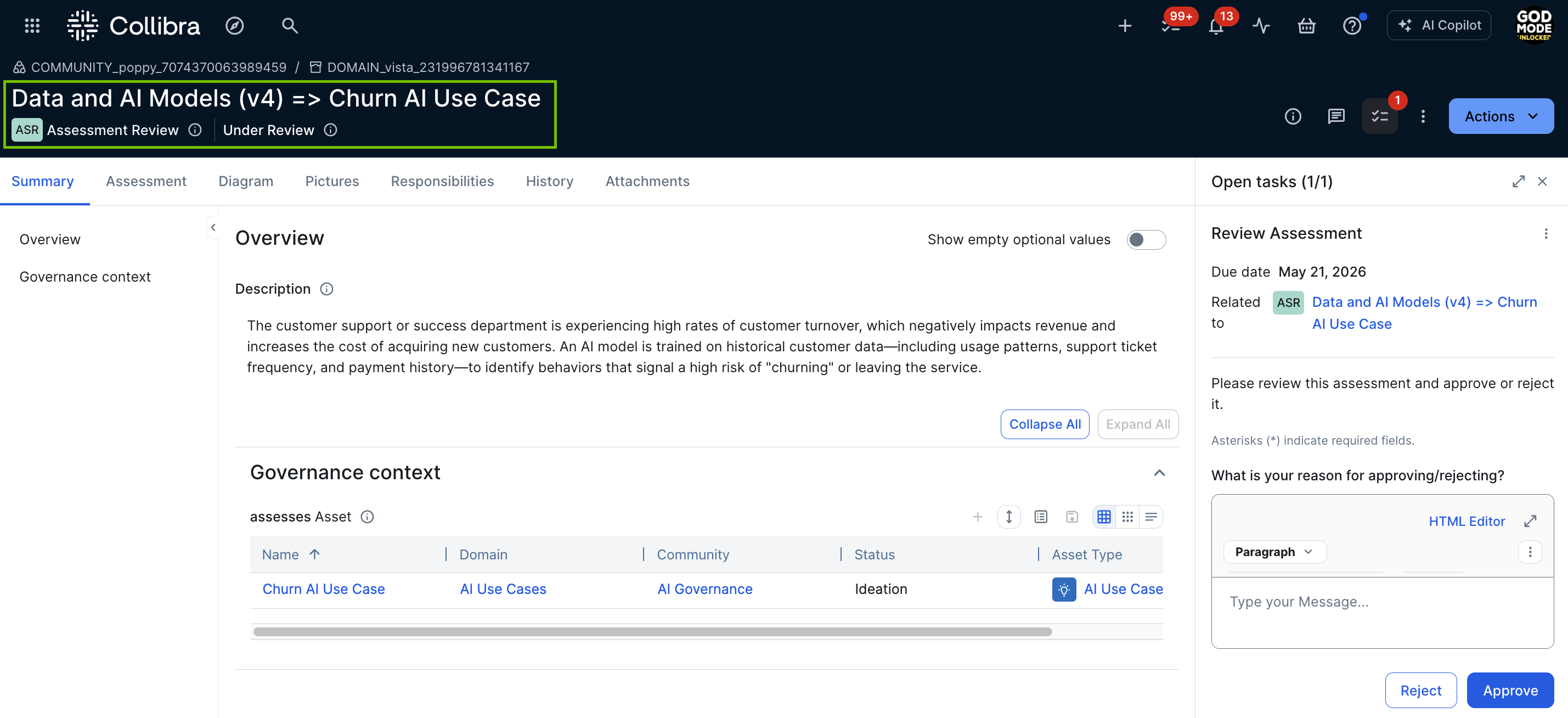
- The Assessments Approval workflow is triggered and the Business Steward for the domain receives a task to approve or reject the Assessment Review asset.
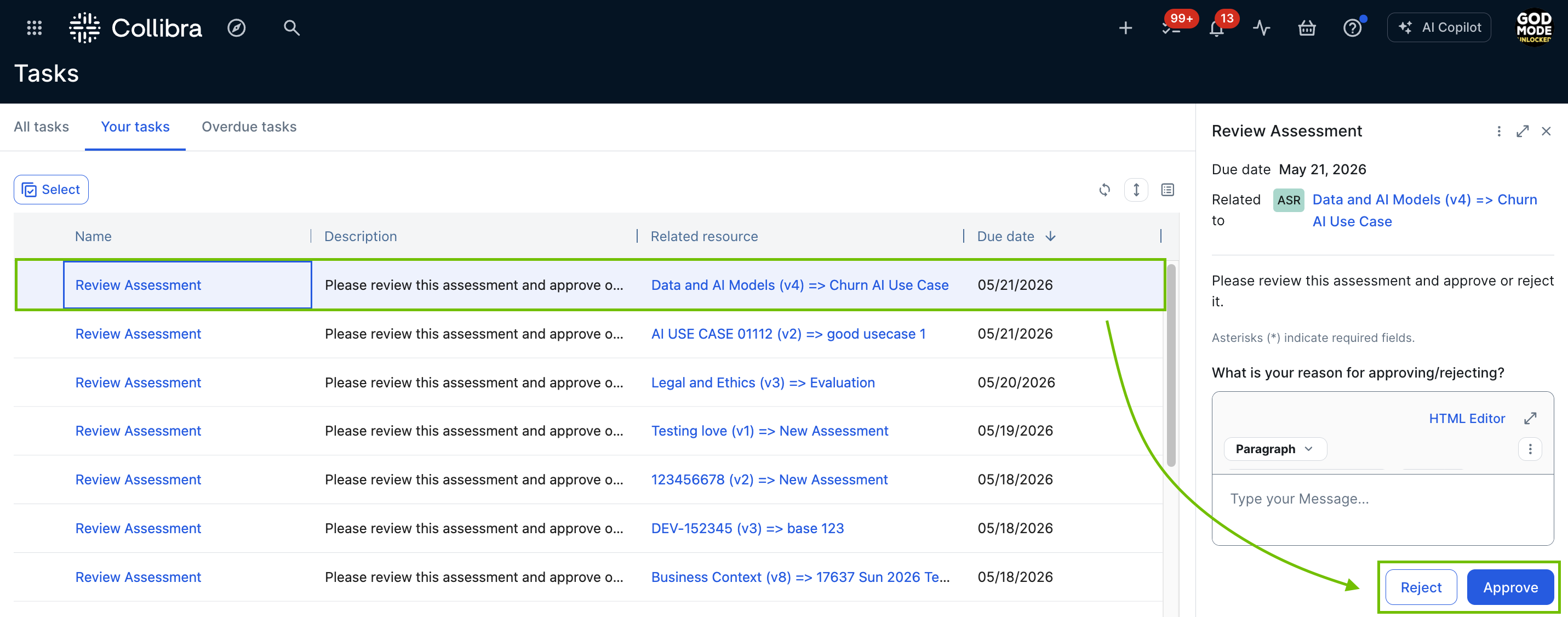
When the assessment is approved, depending on the assessment template, certain assessment responses are copied to the AI Model Version or AI Use Case asset page. The following table shows the conditions under which responses are copied to the asset page.
| If the assessment template is... | Then... |
|---|---|
| One of the out-of-the-box AI Governance assessment templates |
Certain assessment responses are automatically copied over to the asset page. For a complete list of questions for which responses are copied to the asset page, and how they map to the characteristics on the asset page, go to Mapping of copied assessment responses and asset characteristics. |
| Any custom assessment template |
The response to every question for which the "Copy Response to Assessed Asset" option is selected in the assessment template, are copied to the asset page. For complete information, go to Copy response to asset. |