Business Glossary

Important 

Choose an option below to explore the documentation for the latest user interface (UI) or the classic UI.

Business Glossary helps decision-makers understand their digital assets from a business perspective. It is a central tool for governing business terms, and it includes a configurable range of asset types, attributes, taxonomy, relations, and adoption statuses. It is also fully integrated with the technological assets and is supported by Collibra's core features, such as reporting, traceability, commenting, and workflows.

Tip To associate business assets with physical data, you can create a semantic layer through Guided Stewardship. The semantic layer acts as a bridge between the business context and the technical implementation. For example, to associate a business term with a column, establish a relation path where the business term is related to a data attribute, and the data attribute to the column. This can be done via the semantic layer features.

How to open Business Glossary

You can open Business Glossary if you have the Product Rights > Business Semantics Glossary global permission. To open Business Glossary, on the main toolbar, click Products iconBusiness Glossary.

Business Glossary tabs

Business Glossary contains the following tabs:

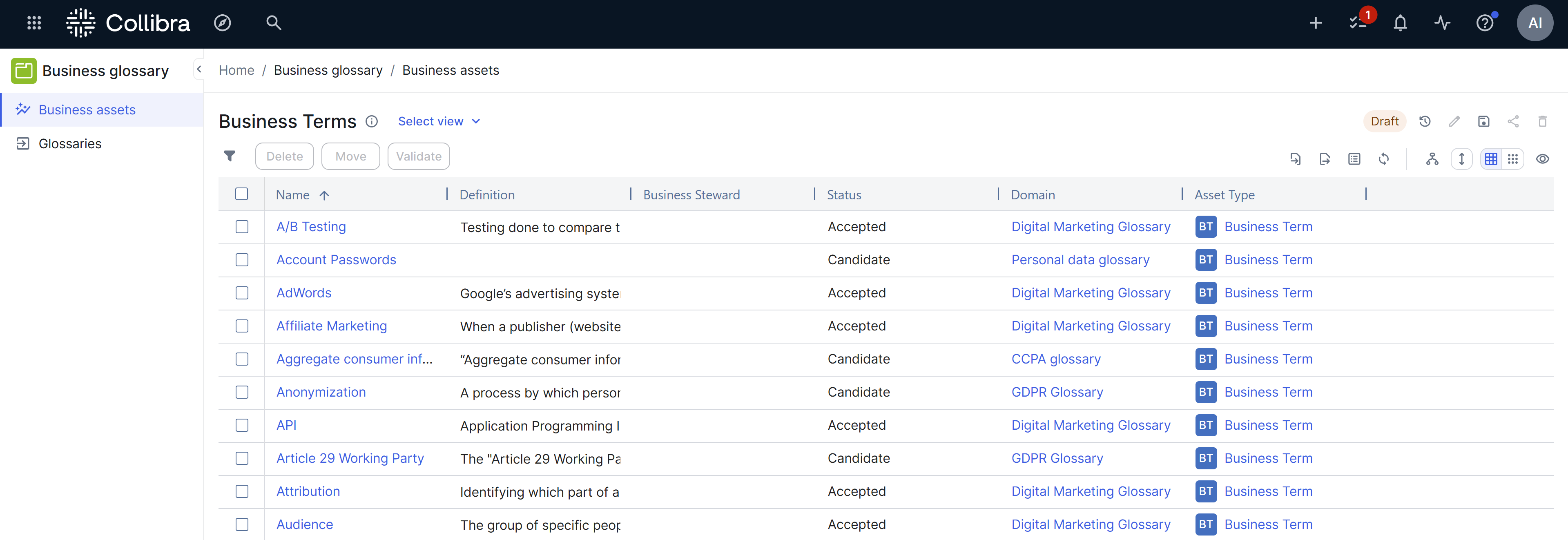
  • Business Assets: All business assets.
  • Metrics: A variety of statistics related to how the assets are used.
  • Glossaries: All domains whose domain type is Glossary.

Out-of-the-box metamodel for Business Glossary

Business Glossary has specific asset types, domain types, and workflows.

Asset types

The following table contains out-of-the-box asset types that are relevant for Business Glossary.

Asset type Description
Business Asset

An asset type that is exclusively used and governed by the business user community. Its instance assets and all instances instantiating its subtypes pertain to the business organization. Business assets typically include business concepts such as Business Term, Business Process, and Line of Business, which help build the semantics of any organization with insufficient details to build an actual business application.

Business Asset 
Business Term

A word or phrase that describes a concept that is used in a particular branch of business.

Examples: customer, person purchase count, loan amount

Business Asset  Business Term
Acronym

An abbreviation of a business term that forms a word or a name. It is formed by stringing the initial components of a business term together. It is often pronounced as a word.

Examples: ERP, EDW, EAD

Business Asset 
Measure

An asset type that is used for calculations, such as sum, count, average, minimum or maximum.

Examples: net sales, top customers, on-hand inventory

Business Asset  Measure
KPI

Key Performance Indicator, an indicator to periodically measure the success of or the progress towards a strategic goal of a particular activity or of an organization.

Examples: employee turnover, customer attrition, claims denial rate

Domain types

The following table contains out-of-the-box domain types that are relevant for Business Glossary.

Tip 

Use these options to filter the rows and columns of the table to suit your needs:

Domain type Description

Asset types

Application

BI Catalog

A collection of BI tool assets with the list of related attributes.

  • Looker Dashboard
  • Looker Data Set
  • Looker Data Set Column
  • Looker Folder
  • Looker Look
  • Looker Report Attribute
  • Looker Query
  • Looker Tenant
  • Looker Tile
  • MicroStrategy Data Attribute
  • MicroStrategy Data Entity
  • MicroStrategy Data Model
  • MicroStrategy Document
  • MicroStrategy Dossier
  • MicroStrategy Folder
  • MicroStrategy Project
  • MicroStrategy Report
  • MicroStrategy Server
  • Power BI Capacity
  • Power BI Column
  • Power BI Dashboard
  • Power BI Data Flow
  • Power BI Data Mart
  • Power BI Data Model
  • Power BI Report
  • Power BI Table
  • Power BI Tile
  • Power BI Workspace
  • Qlik Server
  • Qlik Space
  • Qlik Sense Application
  • Qlik Sheet
  • Qlik Story
  • Qlik Visualization
  • Qlik Data Model
  • Qlik Data Entity
  • Qlik Data Attribute
  • SSRS Column
  • SSRS Data Model
  • SSRS Folder
  • SSRS KPI
  • SSRS Parameter
  • SSRS Report
  • SSRS Server
  • SSRS Table
  • Tableau Project
  • Tableau Site
  • Tableau View
  • Tableau Dashboard
  • Tableau Story
  • Tableau Worksheet
  • Tableau Workbook
  • Tableau Data Attribute
  • Tableau Report Attribute
  • Tableau Data Entity
  • Tableau Data Model
  • Tableau Server
  • Tableau Data Source
  • Business Glossary
  • Data Catalog
  • Stewardship
Business Asset Domain  
  • Business Asset
  • Business Dimension
  • BI Folder
  • Business Glossary
  • Data Catalog
  • Stewardship
Business Asset Domain
Report Catalog
A collection of reports and their definitions with the list of related report characteristics.
  • Measure
  • KPI
  • Report
  • BI Report
  • Report Attribute
  • BI Report Attribute
  • Business Glossary
  • Data Catalog
Glossary A prioritized list of business terms and acronyms, and their meanings.
  • Business Term
  • Acronym

Business Glossary

Workflows

The following table contains out-of-the-box workflows that are relevant for Business Glossary.

Name

Description

Visual representation

Approval Process

The Approval Process workflow allows you to approve an asset in Collibra. This is a more powerful version of the Simple Approval Process.

Assign Owner To Data Set

This process automates adding owners to data sets.

This workflow is automatically triggered when a new Data Set asset is created.

Cancel Process

This process notifies the concerned users of a workflow cancellation.

Escalation Process

This process is the default mechanism for the escalation of user tasks in workflows.

Issue Creation

This process facilitates issue creation.

Issue Management

This process is used to route and resolve issues.

Issue Move

The Issue Move workflow is a process that changes the responsible community of an issue.

Post Data Ingestion Workflow

This process facilitates assigning the Owner and Technical Steward for newly ingested Schema assets.

This workflow is automatically triggered when a new Schema asset is created and after a data source is registered.

Propose New Business Asset

This process facilitates the creation of new Business Assets in the Data Governance Council community.

Propose New Business Term

This process facilitates the creation of new Business Term assets in the Data Governance Council community.

Propose New Code Value

This process facilitates the creation of new Code Value assets in the Data Governance Council community.

Propose New Data Asset

This process facilitates the creation of new Data Assets in the Data Governance Council community.

Propose New Governance Asset

This process facilitates the creation of new Governance Assets in the Data Governance Council community.

Propose New Technology Asset

The Propose New Technology Asset workflow allows you to create a new Technology asset in Collibra Platform. By default, the asset is added to the Data Governance Council community, in the New Applications domain.

Request Assets Access

The Request Assets Access workflow allows you to request access to assets that are added to your Data Basket. All data owners have to approve the request before you can access the assets.

Important 
  • By default, users can add assets of the type Data Set, Report, or one of their child asset types to the basket. These eligible out-of-the-box asset types can be extended with additional asset types. If you add more asset types, make sure to update the workflow logic.
    This workflow accepts by default only Data Sets that contain Column assets as data elements.
  • This workflow requires all users involved in the workflow, Owners and Technical Stewards, to have a global role that has the Workflows > Participate in workflow global permission.
  • If your environment was created before 2024.06, download and enable the latest version of the Request Assets Access workflow. When you activate this workflow, make sure to add the Data Usage asset type in the Applies to section.
    For more information, go to Out-of-the-box workflow deployments.
  • This workflow replaces the Request Data Sets Access workflow.
    However, if you restore a 5.4.x backup or older, the old Requests Data Sets Access workflow will overwrite the Request Assets Access workflow. In that case, you have to deploy the Requests Assets Access workflow again and apply all possible customizations.

The workflow calculates the name of the asset by combining the creation date with a sequential number for that day, for example 2019-09-30 #1 and sets the asset characteristics according to the data submitted through the start form. The user who started the workflow receives the Requester role. The user with an Owner role approves the request for each data set and the Owner or Technical Steward provides access to the data set elements.

For information on the workflow itself, go to the Collibra Developer Portal.
For information on when this workflow is used, go to request access to data.

Simple Approval

The Simple Approval workflow is a single-step process that allows you to approve an asset in Collibra.

Voting Sub-Process

The Voting Sub-Process is a workflow that can be called by other workflows when users need to vote. It is used within other out-of-the-box workflows such as the Approval Process, the Simple Approval or the Issue Management workflow.

You can use this sub-process in new custom workflows. The result is a true or false boolean that is provided to the parent workflow.