About access requests with exceptions
In Data Access, a role may include data objects that are protected by a column mask or a row filter. When you request access to an asset that is linked to such a role, you can also request an exception. An exception lets you see unmasked column data or restricted rows. The request form includes sections where you can select column masks or row filter rules for which you need an exception. A request that includes exceptions is called an access request with exceptions.
- This topic assumes that you are the requester. You can also request access on behalf of others.
- In this topic, "parent role" refers to the role that is linked to the asset to which you requested access.
Types of exceptions
You can request the following types of exceptions.
| Exception type | Description |
|---|---|
|
Column mask exception |
Lets you see unmasked data in the columns that the column mask protects, such as full credit card numbers instead of masked values. If you do not request this exception, those columns remain masked. |
|
Row filter rule exception |
Lets you see the rows that meet the filter rule's criteria in the tables that the row filter protects, such as rows for a specific region. If you do not request this exception, those rows remain hidden. |
How access requests with exceptions work
When you submit an access request with exceptions:
- Data Access creates one access request that covers the parent role and all the exceptions that you selected. The request is assigned to the owners of the parent role, the column mask, and the row filter rule.
- Data Access creates an inactive temporary role, also called a role variation, for your request.
Temporary role
Data Access creates a temporary role whenever an access request with exceptions is generated. This temporary role is created in the Inactive status, and it includes the requester as its beneficiary.
As each owner implements their part of the request, the temporary role itself is added as a beneficiary of their access control (parent role, the column mask, or the row filter rule). The temporary role, however, becomes active only if the request is closed with at least the parent role implemented.
When does a temporary role become active
A temporary role becomes active in any of the following cases:
- The request is closed with only the parent role implemented. In this case, the requester gets access on the role's data objects, excluding the exceptions.
- The request is closed with both the parent role and the exceptions implemented. In this case, the requester gets access on the role's data objects, including all the exceptions.
- The request is closed with the parent role and one of the exceptions implemented. In this case, the requester gets access on the role's data objects, including only the implemented exception.
Once a temporary role becomes active, it is applied to the data source during the next synchronization.
When is a temporary role deleted
A temporary role is deleted in any of the following cases:
- The requester's access expires. When a user requests access to an asset, they set an expiration date. On the expiration date, the requester is automatically removed as the beneficiary of the temporary role. When the last beneficiary is removed from a temporary role, Data Access deletes the temporary role.Tip To see when a requester's access ends, check the Expires at column in the Beneficiaries section of the temporary role.
- The request is closed before anything is implemented.
- The request is closed without the parent role implemented, even if the exceptions were implemented. In this case, the requester does not get any access on the role's data objects. Exceptions apply only on top of the role's permissions and cannot function on their own.
Once a temporary role that was previously active is deleted, it is removed from the data source during the next synchronization.
Example: How a temporary role is created, implemented, and deleted
Suppose that Maya, a data analyst, needs access to the Data Product Port asset named Sales Analytics Port.
Sales Analytics Port is linked to a Data Access role named Sales Role, which grants access on the CUSTOMER table. The CUSTOMER table is protected by the following access controls:
- A column mask named Payment Card Mask on the Credit Card Number column.
- A row filter named Customer Region, which includes the following filter rules:
- All (criterion:
All Rows) - BE Customer Records (criterion:
Region = BE) - UK Customer Records (criterion:
Region = UK)
- All (criterion:
Maya requests access
Maya opens the Sales Analytics Port asset page and requests access with an expiration date of November 1, 2026. Because Sales Role includes a data object that is protected by a column mask and a row filter, the request form shows two additional sections:
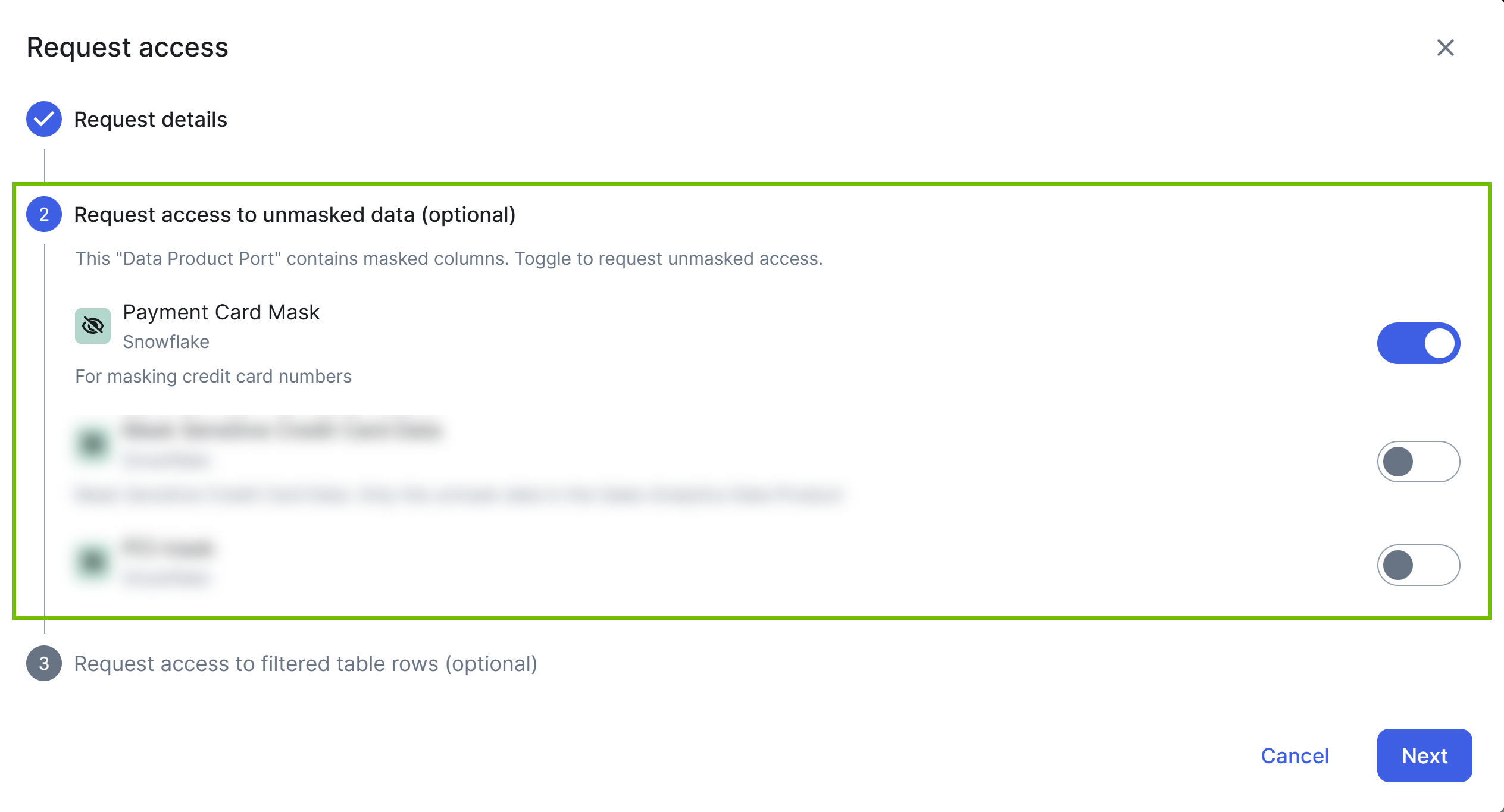
- In the Request access to unmasked data section, she selects Payment Card Mask, because her analysis requires full credit card numbers instead of masked values.
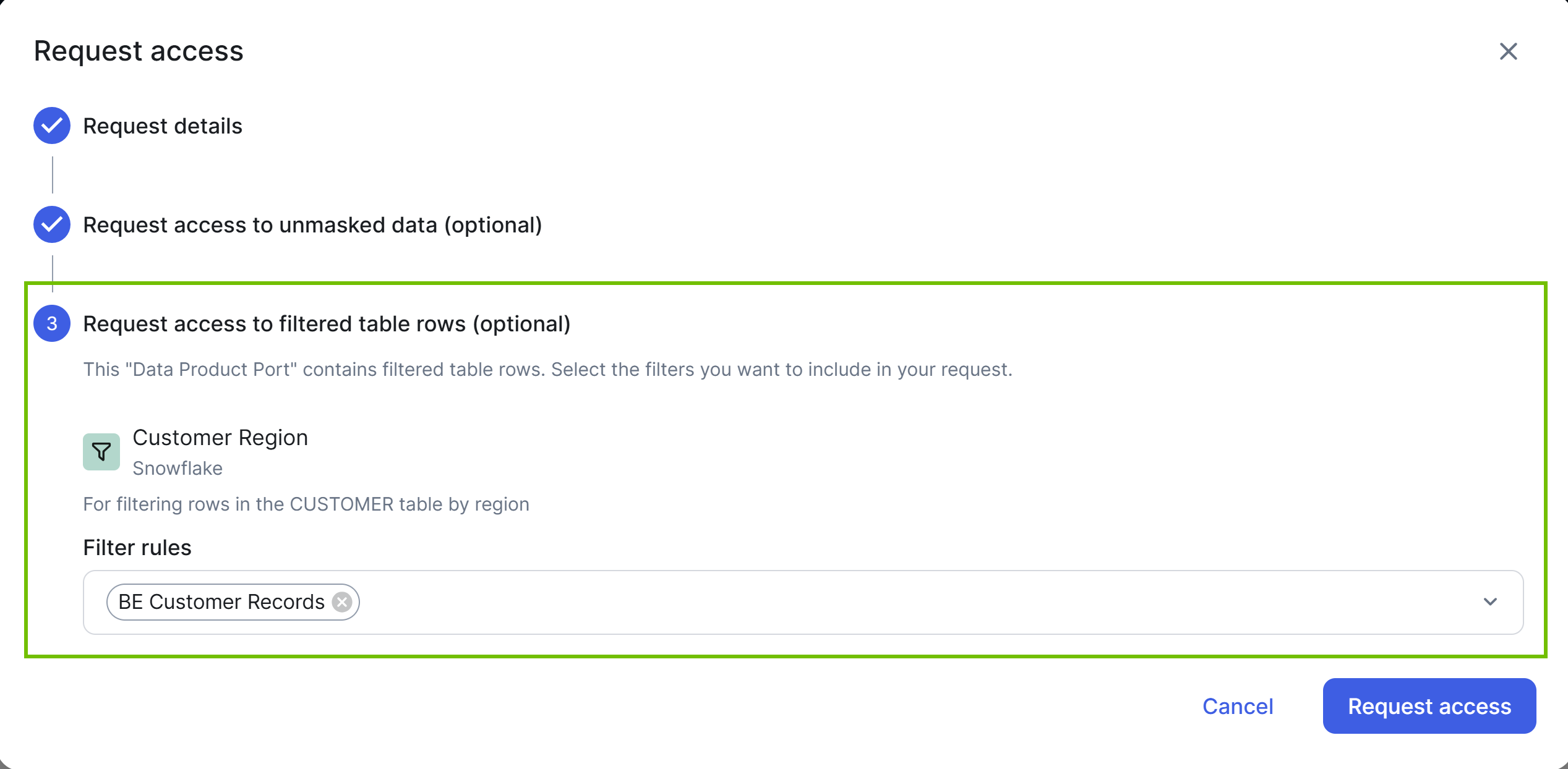
- In the Request access to filtered table rows section, she selects the BE Customer Records filter rule, because she needs customer records for the BE region.
Data Access generates a request and temporary role
Maya submits the request. Data Access generates a single access request that covers Sales Role, Payment Card Mask, and BE Customer Records. The owners of each item are assigned to implement their part.
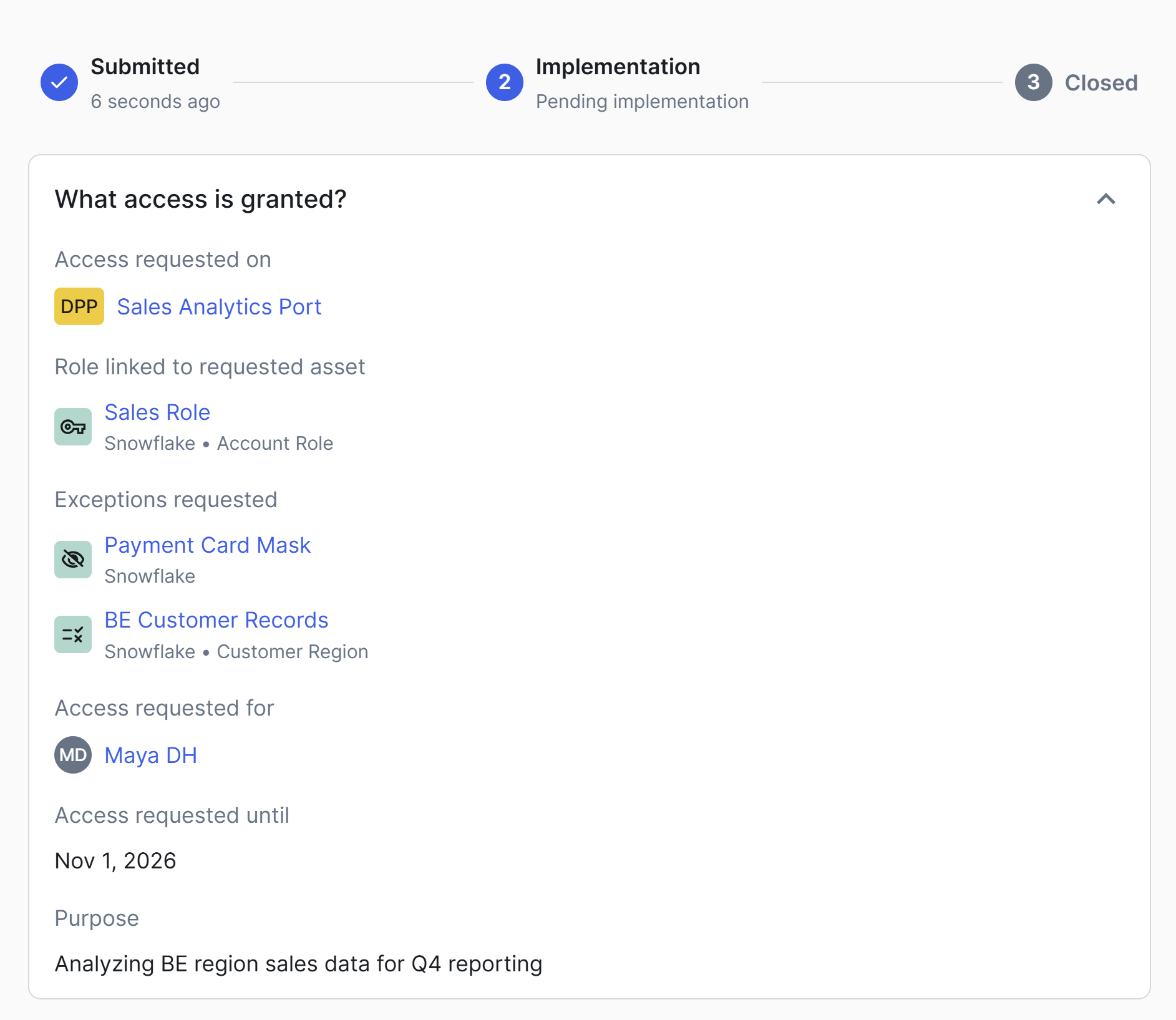
Data Access also creates a temporary role. Maya is automatically added as a beneficiary of the temporary role, and her access carries the expiration date of November 1, 2026. The temporary role starts in the Inactive status with an empty What component. Sales Role, Payment Card Mask and BE Customer Records are added to its What component later, as each owner implements their part. Until then, the temporary role grants nothing.
Owners implement their parts
As each owner implements their part of the request, the temporary role is added as a beneficiary of that owner's access control: Sales Role, Payment Card Mask, or BE Customer Records.
Request closes and temporary role becomes active
When all owners have implemented their part of the request, the request closes with the Implemented status, and the temporary role becomes active. Maya can now access the CUSTOMER table, and also see unmasked credit card numbers and BE customer records.
Access expires
On November 1, 2026, Maya's beneficiary link on the temporary role expires and is removed. Because she was the last beneficiary, the temporary role is then deleted.
What if an owner does not implement
Suppose that the owner of Payment Card Mask closes their part of the request instead of implementing it, whereas the owners of Sales Role and BE Customer Records have already implemented their parts. Then, Maya can still access the CUSTOMER table and see BE customer records, but the credit card numbers remain masked for her.