About column masks
In Data Access, a column mask is a type of access control that masks data in specific columns for everyone except its beneficiaries. The beneficiaries see unmasked data in those columns only if they have access on the tables that contain the columns.
You can use column masks to restrict data visibility within columns. Column masks ensure that even if users have access on a data object, they cannot see sensitive data in a column unless they are authorized. With column masks, you can control data visibility at the column level, define who can bypass the mask, and maintain a secondary layer of security that overrides roles.
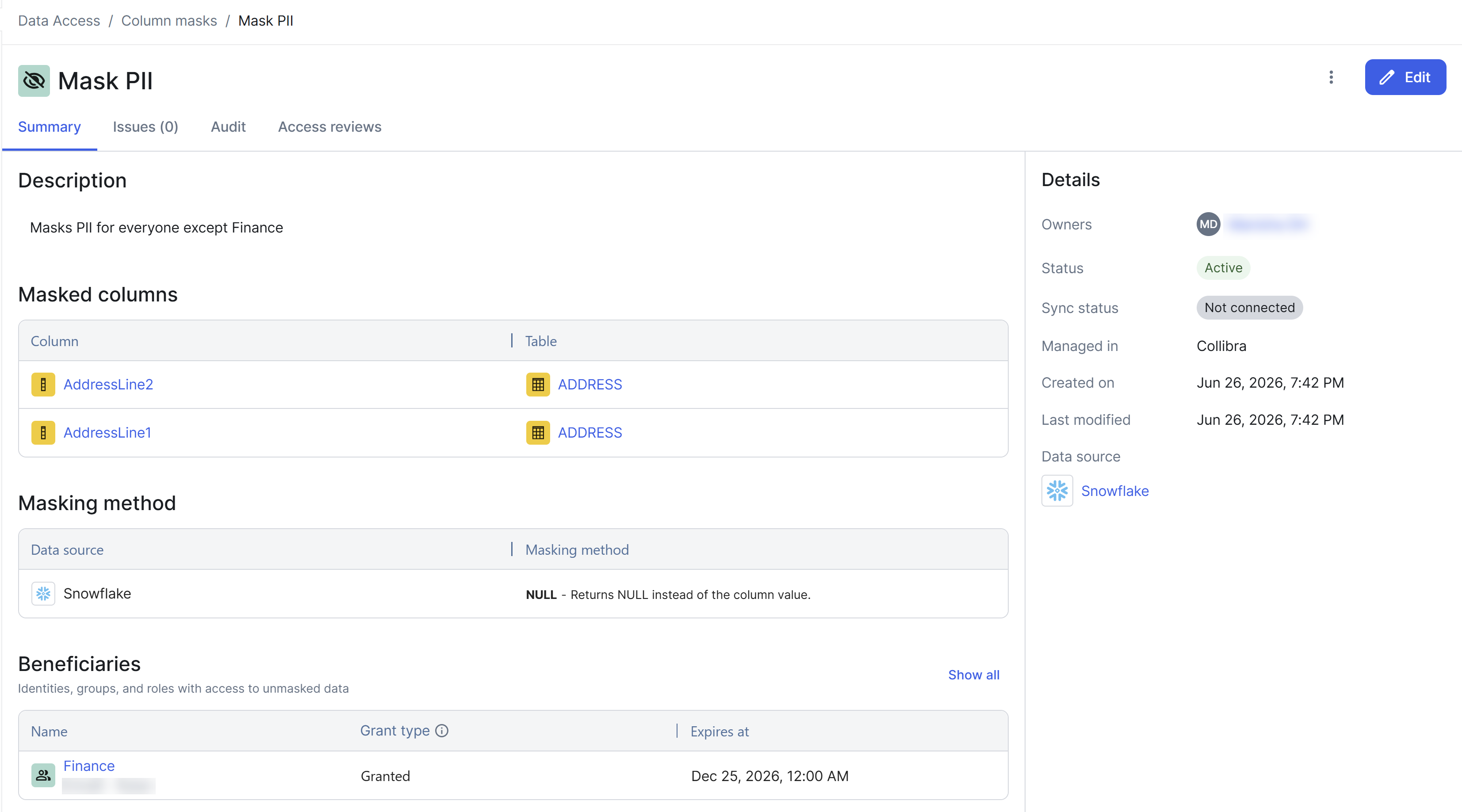
Components
A column mask has the following main components.
| Component | Description |
|---|---|
| What | The columns whose data needs to be masked for everyone, and the masking method that is applied to the columns, for example, redacted, hashed, or null values. |
| Who | The beneficiaries that are granted an exception, meaning that they can bypass the mask. The beneficiaries are authorized to see the original, unmasked data in the columns, provided that they have access on the tables that contain the columns. Everyone else sees masked data in those columns, even if they have Read access on the columns through a role. |
Example
Suppose that you have a column mask for the Salary column with the Redacted masking method. The following scenarios explain how the column mask affects data visibility for a user named Cammy, who has Read access on the linked table through a role.
| Scenario | Result |
|---|---|
|
Cammy is not added as a beneficiary in the column mask. |
Cammy can see the table, but with redacted data in the Salary column. |
| Cammy is added as a beneficiary in the column mask. | Cammy can see unmasked data in the Salary column. |
| Cammy is added as a beneficiary in the column mask, but her Read access on the table is revoked. | Cammy cannot see the table itself. |
| Two column masks exist for the same Salary column, and Cammy is added as a beneficiary in only one of them. |
Cammy can still see unmasked data in the Salary column. Tip A user needs to be a beneficiary of only one column mask that covers a given column to see unmasked data in that column. If multiple column masks apply to the same column, beneficiary status in any one of them is sufficient.
|
Masking methods
The masking method in a column mask defines how sensitive data within a column is masked. The available masking methods vary by data source. NULL is a common masking method.
If multiple column masks with different masking methods are applied to the same column, Data Access enforces the most restrictive masking method.
Beneficiaries
Beneficiaries of a column mask are the specific identities, groups, or roles that are authorized to bypass the column mask. When defining these beneficiaries, your selection determines whether they are granted a global exception or a local exception.
Global exception
If you want to unmask all the columns that you select in a column mask for an identity or a group, apply a global exception by adding the identity or group directly to the Beneficiaries section. The beneficiaries can then see unmasked data in the columns that belong to the data objects that they can already access, regardless of which role grants them access.
Because of such broad access, we recommend that you reserve global exceptions for super users and administrators who need full visibility across all datasets associated with the columns.
Local exception
If you do not want to unmask all the columns that you select in a column mask, apply a local exception by adding a role to the Beneficiaries section. The beneficiaries of that role can then see unmasked data, but only in the columns that belong to the data objects on which that specific role grants them access.
Because of such scoped access, we recommend that you use local exceptions to maintain the principle of least privilege.
How exceptions work
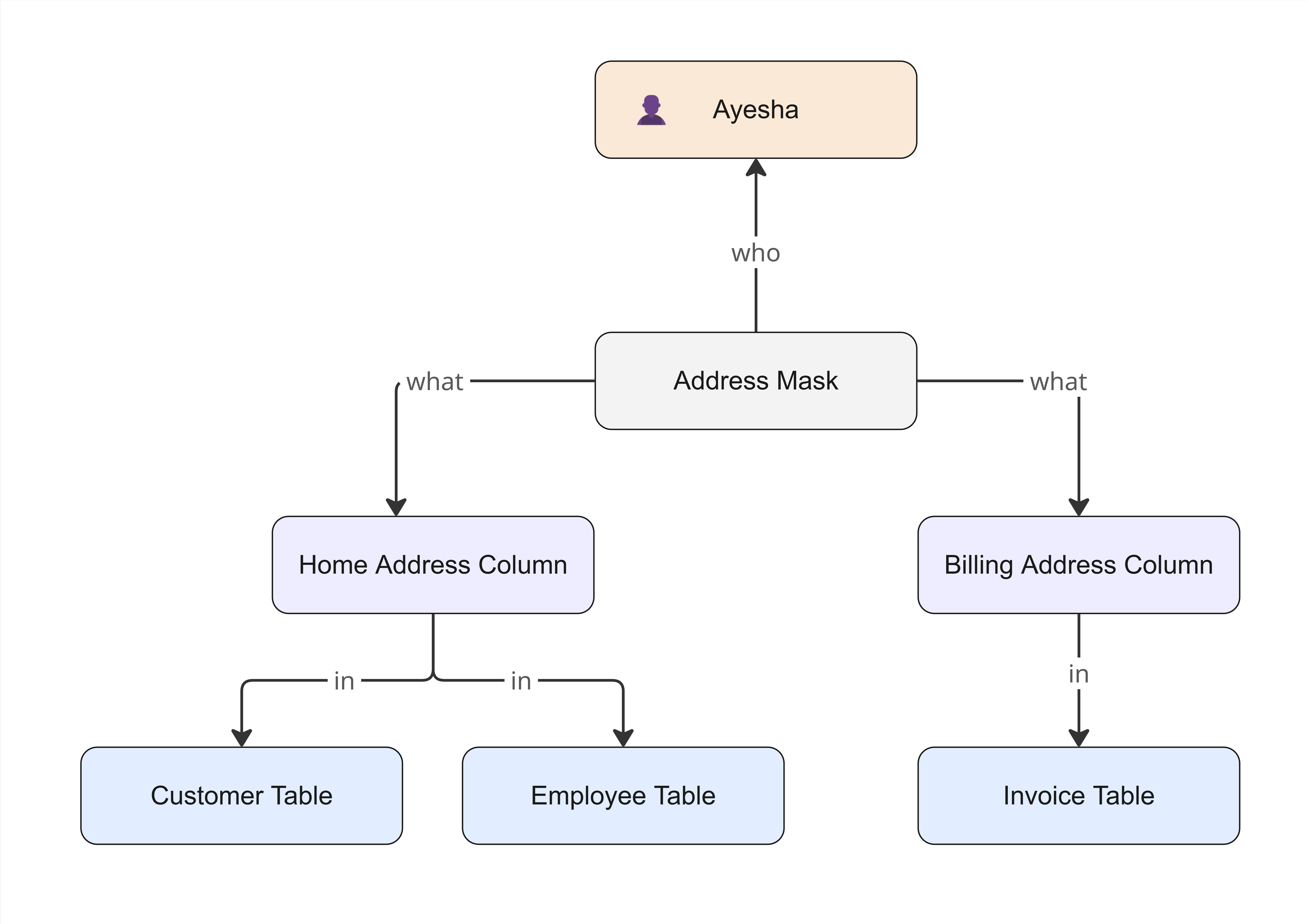
You do not have to apply a single column mask to only one table. When you create a column mask, you can select multiple columns from completely different tables across your data sources. For example, you can create a single column mask named Address Mask, and apply it to the following columns:
- Home Address Column in Customer Table
- Home Address Column in Employee Table
- Billing Address Column in Invoice Table
Granting a global exception
You grant a global exception in a column mask by adding an identity or a group to the Beneficiaries section.
Suppose that Ayesha, an identity, has access on the Customer Table, Employee Table, and Invoice Table. If you add Ayesha as a beneficiary of Address Mask, she can see unmasked addresses in all three tables.
Granting a local exception
You grant a local exception in a column mask by adding a role to the Beneficiaries section, instead of adding an identity or a group.
Suppose that Ayesha is a beneficiary of a role named Sales Role, which grants her access only on Customer Table. Instead of adding Ayesha as a beneficiary of Address Mask, if you add Sales Role, Ayesha can see unmasked addresses only in Customer Table.
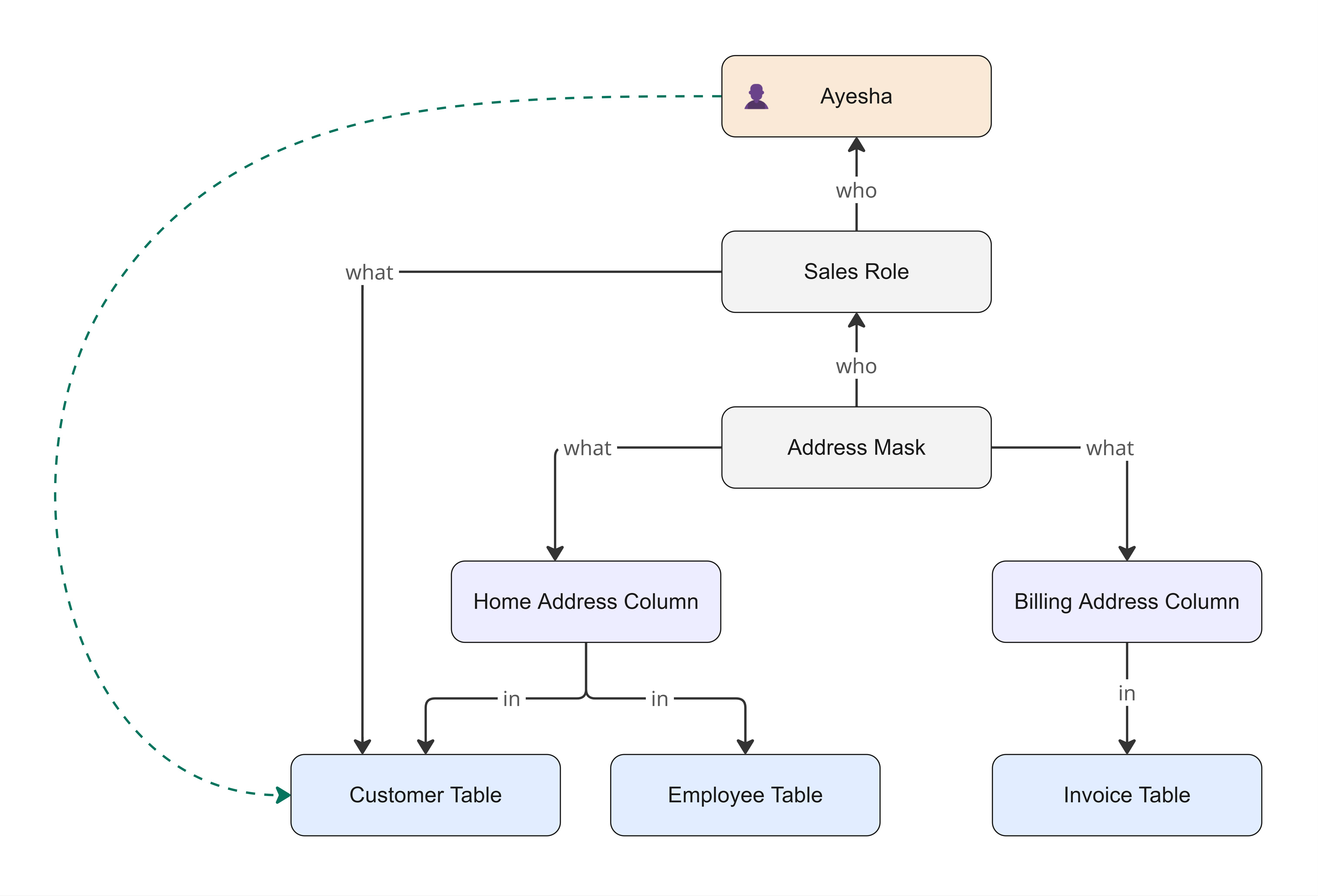
If she happens to have another role that grants her access on Employee Table, the addresses in Employee Table still remain completely masked for her, because Sales Role does not cover Employee Table.
Dynamic rules
Dynamic rules let you define the conditions that automatically determine which columns are masked, and which identities can see unmasked data, without having to select each entity individually.
Suppose that you have a database structure where a database (HR Database) contains a table (Employee Table), and the table contains a column (Salary Column).
HR Database → Employee Table → Salary Column
You are configuring a column mask with a dynamic rule that is scoped to HR Database and defined by the condition Has tag Sensitivity:PII. Then, the dynamic rule is activated only if the tag is directly on the target column.
If the tag Sensitivity:PII is on Salary Column, Data Access masks the data in Salary Column. If, however, the tag Sensitivity:PII is not on Salary Column but is instead on Employee Table or HR Database, Data Access ignores the column mask, which means that the data in Salary Column remains unmasked.