Attribute-level lineage, also known as field-level lineage, provides granular visibility into data flow in Power BI.
Collibra Data Lineage analyzes Power BI report definitions to capture lineage from semantic model tables to the specific fields used in reports. This enables precise, field-level impact analysis and helps you understand how upstream changes affect downstream reporting.
The technical lineage graph includes report pages, allowing you to trace how data flows into specific report tabs.
- This feature is in preview. It is not recommended for production environments.
- The Microsoft API required for this feature is currently available only in Commercial Azure tenants. As a result, this feature is cloud-only and not supported on Collibra Platform for Government.
Requirements
- This feature requires Collibra Platform 2026.04 or newer and one of the following Edge versions or newer:
- 2026.06.0
- 2026.3.91
- 2026.10.231
- Additional permissions are required to use attribute-level lineage:
- Grant the Microsoft Fabric
Item.ReadWrite.Alldelegated permission to your Power BI application in Microsoft Azure. For instructions, got to Register Power BI in Microsoft Azure and set permissions.
For more information about this permission, go to Items - Bulk Export Item Definitions in the Microsoft documentation. - Add the service principal or user account used in the connection as at least a Member of the Power BI workspace that you want to ingest. For more information, go to About setting up Power BI.
- Grant the Microsoft Fabric
Hierarchy at a glance
Attribute-level lineage introduces a more detailed hierarchy in the Power BI operating model:
- Power BI Report: The top-level container.
- Power BI Report Page: Represents individual pages in a report.
- Power BI Column: Represents the fields that provide data for the report page.
Technical lineage graph
Technical lineage expands to show the flow into individual report pages, allowing you to identify which report tab is impacted by an upstream data change. In the business diagram, a new relation type relates Power BI Column assets to their Power BI Report Page assets.
Limitation
The following limitations apply to this feature:
- The Microsoft API has several constraints that might prevent attribute-level lineage from being generated for some reports. When attribute-level lineage is not available, existing lineage continues to work normally.
- If a report contains report pages, the Technical Lineage tab on the Power BI Report asset is displayed but does not show lineage. To view lineage, use the Browse pane or open the technical lineage graph from a related asset.
- If a Power BI workspace contains object types for which Microsoft does not support Service Principal authentication, synchronization of the workspace can fail. For example, Microsoft does not support Service Principal authentication for Paginated Reports. If your workspace contains unsupported object types, use the Resource Owner Password Credentials authentication type in the Power BI connection to avoid synchronization failures. Attribute-level lineage is not available for Paginated Reports, regardless of the authentication method.
Performance and scaling expectations
Retrieving full report definitions is subject to strict Microsoft API limits.
| Aspect | Details |
|---|---|
| Synchronization duration | Synchronization takes significantly longer when this feature is enabled because the Microsoft API is limited to approximately 10 requests per minute. |
| Capacity |
This feature only supports Fabric-based capacities due to a Microsoft API limitation. Support for other capacity types may become available in the future, subject to Microsoft API changes. |
Enabling the feature
You can enable the feature by completing the following steps:
- Open your Technical Lineage for Power BI capability configuration.
- Select the Enable Attribute Level Lineage for Reports (Preview) checkbox, and click Save.
- Synchronize your technical lineage.
Troubleshoot attribute-level lineage
If some workspaces do not have Power BI Report Page assets or attribute-level lineage, review the transformation details to determine why the report definitions could not be retrieved.
- Open the technical lineage browser by clicking the Technical Lineage tab on an asset that supports technical lineage, such as a Power BI Report asset.
- In the lower-right corner of the page, click View Status.
- In the Status pane, filter the messages by selecting the Source ID for your Power BI data source. Use the Search field or pagination if the Source ID is not visible.
- In the Transformations table, select PARSING_ERROR from the Filter by dropdown list.
- Scroll to the end of the transformation details list and expand the Analysis result of the last entry.
The relevant log entry appears at the end of the list because it is the first message in the log. The Search field searches only message content, not log entry titles, so searching for a term such as Harvester report does not return this entry.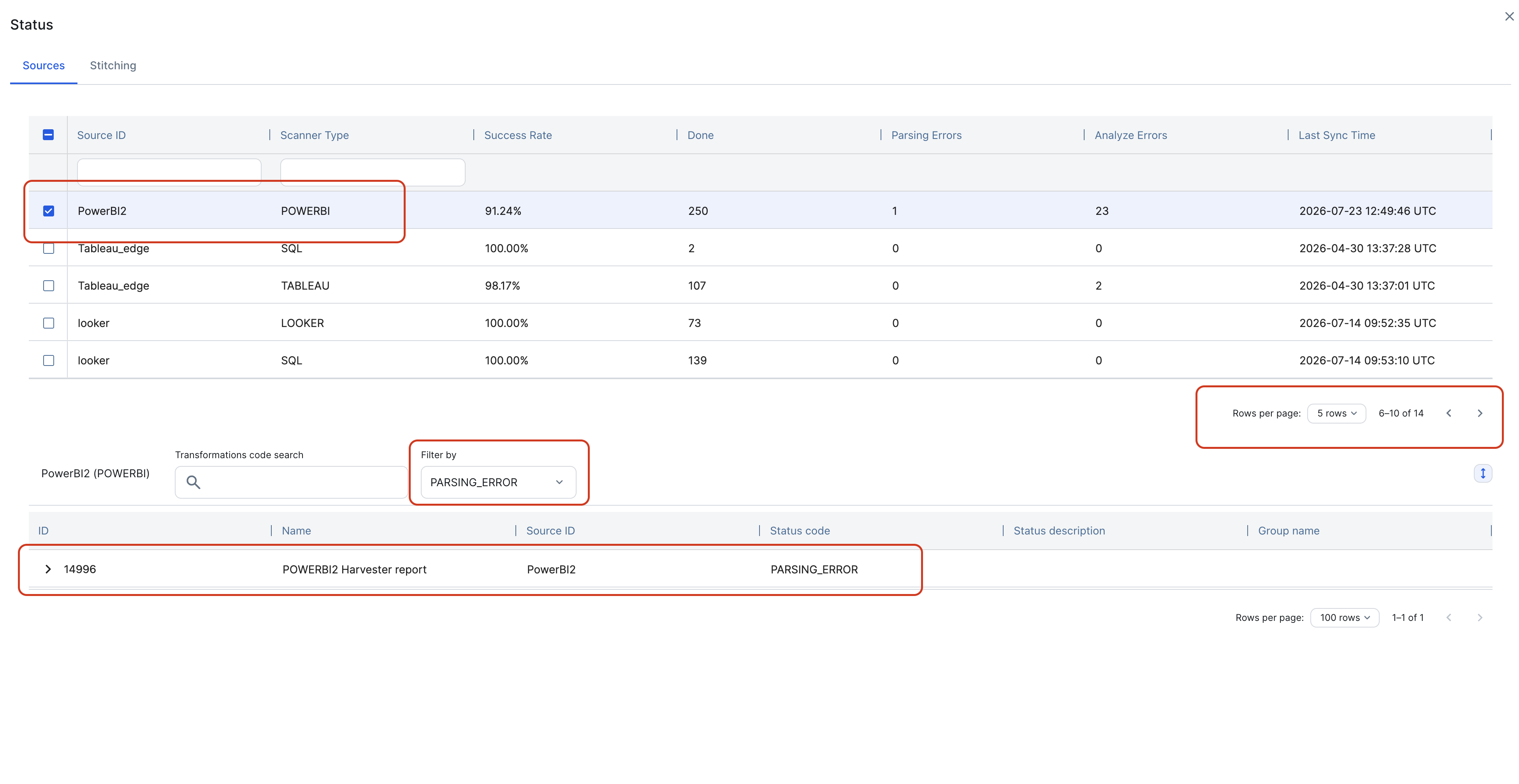
- Look for entries that contain
exportItemDefinitions. TheerrorCodeandmessagevalues explain why Collibra could not retrieve the report definition from a workspace.