About Stewardship
The Stewardship application offers data stewards various features to support efficient data governance.
Out-of-the-box Stewardship features
The Stewardship application includes several features by default. They are organized as follows:
-
The Business metadata submenu helps you manage the data governance framework. It includes the following pages:
-
Organization: Provides a hierarchical view of the communities, domains, and their respective owners. Use this page to manage responsibilities in Collibra.
-
Business dimensions: Shows several out-of-the-box views on Business Process, Data Category, and Line of Business assets. Use this page to show and manage these assets in Collibra.
-
Tags: Shows an overview of all defined tags. Tags can group assets across communities and domains, improving organization and accessibility. Use this page to manage all tags in Collibra.
For information, go to About organization, business dimensions, and tags in Stewardship.
-
-
The Data classification submenu offers all features to categorize and classify data, making data more meaningful and searchable. It includes the following pages:
-
Data Classes allows you to define, assign, and manage data classes. For information, go to About the Data Classes page.
-
Data Categories: Shows the defined data categories. For information, go to About the Data Categories page.
-
Guided Stewardship features
If Guided Stewardship is enabled, an out-of-the-box operating model becomes available and the Stewardship application includes additional features, such as Automatic stitching between Columns and Data Categories, Semantic Model Editor, and the Collibra Semantic Assistant. Additional Guided Stewardship AI features can also be enabled.
For more information, go to About Guided Stewardship.
Navigation in the Stewardship application (in preview)
By default, the New app experience setting in Customizations Settings is enabled, impacting the navigation in the Stewardship application. Administrators can refer back to the old navigation via subtabs by disabling the New app experience setting.
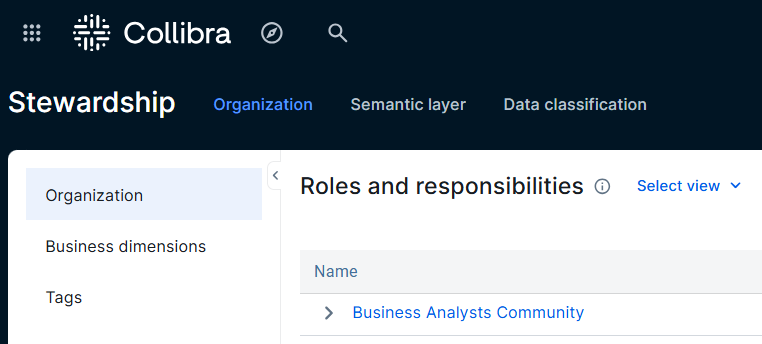
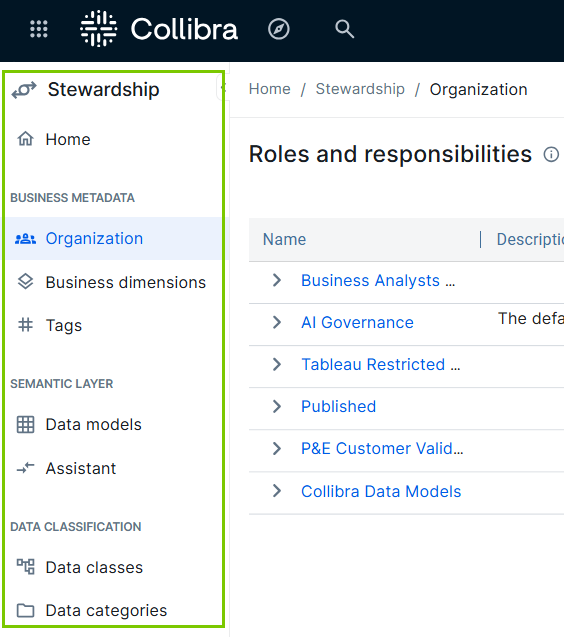
The New app experience setting introduces the following changes to the navigation:
-
Left navigation panel: The Stewardship menu tabs move to the left navigation panel. This panel immediately shows the available submenus, providing a clear overview of all Stewardship features.
-
Customizable landing page: The Stewardship application includes a Home landing page that highlights key features and information. Administrators can customize this page using various components in the Page Editor feature, such as sections and widgets.
By default, the Stewardship Home shows the following:
-
Guided stewardship capabilities: A section that allows users to navigate to important Stewardship features, such as the Data models page, Assistant page, and Data Classes page, if they are enabled.
-
Your governance at a glance: Shows several statistics important to data stewards. Physical metadata shows the total number of Schema and Table assets in an environment. Semantic Models shows the total number of Data Model, Data Entity, and Data Attribute assets in the environment.
-
The last section provides links to other features, such as Tags, and resources, such as Collibra product documentation and the CollibraStewardship Community channel.
For more information on how administrators can customize this page, go to Page Editor.
-
-
Renamed menu options and submenu items:
- Business Metadata replaces the Organization menu.
- Data models replaces the Semantic models submenu.
- Assistant replaces Semantic Assistant submenu.
Required permission to access the Stewardship application
To access the Stewardship application, you must have a global role with the Product rights → Data Stewardship Manager global permission.
Additional permissions may be required for specific features in the Stewardship application.
- About organization, business dimensions, and tags in Stewardship
- About Unified Data Classification
- About Guided Stewardship