Data Categories
Data Categories allow you group data into broad themes based on business, security, and regulatory needs. Unlike data classes, which identify specific patterns such as credit card numbers, Data Categories organize data into groups such as Personal Identifiable Information (PII), Financial data, or Public records. This helps data consumers quickly understand privacy levels, security needs, and compliance requirements. For example, you can define Data Categories such as Restricted, Internal, or Public to show different access levels, helping data consumers quickly see which regulations apply. Data Categories are also valuable in other areas of the platform, such as Data Privacy and AI Governance.
Collibra offers ways to connect Data Categories to other assets through Data Classification. For more information, go to Connect data classes to data categories.
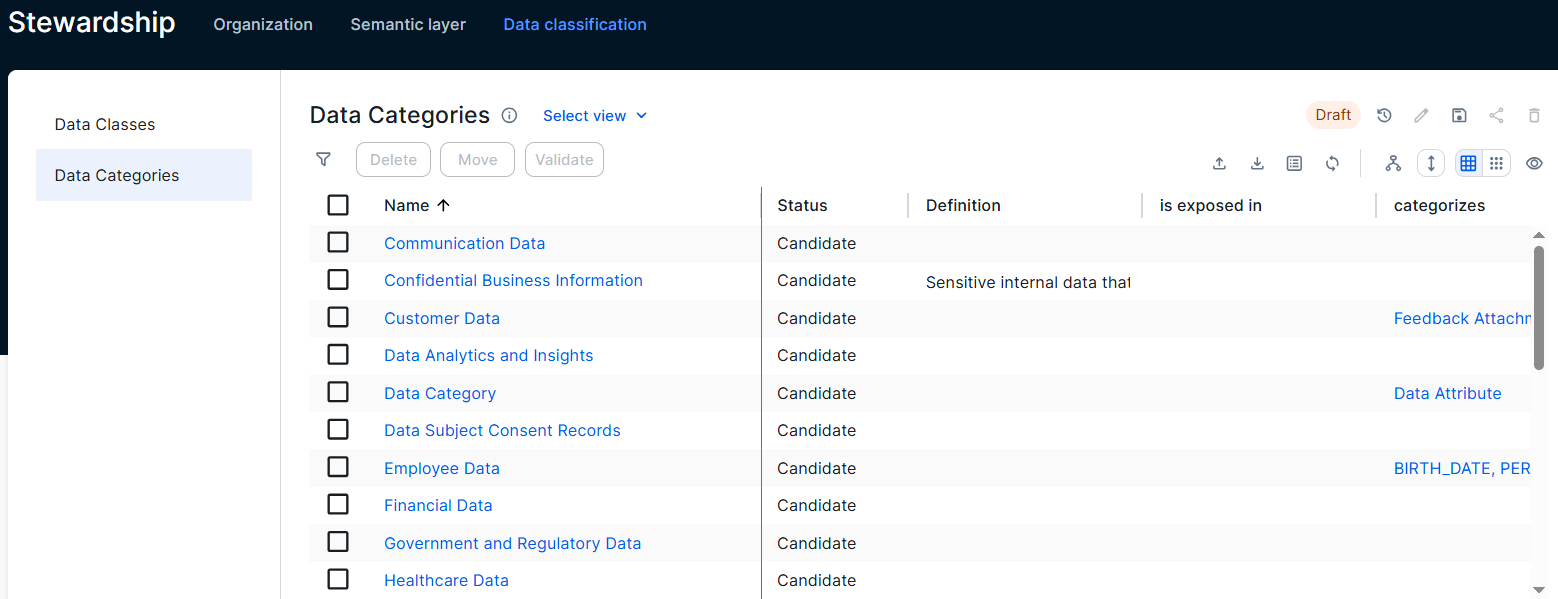
The Data Categories page serves as a central location for data stewards to manage Data Category assets across the Collibra environment.
Access the Data Categories page
The Data Categories page shows the defined Data Category assets and their details. Users with a global role with the Product rights > Data Stewardship Manager global permission, for example data stewards, can access the page.
To open the Data Categories page, go to Stewardship and click Data Classification → Data Categories.
Manage Data Categories
From the Data Categories page, you can edit or delete Data Category assets, view their details, or open their asset page.
Create Data Categories
Prerequisites
- Make sure that the domain where you want to add the Data Category asset allows Data Category assets. For example, a domain with the Business Dimensions domain type.
- You have the following permissions:
- A global role with the Product rights > Stewardship global permission.
- A resource role with the Asset > Add resource permission in the domain you want to add the Data Category.
Steps
- Click the Global create button, and select Asset → Data Category.
- Complete the Domain field.
You can create a Data Category asset only in domains that allow Data Category assets, such as a domain with the Business Dimensions domain type. - Type the name of the Data Category and press Enter.
- Click Create.
The Data Category appears in the assigned domain and in the Data Categories page.