About quality score aggregations
A quality score aggregation is a chain of relations from the target asset to the source of the data quality score that instructs Collibra how to calculate scores. The source of the data quality score can be via Data Quality & Observability or an external data quality tool.
Quality score aggregations allow you to:
- View data quality scores on data products and physical data assets, such as tables and columns.
- View data quality scores on Business, Data, and Governance assets.
- Control how data quality is compiled across assets.
- View the health of your assets regardless of the source of your data quality insights.
Quality scores on assets in Data Catalog require a mapping between data quality monitors from a data quality tool, such as Data Quality & Observability, and a corresponding Column or Column subtype asset. Scores for Column, Data Product, and Table assets are shown out-of-the-box. However, relation types between assets and non-asset objects require custom aggregation paths for quality scores to be shown.
Domains, characteristics, statuses, and workflows do not affect data quality scores. Only two elements of the Operating Model determine whether an asset shows a data quality score:
-
The asset's asset type.
-
The relation types included in that asset type's assigned quality score aggregation path.
This example explains the fields of the score aggregation CDQO Database to Column, which collects values along the specified path and shows them on Database and Schema asset pages.
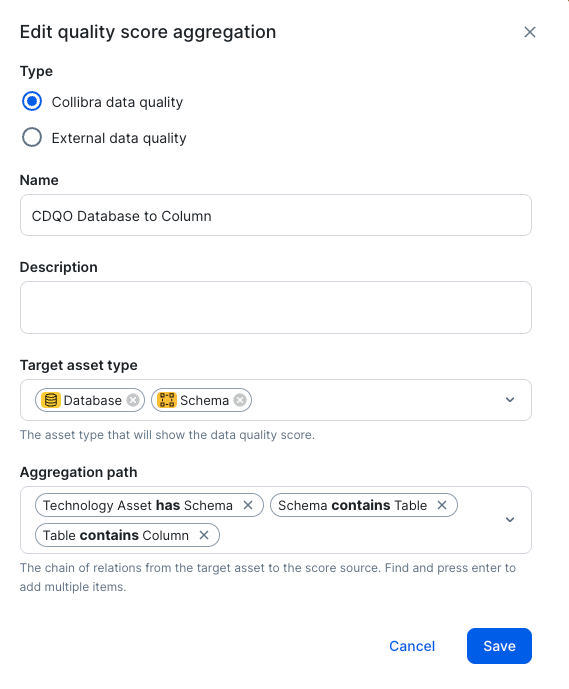
Type
The source data quality tool from which quality scores and results come.
In the example above, both Collibra data quality and External data quality are shown. However, in your environment, you might see only one. Support for the Data Quality & Observability capability and enabling external data quality tools are controlled via settings in Collibra Console. To edit these settings, please create a support ticket.
Name and Description
The quality score aggregation consists of a unique name and a description, which are shown on the Quality score aggregations tab in the Operating model section of the Settings page, and on the Quality score aggregations tab in the assignments of an asset type.
Target asset type
The target asset type is the asset type that will show the data quality score when the aggregation path is created.
In the example above, Database and Schema assets will show the data quality score.
Aggregation path
The quality score aggregation collects and aggregates values through a defined aggregation path. An aggregation path consists of a chain of relations that Collibra follows from the asset receiving the aggregated score to the asset containing the actual data quality values.
Important The first relation in the path must originate at the target asset type. For example, if the target asset type is Metric, the first relation in the path must start at a Metric asset, not at a Table or Column asset.
In the example above, Collibra aggregates values from Column assets for Database assets by looking up:
- The Schema assets that these Database assets have.
- The Table assets that these Schema assets contain.
- The Column assets that these Table assets contain. When Data Quality & Observability is the source of data quality scores, the path does not need to end in a Column asset. If the path ends in a different asset type, Collibra resolves the score through a reverse lookup and scores the asset at that asset's grain.
Monitor type
The type of Data Quality & Observability (cloud) monitor to include when calculating the aggregated data quality score. This field is only available when Collibra data quality is the source of quality scores.
The available options are All, Adaptive rules, or Rules. When you select a monitor type, only monitors of that type are included in the DQ score calculation on the asset's Quality tab for the specified aggregation path.
Profile configuration
When selected, column-level profiling statistics display on the asset's Quality tab. This option is only available when the aggregation path ends with a column asset.
Examples of aggregation paths
Note Collibra automatically shows data quality scores for Table and Database assets, so generally do not need to configure these aggregation paths. These examples are provided only to illustrate the underlying chain of relations.
Table to Column
In the following example, the chain of relations in the aggregation path is Table contains Column.

Database to Column
In the following example, the chain of relations in the aggregation path is Technology Asset has Schema, Schema contains Table, and Table contains Column.

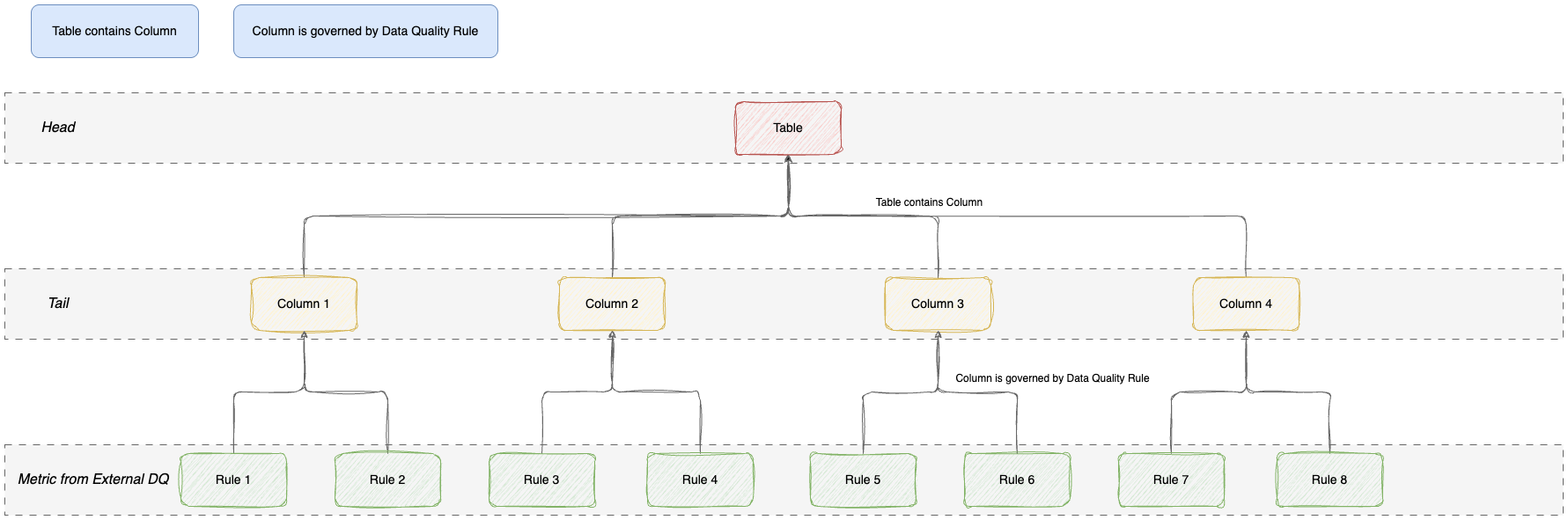
Table to Rule
In the following example, the chain of relations in the aggregation path is Table contains Column and Column is governed by Data Quality Rule.
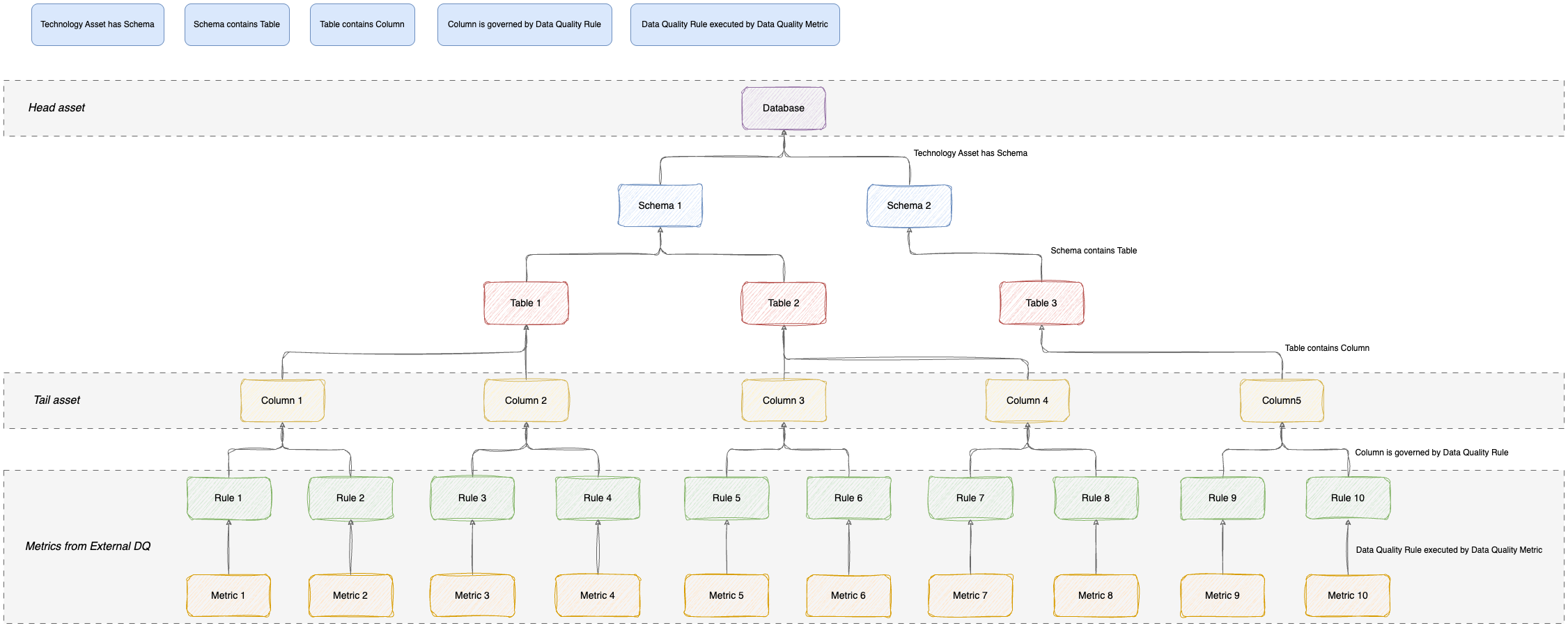
Database to Metric
In the following example, the chain of relations in the aggregation path is Technology Asset has Schema, Schema contains Table, Table contains Column, Column is governed by Data Quality Rule, and Data Quality Rule executed by Data Quality Metric.
- Review the out-of-the-box aggregation paths.
- Create a custom quality score aggregation.