The Unified Data Classification method is the default data classification method and is the only one supported.
With release 2024.07, a migration process is available for customers who were using the old Edge classification method or Cloud Data Classification Platform. The migration process:
- Copies classification information from the old Edge classification method or Cloud Data Classification Platform into the Unified Data Classification method.
Note When you are using APIs to manage classifications with Unified Data Classification disabled, the data you manipulate is considered to be part of the Cloud Data Classification Platform or old Edge data classification method, and it needs to be migrated.
- Creates data classes in the Unified Data Classification method for existing Advanced Data Types (ADTs).
Note ADTs are supported only for Jobserver. Note that Jobserver reached its end of life starting October, 2024, for commercial customers.
What happened during the 2024.07 upgrade and what are the possible next steps?
During the 2024.07 upgrade, we didn't update the data classification information in the environment.
After the 2024.07 upgrade, you can start the migration process manually if you want to migrate old classification information and ADTs. For more information, go to Start the migration process manually.
What happened during the 2024.07 upgrade?
- We activated the Unified Data Classification method.
- We added the Catalog Data Classification capability to all Edge connections that have the JDBC Profiling capability.
- We started the migration process. For more information, go to What happens during the migration process?.
What are the possible next steps?
Start using the Unified Data Classification method.
-
On the main toolbar, click
 →
Stewardship.
→
Stewardship. - Click the Data Classification tab.
- Check the migrated data classes and classifications.
On the Data Classification page, you can filter the data classes based on their name.Tip The names of migrated data classes end with (migrated) or (ADT).
If renaming the data classes leads to duplicate data class names, merge your data classes instead. - Delete any unnecessary data classes, or add a classification rule if none was added by the migration process.
- If you are using Protect, check the standards and rules that are based on data classifications and ensure that the correct data classes are added.
- Once the migration is completed, disable the old Edge classification feature on your Edge or Collibra Cloud site.
Tip You no longer need to enable classification on your Edge or Collibra Cloud site because UDC uses an Edge capability instead.
To disable classification on an existing Edge site deployed on K3S, run the following command:
Copysudo ./edgecli update --set collibra.classification.enabled=falseTip The only difference between disabling classification and enabling classification is that the last argument is false instead of true.
To disable classification on an existing Edge site deployed on your dedicated cluster, run the following command:
Copy./edgecli update --set collibra.classification.enabled=falseTip The only difference between disabling classification and enabling classification is that the last argument is false instead of true.
Important The old Edge data classification method is no longer supported starting October 2024.
What happened during the 2024.07 upgrade?
- We activated UDC.
- We started the migration process.
For more information, go to What happens during the migration process?.
What are the possible next steps?
Start using the Unified Data Classification method.
- Migrate to Edge and add at least the Catalog JDBC ingestion capability and the Catalog Data Classification capability to use UDC.
- After you have migrated to Edge, start using UDC.
-
On the main toolbar, click
→
Stewardship.
- Click the Data Classification tab.
-
On the main toolbar, click
- Check the migrated data classes and classifications.
In the Data Classification page, you can filter the data classes based on their name.Tip The names of migrated data classes end with (migrated) or (ADT). If renaming data classes leads to duplicate data class names, merge your data classes instead.
- Delete any unnecessary data classes, or add a classification rule if none was added by the migration process.
Important The Cloud Data Classification Platform method is no longer supported starting October 2024.
What happened during the 2024.07 upgrade?
- We activated UDC.
- We started the migration process.
For more information, go to What happens during the migration process?.
What are the possible next steps?
Start using UDC.
- If you created the classifications based on data class name:
-
On the main toolbar, click
→
Stewardship.
- Click the Data Classification tab.
- For all data classes whose names end with (migrated) or (ADT), remove the (migrated) or (ADT) suffix.
Tip On the Data Classification page, you can filter the data classes based on their name. If renaming data classes leads to duplicate data class names, use merge your data classes instead.
- Delete any unnecessary data classes.
-
On the main toolbar, click
-
If you created the classifications based on data class ID, update the API calls to refer to the new data class IDs.
- Get a list of the old data class IDs in your environment.
- Get a list of the migrated data class IDs.
Tip If you have migrated to Unified Data Classification and use the old data class ID in the REST API
rest/catalog/1.0/dataClassification/classifications/<old-data-class-id>, you will receive the new data class ID. - Update the API calls to refer to the new data class IDs.
Important Using the Classification APIs with Unified Data Classification disabled is no longer supported starting October 2024.
What happens during the migration process?
- The migration process enriches the Unified Data Classification method. It doesn’t remove anything from your old classification method.
- Migrated data classes receive a new name to avoid conflicts with any newly created data classes in UDC. This allows you to quickly identify the migrated classification information.
The migration process does the following:
- Migrated data classes receive a new ID and a name with the suffix (migrated), for example, Email (migrated).
- The migration process adds all custom data classes from the old data classification method to the Unified Data Classification method, without a classification rule.Example
You have created a custom data class "email." Even though there's an out-of-the-box data class with the same name in UDC, the migration process will create a new data class in UDC named "email (migrated)" without any classification rule.
- The migration process adds all used out-of-the-box data classes from the old classification method to the Unified Data Classification method. This means only out-of-the-box data classes that appear in classifications are migrated.
If an old out-of-the-box data class matches an out-of-the-box data class in the Unified Data Classification method, the migration process copies the classification rules from the Unified Data Classification out-of-the-box data class to the migrated data class. For the matching, a mapping tool is used.ExampleYou have a data class named "Emails", which is a renamed, old, out-of-the-box data class whose ID is "email_address." The migration process:
- Detects that "Emails" is an out-of-the-box data class, based on the ID email_address.
- Searches for the mapping for this out-of-the-box data class. In this case, it finds that the data class matches the UDC data class "email."
- Creates a new data class named "Emails (migrated)", which has the classification rule from the UDC data class "email."
- The migration process adds all custom data classes from the old data classification method to the Unified Data Classification method, without a classification rule.
- The migration process adds all classifications that were manually or automatically assigned to assets to the Unified Data Classification method.
- The migration process adds all linked data categories, data concepts, and so on to the data classes in UDC.
The migration process adds some existing ADT as a new data class to the Unified Data Classification method. Such new data classes receive a name with the suffix (ADT). The following conversion is applied.
| ADT Type | Data Class in UDC |
|---|---|
| True/False | Data class with list of values. All values, both true and all false together, are converted to lists of values. |
| Text | Data class with regular expression rules. Each ADT regular expression is copied to a regular expression rule. |
| Geographical | Data class with regular expression rules. |
| Decimal number | Data class with a classification rule. |
| Whole number | Data class with a classification rule. |
| Date | None. We don't create a data class for this ADT. |
| Time | |
| Date and time | |
| Array | |
| N/A |
Start the migration process manually
You can start the migration process manually if:
- Before the 2024.07 release, you already used the Unified Data Classification method.
- After the 2024.07 release, you followed the steps to disable Unified Data Classification and migrate at a later date.
Steps
- If you are using Protect, capture the data classes used in data protection standards and data access rules so that you can add them back after the migration.
- If you were not yet using UDC, activate and set up Unified Data Classification.
- Enable the Unified Classification migration tool enabled setting.
-
On the main toolbar, click
→
Stewardship.
- Click the Data Classification tab.
- Click Migrate Data.
The migration process starts. For larger classification sets, this process takes a few minutes.
You can follow up on the job and the results from the Activities page.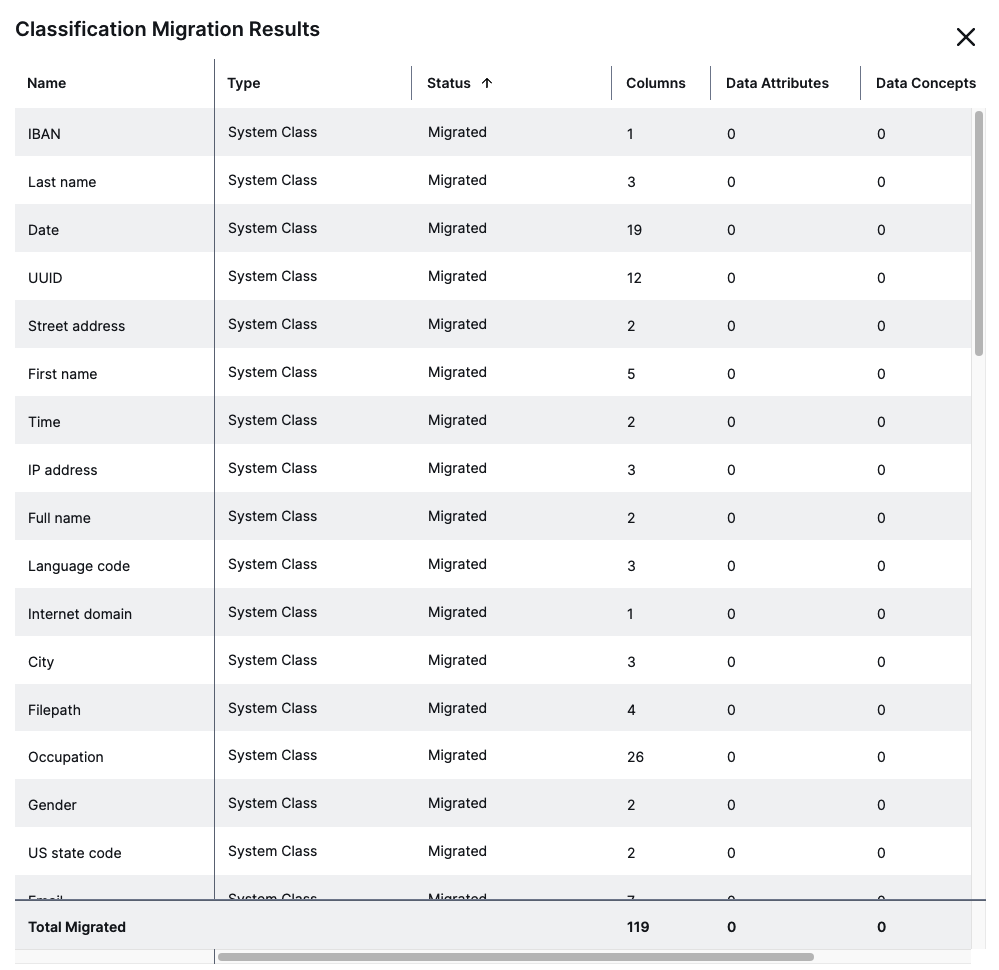
For more information go to What happens during the migration process?. - Check the migrated data classes and classifications.
On the Data Classification page, you can filter the data classes based on their name. The names of migrated data classes end with (migrated) or (ADT). - Delete any unnecessary data classes, merge data classes if needed, or add a classification rule to data classes if none was added by the migration process.
- If you are using Protect, add the data classes you captured in Step 1 to the affected standards and rules.
- Once the migration is completed:
- Disable the Unified Classification migration tool enabled setting.
- If you were using classification on Edge before, disable the old Edge classification feature on your Edge or Collibra Cloud site.
You no longer need to enable classification on your Edge or Collibra Cloud site because UDC uses an Edge capability instead.To disable classification on an existing Edge site deployed on K3S, run the following command:
Copysudo ./edgecli update --set collibra.classification.enabled=falseTip The only difference between disabling classification and enabling classification is that the last argument is false instead of true.
To disable classification on an existing Edge site deployed on your dedicated cluster, run the following command:
Copy./edgecli update --set collibra.classification.enabled=falseTip The only difference between disabling classification and enabling classification is that the last argument is false instead of true.
FAQ on the migration process
- Does the migration process migrate the trained Machine Learning (ML) models from the Cloud Data Classification Platform?
No, the migration process does not take ML into account. - Can I still disable Unified Data Classification after 2024.07 and use my old classification method?
From October 1, 2024, this is no longer possible. The old Edge classification and the Cloud Data Classification Platform have reached end of life on September 30, 2024. - What happens if I run the migration process multiple times?
Data classes from the old classification methods and ADTs are migrated by the migration process only if they were not migrated before. To ensure that a data class or ADT is migrated again, delete the created related data class from Unified Data Classification. The names of migrated data classes end with (migrated) or (ADT). - Can I run the migration process after the end of life date for the old Edge classification and Cloud Data Classification Platform?
Yes, you can. The migration process works only on the data stored in the Collibra database and doesn't connect to the old Edge or Cloud Data Classification Platform systems. However, note that the migration process will be removed at a later date. - I use only API calls to classify data. Am I impacted by this?
Yes, all environments have to move the Unified Data Classification method APIs.