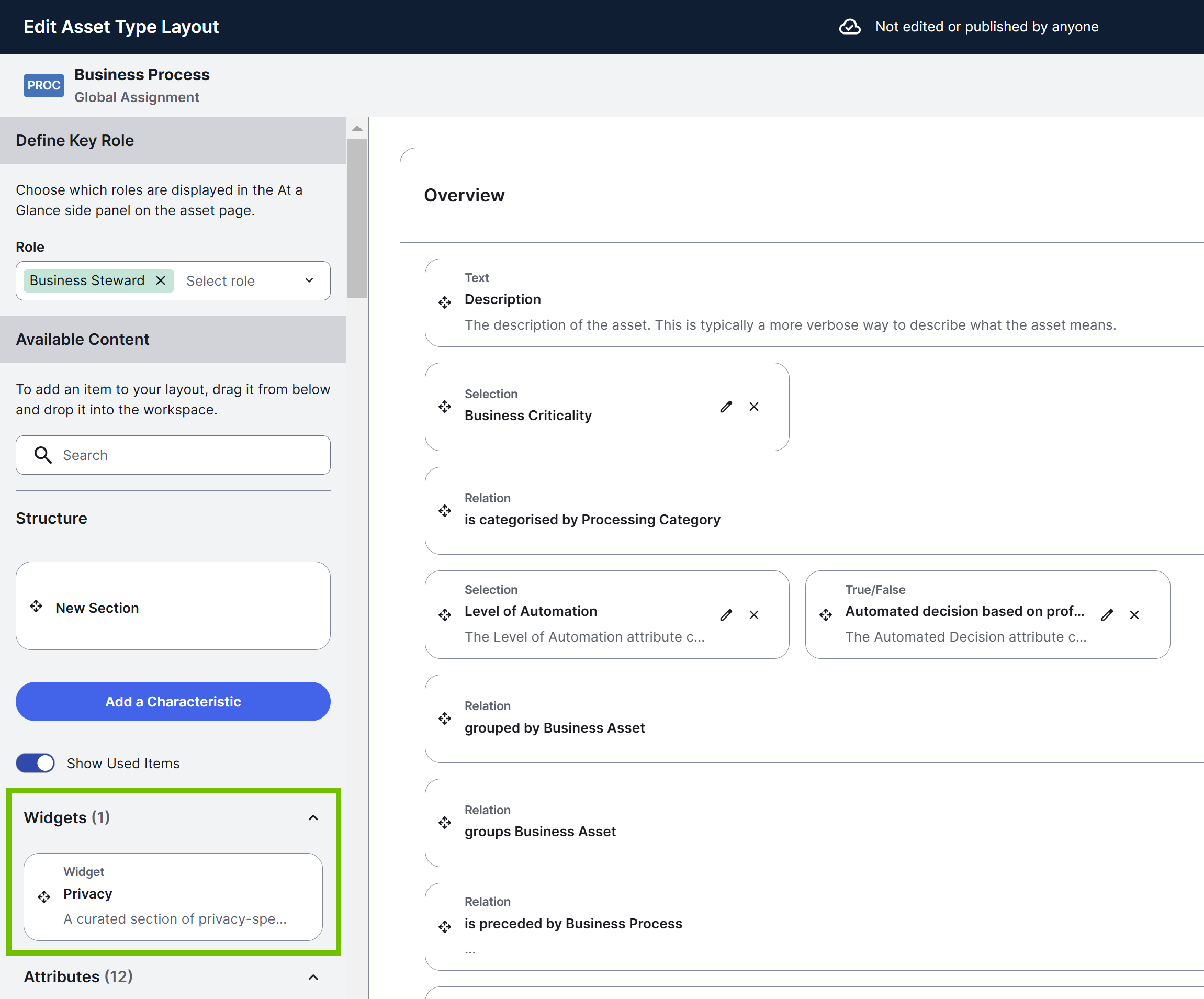
Asset layout widgets enable you to show custom content on all the asset pages of a given asset type. For example, if you want to show Catalog elements on the asset pages of the Column asset type, you can achieve this using widgets. As an administrator, you can add widgets to the asset pages of a given asset type or reposition them when you edit the asset page layout for that asset type.
 .
.
Asset types with widgets
The following table lists the asset types with an out-of-the-box page layout that contains widgets. The table also shows if a widget is read-only and the default sections in which the widgets appear.
| Asset type | Widget | Description | Read-only? | Section |
|---|---|---|---|---|
| AI Agent | Lifecycle Tracker | Enables users to monitor the evolution of AI use cases. They can view assessment history and statuses, start new assessments, add assessments and sign-off activities, and advance the AI use case to its next lifecycle stage. | No | Lifecycle tracker |
| AI Use Case |
Lifecycle Tracker |
Enables users to monitor the evolution of AI use cases. They can view assessment history and statuses, start new assessments, add assessments and sign-off activities, and advance the AI use case to its next lifecycle stage. Tip You can define whether the Lifecycle tracker widget appears expanded or collapsed (default state) on the AI Use Case asset pages using
 . . |
No |
Lifecycle tracker |
| Other Policies That Apply | Shows policies linked to training data, inference data, output data, or AI Models linked to the AI use case. | Yes | Legal, Ethics and Compliance | |
|
Privacy Context |
Shows data categories linked to data columns. | Yes |
Privacy Context |
|
|
Diagram |
Shows a diagram view of the AI Use Case asset, depicting all of the relations that exist between the AI use case and other assets. |
Yes |
Data Flow |
|
| Column |
Catalog Overview |
Shows description, description from source, business context, categorization, and source tags. For more information, go to Data Catalog asset pages. |
Yes |
Overview |
| Semantic Layer |
Shows related semantic assets, including data attributes that represent the column, key measures that are calculated using the column, and business terms that the column refers to. |
Yes | Overview | |
| Descriptive Statistics |
Shows attributes populated by metadata synchronization and data profiling. |
Yes | Descriptive Statistics | |
| Data Category | Data Classes | Shows data classes linked to the data category. | No | Overview |
| Data Product | Output Ports Viewer |
Shows Data Product Port assets related to the data product through the "Data Product exposes data as Data Product Port" relation type. |
No | Overview |
| Lifecycle tracker |
Shows the current stage of the Data Product asset within its lifecycle, and what requirements or activities are still needed to transition the asset to the next stage. |
No | Lifecycle track | |
| Diagram |
Shows a diagram view of the Data Product asset, depicting all of the relations that exist between the data product and other assets. |
No | Diagram view | |
| Data Product Port | Data Contract Viewer |
Shows Data Contract assets related to the data product port through the "Data Product Port should operate according to Data Contract" relation type. |
Yes | Overview |
| Data Set |
Catalog Overview |
Shows description and business context. For more information, go to Data Catalog asset pages. |
Yes | Overview |
| Catalog Relation | Shows the "Data Set contains Data Element" relation. | No | Data Elements | |
| Database |
Catalog Overview |
Shows description, description from source, and source tags. For more information, go to Data Catalog asset pages. |
Yes | Overview |
| Database View |
Catalog Overview |
Shows description, description from source, business context, categorization, and source tags. |
Yes | Overview |
| Catalog Relation | Shows the "Table contains Column" relation. | No | Columns | |
| AI Model Version |
Lifecycle Tracker |
Enables users to monitor the evolution of AI use cases. They can view assessment history and statuses, start new assessments, add assessments and sign-off activities, and advance the AI use case to its next lifecycle stage. | No |
Lifecycle tracker |
| Other Policies That Apply | Shows policies linked to training data, inference data, output data, or AI use cases linked to AI models. | Yes | Model Information | |
| AI Base Model |
Lifecycle Tracker |
Enables users to monitor the evolution of AI use cases. They can view assessment history and statuses, start new assessments, add assessments and sign-off activities, and advance the AI use case to its next lifecycle stage. |
No |
Lifecycle tracker |
| Schema |
Catalog Overview |
Shows description, description from source, and source tags. For more information, go to Data Catalog asset pages. |
Yes | Overview |
| Catalog Relation | Shows the "Schema contains Table" relation. | No | Tables | |
| Table |
Catalog Overview |
Shows description, description from source, business context, categorization, and source tags. For more information, go to Data Catalog asset pages. |
Yes | Overview |
| Semantic Layer |
Shows related semantic assets, including data entities that represent the table, key measures that are calculated using the table, and business terms that the table refers to. |
Yes | Overview | |
| Catalog Relation | Shows the "Table contains Column" relation. | No | Columns |
Key Value Pair widget
The Key Value Pair widget shows key asset metadata in a compact key-value layout on asset pages or the preview sidebar for all asset types. The default name of the widget is At a glance and shows the last modified date, key roles, and tags. You can customize which properties appear for each asset type by adding, removing, or reordering them.
Properties
The following properties are already available when you add the Key Value Pair widget:
- Last modified date: The date and time the asset was last modified.
- Roles: The owner role assigned to the asset. Clicking a role navigates to the Responsibilities tab.
- Tags: The tags assigned to the asset. You can edit tags directly from the widget.
The following properties are conditional and appear only for asset types where they apply: Articulation score, Classification, Data popularity, Data quality, Data source type, External links, Page visits, Rating, Row count, Table type, Technical data type, and Validation result.
In the widget settings, you can optionally change the widget name. The default name is At a glance. You can also add, remove, or reorder the displayed properties.
Completeness score
The Key Value Pair widget can show a completeness score for each asset. The completeness score is calculated as the number of passing smart checks out of the total smart checks configured for the asset.
When you click the completeness score, a pop-up appears with a breakdown of the results. Based on your role, you can see the full breakdown with passing and failing check counts and links to individual smart check rules or a summary score only.
Clicking a check in the pop-up scrolls to the related attribute on the asset page.
You can enable or disable the completeness score display in the Key Value Pair widget configuration panel.
Diagram widget
The Diagram widget is available for all asset types. You can use this widget to show a specific diagram view on the Summary tab of the asset pages.
Properties
In the widget settings, select the diagram view you want to show on the Summary tab of the asset pages.
The Diagram view drop-down list contains both public diagram views and your private diagram views. If you select a private view, it isn't shown to other users.
The default diagram view is Explore but for the AI Use Case asset type, the default diagram view is Data Flow and for the Data Product asset type and its descendant asset types, the default diagram view is Data Product.
Configuring a widget
Prerequisites
You have a global role with the Product Rights > System administration global permission.
Steps
-
Open the asset type:
-
On the main toolbar, click
 →
→
 Settings.
The Settings page opens. - In the Operating model section, click Asset types.
- On the Asset types page, click the name of the asset type.
Tip You can also open an asset type from an asset page by clicking the asset type in the upper-left corner of the asset page.
-
On the main toolbar, click
- In the left pane, click the relevant assignment, and then click Characteristics.
The Characteristics table, which contains all the characteristic types assigned to the asset type, is shown. - On the Characteristics tab, click Edit layout.
The Edit layout page opens. - Drag the widget from the left pane to the layout.
- Move the widget to the required position using .
- In the widget, click .
The Settings dialog box appears. - Configure the widget settings. For more information about the available settings, go to the relevant widget section above.
- Click Save.
- Click Publish.
Your changes are published and applied to all the asset pages of the asset type.