Smart checks are automated validation checks that run against set parameters across all assets of an asset type. You can add smart checks to an asset type's global assignment to enforce metadata quality standards for all assets of that type. Smart checks are recalculated each time an asset is edited or updated.
For information on how stewards view and interact with smart check results on the asset page, go to About smart check activities.
You can add up to 20 smart checks per asset type assignment.
To use smart checks as part of an asset's lifecycle process, you also need to configure them as lifecycle activities for specific lifecycle stages of an asset. For more information, go to Configure lifecycle activities for an asset type.
Prerequisites
- The smart checks feature is enabled in Collibra Console. For more information, go to Enable the Governance by design toolkit features.
- You have a global role with the Product Rights > System Administration global permission.
Steps
-
On the main toolbar, click
 →
→
 Settings.
The Settings page opens. - Click the Operating model tab.
Operating Model settings are shown. - In the Asset types table, click the relevant asset type.
The asset type overview page opens. - In the tab pane, expand the Global Assignment tab, or the tab of the relevant assignment, and then click Smart checks.
- Click Add a smart check.
The Add a smart check dialog box appears. - Enter the required information.
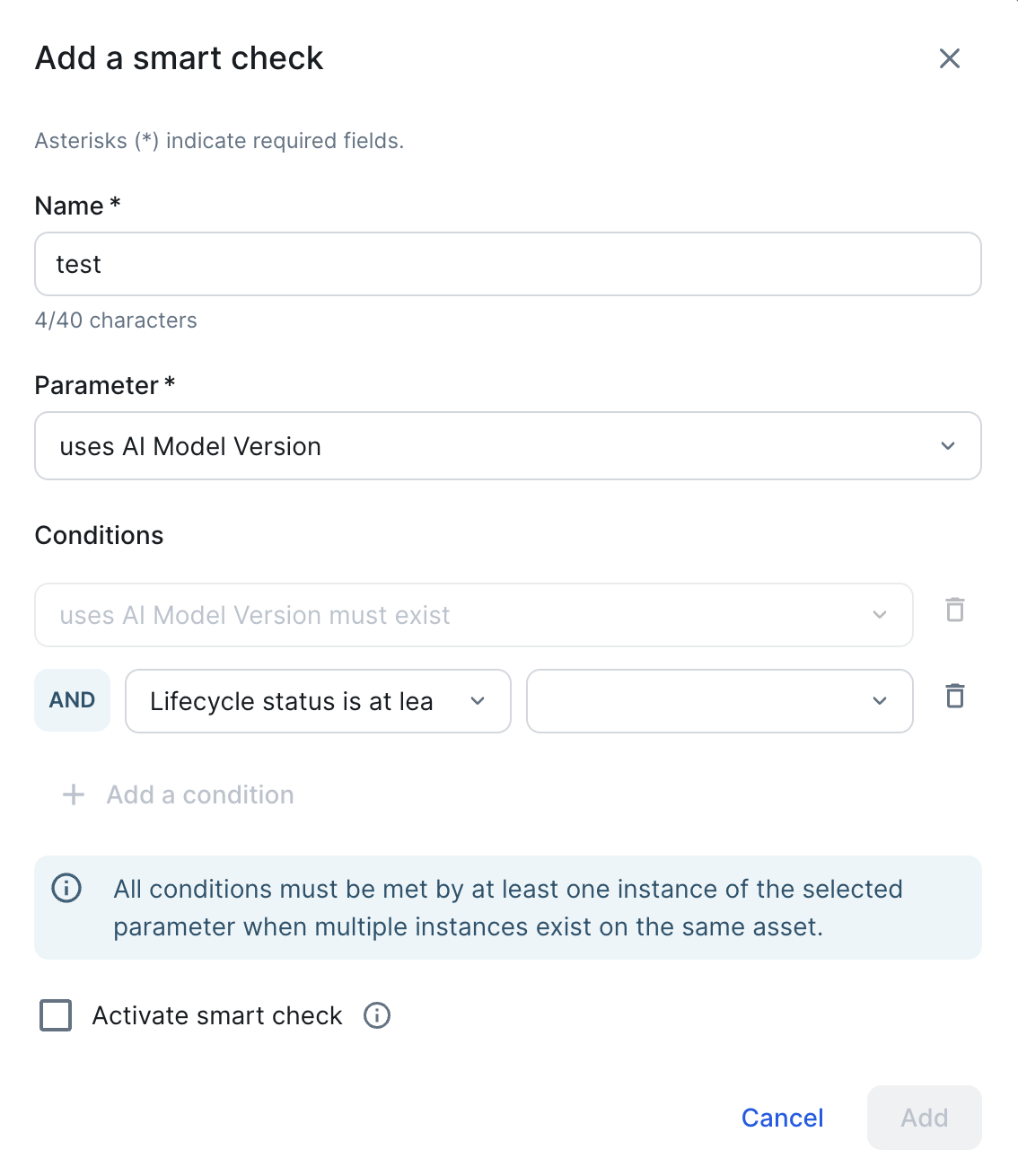
Field Description Mandatory? Name A name for the smart check. Maximum 40 characters. Yes Parameter The asset attribute or relation to validate. The available conditions update based on the parameter you select. Yes Conditions The condition that the selected parameter must meet. Optionally, click + Add a condition to add more conditions. Note When multiple instances of a parameter exist on the same asset, all conditions must be met by at least one of those instances.For smart checks on relation types, the default condition is "must exist". If the target asset type has the Lifecycle management feature enabled, you can also add a Lifecycle status is at least condition. Select an asset status from the second dropdown to restrict the smart check to assets that have reached at least that status. Only statuses assigned to the target asset type are available.
Yes Activate smart check Select this option to activate the smart check immediately. If not selected, the smart check is saved but does not run until activated. No - Click Add.
The smart check is added to the asset type and appears in the smart checks table.
Manage smart checks
To edit, activate, deactivate, or delete an existing smart check, click  in its row in the smart checks table.
| Action | Description |
|---|---|
| Activate | Run the smart check for the asset type. Available when the smart check is deactivated. |
| Deactivate | Pause the smart check without deleting it. Deactivated smart checks do not run until reactivated. |
| Edit | Modify the smart check's name, parameter, or conditions. |
| Delete | Permanently remove the smart check from the asset type. |
Configure the smart check for a specific lifecycle stage. For complete information, go to Configure lifecycle activities for an asset type.