The diagram editor allows you to view and edit diagrams.
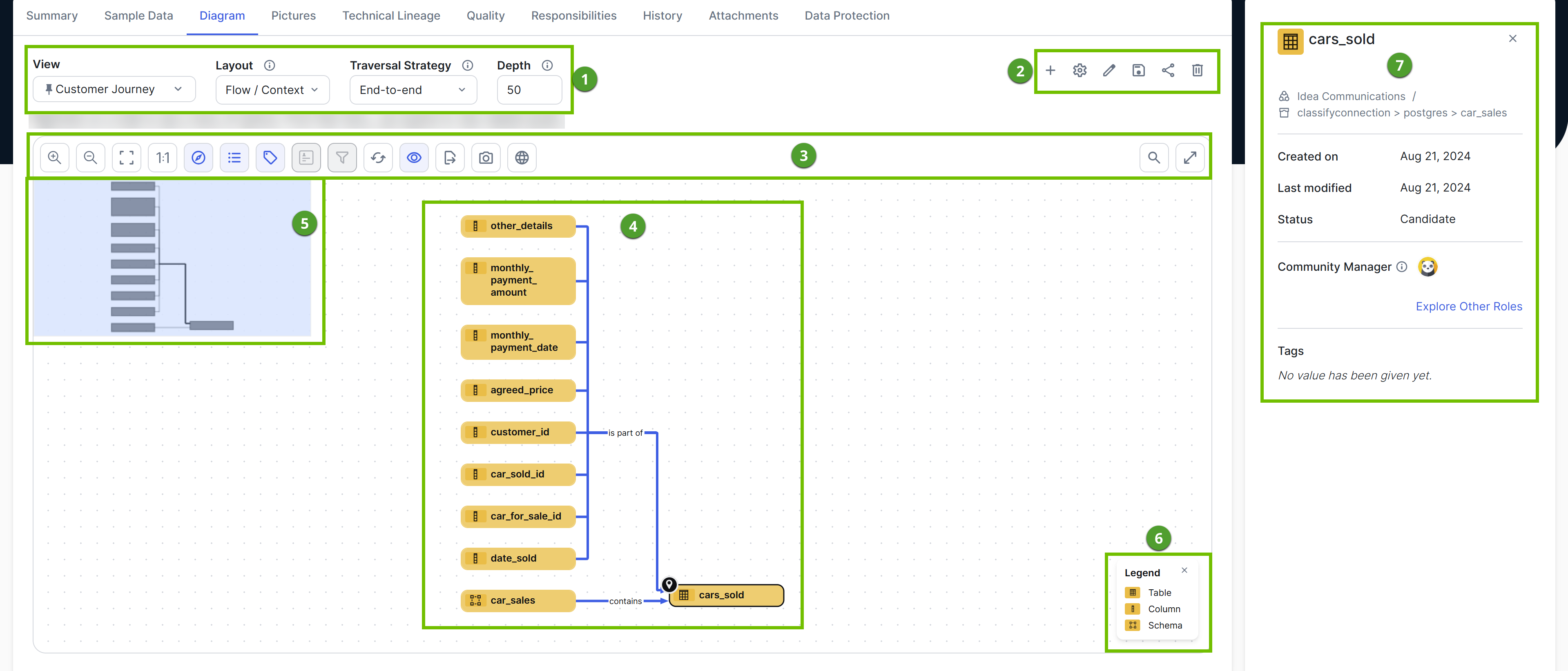
| Number | Description |
|---|---|

|
|

|
|

|
A toolbar to work with the diagram. |

|
The actual depiction of the traceability of the current asset, based on the selected diagram view. |

|
An overview with a box to zoom and navigate the diagram. The overview appears when you click Tip This is useful when the diagram is too large to fit the screen. You can move the box anywhere in the diagram.
|

|
A legend to explain color codes and symbols of the items in the diagram or picture. For each asset type and complex relation type that is visible on the diagram or picture, the legend shows the color and symbol, followed by the name of the type. If all occurrences of a given type are boxed inside collapsed boxing nodes, that type is not visible and therefore, not shown in the legend. Tip Click an item in the legend to select all occurrences of that type in the diagram or picture. You can use this to expand or collapse all nodes of the same type. |

|
A About the diagram preview pane with information about the selected node in the diagram. |


 (
(Note The UI may look different if the new diagram canvas is enabled.