You can use the Register AI Model button to register AI Model Version and AI Base Model assets.
Tip You can also use the CLI to register your AI model versions in Collibra.
Requirements and permissions
You have:
- A global role with the Product Rights > Assessments global permission.
- A global role with the AI Governance > Register AI Model global permission.
The out-of-the-box AI Producer global role has these permissions.
Steps
-
In the registry, click the arrow next to the Register AI use case button, and then select Register AI Model.
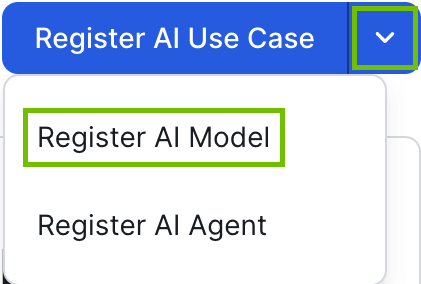 Note If your Admin configured a custom workflow for the registration button, the button label reflects the name of that workflow instead of Register AI use case. The drop-down options for registering AI agents and AI models are not affected.The Register AI Model option is not shown if you don't have global role with the AI Governance > Register AI Model global permission.
The Register AI Model registration form opens. - Enter the required information.
Field Description Name The name of the new asset.
When you type three or more characters in the Name field, duplicate detection uses fuzzy matching to identify similar existing assets, even when names differ in spelling, abbreviations, or formatting.
Type The asset type of the new asset.
You can choose AI Model Version, AI Base Model, or any child asset type, including custom child asset types.
Domain The domain in which you want to create the new asset.
If you know that a certain domain exists, but it doesn't appear in the drop-down list, it could mean that:- The domain is of a type that has not been configured for this asset type. For more information, go to Assign a domain type to an asset type.
- You are subject to view permissions restrictions. By default, all users can view all assets in all communities and domains. If a community or domain is restricted by view permissions to which you are subject, the domain is not shown in the drop-down list.
Owner The Collibra users or user groups that will act as the owner of the AI model. They are assigned the Owner resource role for the asset.
- Click Register.
A new asset is created in the specified domain.
Note An AI Trust Score is automatically derived for the new asset; however, it takes a moment to appear after the asset is created.
- On the asset page, use the Lifecycle tracker features to:
- Edit the AI model asset, as necessary.Important
Be mindful of the edits you make on the asset page before the assessments are completed and approved. When an assessment is approved, depending on the assessment template, certain assessment responses are copied to the asset page. If you manually edit the attributes of an asset, some of the values might be overwritten when the assessment is approved. For more information, go to:
If you want to manually fill out the details without conducting the prescribed assessments, you can create the asset via the global Create button. When you create an asset that way, no assessments are started. You can then add details to the various sections of the asset page as you would an asset of any other type, knowing the values won't be overwritten by an assessment. When you're on the asset page, remember to switch on the Show everything switch to see all available fields.