About responsibilities
Overview of the Responsibilities tab user interface
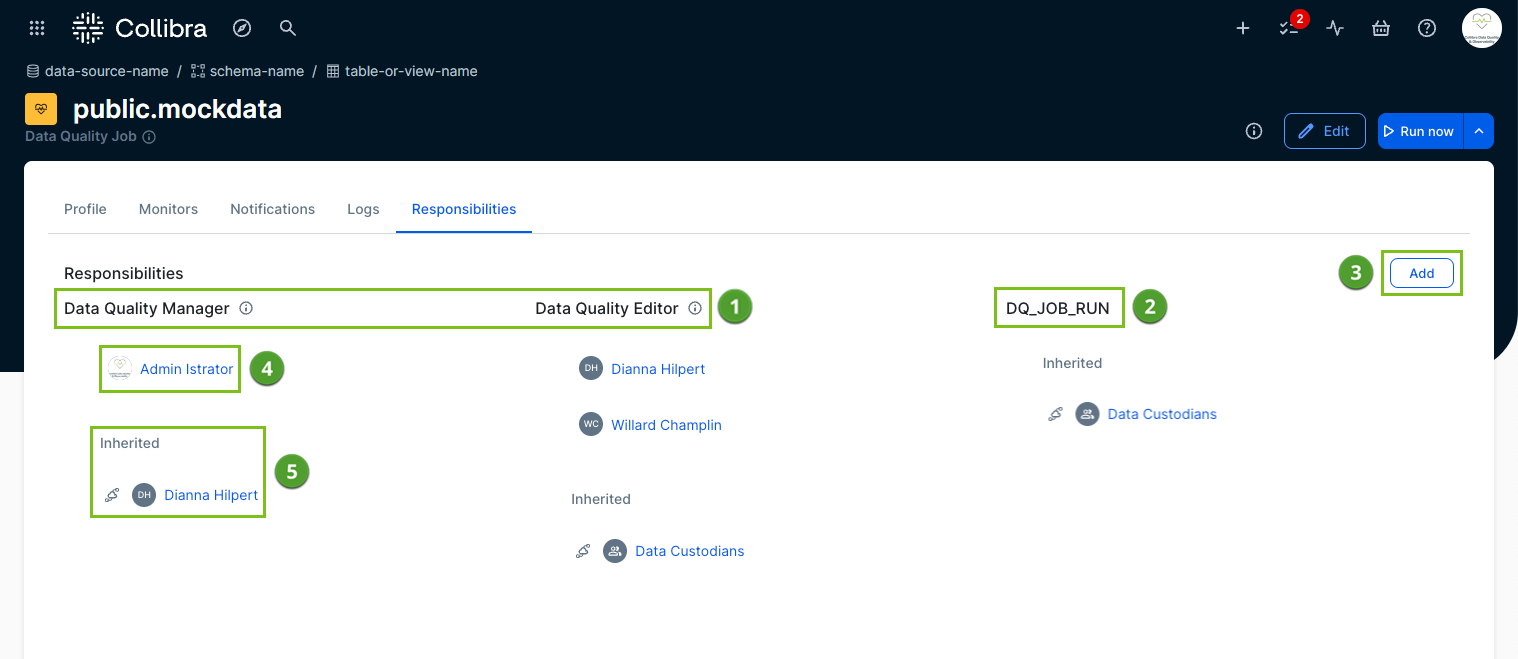
The following image and sections describe the key functional areas of the Responsibilities tab.
Out-of-the-box resource roles
Out-of-the-box resource roles ( ) represent the default data quality roles that come with Collibra. In the previous screenshot, the Data Quality Manager and Data Quality Editor roles display both custom and inherited responsibilities.
Custom resource role
You can distinguish custom resource roles ( ) from out-of-the-box resource roles because they do not display an icon next to their names on the Responsibilities page.
Add button
The Add button ( ) opens the Add responsibility dialog box, which allows you to assign custom responsibilities.
Note Custom responsibilities supplement inherited responsibilities. A custom responsibility must include a user or user group and a resource role.
Custom responsibilities
A custom responsibility ( ) assigns a specific user or user group directly to a resource role, adding to any inherited responsibilities. In the previous screenshot, the Data Quality Manager and Data Quality Editor out-of-the-box resource roles contain at least one custom responsibility. You can grant colleagues and groups access to resource roles by creating these custom responsibilities.
Inherited responsibilities
When you create a job, the system automatically inherits all responsibilities defined at the connection level ( ). In the previous screenshot, the Data Quality Manager, Data Quality Editor, and DQ_JOB_RUN roles all include a user or user group that the job inherits directly from the connection.
| Element number | Element | Description |
|---|---|---|
|
|
Out-of-the-box resource roles |
The data quality resource roles that come out-of-the-box with Collibra. In the screenshot above, Data Quality Manager and Data Quality Editor are shown with custom and inherited responsibilities. |
|
|
Custom resource role |
Custom resource roles are distinguishable from out-of-the-box resource roles on the Responsibilities page because they don't have an |
|
|
Add button |
A button that opens the Add responsibility dialog box, where you can add custom responsibilities. Note Custom responsibilities are in addition to inherited responsibilities, and must include a user or user group and a resource role. |
|
|
A user or user group added to a custom responsibility |
A user or user group that was added to the resource role as a custom responsibility, in addition to the inherited responsibility. In the screenshot above, the Data Quality Manager and Data Quality Editor out-of-the-box resource roles have at least one custom responsibility. You can add users and user groups to resource roles by adding custom responsibilities. |
|
|
A user or user group automatically inherited from the connection |
When a job is created, it inherits all responsibilities defined at the connection-level. In the screenshot above, the Data Quality Manager and Data Quality Editor out-of-the-box resource roles and DQ_JOB_RUN custom resource role all have a user or user group that was inherited from the connection. |
 next to their names.
- Add or remove responsibilities from jobs
- View and manage connections