Collibra can find assets based on relations between assets. This applies to Data Marketplace and the Business Glossary and Catalog search tabs (in preview).
- Search results include assets that have a direct match with the search term, but also assets that are related to the search term via specific relation types and based on the name of the asset.
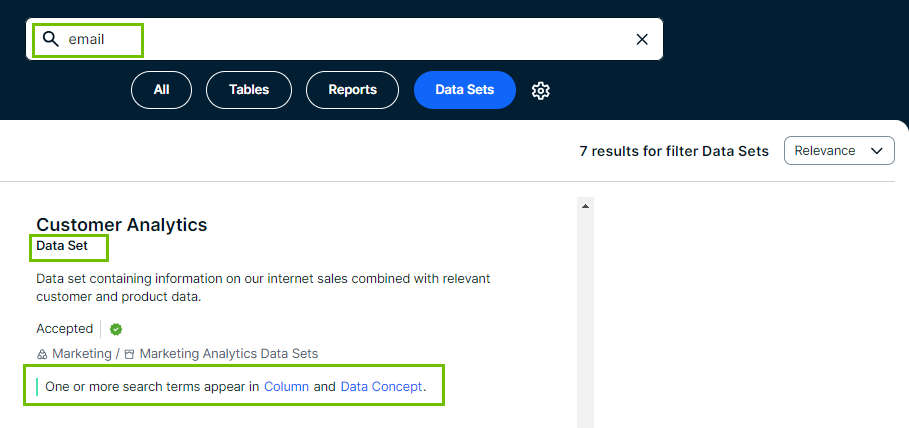
A data set, for example, can show up in the results if the data set contains a column with a name that matches the searched term. - Data consumers can filter search results based on specific relations.
Next to filters based on asset type, status, tags, creator, modification and creation date, they can also filter based on specific relations.
For example, they can filter the results for a specific data domain.
To make filtering and searching based on relations possible, Collibra indexes specific relation paths. The out-of-the-box indexed relation paths are based on the Guided Stewardship metamodel.
- Search uses relations only if the Relation-based search setting is enabled.
- You can use a relation index to create a facet that filters assets based on related assets or the attributes of related assets. However, you can't use a relation index to create a facet that filters assets based on their own attributes. As a result, you can't link the first asset type in a relation path to an attribute. To create a filter facet based on attribute types, go to Attribute filter facets. Note that attribute facets don't apply to standalone Data Marketplace and the All results tab on the search page.
By default, relation-based search uses the following relation paths.
If your Collibra environment does not use one or more of these relation types, the out-of-the-box relation-based search does not work.
| Relation paths |
|---|
|
Same relation paths as defined for the relation-based filters. |
Relation path for Data Set - Column:
|
You can create custom relation paths for the relation-based search. For information, go to About relation indexes.
The "Customer Analytics" data set contains a column with the name "email'.
If relation-based search is enabled and you search for "email', then the "Customer Analytics" data set appears in the search results because the column name matches the search term and there is a Data set - Column relation between "email' and "Customer Analytics".