After the synchronization, the assets are available in the specified domain.
Warning Do not move the assets to another domain. Doing so may lead to errors during future synchronizations.
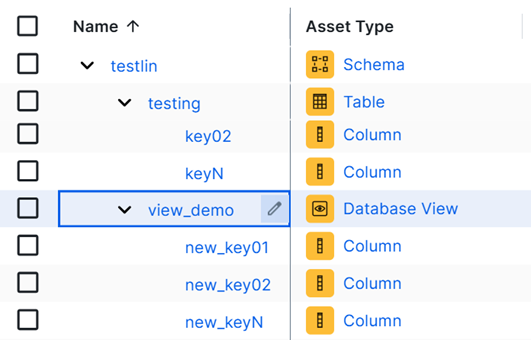
By default, the assets are shown in a plain list, but you can enable a multi-path hierarchy to show it in a tree structure.
The following images shows the resulting assets:
Tip
Edge naming conventions for Amazon SageMaker Unified Studio assets
You can view the full name of an asset by editing the asset.
Warning Avoid editing the full name of an asset, because the full name is used to synchronize and refresh data sources. Changing the full name may cause unexpected results and break the synchronization or refresh process.
Amazon Redshift
The SageMaker Unified Studio integration does not create the Amazon Redshift System asset. It references a preexisting System asset, which you select through the System configuration field. The name prefix is constructed from the Redshift metadata you provide, not from the name of the System asset in Collibra. As a result, child asset full names always use this prefix, even if you rename the System asset.
The Amazon Redshift assets created when integrating SageMaker Unified Studio receive a unique full name (fully qualifying name) based on the following naming convention:
| Asset type | Naming convention | Example |
|---|---|---|
| Name prefix (derived from Redshift metadata) |
redshift.{awsAccountId}.{awsRegion}.[serverless|cluster].[{workgroupName}|{clusterName}] |
redshift.138268366.eu-west-1.cluster.ay-test-cluster<br>redshift.138268366.eu-west-1.serverless.ay-redshift-serverless-workgroup |
| Database | SystemName> DbName |
redshift.138268366.eu-west-1.serverless.ay-redshift-serverless-workgroup>dev |
| Schema | SystemName>DbName>SchemaName | redshift.138268366.eu-west-1.serverless.ay-redshift-serverless-workgroup>dev>public |
| Table | SystemName>DbName>SchemaName>TableName | redshift.138268366.eu-west-1.serverless.ay-redshift-serverless-workgroup>dev>public>test |
| Database View | SystemName>DbName>SchemaName>ViewName | redshift.138268366.eu-west-1.serverless.ay-redshift-serverless-workgroup>dev>public>test1 |
| Column | SystemName>DbName>SchemaName>TableName>ColumnName(column) | redshift.138268366.eu-west-1.serverless.ay-redshift-serverless-workgroup>dev>public>test>c1(column) |
| SystemName>DbName>SchemaName>ViewName>ColumnName(column) | redshift.138268366.eu-west-1.serverless.ay-redshift-serverless-workgroup>dev>public>test1>c2(column) |
AWS Glue
The AWS Glue assets created when integrating SageMaker Unified Studio receive a unique full name (fully qualifying name) based on the following naming convention:
| Asset type | Naming convention | Example |
|---|---|---|
| System | glue.{catalogId}.{region} |
glue.368426834578.eu-west-1 |
| Database | SystemName>AwsDataCatalog |
glue.368426834578.eu-west-1>AwsDataCatalog |
| Schema | SystemName>AwsDataCatalog>{glueDatabaseName} | glue.368426834578.eu-west-1>AwsDataCatalog>glue_db_c41r6s5kiko4uu |
| Table | SystemName>AwsDataCatalog>{glueDatabaseName}>{tableName} | glue.368426834578.eu-west-1>AwsDataCatalog>glue_db_c41r6s5kiko4uu>cities-parquet |
| Database View | SystemName>AwsDataCatalog>{glueDatabaseName}>{viewName} | glue.368426834578.eu-west-1>AwsDataCatalog>glue_db_c41r6s5kiko4uu>test_view |
| Column | SystemName>AwsDataCatalog>{glueDatabaseName}>{tableName}>{columnName}(column) | glue.368426834578.eu-west-1>AwsDataCatalog>glue_db_c41r6s5kiko4uu>cities-parquet>city(column) |
Synchronized metadata per Amazon SageMaker Unified Studio asset type
This table shows the metadata for the SageMaker Unified Studio asset type. If you do not see any of the listed synchronized metadata, you can add characteristics to the layout on the asset type page.
Note If you remove a label in Amazon SageMaker Unified Studio after a SageMaker Unified Studio synchronization, the attribute for the removed label is removed when you integrate SageMaker Unified Studio again.
|
Asset type |
Synchronized metadata |
Public ID |
|---|---|---|
| System | Technology Asset groups / is grouped by Technology Asset | TechnologyAssetGroupsTechnologyAsset |
| Database | Technology Asset groups / is grouped by Technology Asset | TechnologyAssetGroupsTechnologyAsset |
|
Data Source Type The value depends on your Collibra Platform version:
|
DataSourceType | |
| Schema | Technology Asset has / belongs to Schema | TechnologyAssetHasSchema |
| Table |
Description from source system |
DescriptionFromSourceSystem |
| Schema contains / is part of Table | SchemaContainsTable | |
| Database View | Description from source system | DescriptionFromSourceSystem |
| Schema contains / is part of Table | SchemaContainsTable | |
| Column |
Description from source system |
DescriptionFromSourceSystem |
| Column Position | ColumnPosition | |
| Is Nullable | IsNullable | |
|
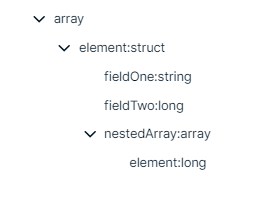
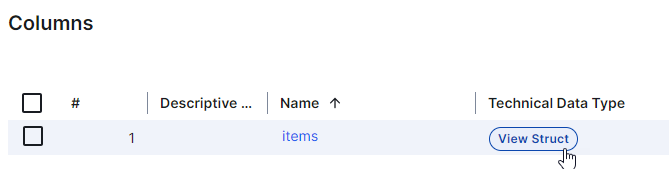
Technical Data Type Tip
|
TechnicalDataType | |
| Column is part of / contains Table | ColumnIsPartOfTable |
 . For columns that have a structured technical data type, Array or Struct, click the hyperlink to see the structure of the data in a dialog box. In other locations, for example, in Table assets, click the