About access requests
In Data Access, access requests ensure proper authorization by letting data owners control who can access their entities, giving them full visibility and control over data sharing decisions.
An access request is automatically generated when you add entities that you do not own, such as data objects or access controls, to your access control. An access request is also generated when you request access from an asset that is linked to Data Access.
Types of access requests
An access request can be of one of the following types.
| Type | Description |
|---|---|
| Entity-based access request |
Generated when you add a data object or an access control that you do not own to the What component of your access control. Adding multiple unowned data objects to an access control generates one combined access request, even if those data objects have different owners. |
| Beneficiary-based access request |
Generated when you request access from an asset that is linked to Data Access. |
Viewing access requests
To view access requests, on the Data Access landing page, in the left pane, click Access requests. The Access requests page contains the access requests that you submitted or those that are assigned to you. The page also contains the access requests in which you are mentioned in a comment.
You can view all access requests, including those submitted by or assigned to others, only if you have a global role with the Data Access > View All Access And Usage or Data Access > Manage All Access global permission, for example, the Data Access Observer or Data Access Manager global role.
Access requests page
The Access requests page contains the following information.
| Column | Description |
|---|---|
| Access request | The ID of the access request, shown as a clickable link that opens the access request page. |
| Requested access |
The data objects or the access controls (entities) for which the access is requested. |
| Assignees | The users who are responsible for implementing or closing the request. These are the owners of the requested entities. For a role that is linked to a group, the assignees are the owners of the role’s controlling group, not the role's owners. |
| Requester | The user who initiated the access request. |
| Created on | The date and time when the access request was generated. |
| Status |
The status of the access request. You can use the Status filter to narrow the list to one or more specific statuses. |
Status of an access request
The status of an access request indicates which stage the request is in.
| Status | Description |
|---|---|
| Awaiting approval |
The request is waiting for approval in a custom workflow. This status is applicable only for a beneficiary-based request that started a custom workflow. Otherwise, this step is skipped and the request moves directly to the Awaiting implementation status. |
| Awaiting implementation |
The request is waiting for an assignee to implement access. |
| Implemented |
Access to all requested entities is implemented in the data source, and the request is automatically closed. |
| Partially implemented |
Access to some of the requested entities is implemented in the data source. This happens when an assignee closes the request while some entities are still awaiting implementation. |
| Rejected |
Access to none of the requested entities is implemented in the data source. This happens when an assignee closes the request while all entities are still awaiting implementation, or when the request is rejected in the custom workflow itself. For a request with exceptions, however, this happens when the request is closed while the requested role is not implemented, even if some of the exceptions are implemented. |
| Canceled |
Access to none of the requested entities is implemented in the data source. This happens when the requester (or an authorized user) closes the request, or when the requested entities are deleted. |
Access request details
The access request page opens when you click an access request ID on the Access requests page. It contains details to help you decide whether to implement or close the request.
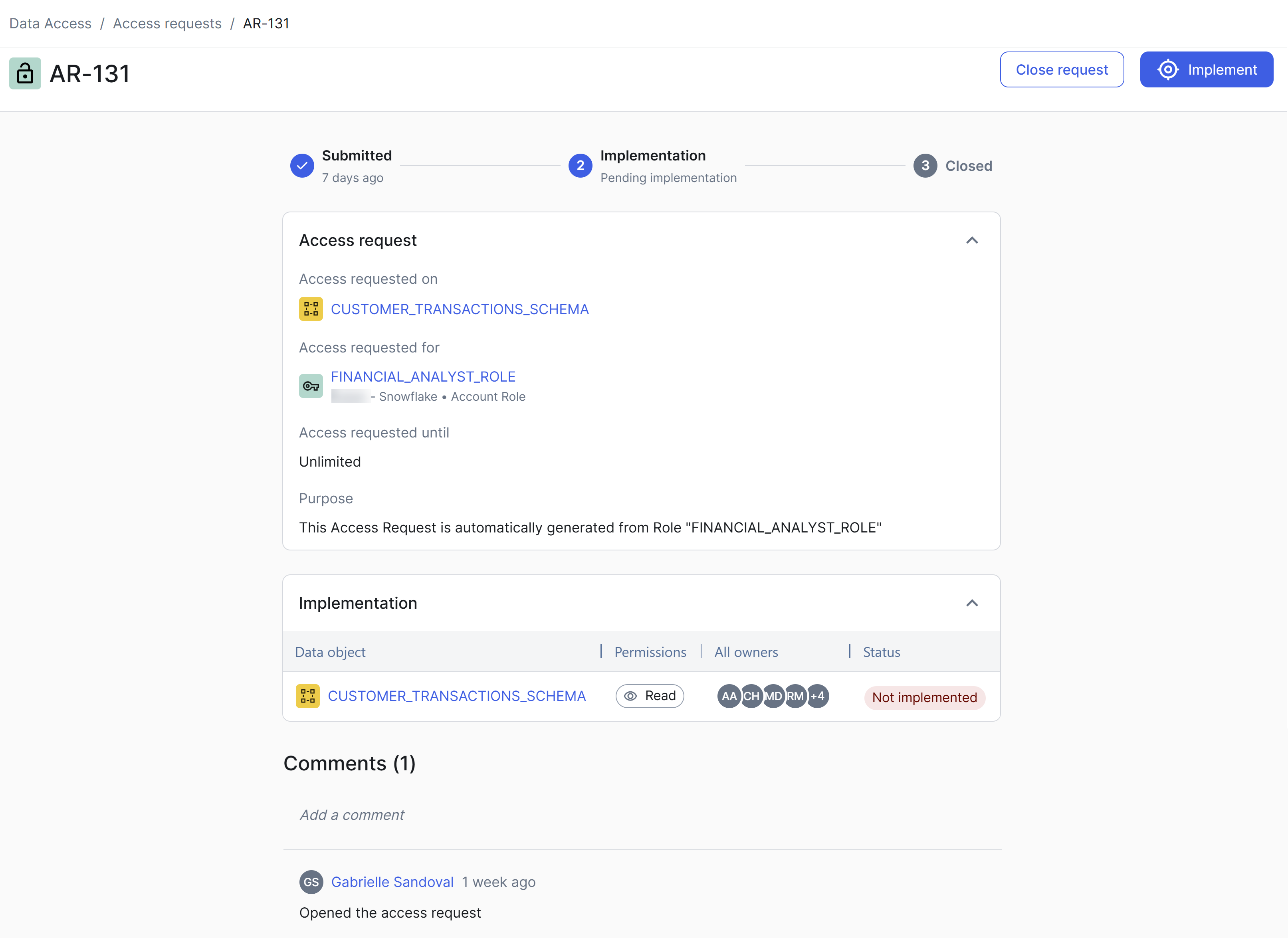
What access is granted
The What access is granted section on the access request page contains the following information.
| Field | Description |
|---|---|
| Access requested on |
|
| Role linked to requested asset | The role that is linked to the asset from which the request originated. This field is shown only for beneficiary-based requests. |
| Exceptions requested |
The column masks or row filters that the requester wants the requested beneficiaries to be exempt from, when they are granted access through the role. This field is shown only for beneficiary-based requests that include at least one exception. |
| Access requested for |
|
| Access requested until |
The date and time when the granted access expires and is revoked.
|
| Purpose |
|
Implementation
The Implementation section on the access request page contains the following information.
| Column | Description |
|---|---|
| Data object (or Access control) |
The data objects or access controls for which access is requested. |
| Permissions | The permissions that are associated with the data objects. |
| All owners | The identities that own the requested entities. These are the users who are tasked with reviewing the request. |
| Status |
The implementation statuses of the entities (Implemented or Not implemented). |
Implementation versus overall status
On an access request page, the Status column in the Implementation section shows the current access state of each requested entity. This is the implementation status, and it can change over time. For example, it can change from Implemented to Not implemented if the requester removes a data object from their access control.
By contrast, the overall status of an access request, which is shown in the Status column on the Access requests page, works differently. While the request is open, its status moves through the workflow, from awaiting approval to awaiting implementation. When the request is closed, its status records the outcome. That outcome is not recalculated afterwards, so it stays the same even if the access changes later.