A Technical Lineage Admin connection enables secure communication between Edge or Collibra Cloud site and the Collibra Data Lineage service. This connection allows Edge to collect lineage information from your data sources, and lets the Collibra Data Lineage service upload the generated technical lineage back to Collibra.
Important OAuth authentication is not yet available for Collibra Platform for Government customers.
Prerequisites
- You have a global role with the Product Rights > System administration global permission.
- You have a global role that has the Manage Edge sites global permission.
- You have a global role that has the Manage connections and capabilities global permission.
Steps
- Open a site.
-
On the main toolbar, click
 →
→
 Settings.
The Settings page opens. -
In the tab pane, click Edge.
The Sites tab opens and shows a table with an overview of your sites. - In the site overview, click the name of a site.
The site page appears.
-
On the main toolbar, click
-
In the Connections section, click Create Connection.
The Create Connection dialog box appears. - Select the Technical Lineage Admin connection.
-
Enter the connection information.
Field Description Required Name A name for the Edge connection.
 Yes
YesDescription A description of the connection.
 No
No
Authentication Type
The authentication method you use to connect to Collibra Data Lineage:
- Basic Authentication
Collibra Data Lineage uses the DGC user name and DGC user password configured in Collibra Console when you enabled technical lineage via Edge. These are the credentials of a Collibra user account. If you choose this method, ignore the remaining fields. - OAuth
If you choose this method, you must use the following fields to provide a client ID and client secret. This authentication method is recommended for enhanced security.Important OAuth authentication is not yet available for Collibra Platform for Government customers.
YesClient ID
Your client ID for OAuth authentication.
How to obtain a client ID and client secret- In Collibra Settings, click OAuth Applications.
- Click Register New Application.
The Register New Application dialog box appears. - Enter the following information:
- For the Application Type, select Platform.
- Provide a name for the application.
- In the Integration Type drop-down list, select Technical Lineage.
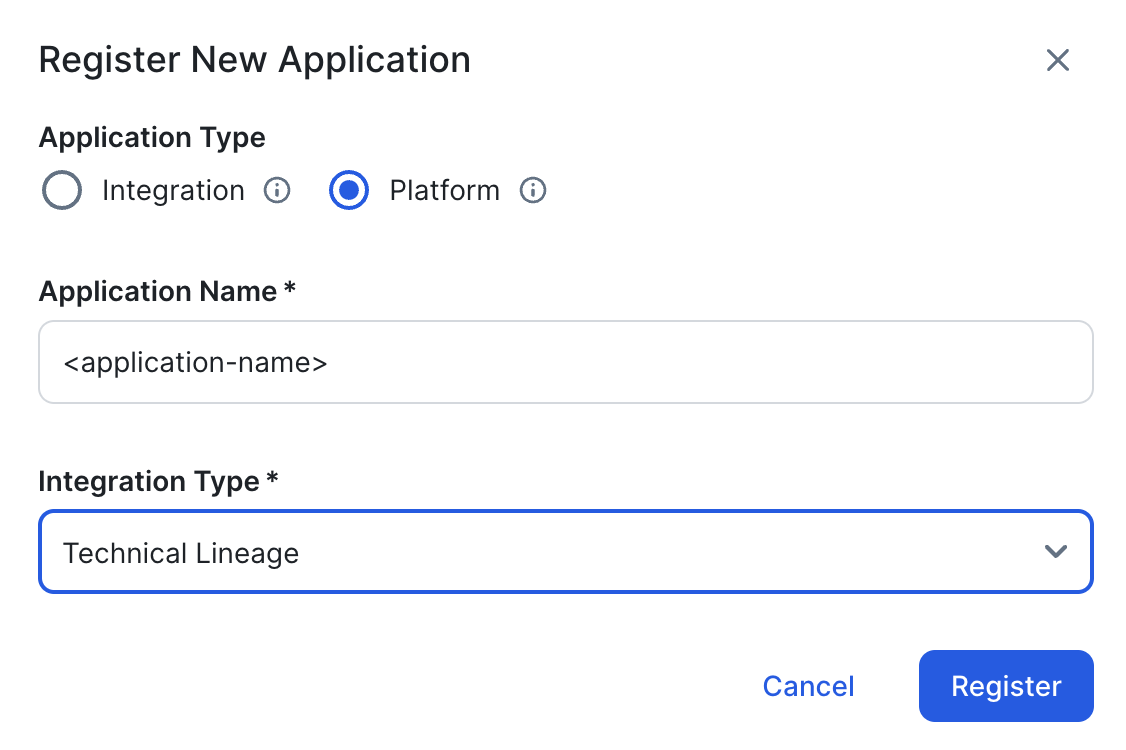
- Click Register.
-
Copy and safely store the Client ID and Client Secret.
Important This is the only time you are able to see the client secret.
For complete information, go to OAuth Applications.
Yes
Client Secret
Your client secret for OAuth authentication.
How to obtain a client ID and client secret- In Collibra Settings, click OAuth Applications.
- Click Register New Application.
The Register New Application dialog box appears. - Enter the following information:
- For the Application Type, select Platform.
- Provide a name for the application.
- In the Integration Type drop-down list, select Technical Lineage.
- Click Register.
-
Copy and safely store the Client ID and Client Secret.
Important This is the only time you are able to see the client secret.
For complete information, go to OAuth Applications.
Yes
.
- Basic Authentication
- Click Create.