Databricks Unity Catalog objects are mapped to Collibra assets during synchronization. Once synchronization is completed, you can explore asset attributes or metadata synchronized per asset type.
After the synchronization, Database, Schema, Table, Database View, Metric View, Column, Databricks Volume, Databricks Listing, Data Product Port, and Notebook assets become available in Collibra.
- Tip
-
- If you're looking for information on how to create technical lineage for Databricks Unity Catalog via Edge, go to the technical lineage for Databricks Unity Catalog documentation.
Asset location
- If you don't define any domain include mappings, the integration automatically creates new domains for each Database and Schema asset, using the following naming conventions:
- Database domain name: System asset domain name > Database name
- Schema domain name: Database domain name > Schema name
- If you define domain include mappings, only the referenced assets are integrated in their specified location.
-
If you move the resulting Table and Column assets to another domain and you run the integration again, the Table and Column assets will be returned to their initial domain. For Database and Schema assets, this depends on the domain mapping version.
To move all resulting assets to another location permanently, select another System asset in the current synchronization configuration or create a new capability with a synchronization configuration that integrates the data in the new location.ExampleYou created System asset A in Domain A and synchronized Databricks. As a result, Table A and Column A have been added to Domain A. Then, you manually moved Table A and column A to Domain B. When you synchronize Databricks again, Table A and Column A will move back to Domain A.
-
The Databricks Unity Catalog integration uses different naming conventions for assets compared to the Edge JDBC naming conventions. The applied naming conventions are:
Asset type Naming convention Example Database domainName>catalogName ay-tech-domain-4>oleg-test Schema databaseFullName>schemaName ay-tech-domain-4>oleg-test>demo Databricks Schema databaseFullName>schemaName
ay-tech-domain-4>oleg-test>demo Table schemaFullName>tableName ay-tech-domain-4>oleg-test>demo>dinner Database View schemaFullName>viewName ay-tech-domain-4>oleg-test>demo>dinner_view Metric View schemaFullName>viewName ay-tech-domain-4>oleg-test>demo>dinner_metric_view Column tableFullName>columnName(column) ay-tech-domain-4>oleg-test>demo>dinner>recipe(column) Databricks Volume schemaFullName>volumeName(volume) ay-tech-domain-4>oleg-test>demo>demoVolume(volume) Directory (root) volumeFullName>/ ay-tech-domain-4>oleg-test>demo>demoVolume>/ Directory (subfolder) volumeFullName>/>folderName ay-tech-domain-4>oleg-test>demo>demoVolume>/>folder File volumeFullName>/>folderName>fileName ay-tech-domain-4>oleg-test>demo>demoVolume>/>folder>file Databricks Listing domainId>listingName>listingId b6f1a8b2-2e39-4d3a-9c3a-1f2b3c4d5e6f>Sales Performance Data>a1b2c3d4-5e6f-7890-abcd-ef1234567890 Data Product Port domainId>shareName b6f1a8b2-2e39-4d3a-9c3a-1f2b3c4d5e6f>sales_performance_share Notebook systemName>workspacePath databricks-prod>/Shared/Sales/ChurnAnalysis
Note If you selected V0 for the Ingestion mapping version
field and add a domain include mapping for the database but not for a related schema, the automatically created domain for the schema is added in the same community as the domain of the database.
Asset status
The status of the assets depends on the selected value in the Default Asset Status field during synchronization.
- If Implemented is selected, all assets receive the "Implemented" status.
- If No Status is selected, newly created assets receive the first status listed in your operating model statuses and existing assets keep their assigned status.
When you integrate a data source without applying Include or Exclude Mappings rules, and then later exclude a integrated asset using an Include or Exclude Mapping during resynchronization, the related assets receive the Missing from Source status.
If a temporary communication issue results in a partial synchronization, the status of the assets that were not synchronized becomes Missing from source. If the assets are identified in the source system during the next fully successful synchronization, the status behavior depends on the nature of the failure:
- If synchronization of the asset was interrupted during processing, the previous status is restored.
- If synchronization of the asset did not start, the status is reset to the first default status configured in the asset's lifecycle.
Integrated assets and their metadata
Database, Schema, Table, Database View, Metric View, Column, Databricks Volume, Databricks Listing, Data Product Port, and Notebook assets are added.
You can enable a multi-path hierarchy to show the assets in a tree structure. For the best results, use the following relations in the multi-path hierarchy:
- Technology Asset groups Technology Asset
- Database contains Table
- Technology Asset has Schema
- Schema contains Table
- Table contains Column
The following image shows the resulting hierarchical table.
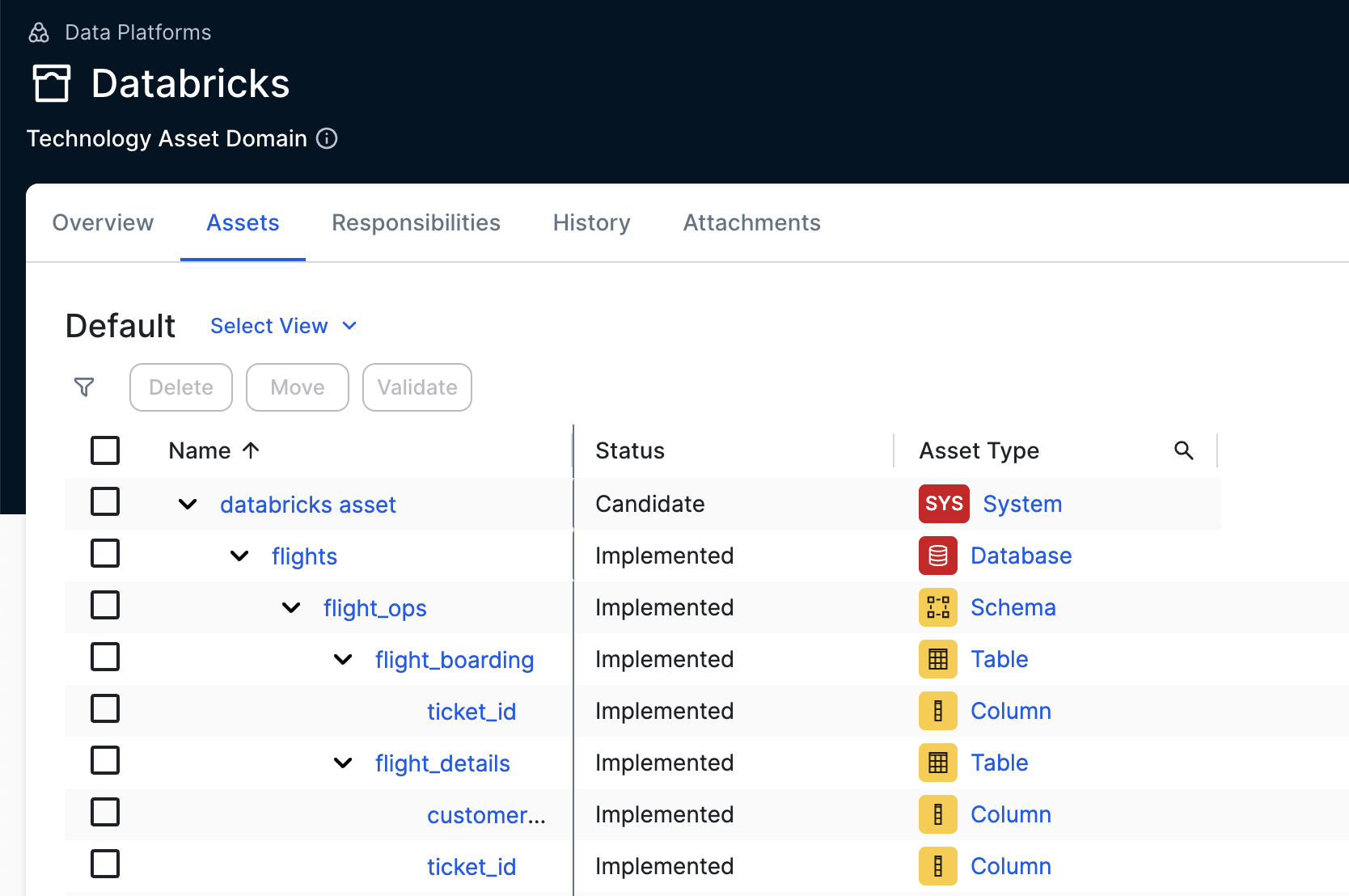
Synchronized metadata per asset type
This table shows the metadata for each Databricks asset type.
|
Asset type |
Synchronized metadata |
Public ID |
|---|---|---|
| Database |
Description from source system |
DescriptionFromSourceSystem |
| Owner in source | OwnerInSource | |
| Source Tags, if the HTTP path has been defined in the capability and the Databricks access token or OAuth Client has the required permissions. The tag naming convention is We fetch source tags from the Databricks Unity Catalog information schema using SQL; everything else is fetched by REST API. |
SourceTags | |
|
Data Source Type The value is automatically set to Databricks Unity Catalog. |
DataSourceType | |
|
Any extensible properties defined in the configuration. |
||
| Technology Asset groups / is grouped by Technology Asset | TechnologyAssetHasSchema | |
| Schema and Databricks Schema (Only available if you selected Ingest volumes in the integration settings.) |
Description from source system |
DescriptionFromSourceSystem |
| Owner in source | OwnerInSource | |
| Source Tags, if the HTTP path has been defined in the capability and the Databricks access token or OAuth Client has the required permissions. The tag naming convention is We fetch source tags from the Databricks Unity Catalog information schema using SQL; everything else is fetched by REST API. |
SourceTags | |
|
Data Source Type The value is automatically set to Databricks Unity Catalog. |
DataSourceType | |
| Any extensible properties defined in the configuration. | ||
| Technology Asset has / belongs to Schema | TechnologyAssetHasSchema | |
|
Databricks Schema contains / is part of Databricks Volume (Only applicable to Databricks Schema asset type.) |
DatabricksSchemaContainsDatabricksVolume | |
| Table |
Description from source system |
DescriptionFromSourceSystem |
| Owner in source | OwnerInSource | |
| Source Tags, if the HTTP path has been defined in the capability and the Databricks access token or OAuth Client has the required permissions. The tag naming convention is We fetch source tags from the Databricks Unity Catalog information schema using SQL; everything else is fetched by REST API. |
SourceTags | |
|
Any extensible properties defined in the configuration. |
||
| Schema contains / is part of Table | SchemaContainsTable | |
| Database View |
Description from source system |
DescriptionFromSourceSystem |
| Owner in source | OwnerInSource | |
| Source Tags, if the HTTP path has been defined in the capability and the Databricks access token or OAuth Client has the required permissions. The tag naming convention is We fetch source tags from the Databricks Unity Catalog information schema using SQL; everything else is fetched by REST API. |
SourceTags | |
| Schema contains / is part of Table | SchemaContainsTable | |
|
Metric View (Only available if you selected Ingest metric views (In preview) in the integration settings.) |
Description from source system |
DescriptionFromSourceSystem |
| Owner in source | OwnerInSource | |
| Source Tags, if the HTTP path has been defined in the capability and the Databricks access token or OAuth Client has the required permissions. The tag naming convention is We fetch source tags from the Databricks Unity Catalog information schema using SQL; everything else is fetched by REST API. |
SourceTags | |
| Schema contains / is part of Table | SchemaContainsTable | |
|
Databricks Volume (Only available if you selected Ingest volumes in the integration settings.) |
Volume ID |
VolumeId |
| Volume Type | VolumeType | |
|
Catalog Name |
CatalogName | |
| Schema Name | SchemaName | |
| File Location | FileLocation | |
| Owner in Source | OwnerInSource | |
| Description from source system | DescriptionFromSourceSystem | |
| Databricks Schema contains / is part of Databricks Volume | DatabricksSchemaContainsDatabricksVolume | |
| Directory | Location | Location |
| File |
Document size |
DocumentSize |
| File Location | FileLocation | |
| Document modification date | DocumentModificationDate | |
| Column |
Description from source system |
DescriptionFromSourceSystem |
| Source Tags, if the HTTP path has been defined in the capability and the Databricks access token or OAuth Client has the required permissions. The tag naming convention is We fetch source tags from the Databricks Unity Catalog information schema using SQL; everything else is fetched by REST API. |
SourceTags | |
| Column Position | ColumnPosition | |
| Is Nullable | IsNullable | |
| Is Primary Key | IsPrimaryKey | |
| Primary Key Name (if the column is the primary key) | PrimaryKeyName | |
| Original Name | OriginalName | |
|
Technical Data Type Tip
You see the technical data type in the Technical Data Type field in the At a glance sidebar of the Column asset. If the At a glance sidebar is hidden, click |
TechnicalDataType | |
| Column is part of / contains Table | ColumnIsPartOfTable | |
| Foreign Key Mapping (if the column is part of a foreign key) | ForeignKeyMapping | |
| Field Expression (if the parent asset of the column is a Metric View) | FieldExpression | |
|
Field Type (if the parent asset of the column is a Metric View) Field Type can include dimensions or measures. |
FieldType | |
| Foreign Key | The full name of the Foreign Key asset has the following pattern: table_full_name > foreign_key_name (foreign_key) | |
| Foreign Key Mapping | ForeignKeyMapping | |
| Databricks Listing (Only available if you selected the Listings (In preview) tab in the integration settings.) |
Description From Source System | DescriptionFromSourceSystem |
| Status in Source | StatusInSource | |
| Owner in Source | OwnerInSource | |
| Publication Date in Source | PublicationDateInSource | |
| Refresh Frequency | RefreshFrequency | |
| Target Audience | TargetAudience | |
| Data Product exposes data as / is output port for Data Product Port | DataProductHasOutputPort | |
| Listing categories are ingested as Collibra tags on the Databricks Listing asset. | ||
|
Data Product Port (Only available if you selected the Listings (In preview) tab in the integration settings.) |
Data Product Port is implemented as / implements Data Product Port Asset | OutputPortImplementedByAsset |
| Data Product exposes data as / is output port for Data Product Port | DataProductHasOutputPort | |
|
Notebook (Only available if you selected Ingest notebooks (In preview) in the integration settings.) |
Description from source system |
DescriptionFromSourceSystem |
|
Notebook language Allowed values: PYTHON, SCALA, SQL, R |
NotebookLanguage | |
| URL | Url | |
|
Owner in Source (This is populated only for notebooks in personal workspace folders. For example, paths like |
OwnerInSource | |
| Data Source Type | DataSourceType | |
| Technology Asset groups / is grouped by Technology Asset | TechnologyAssetGroupsTechnologyAsset |
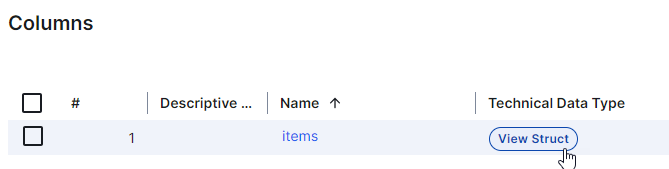
 . For columns that have a structured technical data type, Array or Struct, click the hyperlink to see the structure of the data in a dialog box. In other locations, for example, in Table assets, click the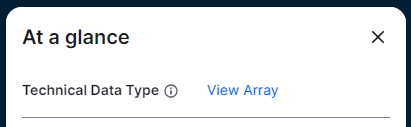

Depending on your needs and setup, you can profile and classify the data for the integrated assets. For more information, go to Steps: Integrate Databricks Unity Catalog via Edge.