Important This feature isn't available in the latest UI.
Because the DQ Connector is an Edge capability, you must be able to ingest data via Edge. For information about enabling and configuring Edge, see the Edge Configuration guide.
Create a Data Quality & Observability (self-hosted) Edge site
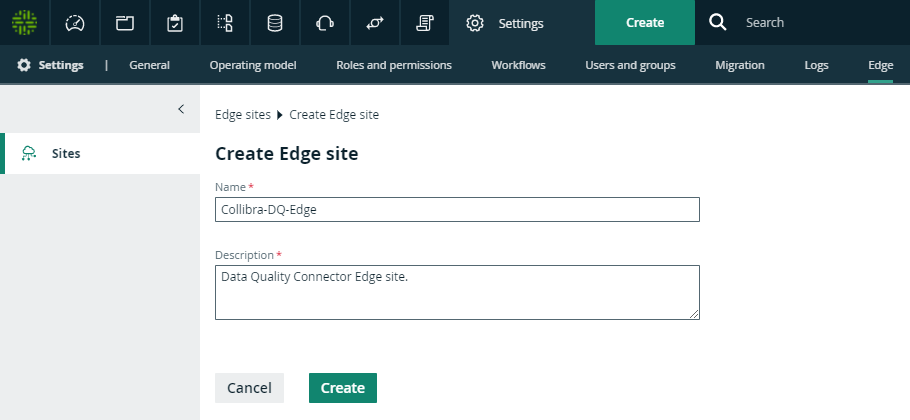
Create an Edge site with the following properties:
| Field | Description |
|---|---|
|
Name |
The name of the Edge site, for example Collibra-DQ-Edge. Do not use spaces or special characters. This field is mandatory and the name must be globally unique. |
|
Description |
The description of the Edge site. Enter at least basic location information of the Edge site. |
Install the Data Quality & Observability (self-hosted) Edge site
Follow the instructions for your environment to Install an Edge site.
Note This process automatically creates an Edge user, which you use later in the setup process.
Connect to your Data Quality & Observability (self-hosted) source
Create a connection for each CollibraData Quality & Observability (self-hosted) data source you want to synchronize.
| Section | Property | Value |
|---|---|---|
| Connection settings | Name | The same name as the Collibra Data Quality & Observability (self-hosted) connection name. |
| Description | The description of the JDBC connection. This field is also visible when you register content. | |
| Connection provider | The connection provider, which determines the available connection parameters. Same as Collibra Data Quality & Observability (self-hosted). | |
|
Connection parameters Example for Username / Password JDBC drive |
Username | The same username as the Collibra Data Quality & Observability (self-hosted) connection username. |
| Password | The same password as the Collibra Data Quality & Observability (self-hosted) connection password. | |
| Driver class name | The same driver name as the Collibra Data Quality & Observability (self-hosted) connection driver name. | |
| Driver Jar | The same driver JAR file as from Collibra Data Quality & Observability (self-hosted). | |
| Connection string | The same URL as the Collibra Data Quality & Observability (self-hosted) connection URL. |
Add ingestion capabilities to your Data Quality & Observability (self-hosted) connection
You must add a Catalog JDBC ingestion Edge capability template for each connection you have created to extract and process data for your data source.
| Field | Description | Required |
|---|---|---|
|
Name |
The name of the capability. |
|
|
Description |
The description of the capability. |
|
|
JDBC connection
|
|
|
|
JDBC data source type (Deprecated)
|
Deprecated field. The field was used to indicate the type of the data source. You no longer need to change this field. The required value is automatically identified. The value isn't shown in this page. |
|
|
Supports schemas
|
A text field where you have to enter True to enable database registration of data sources without schemas. If the data source doesn't have a schema, Data Catalog creates a Schema asset with the same name as the full name of the database. If the data source has schemas, you can ignore this field. |
|
|
Other Settings |
This section can contain additional capability properties. Click Add Other Settings to add a property. For an overview of all available properties, go to Other Settings. Note No validation is performed on the values you add. |
|
|
Debug |
An option to automatically send Edge infrastructure log files to Collibra Platform. By default, this option is set to false. Note We highly recommend to only send Edge infrastructure log files to Collibra Platform when you have issues with Edge. If you set it to true, it will automatically revert to false after 24h.
For more information, go to Edge logging. |
|
|
Log level |
An option to determine the verbosity level of Catalog connector log files. By default, this option is set to No logging. |
|
 Yes
Yes
 No
No
Configure destinations for Data Quality & Observability (self-hosted) assets
- Rules: Rulebook Domain
- Metrics: Business Asset Domain
- Dimensions: Business Asset Domain
Assign permissions for Data Quality & Observability (self-hosted) domains
Edge must have the correct resource permissions to manage assets inside the dedicated Data Quality & Observability (self-hosted) domains. For each dedicated domain, assign the Technical Steward role to the Edge user.
Note The Edge user is automatically created when you install the Edge site.
Add Data Quality & Observability (self-hosted) characteristics to assets
To show Data Quality & Observability (self-hosted) statistics for your data source, assign the following characteristic types to the Table and Column asset types:
| Asset type | Characteristic type |
|---|---|
| Table | governed by Governance Asset |
| Column | is governed by Data Quality Rule |
Add a DQ Connector capability
The DQ Connector facilitates the communication with Collibra Data Quality & Observability (self-hosted). Add a DQ Connector capability to your Data Quality & Observability (self-hosted) Edge site:
| Field | Description | Required |
|---|---|---|
|
Capability |
This section contains general information about the capability. |
|
|
Name |
The name of the capability. |
|
|
Description |
The description of the capability. |
|
|
DQ |
This section contains information about the Data Quality & Observability (self-hosted) connection. | |
|
Base URL
|
Your Data Quality & Observability (self-hosted) URL |
|
|
Username
|
The Data Quality & Observability (self-hosted) username for this connection. |
|
|
Password
|
The Data Quality & Observability (self-hosted) password for this connection. |
|
|
Encryption options
|
Select the type of encryption to use. Default: To be encrypted by Edge management server. |
|
|
Issuer of the JWT
|
If you have selected Encrypted with public key, enter your JWT issuer. |
|
| Collibra metadata model | This section contains information about where to ingest Data Quality & Observability (self-hosted) assets. | |
|
DQ Rules domain id
|
The UUID of the Rulebook Domain for the ingested Data Quality & Observability (self-hosted) rules. |
|
|
DQ Metrics domain id
|
The UUID of the Rulebook Domain for the ingested Data Quality & Observability (self-hosted) metrics. |
|
|
DQ Dimensions domain id
|
The UUID of the Governance Asset Domain for the ingested Data Quality & Observability (self-hosted) dimensions. |
|
|
Default DQ Dimension name
|
The default Data Quality Dimension, for example Accuracy, Completeness, Consistency and so on. Default: Completeness. |
|
|
DQ Metric classified by DQ Dimension relation type id
|
The UUID of the Data Quality Metric classified by / classifies Data Quality Dimension relation. If left unspecified, this relation will not be added. |
|
|
Assets are imported in batches of this size
|
The batch size of the ingestion. Default: 5000. |
|