The Data Classes page serves as a central location to manage data classes across your Collibra environment.
Users with the required permissions, such as data stewards, can open this page by going to Stewardship and clicking Data Classification → Data Classes. They can use the page to monitor classification coverage and ensure data classes align with your business asset model.
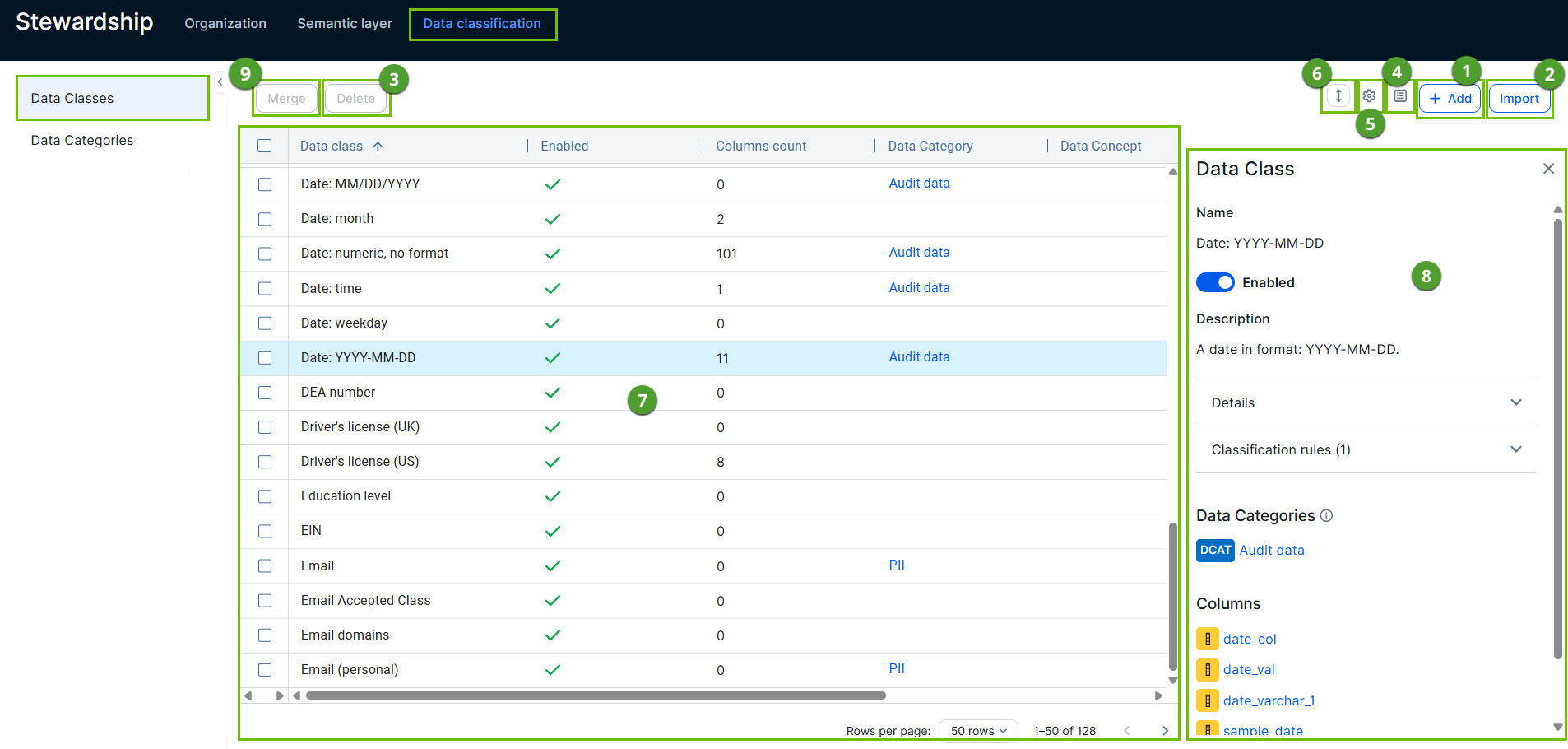
|
No. |
Name |
Description |
|---|---|---|
|
|
Add button |
Allows you to add data classes. |
|
|
Import button | Allows you to import out-of-the-box data classes. |
|
|
Delete button |
Allows you to delete one or more data classes. |
|
|
Edit fields icon |
Allows you to manage the columns shown. |

|
Configuration menu icon | Opens options to define the classification thresholds for automatic acceptance and rejection of data classification suggestions. |

|
Trim text icon | Allows you to view more or less content in one page. |
|
|
Table with all data classes. The table contains multiple columns. |
Shows all the data classes that exist in your environment. Click the Preview button that appears when you hover over a data class to view the details of the data class in an extra pane (explained in number 8) and update them. Note You can't see the Data Categories, Data Attributes, or Data Concepts for which you don't have the View permission. |
|
Data Class
|
The data class name. |
|
|
Enabled
|
Indicates whether the data class will be taken into account for data classification. For more information go to About data classes. | |
|
Columns Count
|
The number of columns classified with the data class. |
|
|
Data Concept
|
The name of the associated Data Concept assets. It connects the data class to your business asset model. For more information, go to Connect data classes to data layers. |
|
|
Data Attribute
|
The name of the associated Data Attribute assets. It connects the data class to your logical data model. For more information, go to Connect data classes to data layers. |
|
|
Data Categories
|
The name of the associated Data Category assets. |
|
|
Created By
|
The name of the user who created or imported the data class. | |
|
Created On
|
The date the data class was created. |
|
|
Last Modified By
|
The name of the user who made the last change. |
|
|
Last Modified On
|
The date the data class was last changed. |
|
|
|
Side pane |
The data class side pane provides the details of the data class. To open the side pane, click the Preview button that appears when you hover over a data class. |
|
Data class name, details, and classification rules
|
The name of the selected data class. You can edit the name by clicking the name. For information on updating the data class details and classification rules, go to configure a data class. |
|
|
Data Concepts
|
The list of data concepts that are associated with the data class. |
|
|
Data Attributes
|
The list of data attributes that are associated with the data class. |
|
|
Columns
|
The list of columns that are classified with the selected data class. When there are too many columns to show, you can follow a See all link. This opens a search results page with all corresponding columns. |
|
|
|
Merge button |
Allows you to merge 2 or more data classes. |


