After synchronization, the resulting Sigma assets are available in Data Catalog.
- The assets have the same technical names as their counterparts in Sigma.
- By default, all ingested assets have an initial asset status Candidate. You can, however, configure which initial status you want assets to have when they are ingested.
- Relations that were created between Sigma assets and other assets via a relation type in the Sigma operating model, are deleted upon synchronization. The same is true of any attribute types in the operating model that you add to the Sigma assets mentioned in the following table. To ensure that the characteristics you add to the following assets are not deleted upon synchronization, be sure to use characteristics that are not part of the Sigma operating model.
- If you move assets to another domain, they will automatically be moved back to the original domain at the next synchronization.
- If a temporary communication issue results in a partial synchronization, the status of the assets that were not synchronized becomes Missing from source. If the assets are identified in the source system during the next fully successful synchronization, the previous statuses are restored.
Sigma synchronized metadata per asset type
This table shows the metadata for each Sigma asset type and the public ID for each asset type and characteristic.
|
Asset type |
Synchronized metadata |
Public ID |
|---|---|---|
|
Sigma Tenant Public ID: SigmaTenant |
URL The value returned is: |
Url |
|
Technology Asset groups / is grouped by Technology Asset → Sigma Tenant groups Sigma Data Source |
TechnologyAssetGroupsTechnologyAsset | |
|
Server hosts / is hosted in Business Dimension → Sigma Tenant hosts Sigma Workspace |
ServerHostsBusinessDimension | |
|
Sigma Data Source Public ID: SigmaDataSource |
Description | Description |
|
URL This is the URL of the host Account. |
Url | |
| Warehouse | Warehouse | |
| Creation Date in Source | CreationDateInSource | |
| Modification Date in Source | ModificationDateInSource | |
|
Technology Asset groups / is grouped by Technology Asset → Sigma Tenant groups Sigma Data Source |
TechnologyAssetGroupsTechnologyAsset | |
|
Technology Asset source system for / source system Data Asset → Sigma Data Source source system for Sigma Data Entity → Sigma Data Source source system for Sigma Data Set |
TechnologyAssetSourceSystemForDataAsset | |
|
Sigma Workspace Public ID: SigmaWorkspace |
Description | Description |
|
URL The value returned is: |
Url | |
| Creation Date in Source | CreationDateInSource | |
| Modification Date in Source | ModificationDateinSource | |
|
Server hosts / is hosted in Business Dimension → Sigma Tenant hosts Sigma Workspace |
ServerHostsBusinessDimension | |
|
BI Folder assembles / is assembled in BI Folder → Sigma Workspace assembles Sigma Folder |
BIFolderAssemblesBIFolder | |
|
Sigma Folder Public ID: SigmaFolder |
Description | Description |
| Description from source | DescriptionFromSource | |
|
URL The value returned is: |
Url | |
|
Owner in Source The value returned is an email address. |
OwnerInSource | |
| Creation Date in Source | CreationDateInSource | |
| Modification Date in Source | ModificationDateInSource | |
|
BI Folder assembles / is assembled in BI Folder → Sigma Workspace assembles Sigma Folder → Sigma Folder assembles Sigma Folder |
BIFolderAssemblesBIFolder | |
|
Business Dimension groups / is grouped into Report → Sigma Folder groups Sigma Workbook |
BusinessDimensionGroupsReport | |
|
BI Folder contains / contained in Data Asset → Sigma Folder contains Sigma Data Model |
BIFolderContainsDataAsset | |
|
Sigma Workbook Public ID: SigmaWorkbook |
Description | Description |
| Description from source | DescriptionFromSource | |
|
URL The value returned is: |
Url | |
|
Owner in Source The value returned is an email address. |
OwnerInSource | |
| Source Tags | SourceTags | |
| Creation Date in Source | CreationDateInSource | |
| Modification Date in Source | ModificationDateInSource | |
|
Business Dimension groups / is grouped into Report → Sigma Folder groups Sigma Workbook |
BusinessDimensionGroupsReport | |
|
Report uses / used in Report → Sigma Workbook uses Sigma Workbook Page |
ReportUsesReport | |
|
Sigma Workbook Page Public ID: SigmaWorkbookPage |
Description | Description |
| Description from source | DescriptionFromSource | |
|
Report uses / used in Report → Sigma Workbook uses Sigma Workbook Page |
ReportUsesReport | |
|
Report groups / is grouped into Report → Sigma Workbook Page groups Sigma Workbook Element |
ReportGroupsReport | |
|
Sigma Workbook Element Public ID: SigmaWorkbookElement |
Description | Description |
| Description from source | DescriptionFromSource | |
|
Report groups / is grouped into Report → Sigma Workbook Page groups Sigma Workbook Element |
ReportGroupsReport | |
|
Report Attribute contained in / contains Report → Sigma Report Attribute contained in Sigma Workbook Element |
ReportAttributeContainedInReport | |
|
Sigma Report Attribute Public ID: SigmaReportAttribute |
Description | Description |
| Description from source | DescriptionFromSource | |
|
Report Attribute sourced from / is source of Data Attribute → Sigma Report Attribute sourced from Sigma Data Attribute |
ReportAttributeSourcedFromDataAttribute | |
|
Sigma Data Model Public ID: SigmaDataModel |
Description | Description |
| Description from source | DescriptionFromSource | |
| URL | Url | |
|
Owner in Source The value returned is an email address. |
OwnerInSource | |
| Creation Date in Source | CreationDateInSource | |
| Modification Date in Source | ModificationDateInSource | |
|
BI Data Model is source for / sources BI Data Model → Sigma Data Model is source for Sigma Data Model |
BIDataModelIsSourceForBIDataModel | |
|
BI Folder contains / contained in Data Asset → Sigma Folder contains Sigma Data Model |
BIFolderContainsDataAsset | |
|
BI Report contains / is contained in BI Data Model → Workbook Element contains Sigma Data Model |
BIReportContainsBIDataModel | |
|
BI Data Model contains / is part of BI Data Attribute → Sigma Data Model contains Sigma Data Attribute |
BIDataModelContainsBIDataAttribute | |
|
Data Entity is part of / contains Data Model → Sigma Data Entity is part of Sigma Data Model |
DataEntityIsPartOfDataModel | |
|
Sigma Data Set Public ID: SigmaDataSet |
Description | Description |
| Description from source | DescriptionFromSource | |
|
Source Type This is a comma-separated value. |
SourceType | |
| URL | Url | |
| Creation Date in Source | CreationDateInSource | |
| Modification Date in Source | ModificationDateInSource | |
|
Technology Asset source system for / source system Data Asset → Sigma Data Source source system for Sigma Data Set |
TechnologyAssetSourceSystemForDataAsset | |
|
BI Folder contains / contained in Data Asset → Sigma Folder contains Sigma Data Set |
BIFolderContainsDataAsset | |
|
Data Set contains / is part of Data Element → Sigma Data Set contains Sigma Data Attribute |
DataSetContainsDataElement | |
| Sigma Data Entity | Description | Description |
| Description from source | DescriptionFromSource | |
|
Source Type The value returned is: |
SourceType | |
|
Data Entity is part of / contains Data Model → Sigma Data Entity is part of Sigma Data Model |
DataEntityIsPartOfDataModel | |
|
Technology Asset source system for / source system Data Asset → Sigma Data Source source system for Sigma Data Entity |
TechnologyAssetSourceSystemForDataAsset | |
|
Data Asset is source for / source BI Report → Sigma Data Entity is source for Sigma Workbook Element |
DataAssetIsSourceForBIReport | |
|
Data Entity contains / is part of Data Attribute → Sigma Data Entity contains Sigma Data Attribute |
DataEntityContainsDataAttribute | |
|
Sigma Data Attribute Public ID: SigmaDataAttribute |
Description | Description |
| Description from source | DescriptionFromSource | |
|
Role in Report The value returned is: |
Role in Report | |
| Technical Data Type | TechnicalDataType | |
| Calculation Rule | CalculationRule | |
|
Data Entity contains / is part of Data Attribute → Sigma Data Entity contains Sigma Data Attribute |
DataEntityContainsDataAttribute | |
|
Report Attribute sourced from / is source of Data Attribute → Sigma Report Attribute sourced from Sigma Data Attribute |
ReportAttributeSourcedFromDataAttribute | |
|
Data Element targets / sources Data Element → Sigma Data Attribute targets Column |
DataElementTargetsDataElement |
Recommended hierarchy within a domain
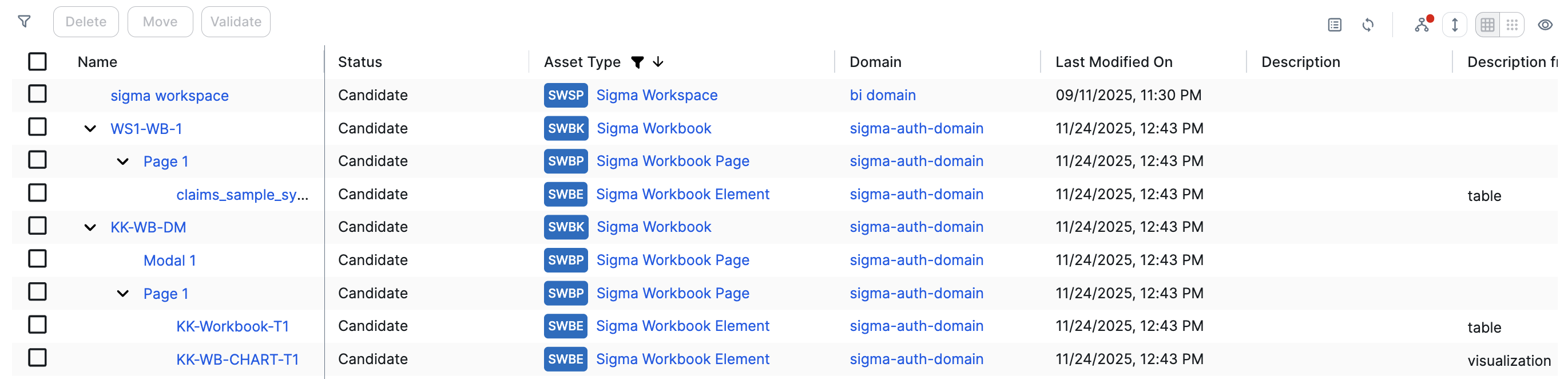
By default, the assets in the resulting domains are shown in a list, but as shown in the following image, you can enable a hierarchy to show them in a tree structure. Doing so makes it easier to understand the relation between your SAP assets, when viewing the assets in a domain.
Steps
- Open the relevant domain page.
- On the content toolbar, click
 .
.
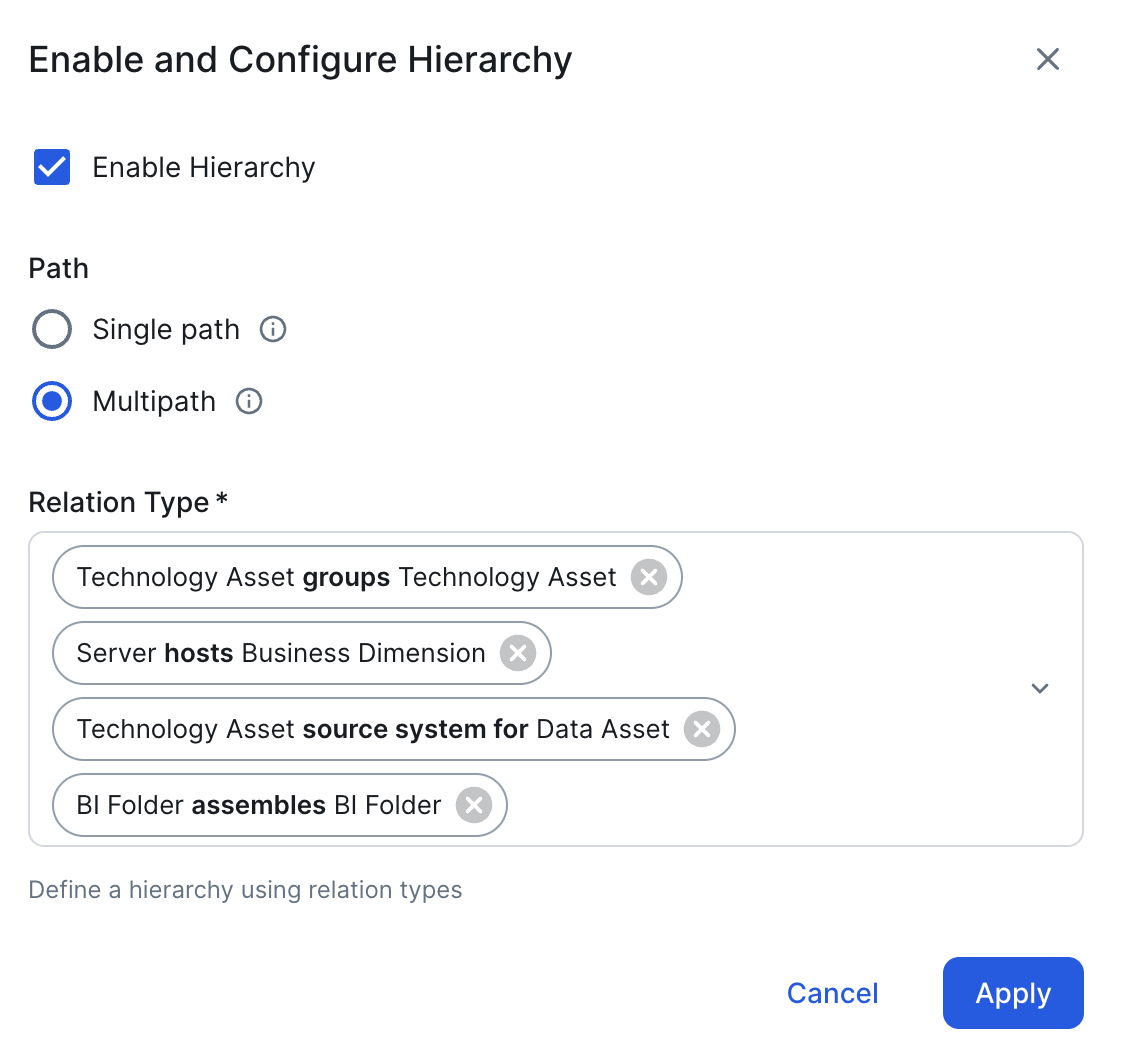
The Configure Hierarchy dialog box appears. - Select Enable Hierarchy.
- Select Multipath.
- Start typing and select each of the following relation types:
- Technology Asset groups Technology Asset
- Server hosts Business Dimension
- Technology Asset source system for Data Asset
- BI Folder assembles BI Folder
- Business Dimension groups Report
- BI Folder contains Data Asset
- Report uses Report
- Report groups Report
- Report Attribute contained in Report
- Report Attribute sourced from Data Attribute
- BI Data Model is source for BI Data Model
- BI Report contains BI Data Model
- BI Data Model contains BI Data Attribute
- Data Entity is part of Data Model
- Data Set contains Data Element
- Data Asset is source for BI Report
- Data Entity contains Data Attribute
- Data Element targets Data Element
- Click Apply.
- In an asset view, if any asset is deleted, for example via synchronization or manual deletion, the view is recreated and the hierarchy is lost. In this case, you can again enable and configure the recommended hierarchy.
- When viewing the hierarchy for a community or domain, if the parent of a node that is in the community or domain belongs to a different community or domain, that node is not shown in the hierarchy.