The Sigma integration in Collibra creates and maintains a dedicated set of asset types that represent the metadata from your Sigma environment. These assets are automatically generated and synchronized from Sigma via the Edge capability.
Each asset type reflects a core Sigma object — such as a workspace, folder, or dataset — and is related hierarchically within Collibra to provide data context, ownership, and lineage.
The Sigma integration uses the following out-of-the-box asset types:
| Asset type in Collibra | Description |
|---|---|
| Sigma Tenant | Represents the top-level Sigma environment for a specific organization. A tenant includes users, workspaces, data sources, and access configurations. |
| Sigma Data Source | Represents a connection configuration in Sigma that links to an external data source such as Snowflake, BigQuery, or Redshift. This enables mapping of Sigma datasets to underlying data warehouse tables. |
| Sigma Workspace | Represents a top-level workspace in Sigma that contains dashboards, datasets, and assets accessible to users. It corresponds to the logical grouping of reports or data models in your Sigma organization. |
| Sigma Folder | Represents a logical folder structure inside a workspace that organizes dashboards, datasets, and workbooks. Used for navigation and access control. |
| Sigma Workbook | Represents a published or draft dashboard within a workspace. Dashboards contain one or more datasets or visual elements (widgets) built on top of Sigma queries. |
| Sigma Workbook Element | Represents an individual component (visual, chart, or text element) that appears within a workbook page. |
| Sigma Workbook Page | Represents an individual page or tab within a workbook. Each page may contain a set of visual elements, tables, or filters. |
| Sigma Report Attribute | Represents metadata or configuration details specific to reports or dashboards (e.g., filters, visual parameters, display settings). |
| Sigma Dataset | Represents a dataset in Sigma that is used as the underlying data source for dashboards. Datasets contain calculated fields, joins, and filters. |
| Sigma Data Entity | Represents a table-like object (entity) inside a dataset or model — typically corresponding to a warehouse table or joined query. |
| Sigma Data Model | Represents a data model in Sigma that is used as the underlying data source for dashboards. Datasets contain calculated fields, joins, and filters. |
| Sigma Data Attribute | Represents an individual data element or column within a Sigma dataset. Each data element can correspond to a column in a data warehouse or a calculated field defined in Sigma. |
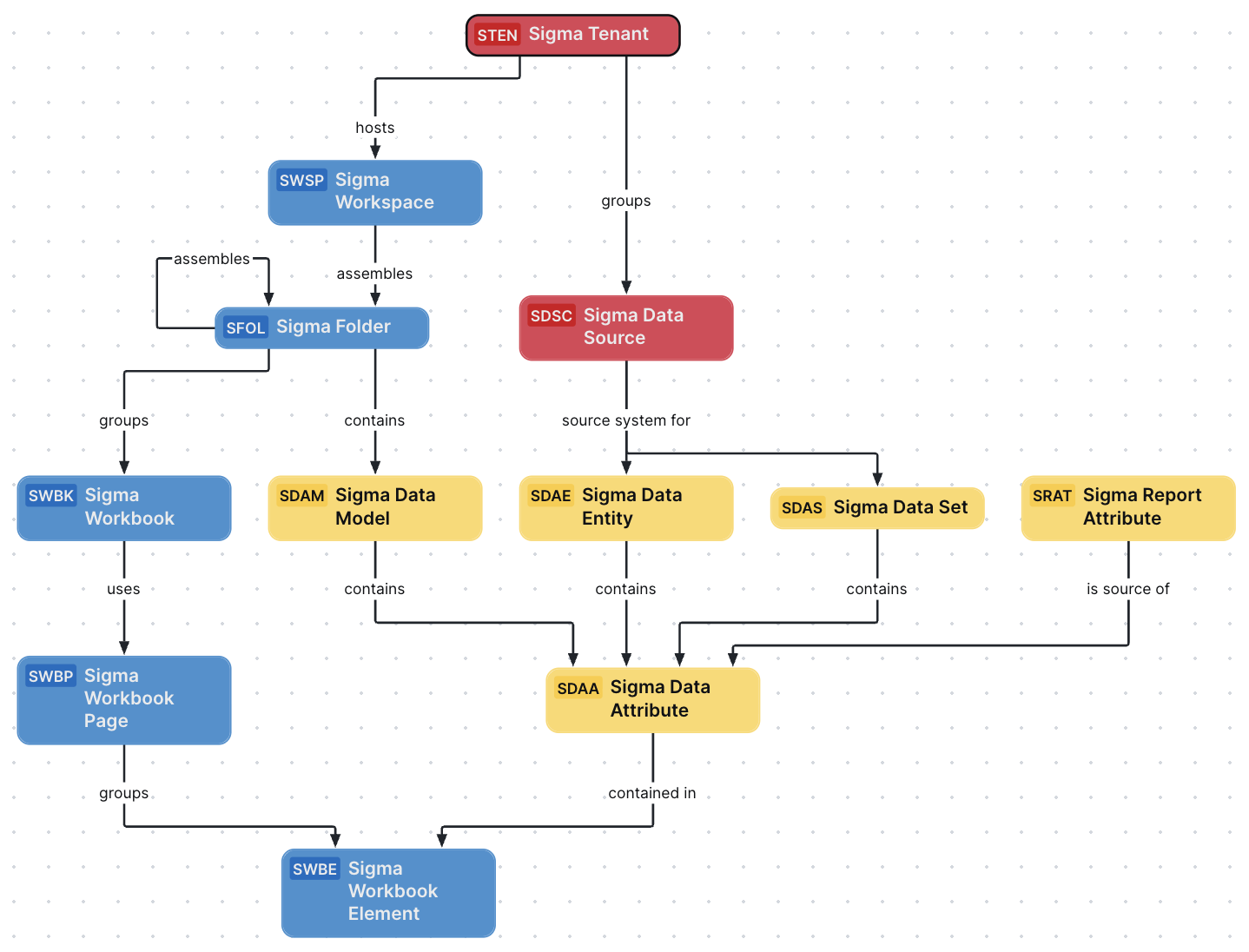
The following section describes how to recreate this diagram view in your Collibra environment.
Create a Sigma operating model diagram view
The following procedure describes how to quickly create a new diagram view to visualize the operating model.
Steps
- Open the asset page.
- Click the
Diagram tab.
The diagram is shown in the default diagram view. - Click
 to add a new view.
 - Select the Text option below the diagram view name.
The diagram view text editor is shown. - Copy the code from the Show JSON code section below and paste it in the diagram view text editor.
- Click Save.
- Edit the name and description of the diagram view as needed.
{
  "nodes": [
    {
      "id": "Sigma Tenant",
      "type": {
        "id": "00000000-0000-0000-0000-100000000091"
      }
    },
    {
      "id": "Sigma Workspace",
      "type": {
        "id": "00000000-0000-0000-0000-100000000093"
      }
    },
    {
      "id": "Sigma Data Source",
      "type": {
        "id": "00000000-0000-0000-0000-100000000092"
      }
    },
    {
      "id": "Sigma Folder",
      "type": {
        "id": "00000000-0000-0000-0000-100000000094"
      }
    },
    {
      "id": "Sigma Workbook",
      "type": {
        "id": "00000000-0000-0000-0000-100000000095"
      }
    },
    {
      "id": "Sigma Workbook Page",
      "type": {
        "id": "00000000-0000-0000-0000-100000000096"
      }
    },
    {
      "id": "Sigma Workbook Element",
      "type": {
        "id": "00000000-0000-0000-0000-100000000097"
      }
    },
    {
      "id": "Sigma Data Entity",
      "type": {
        "id": "00000000-0000-0000-0000-100000000101"
      }
    },
    {
      "id": "Sigma Data Set",
      "type": {
        "id": "00000000-0000-0000-0000-100000000100"
      }
    },
    {
      "id": "Sigma Data Model",
      "type": {
        "id": "00000000-0000-0000-0000-100000000099"
      }
    },
    {
      "id": "Sigma Data Attribute",
      "type": {
        "id": "00000000-0000-0000-0000-100000000102"
      }
    },
    {
      "id": "Sigma Report Attribute",
      "type": {
        "id": "00000000-0000-0000-0000-100000000098"
      }
    }
  ],
  "edges": [
    {
      "from": "Sigma Tenant",
      "to": "Sigma Workspace",
      "label": "",
      "style": "arrow",
      "type": {
        "id": "00000000-0000-0000-0000-120000000000"
      },
      "roleDirection": true
    },
    {
      "from": "Sigma Tenant",
      "to": "Sigma Data Source",
      "label": "",
      "style": "arrow",
      "type": {
        "id": "00000000-0000-0000-0000-000000007054"
      },
      "roleDirection": true
    },
    {
      "from": "Sigma Workspace",
      "to": "Sigma Folder",
      "label": "",
      "style": "arrow",
      "type": {
        "id": "00000000-0000-0000-0000-120000000001"
      },
      "roleDirection": true
    },
    {
      "from": "Sigma Folder",
      "to": "Sigma Folder",
      "label": "",
      "style": "arrow",
      "type": {
        "id": "00000000-0000-0000-0000-120000000001"
      },
      "roleDirection": true
    },
    {
      "from": "Sigma Folder",
      "to": "Sigma Workbook",
      "label": "",
      "style": "arrow",
      "type": {
        "id": "00000000-0000-0000-0000-120000000002"
      },
      "roleDirection": true
    },
    {
      "from": "Sigma Workbook",
      "to": "Sigma Workbook Page",
      "label": "",
      "style": "arrow",
      "type": {
        "id": "00000000-0000-0000-0000-120000000007"
      },
      "roleDirection": true
    },
    {
      "from": "Sigma Workbook Page",
      "to": "Sigma Workbook Element",
      "label": "",
      "style": "arrow",
      "type": {
        "id": "00000000-0000-0000-0000-120000000004"
      },
      "roleDirection": true
    },
    {
      "from": "Sigma Data Source",
      "to": "Sigma Data Entity",
      "label": "",
      "style": "arrow",
      "type": {
        "id": "00000000-0000-0000-0000-000000007050"
      },
      "roleDirection": true
    },
    {
      "from": "Sigma Data Source",
      "to": "Sigma Data Set",
      "label": "",
      "style": "arrow",
      "type": {
        "id": "00000000-0000-0000-0000-000000007050"
      },
      "roleDirection": true
    },
    {
      "from": "Sigma Folder",
      "to": "Sigma Data Model",
      "label": "",
      "style": "arrow",
      "type": {
        "id": "00000000-0000-0000-0000-120000000014"
      },
      "roleDirection": true
    },
    {
      "from": "Sigma Data Entity",
      "to": "Sigma Data Attribute",
      "label": "",
      "style": "arrow",
      "type": {
        "id": "00000000-0000-0000-0000-000000007047"
      },
      "roleDirection": true
    },
    {
      "from": "Sigma Data Set",
      "to": "Sigma Data Attribute",
      "label": "",
      "style": "arrow",
      "type": {
        "id": "00000000-0000-0000-0000-000000007062"
      },
      "roleDirection": true
    },
    {
      "from": "Sigma Data Model",
      "to": "Sigma Data Attribute",
      "label": "",
      "style": "arrow",
      "type": {
        "id": "00000000-0000-0000-0000-000000007196"
      },
      "roleDirection": true
    },
    {
      "from": "Sigma Report Attribute",
      "to": "Sigma Data Attribute",
      "label": "",
      "style": "arrow",
      "type": {
        "id": "00000000-0000-0000-0000-120000000010"
      },
      "roleDirection": false
    },
    {
      "from": "Sigma Data Attribute",
      "to": "Sigma Workbook Element",
      "label": "",
      "style": "arrow",
      "type": {
        "id": "00000000-0000-0000-0000-000000007058"
      },
      "roleDirection": true
    }
  ],
  "showOverview": false,
  "enableFilters": true,
  "showLabels": true,
  "showFields": true,
  "showLegend": false,
  "showPreview": true,
  "visitStrategy": "directed",
  "layout": "HierarchyTopBottom",
  "maxNodeLabelLength": 50,
  "maxEdgeLabelLength": 30,
  "layoutOptions": {
    "compactGroups": false,
    "componentArrangementPolicy": "topmost",
    "edgeBends": true,
    "edgeBundling": true,
    "edgeToEdgeDistance": 5,
    "minimumLayerDistance": "auto",
    "nodeToEdgeDistance": 5,
    "orthogonalRouting": true,
    "preciseNodeHeightCalculation": true,
    "recursiveGroupLayering": true,
    "separateLayers": true,
    "webWorkers": true,
    "nodePlacer": {
      "barycenterMode": true,
      "breakLongSegments": true,
      "groupCompactionStrategy": "none",
      "nodeCompaction": false,
      "straightenEdges": true
    }
  }
}