Processing methods
Data Quality & Observability uses two methods to process Data Quality Jobs: Pullup and Pushdown. The processing method of your data is determined by whether your connection uses the Data Quality Pullup Processing or Data Quality Pushdown Processing capability.
Pushdown processing
In Pushdown mode, Data Quality Jobs are submitted directly to Pushdown-compatible data source, such as Databricks, SAP HANA, or Snowflake. Processing occurs entirely within the SQL data warehouse. The resulting profile data is then shown on the Job Details page.
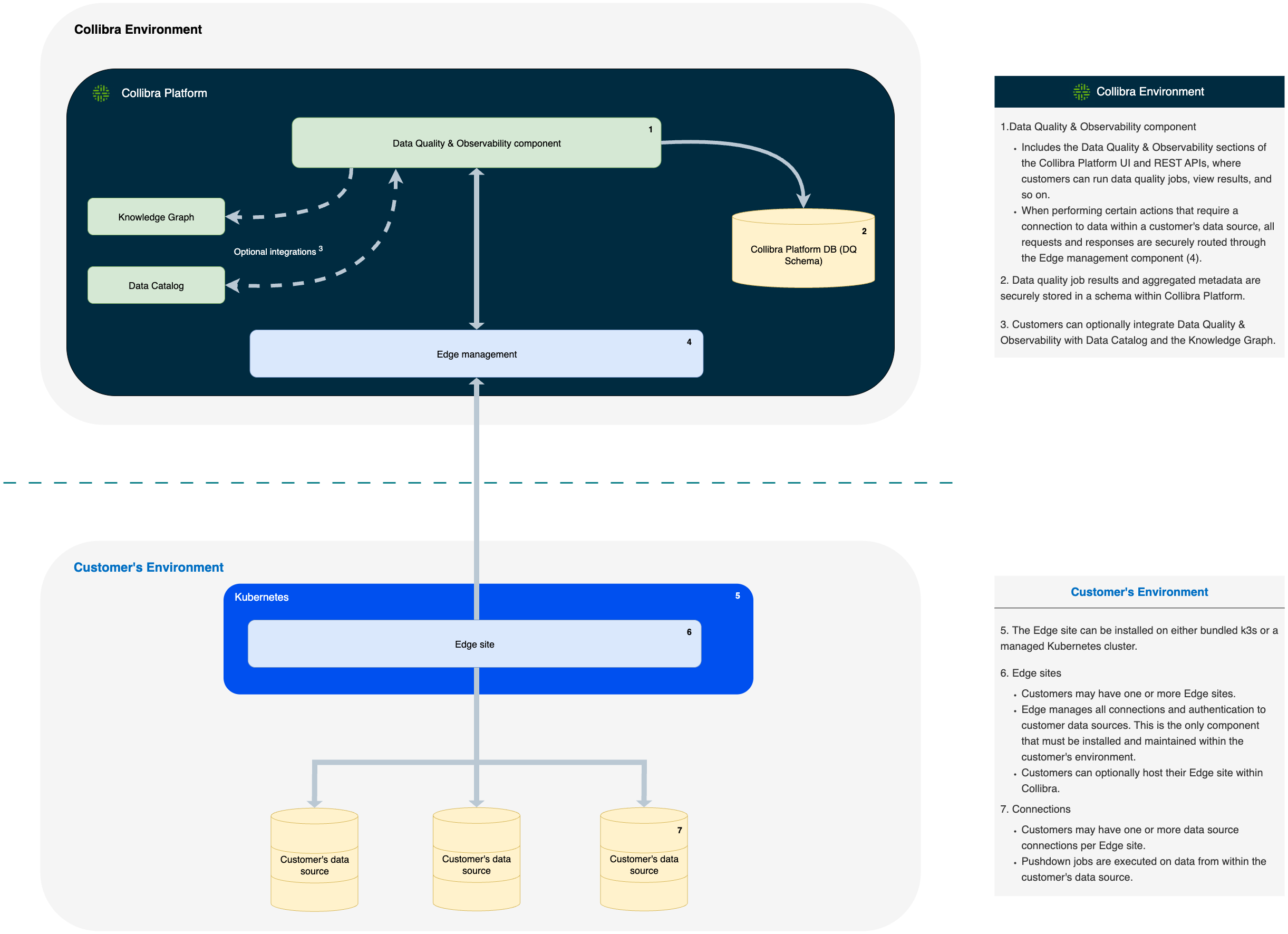
- Data Quality & Observability component
- Includes the Data Quality & Observability sections of the Collibra Platform UI and REST APIs, where customers can run Data Quality Jobs, view results, and so on.
- Data Quality Job results and aggregated metadata are securely stored in a schema within Collibra Platform.
- Customers can optionally integrate Data Quality & Observability with Data Catalog and the Knowledge Graph.
- When performing certain actions that require a connection to data within a customer's data source, all requests and responses are securely routed through the Edge management component.
- The Edge site can be installed on either bundled k3s or a managed Kubernetes cluster.
- Edge sites
- Customers may have one or more Edge sites.
- Edge manages all connections and authentication to customer data sources. This is the only component that must be installed and maintained within the customer's environment.
- Customers can optionally host their Edge site within Collibra.
- Connections
- Customers may have one or more data source connections per Edge site.
- Pushdown jobs are executed on data from within the customer's data source.
Pullup processing
In Pullup mode, the Apache Spark compute engine handles all of the data processing. Spark reads source data from a database and processes it based on the parameters you define in the job configuration. The resulting profile data is then shown on the Job Details page.
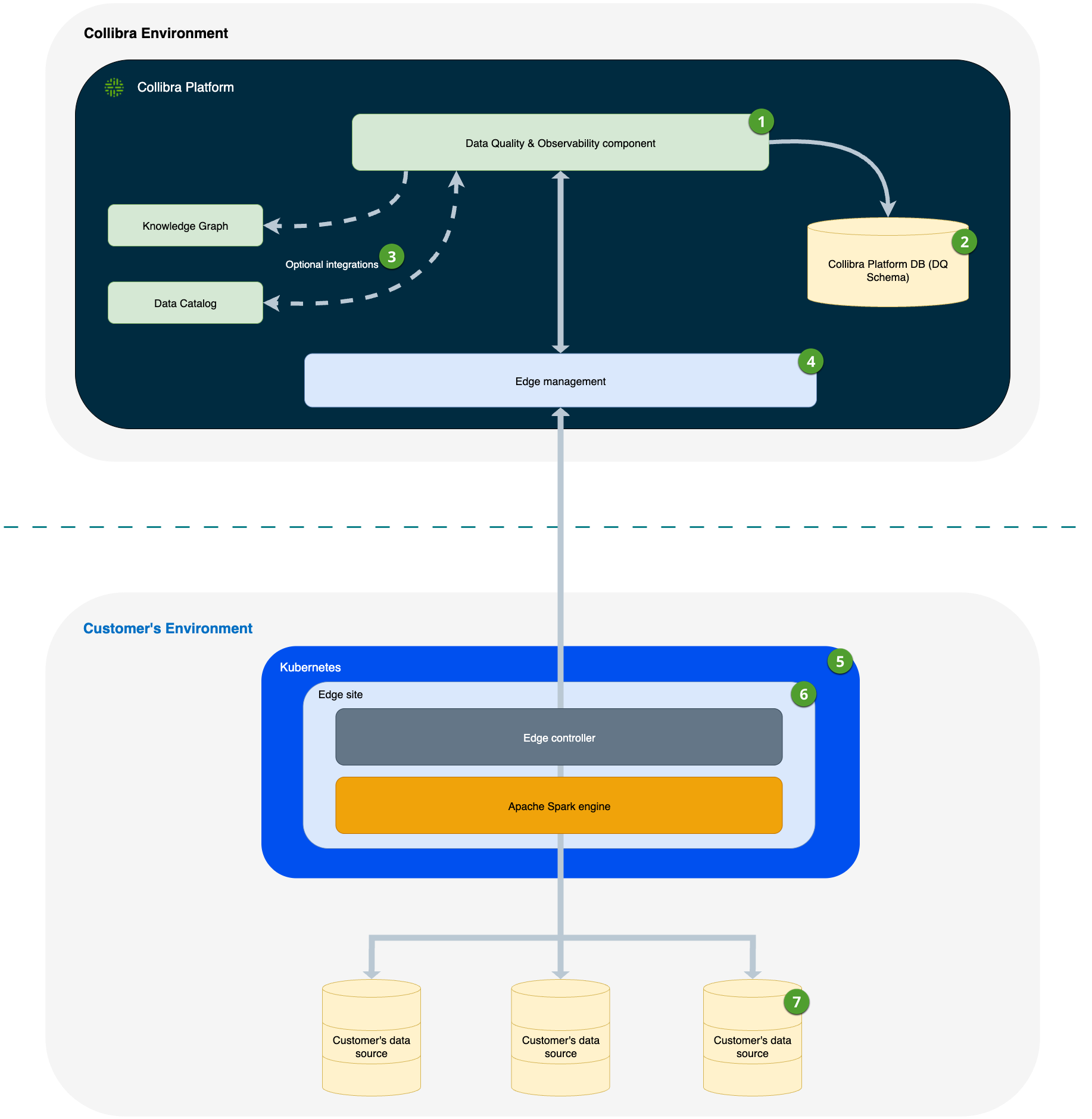
- Data Quality & Observability component
- Includes the Data Quality & Observability sections of the Collibra Platform UI and REST APIs, where customers can run Data Quality Jobs, view results, and so on.
- Data Quality Job results and aggregated metadata are securely stored in a schema within Collibra Platform.
- Customers can optionally integrate Data Quality & Observability with Data Catalog and the Knowledge Graph.
- When performing certain actions that require a connection to data within a customer's data source, all requests and responses are securely routed through the Edge management component.
- The Edge site can be installed on either bundled k3s or a managed Kubernetes cluster.
- Edge sites
- Customers may have one or more Edge sites.
- Edge manages all connections and authentication to customer data sources. This is the only component that must be installed and maintained within the customer's environment.
- An Apache Spark engine is deployed to the Edge site to support the Pullup processing of Data Quality Jobs. Pullup processing on the Edge site enhances security and data residency by ensuring that all sensitive data processing occurs directly within the customer's environment.
- Connections
- Customers may have one or more data source connections per Edge site.
- Pullup jobs are executed on data or a subset of data from the customer's data source that is brought to the Edge site for execution via the Spark engine.
Comparing the advantages of Pushdown and Pullup processing
Pushdown processes data in its source location, which helps reduce data transfer costs and can alleviate egress latency when running jobs on large sets of data. This method also contributes to lower latency and improved processing speeds by reducing reliance on external compute engines, such as Spark, for running Data Quality Jobs. Additionally, compared to Pullup, Pushdown features simplified management by avoiding the need for detailed Spark configuration tuning and supports auto-scaling with data warehouses like Snowflake and Databricks.
In contrast, Pullup offers flexibility to scale Spark compute resources to meet your needs. Spark allows you to monitor data quality on remote file systems and traditional databases that lack scalable computing power to run jobs efficiently. Pullup is more complex than Pushdown, however. You must carefully tune Spark resource settings to ensure jobs run efficiently. Note that jobs running in Pullup mode may also incur egress costs.
Helpful resources
- Go to Create a JDBC connection for more information on how to configure connections to these data sources.
- Go to Create a Pullup job to see how to configure a Pullup job.
- Go to Create a Pushdown job to see how to configure a Pushdown job.