Once your environment has been set up, you can create and manage data products. Community workflows are available to support the request, creation, and building of data products.
Data product lifecycle
The detailed lifecycle of a data product can look like this:
- Data products can be created beforehand or requested by consumers. (Request)
- The data product is built and published.
- The requirements are defined. (Discover)
- The port details are refined. (Discover)
- The sources are prepared. (Build)
- The data product is published and made available as curated data. (Publish)
- The requestor or any data consumer can find and use the data product. (Access)
- The data product is monitored and updated when needed. (Monitor)
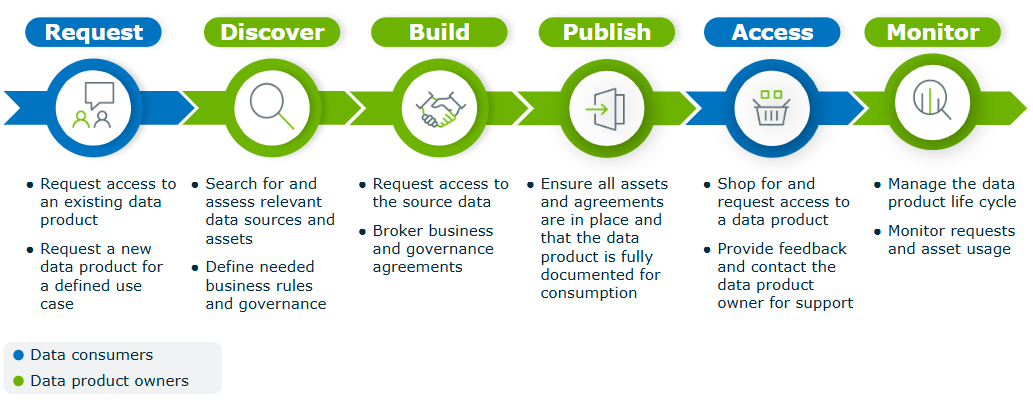
Available workflows
Workflows can help with the data product lifecycle: the request, creation, and access request. You can find the following data product-specific workflows in Collibra Marketplace.
Tip These workflows are published as community offerings and include dedicated documentation.
- Request Data Product: Allows users to request the creation of a new data product. The owner of the Data Product Catalog domain specified in the workflow definition receives the request.
- Data Product Request Management: Can automatically be activated when a user accepts data product ownership. It guides stakeholders through a structured, collaborative process to build and finalize the data product.
- Promote to Data Product: Allows users to create a Data Product from a Data Set asset. It links the data exposed in a Data Set to a Data Product through a new or existing Data Product Port.
- By default, this workflow is applicable only to Data Sets.
- Make sure you have a Data Product Catalog domain available in your environment before starting this workflow.
- Add port and output: Allows users to create a new Data Product Port or a new version of an existing Data Product Port from a Data Product.
- Request Assets Access:Allows users to add Data Product assets to their Data Basket for review and checkout.
This is an adapted version of the standard Request Assets Access workflow. The users who start the workflow must also have a global role with the Workflows > Participate in workflow global permission. This permission requires a Contributor license.
To activate and configure these workflows you need the following permissions:
- Product Rights > Workflow Administration
- Product Rights > System administration
Data product lifecycle example
The following life cycle example is based on the community workflows.

Related topics
Helpful resources
- Videos:
- Data Product learning path on Collibra University
- Ebook: Six best practices for building and deploying effective data products