A data product is a reusable package that provides data to answer a business question or solve a business problem. It includes everything that you need to understand, access, and use the data to make business decisions. It is secure and designed for all users, including those who are not domain experts.
Technically, a data product is an asset whose asset type is Data Product.
Components
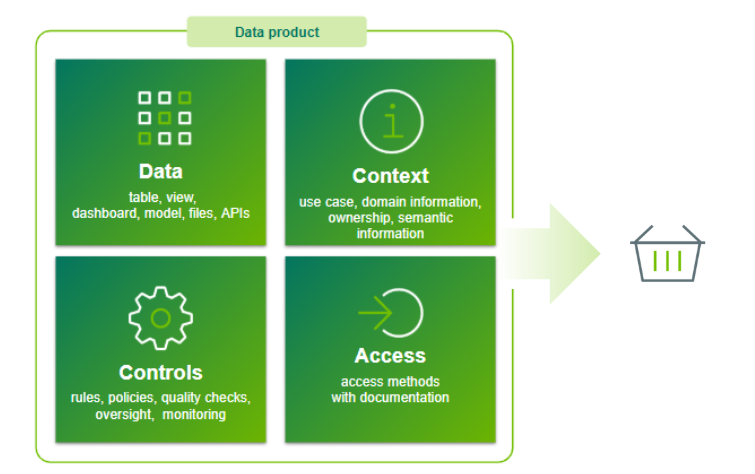
A data product goes beyond raw data elements such as tables or views. It consolidates four main components into a single asset, making the data easy to understand and use:
- Context: Background information explaining why the data product was created, who owns it, and any relevant quality or privacy details.
- Data: The physical assets, which can include tables, views, or business assets such as reports and models.
- Controls: Governing policies and data quality checks that ensure that data remains reliable.
- Access: Detailed instructions and governing policies on how data consumers can securely retrieve the data.
Data Product asset page
The Data Product asset page contains information to help you understand, access, and use the data that it represents. This information is based on the relation between the data product and other assets such as data product ports and data contracts. In addition to data elements, a Data Product asset includes context about the data and how to access it.
The Summary tab
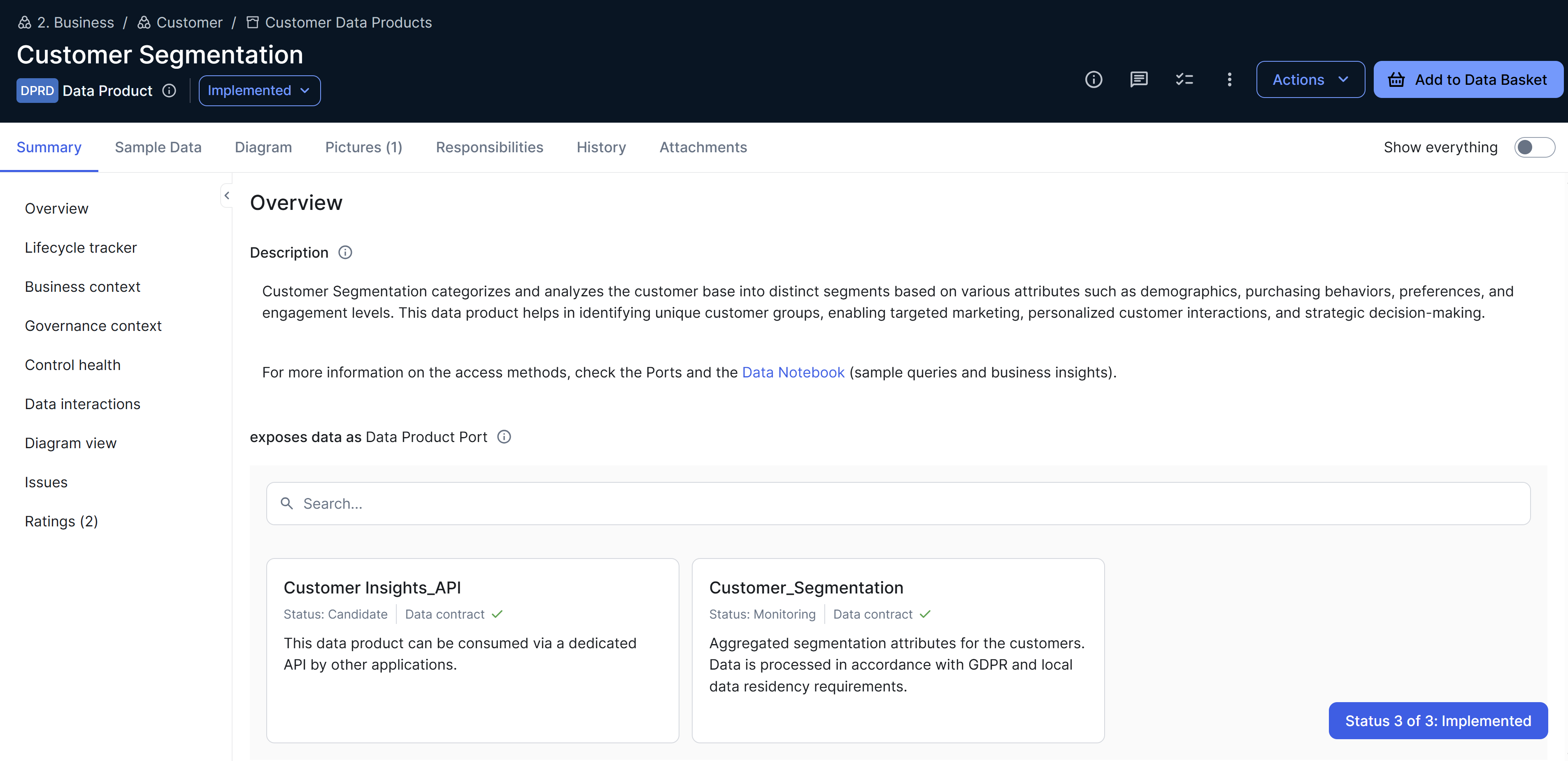
By default, the Summary tab on a Data Product asset page contains the following information.
| Field | Description |
|---|---|
| Description | A short, clear explanation of the data product. This is to provide immediate context for the product. |
| exposes data as Data Product Port |
Data Product Port assets that are an output for the data product, linked through the "Data Product exposes data as Data Product Port" relation type. When you click a data product port card, the Preview sidebar opens with the following information:
|
| Lifecycle track | The current stage in the lifecycle of the data product. |
| Business Case |
The rationale for how the data product improves decisions or profits. This is to justify resource allocation and ensure alignment with business goals. |
| Business Value |
A statement of when and how the data product delivers impact. This is to help prioritize and communicate the product's strategic value. |
| Data Product Category |
The category of the data product. The out-of-the-box values are Foundational and Derived. Foundational data products provide core data, whereas derived data products use that core data to deliver business insights. |
| relates to Business Terms | Business Term assets that are related to the data product, linked through the "Data Product relates to Business Term" relation type. |
| relates to Data Domain | Data Domain assets that are related to the data product, linked through the "Data Product relates to Data Domain" relation type. |
| relates to Measure | Measure assets that are related to the data product, linked through the "Data Product relates to Measure" relation type. |
| is explained in Data Notebook | Data Notebook assets that explain or provide interactive documentation for the data product, linked through the "Data Product is explained in Data Notebook" relation type. |
| Target Delivery Date | The expected completion date for building and publishing the data product. |
| consumes data through Data Product Port | Data Product Port assets through which the data product consumes data, linked through the "Data Product consumes data through Data Product Port" relation type. |
| Diagram view | A diagram view of the data product and its related assets. |
Workflows
Collibra offers specific workflows to help you request, create, and build data products effectively. These workflows, which are published as community offerings, are available in Collibra Marketplace. To activate and configure the workflows, you need to have a global role with the Product Rights > Workflow administration and System administration global permissions.
| Workflow | Description |
|---|---|
| Request Data Product |
Allows you to request the creation of a data product. The request is sent to the owner of the Data Product Catalog domain that is specified in the workflow definition. |
| Promote to Data Product |
Allows you to create a data product from a Data Set asset. It links the data that is exposed in a data set to a data product through a new or existing data product port. By default, this workflow is applicable only to Data Set assets. Before starting this workflow, ensure that you have a Data Product Catalog domain in your environment. |
| Add Port and Output | Allows you to create a data product port or a new version of an existing data product port from a data product. |
| Request Asset Access | Allows you to add data products to your data basket for review and check out the basket. This is an adapted version of the standard Request Assets Access workflow. To start the workflow, you need to have the Workflows > Participate in workflow global permission, which requires a Contributor license. |