Process Register domain page overview

Important 

Choose an option below to explore the documentation for the latest user interface (UI) or the classic UI.

The domain page provides a complete overview of all information related to a domain.
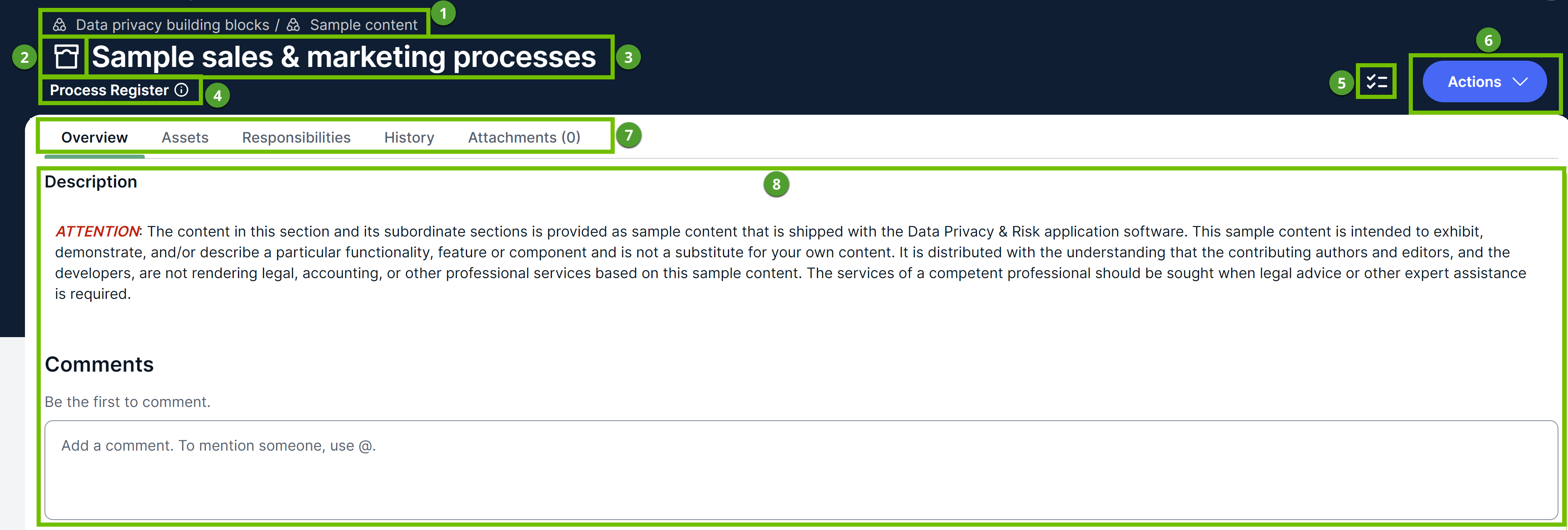
Image of the Progress Register domain page

Image of the Progress Register domain page

Number Description
1 Navigation path of the current domain.
2

The icon or abbreviation of the domain's type.

3 The name of the domain.
4

The type of the domain.

5 Open tasks for the domain.
5 6

Actions you can take on the domain, for example, requesting input, editing, moving, or deleting.

6 7

Tabs to navigate to other pages of the domain and add characteristics.

  • Overview: Description of the domain and comments.
  • Assets: Assets in the domain.
  • Responsibilities: View permissions and responsibilities of the domain.
  • History: Changes made to the domain, including the names of the users who made the changes, along with the timestamp.
  • Files: Attachments: Attachments related to the domain.
7 8

The currently selected page, in this case the Overview page, contains all of the attributes that have been defined for the domain.

If you want to paste text from external sources into the text box, we recommend clicking <> and then pasting the text into the Source Code dialog box. This allows you to edit the HTML source code and help remove any unwanted formatting or tags. The Source Code dialog box does not support iframes.