Overview and diagram view
When you integrate Strategy, Collibra Data Lineage creates new Strategy assets and relations in Data Catalog. You can see them on the asset page overview or visualize them in a diagram.
- The assets have the same names as their corresponding data objects in Strategy.
- Asset types are only created if you have all specific Strategy and Data Catalog permissions.
- All Strategy assets are created in the same domain.
- Relations that were manually created between Strategy assets and other assets via a relation type in the Strategy operating model, are deleted after synchronizing the Strategy metadata.
The following image shows the relations between Strategy asset types.
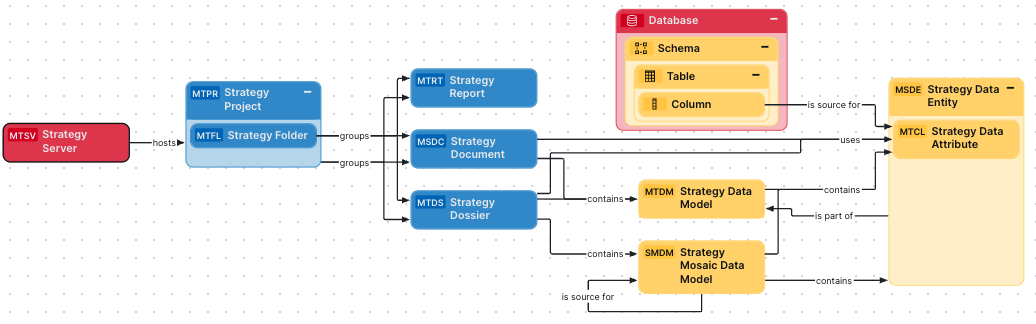
- Between Strategy Documents and Strategy Dossiers.
- Between Strategy Documents and Strategy Reports.
Harvested metadata per asset type
This table shows the harvested Strategy metadata for assets of each Strategy asset type, assuming you have the necessary subscriptions and configurations for a full ingestion.
Important To access Strategy data, you have to use the In-memory Dataset connection method in Strategy, not the Live Connect connection method. If the data is not stored in memory, the Strategy APIs can't access it.
- Object Templates
- System Objects
- Version Update History
| Asset type | Harvested Strategy metadata in Data Catalog |
Public ID |
|---|---|---|
|
Strategy Data Attribute Public ID: MicroStrategyDataAttribute |
Description |
Description |
| Technical Data Type | TechnicalDataType | |
|
Calculation Rule Note This attribute is not assigned to the asset type by default and must be added manually. Automated assignment will be available in a future release.
|
CalculationRule | |
| Description from source system | DescriptionFromSourceSystem | |
| Source Type | SourceType | |
| Semantic Type in Source | SemanticTypeInSource | |
| Aggregate from Base | AggregateFromBase | |
|
BI Data Model contains / is part of BI Data Attribute |
BIDataModelContainsBIDataAttribute |
|
| Report uses / used in Data Attribute | ReportUsesDataAttribute | |
|
Data Entity contains / is part of Data Attribute |
DataEntityContainsDataAttribute |
|
|
Column is source for / is target of Data Attribute |
ColumnIsSourceForDataAttribute | |
|
Strategy Data Entity Public ID: MicroStrategyDataEntity |
Description |
Description |
|
Descriptive Example |
DescriptiveExample |
|
| Location | Location | |
| Description from source system | DescriptionFromSourceSystem | |
| Source Type | SourceType | |
|
Data Entity contains / is part of Data Attribute |
DataEntityContainsDataAttribute |
|
|
Data Entity is part of / contains Data Model |
DataEntityIsPartOfDataModel |
|
|
Strategy Data Model Public ID: MicroStrategyDataModel Note If the data model is embedded in the project, the data model inherits the name of the project. |
Description |
Description |
|
Certified |
Certified | |
|
Owner in source The only harvested metadata are email addresses. |
OwnerInSource | |
| BI Report contains / is contained in BI Data Model | BIReportContainsBIDataModel | |
|
BI Data Model contains / is part of BI Data Attribute |
BIDataModelContainsBIDataAttribute |
|
| Data Model contains / is part of Data Entity | DataEntityIsPartOfDataModel | |
|
Data Model contains / is used in Column |
DataModelContainsColumn |
|
|
Strategy Mosaic Data Model Public ID: StrategyMosaicDataModel |
Description from source system | DescriptionFromSourceSystem |
| Source Type | SourceType | |
| Document creation date | DocumentCreationDate | |
| Document modification date | DocumentModificationDate | |
| Version | Version | |
| Certified | Certified | |
|
Owner in source The only harvested metadata are email addresses. |
OwnerInSource | |
| URL | Url | |
| Data Serve Mode | DataServeMode | |
| BI Report contains / is contained in BI Data Model | BIReportContainsBIDataModel | |
| BI Data Model contains / is part of BI Data Attribute | BIDataModelContainsBIDataAttribute | |
| Data Model contains / is part of Data Entity | DataEntityIsPartOfDataModel | |
| Model is source for / sources Model | BIDataModelIsSourceForBIDataModel | |
|
Strategy Document Public ID: MicroStrategyDocument |
Description |
Description |
|
Certified |
Certified | |
|
Owner in source The only harvested metadata are email addresses. |
OwnerInSource | |
|
URL Note You can specify the platform on which you run Strategy, in your lineage harvester configuration file, to ensure the correct URL. |
Url | |
| Description from source system | DescriptionFromSourceSystem | |
|
Business Dimension groups / is grouped into Report |
BusinessDimensionGroupsReport | |
|
BI Report contains / contained in BI Data Model |
BIReportContainsBIDataModel | |
|
Report uses / used in Data Attribute |
ReportUsesDataAttribute | |
|
Strategy Dossier Public ID: MicroStrategyDossier |
Description |
Description |
|
Certified |
Certified | |
|
Owner in source The only harvested metadata are email addresses. |
OwnerInSource | |
| Description from source system | DescriptionFromSourceSystem | |
|
Business Dimension groups / is grouped into Report |
BusinessDimensionGroupsReport | |
| BI Report contains / is contained in BI Data Model | BIReportContainsBIDataModel | |
|
Report uses / used in Data Attribute |
ReportUsesDataAttribute | |
| BI Report source / is source for Data Asset | DataAssetIsSourceForBIReport | |
|
Strategy Folder Public ID: MicroStrategyFolder |
Description |
Description |
| Description from source system | DescriptionFromSourceSystem | |
|
BI Folder assembles / is assembled in BI Folder |
BIFolderAssemblesBIFolder | |
|
Business Dimension groups / is grouped into Report |
BusinessDimensionGroupsReport | |
|
Strategy Project Public ID: MicroStrategyProject |
Description |
Description |
|
Document creation date |
DocumentCreationDate | |
| Document modification date | DocumentModificationDate | |
| Description from source system | DescriptionFromSourceSystem | |
| Server hosts / is hosted in Business Dimension | ServerHostsBusinessDimension | |
|
BI Folder assembles / is assembled in BI Folder |
BIFolderAssemblesBIFolder | |
|
Business Dimension groups / is grouped into Report |
BusinessDimensionGroupsReport | |
|
Strategy Report Public ID: MicroStrategyReport |
Description |
Description |
|
Certified |
Certified | |
| Document creation date | DocumentCreationDate | |
| Document modification date | DocumentModificationDate | |
|
URL |
Url | |
|
Owner in source The only harvested metadata are email addresses. |
OwnerInSource | |
| Description from source system | DescriptionFromSourceSystem | |
|
Report groups / is grouped into Report |
ReportGroupsReport | |
|
Strategy Server Public ID: MicroStrategyServer |
Description | Description |
|
Server hosts / is hosted in Business Dimension |
ServerHostsBusinessDimension |
Recommended hierarchy within a domain
You can enable hierarchies for the domain in which your Strategy assets are ingested. Doing so makes it easier to understand the relation between your Strategy assets, when viewing the assets on the domain page.
Follow these steps to enable and configure the recommended hierarchy.
Steps
- Open the domain page of the relevant BI Catalog domain.
- On the content toolbar, click
 .
.
The Configure Hierarchy dialog box appears. - Select Enable Hierarchy.
- Select Single path.
- Start typing and select each of the following relation types:
- Server hosts Business Dimension
- BI Data Model contains BI Data Attribute
- BI Report contains BI Data Model
- BI Report source Data Asset
- BI Folder assembles BI Folder
- Report groups Report
- Business Dimension groups Report
- Report uses Data Attribute
- Report Attribute contained in Report
- Report Attribute sourced from Data Attribute
- Data Entity contains Data Attribute
- Data Entity is part of Data Model
- Data Model contains Column
- Column is source for Data Attribute
- Click Apply.
- In an asset view, if any asset is deleted, for example via synchronization or manual deletion, the view is recreated and the hierarchy is lost. In this case, you can again enable and configure the recommended hierarchy.
- When viewing the hierarchy for a community or domain, if the parent of a node that is in the community or domain belongs to a different community or domain, that node is not shown in the hierarchy.
Create a Strategy operating model diagram view
You can create a Strategy-specific diagram view, to visualize the operating model. The following procedure provides instruction on how to quickly create a new diagram view by copying and pasting the JSON code in the diagram view text editor.
Steps
- Open the asset page.
- Click the
Diagram tab.
The diagram is shown in the default diagram view. - Click
 to add a new view.
 - Select the Text option below the diagram view name.
The diagram view text editor is shown. - Copy the code from the Show JSON code section below and paste it in the diagram view text editor.
- Click Save.
- Edit the name and description of the diagram view as needed.
{
  "nodes": [
    {
      "id": "Strategy Server",
      "type": {
        "id": "00000000-0000-0000-0000-100000000040"
      }
    },
    {
      "id": "Strategy Project",
      "type": {
        "id": "00000000-0000-0000-0000-100000000041"
      }
    },
    {
      "id": "Strategy Folder",
      "type": {
        "id": "00000000-0000-0000-0000-100000000042"
      }
    },
    {
      "id": "Strategy Dossier",
      "type": {
        "id": "00000000-0000-0000-0000-100000000043"
      }
    },
    {
      "id": "Strategy Report",
      "type": {
        "id": "00000000-0000-0000-0000-100000000044"
      },
      "layoutRegion": "flow"
    },
    {
      "id": "Strategy Document",
      "type": {
        "id": "00000000-0000-0000-0000-100000000049"
      }
    },
    {
      "id": "Strategy Data Model",
      "type": {
        "id": "00000000-0000-0000-0000-100000000046"
      }
    },
    {
      "id": "Strategy Data Entity",
      "type": {
        "id": "00000000-0000-0000-0000-100000000048"
      }
    },
    {
      "id": "Strategy Data Attribute",
      "type": {
        "id": "00000000-0000-0000-0000-100000000047"
      },
      "layoutRegion": "flow"
    },
    {
      "id": "Column",
      "type": {
        "id": "00000000-0000-0000-0000-000000031008"
      }
    },
    {
      "id": "Table",
      "type": {
        "id": "00000000-0000-0000-0000-000000031007"
      }
    },
    {
      "id": "Schema",
      "type": {
        "id": "00000000-0000-0000-0001-000400000002"
      }
    },
    {
      "id": "Database",
      "type": {
        "id": "00000000-0000-0000-0000-000000031006"
      }
    },
    {
      "id": "Strategy Mosaic Data Model",
      "type": {
        "id": "00000000-0000-0000-0000-100000000120"
      },
      "layoutRegion": "flow"
    }
  ],
  "edges": [
    {
      "from": "Strategy Server",
      "to": "Strategy Project",
      "style": "arrow",
      "type": {
        "id": "00000000-0000-0000-0000-120000000000"
      },
      "roleDirection": true
    },
    {
      "from": "Strategy Project",
      "to": "Strategy Folder",
      "style": "boxing",
      "type": {
        "id": "00000000-0000-0000-0000-120000000001"
      },
      "roleDirection": true
    },
    {
      "from": "Strategy Folder",
      "to": "Strategy Document",
      "style": "arrow",
      "type": {
        "id": "00000000-0000-0000-0000-120000000002"
      },
      "roleDirection": true
    },
    {
      "from": "Strategy Data Entity",
      "to": "Strategy Data Model",
      "style": "arrow",
      "type": {
        "id": "00000000-0000-0000-0000-000000007046"
      },
      "roleDirection": true
    },
    {
      "from": "Strategy Data Entity",
      "to": "Strategy Data Attribute",
      "style": "boxing",
      "type": {
        "id": "00000000-0000-0000-0000-000000007047"
      },
      "roleDirection": true
    },
    {
      "from": "Column",
      "to": "Table",
      "label": "",
      "style": "boxed",
      "type": {
        "id": "00000000-0000-0000-0000-000000007042"
      },
      "roleDirection": true
    },
    {
      "from": "Schema",
      "to": "Table",
      "label": "",
      "style": "boxing",
      "type": {
        "id": "00000000-0000-0000-0000-000000007043"
      },
      "roleDirection": true
    },
    {
      "from": "Strategy Project",
      "to": "Strategy Report",
      "label": "",
      "style": "arrow",
      "type": {
        "id": "00000000-0000-0000-0000-120000000002"
      },
      "roleDirection": true
    },
    {
      "from": "Strategy Project",
      "to": "Strategy Dossier",
      "label": "",
      "style": "arrow",
      "type": {
        "id": "00000000-0000-0000-0000-120000000002"
      },
      "roleDirection": true
    },
    {
      "from": "Strategy Project",
      "to": "Strategy Document",
      "label": "",
      "style": "arrow",
      "type": {
        "id": "00000000-0000-0000-0000-120000000002"
      },
      "roleDirection": true
    },
    {
      "from": "Strategy Folder",
      "to": "Strategy Dossier",
      "label": "",
      "style": "arrow",
      "type": {
        "id": "00000000-0000-0000-0000-120000000002"
      },
      "roleDirection": true
    },
    {
      "from": "Strategy Folder",
      "to": "Strategy Report",
      "label": "",
      "style": "arrow",
      "type": {
        "id": "00000000-0000-0000-0000-120000000002"
      },
      "roleDirection": true
    },
    {
      "from": "Strategy Document",
      "to": "Strategy Data Model",
      "label": "",
      "style": "arrow",
      "type": {
        "id": "00000000-0000-0000-0000-120000000015"
      },
      "roleDirection": true
    },
    {
      "from": "Strategy Dossier",
      "to": "Strategy Data Model",
      "label": "",
      "style": "arrow",
      "type": {
        "id": "00000000-0000-0000-0000-120000000015"
      },
      "roleDirection": true
    },
    {
      "from": "Strategy Dossier",
      "to": "Strategy Data Attribute",
      "label": "",
      "style": "arrow",
      "type": {
        "id": "00000000-0000-0000-0000-120000000021"
      },
      "roleDirection": true
    },
    {
      "from": "Strategy Document",
      "to": "Strategy Data Attribute",
      "label": "",
      "style": "arrow",
      "type": {
        "id": "00000000-0000-0000-0000-120000000021"
      },
      "roleDirection": true
    },
    {
      "from": "Strategy Data Model",
      "to": "Strategy Data Attribute",
      "label": "",
      "style": "boxing",
      "type": {
        "id": "00000000-0000-0000-0000-000000007196"
      },
      "roleDirection": true
    },
    {
      "from": "Column",
      "to": "Strategy Data Attribute",
      "label": "",
      "style": "arrow",
      "type": {
        "id": "00000000-0000-0000-0000-120000000011"
      },
      "roleDirection": true
    },
    {
      "from": "Database",
      "to": "Schema",
      "label": "",
      "style": "boxing",
      "type": {
        "id": "00000000-0000-0000-0000-000000007024"
      },
      "roleDirection": true
    },
    {
      "from": "Strategy Dossier",
      "to": "Strategy Mosaic Data Model",
      "label": "",
      "style": "arrow",
      "type": {
        "id": "00000000-0000-0000-0000-120000000015"
      },
      "roleDirection": true
    },
    {
      "from": "Strategy Mosaic Data Model",
      "to": "Strategy Data Entity",
      "label": "",
      "style": "arrow",
      "type": {
        "id": "00000000-0000-0000-0000-000000007046"
      },
      "roleDirection": false
    },
    {
      "from": "Strategy Mosaic Data Model",
      "to": "Strategy Data Attribute",
      "label": "",
      "style": "arrow",
      "type": {
        "id": "00000000-0000-0000-0000-000000007196"
      },
      "roleDirection": true
    },
    {
      "from": "Strategy Mosaic Data Model",
      "to": "Strategy Mosaic Data Model",
      "label": "",
      "style": "arrow",
      "type": {
        "id": "00000000-0000-0000-0000-120000000022"
      },
      "roleDirection": true
    }
  ],
  "showOverview": false,
  "enableFilters": true,
  "showLabels": true,
  "showFields": true,
  "showLegend": true,
  "showPreview": true,
  "visitStrategy": "directed",
  "layout": "HierarchyLeftRight",
  "maxNodeLabelLength": 50,
  "maxEdgeLabelLength": 30,
  "layoutOptions": {
    "compactGroups": false,
    "componentArrangementPolicy": "topmost",
    "edgeBends": true,
    "edgeBundling": true,
    "edgeToEdgeDistance": 5,
    "minimumLayerDistance": "auto",
    "nodeToEdgeDistance": 5,
    "orthogonalRouting": true,
    "preciseNodeHeightCalculation": true,
    "recursiveGroupLayering": true,
    "separateLayers": true,
    "webWorkers": true,
    "nodePlacer": {
      "barycenterMode": true,
      "breakLongSegments": true,
      "groupCompactionStrategy": "none",
      "nodeCompaction": false,
      "straightenEdges": true
    }
  }
}