Warning The single-file definition option for custom technical lineage reached its end of life on July 31, 2026. Create new custom technical lineage definitions by using the batch definition option.
You can create a technical lineage for a particular data source, even if Collibra Data Lineage does not currently support integration of that data source. We refer to this as custom technical lineage.
For example, you want to create a technical lineage that shows relations between tables and columns from system A and system B, to system C, to system D (A and B -> C -> D). System A, B and D are supported data sources, but system C is a custom application. Depending on the instruction formatting option you choose, you can create one or more JSON files that defines the metadata of system C, to generate a technical lineage.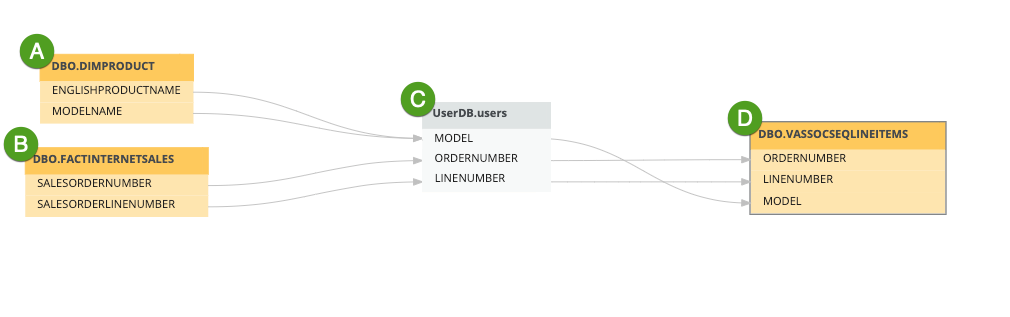
You can use your custom technical lineage JSON files as the only lineage source, or you can harvest metadata from supported data sources, such as Oracle and Tableau, to visualize lineage alongside the custom technical lineage defined by your JSON files.
JSON file formatting options: Single-file or batch definition
There are two formatting options for defining your custom technical lineage.
With the batch definition option, you define custom technical lineage across one or more JSON files. Collibra Data Lineage generates technical lineage based on the definitions in these files. You can also provide source code files to add details about where the lineage originates.
Note With the batch definition option, we no longer draw a distinction between simple and advanced custom technical lineage. You can still choose to include source code files to provide additional details on where the lineage comes from, but we no longer differentiate between a custom technical lineage that includes source code and one that does not.
Benefits
- You can define any number of JSON files, which allows for more efficient processing.
- Multiple organizational teams can contribute to the lineage, without having to merge their definitions into a single JSON file.
- You can show table-level lineage, column-level lineage, and indirect lineage.
- Stitching is natively available for any asset type.
With the single-file definition option, you define custom technical lineage in a single JSON file. Collibra Data Lineage generates technical lineage based on the definition in this file. You can also provide source code files to add transformation details.
When you use the sing-file definition option, consider the following limitations:
- The custom technical lineage must be defined in a single JSON file. This can be challenging if, for example, you have several organizational teams contributing to the lineage definition.
- You can only show column-level lineage, meaning the target of your lineage relationship always has to be a column.
- Stitching is only available natively for Column assets. Stitching is available for other asset types, but only if those assets are discovered by another scanner.
Simple and advanced custom technical lineage
If you opt for the single-file definition option, there are two types of custom technical lineages that you can create:
- Simple custom technical lineage, which defines a basic object hierarchy and creates a lineage between two or more data objects. To create a simple custom technical lineage, you need to include
assetsandlineagessections in your JSON file. You can add the transformation code in thelineagessection. - Advanced custom technical lineage, which contains a simple custom technical lineage and uses separate source code files that include transformation details, to create the lineage. To create an advanced custom technical lineage, you need to include
assets,lineagesandcodebase_filessections in your JSON file. You add references to the transformation code in source code files in thecodebase_filessection.
Transformation code in both simple and advanced custom technical lineages is shown in the source code pane at the bottom part of the technical lineage graph.
Note With the batch definition option, we no longer draw a distinction between simple and advanced custom technical lineage. You can still include, or not include, source code files to create the lineage, but we no longer differentiate between a custom technical lineage that includes source code and one that does not.
Custom technical lineage limitations
| Issue | Description |
|---|---|
|
The "Data Element targets / sources Data Element" relations aren't created for some asset types. |
As part of the technical lineage process, Collibra Data Lineage automatically creates relations of the type "Data Element targets / sources Data Element" between assets in Collibra that represent the data objects in your external data sources. However, he "Data Element targets / sources Data Element" relation can only be created between Data Element assets or assets of child asset types, for example:
To confirm, the "Data Element targets / sources Data Element" relation can't be created between other asset types; therefore that lineage can't be shown in a business lineage for other asset types. |
|
The Technical Lineage tab is not included on an asset page. |
The Technical Lineage tab, by which you access the technical lineage viewer, is not available on the asset pages of all asset types. If you want to view the technical lineage for an asset of a type for which the Technical Lineage tab is not included on the asset page, you need to access the lineage via an asset of a type for which the tab is included on the asset page. Keep in mind that he Technical Lineage tab is only visible if you have the following permissions:
|
| Missing stitching for Column assets |
Stitching cannot be achieved for Column assets if they are not part of the standard Database > Schema > Table > Column hierarchy, because such columns are not returned by the API. Example in which stitching cannot be achieved
In the following example hierarchy, the Column asset is not returned by API.
"name": "Archive",
      "type": "Folder"
    },
    {
      "name": "123",
      "type": "Folder"
    }
  ],
  "parent": {
    "name": "ABC",
    "type": "Folder"
  },
  "leaf": {
    "name": "DEF",
    "type": "Column"
  }
}
|

For details on creating the JSON files, go to Custom technical lineage JSON file details and Custom technical lineage JSON file examples.