The SAP AI Core integration of Collibra Platform uses the following asset types. The asset types are available out of the box in Collibra.
Important The functions of the SAP AI Core integration are limited if you do not enable AI governance. When you enable AI Governance, you can add custom attributes or custom relations, for example, AI Model Version, to the SAP AI Model Version asset.
| Asset type | Description |
|---|---|
|
AI Base Model
|
Represents foundational business concepts that define the model’s purpose and governing principles in your SAP AI Model workspace. |
|
SAP AI Model Version
|
A subtype of AI Model Version that represents AI model versions in SAP AI Core. |
|
AI Model Deployment
|
The operational instance where a model version is assigned computational resources to execute and generate real-time outputs. |
|
AI Endpoint
|
The access point for external systems that provides a consistent interface while allowing for the seamless exchange of underlying deployments. |
|
File
|
Represents the dataset files used to fine-tune your AI base models in the SAP AI Core workspace. This asset is optional, you can ingest this data during the integration by selecting Yes in the Do you want to ingest input and output assets? field. |
|
Storage Container
|
Represents the folder that contains the dataset files used to fine-tune your AI base models in the SAP AI Core workspace. This asset is optional, you can ingest this data during the integration by selecting Yes in the Do you want to ingest input and output assets? field. |
SAP AI Core diagram view
For information on the data that is integrated from SAP AI Core, go to Integrated SAP AI Core data.
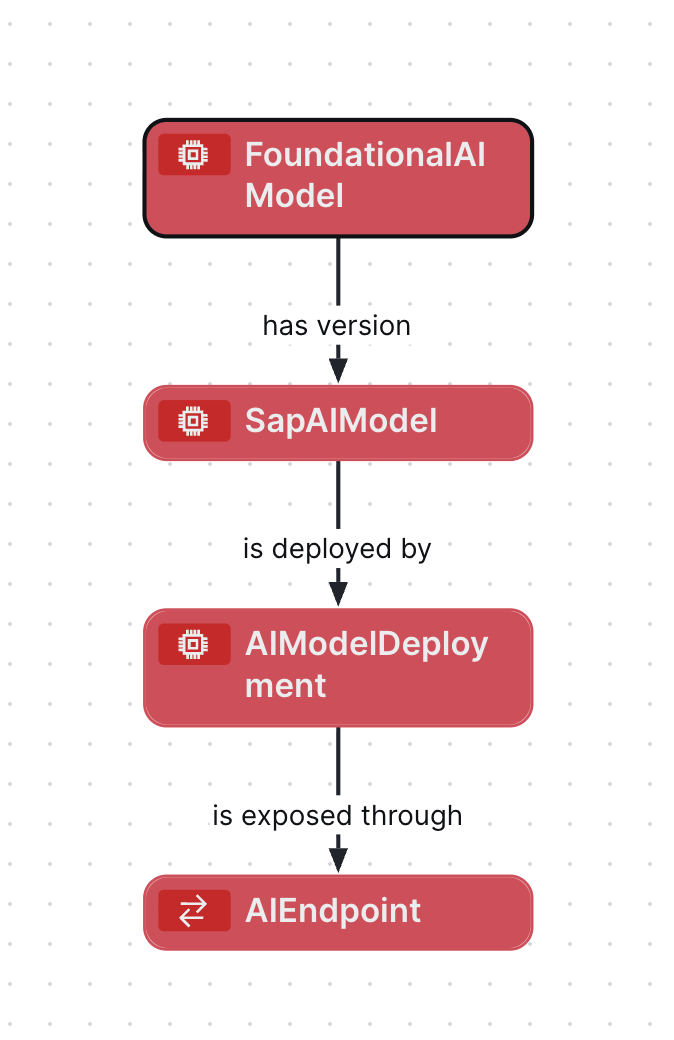
Steps
- Open the asset page.
- Click the
Diagram tab.
The diagram is shown in the default diagram view. - Click
 to add a new view.
 - Select the Text option below the diagram view name.
The diagram view text editor is shown. - Copy the code from the Show JSON code section below and paste it in the diagram view text editor.
- Click Save.
- Edit the name and description of the diagram view as needed.
Show JSON code
Copy
{
  "nodes": [
    {
      "id": "FoundationalAIModel",
      "type": {
        "id": "00000000-0000-0000-0000-000000031422"
      }
    },
    {
      "id": "SapAIModel",
      "type": {
        "id": "00000000-0000-0000-0000-000000031409"
      }
    },
    {
      "id": "AIModelDeployment",
      "type": {
        "id": "00000000-0000-0000-0000-000000031500"
      }
    },
    {
      "id": "AIEndpoint",
      "type": {
        "id": "00000000-0000-0000-0000-000000031501"
      }
    }
  ],
  "edges": [
    {
      "from": "FoundationalAIModel",
      "to": "SapAIModel",
      "label": "",
      "style": "arrow",
      "type": {
        "id": "00000000-0000-0000-0000-000000077000"
      },
      "roleDirection": true
    },
    {
      "from": "SapAIModel",
      "to": "AIModelDeployment",
      "label": "",
      "style": "arrow",
      "type": {
        "id": "00000000-0000-0000-0000-000000077001"
      },
      "roleDirection": true
    },
    {
      "from": "AIModelDeployment",
      "to": "AIEndpoint",
      "label": "",
      "style": "arrow",
      "type": {
        "id": "00000000-0000-0000-0000-000000077006"
      },
      "roleDirection": true
    }
  ],
  "showOverview": false,
  "enableFilters": true,
  "showLabels": true,
  "showFields": true,
  "showLegend": true,
  "showPreview": true,
  "visitStrategy": "completeGraph",
  "layout": "HierarchyTopBottom",
  "maxNodeLabelLength": 50,
  "maxEdgeLabelLength": 30,
  "layoutOptions": {
    "compactGroups": false,
    "componentArrangementPolicy": "topmost",
    "edgeBends": true,
    "edgeBundling": true,
    "edgeToEdgeDistance": 5,
    "minimumLayerDistance": "auto",
    "nodeToEdgeDistance": 5,
    "orthogonalRouting": true,
    "preciseNodeHeightCalculation": true,
    "recursiveGroupLayering": true,
    "separateLayers": true,
    "webWorkers": true,
    "nodePlacer": {
      "barycenterMode": true,
      "breakLongSegments": true,
      "groupCompactionStrategy": "none",
      "nodeCompaction": false,
      "straightenEdges": true
    }
  }
}