The Databricks Unity Catalog integration for metadata uses a specific subset of asset types. These are available out of the box. For more information on asset attributes or metadata synchronized per asset type, go to Integrated Databricks Unity Catalog data.
- Tip
-
- If you're looking for information on how to create technical lineage for Databricks Unity Catalog via Edge, go to the technical lineage for Databricks Unity Catalog documentation.
| Asset type | Description |
|---|---|
|
Technology Asset System |
Executable software that you can buy commercially off the shelf (COTS) or build internally to automate one or more business functions that help run a business smoothly and efficiently. Examples: CRM, ERP, EDW |
|
Technology Asset Database |
A collection of data that is systematically organized or structured to make it easy to create, update, and query the information. Examples: Ora_DGC_V45, SalesDB2020 |
|
Data Asset Schema Data Structure |
An asset that contains the location of specific data. It provides all the details that are required for setting up a connection to a database or server. |
|
Data Asset
Table Data Structure |
An implementation of data entities in columns and rows, in a given database system. It is the basic structure of a relational database. Examples: Account_tbl, CUST_ADDR |
|
Data Asset
Database View Data Structure |
A Database View is a virtual table based on the result-set of an SQL statement. Database View assets in Collibra represent Views and Metric Views in Databricks Unity Catalog. |
|
Data Asset
Metric View Data Structure |
A dimensional model in Databricks Unity Catalog that maps physical data schemas to report-friendly concepts by defining dimensions, measures, and relationships to enable consistent query generation. This is currently only available if you select Ingest metric views (in preview) in the integration settings. |
|
Data Asset Column Data Element |
An atomic unit of data that can be stored in a database table. Examples: FST_NM, EMPID |
Databricks Unity Catalog diagram view
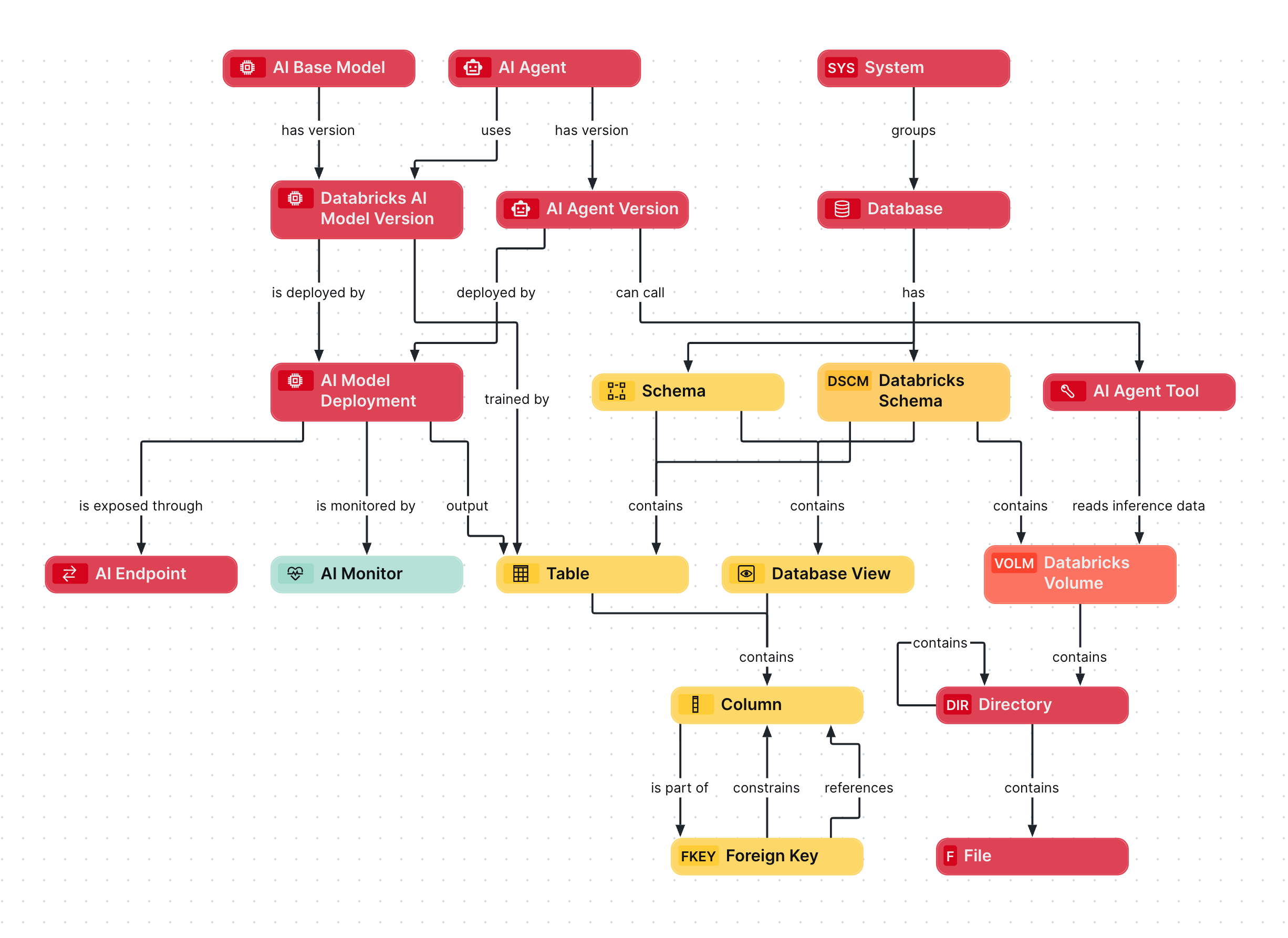
The following image provides a comprehensive overview of the relations between Databricks Unity Catalog asset types and cardinality of the relation types in the assets' assignment.
- For metadata ingestion data from Databricks Unity Catalog, go to Integrated Databricks Unity Catalog data.
- For AI ingestion data from Databricks Unity Catalog, go to Synchronized Databricks AI Catalog data.
Steps
- Open the asset page.
- Click the
Diagram tab.
The diagram is shown in the default diagram view. - Click
 to add a new view.
 - Select the Text option below the diagram view name.
The diagram view text editor is shown. - Copy the code from the Show JSON code section below and paste it in the diagram view text editor.
- Click Save.
- Edit the name and description of the diagram view as needed.
{
  "nodes": [
    {
      "id": "System",
      "type": {
        "id": "00000000-0000-0000-0000-000000031302"
      }
    },
    {
      "id": "Database",
      "type": {
        "id": "00000000-0000-0000-0000-000000031006"
      }
    },
    {
      "id": "Schema",
      "type": {
        "id": "00000000-0000-0000-0001-000400000002"
      }
    },
    {
      "id": "Databricks Schema",
      "type": {
        "id": "00000000-0000-0000-0000-000000031413"
      }
    },
    {
      "id": "Table",
      "type": {
        "id": "00000000-0000-0000-0000-000000031007"
      }
    },
    {
      "id": "Database View",
      "type": {
        "id": "00000000-0000-0000-0001-000400000009"
      }
    },
    {
      "id": "Column",
      "type": {
        "id": "00000000-0000-0000-0000-000000031008"
      }
    },
    {
      "id": "Foreign Key",
      "type": {
        "id": "00000000-0000-0000-0001-000400000003"
      }
    },
    {
      "id": "Databricks Volume",
      "type": {
        "id": "00000000-0000-0000-0000-000000031412"
      }
    },
    {
      "id": "Directory",
      "type": {
        "id": "00000000-0000-0000-0000-000000031303"
      }
    },
    {
      "id": "File",
      "type": {
        "id": "00000000-0000-0000-0000-000000031304"
      }
    },
    {
      "id": "AI Base Model",
      "type": {
        "id": "00000000-0000-0000-0000-000000031422"
      }
    },
    {
      "id": "Databricks AI Model Version",
      "type": {
        "id": "00000000-0000-0000-0000-000000031405"
      }
    },
    {
      "id": "AI Model Deployment",
      "type": {
        "id": "00000000-0000-0000-0000-000000031500"
      }
    },
    {
      "id": "AI Endpoint",
      "type": {
        "id": "00000000-0000-0000-0000-000000031501"
      }
    },
    {
      "id": "AI Monitor",
      "type": {
        "id": "00000000-0000-0000-0000-000000031502"
      }
    },
    {
      "id": "AI Agent",
      "type": {
        "id": "00000000-0000-0000-0000-000000031450"
      }
    },
    {
      "id": "AI Agent Version",
      "type": {
        "id": "00000000-0000-0000-0000-000000031452"
      }
    },
    {
      "id": "AI Agent Tool",
      "type": {
        "id": "00000000-0000-0000-0000-000000031453"
      }
    }
  ],
  "edges": [
    {
      "from": "System",
      "to": "Database",
      "label": "",
      "style": "arrow",
      "type": {
        "id": "00000000-0000-0000-0000-000000007054"
      },
      "roleDirection": true
    },
    {
      "from": "Database",
      "to": "Schema",
      "label": "",
      "style": "arrow",
      "type": {
        "id": "00000000-0000-0000-0000-000000007024"
      },
      "roleDirection": true
    },
    {
      "from": "Database",
      "to": "Databricks Schema",
      "label": "",
      "style": "arrow",
      "type": {
        "id": "00000000-0000-0000-0000-000000007024"
      },
      "roleDirection": true
    },
    {
      "from": "Schema",
      "to": "Table",
      "label": "",
      "style": "arrow",
      "type": {
        "id": "00000000-0000-0000-0000-000000007043"
      },
      "roleDirection": true
    },
    {
      "from": "Schema",
      "to": "Database View",
      "label": "",
      "style": "arrow",
      "type": {
        "id": "00000000-0000-0000-0000-000000007043"
      },
      "roleDirection": true
    },
    {
      "from": "Databricks Schema",
      "to": "Table",
      "label": "",
      "style": "arrow",
      "type": {
        "id": "00000000-0000-0000-0000-000000007043"
      },
      "roleDirection": true
    },
    {
      "from": "Databricks Schema",
      "to": "Database View",
      "label": "",
      "style": "arrow",
      "type": {
        "id": "00000000-0000-0000-0000-000000007043"
      },
      "roleDirection": true
    },
    {
      "from": "Table",
      "to": "Column",
      "label": "",
      "style": "arrow",
      "type": {
        "id": "00000000-0000-0000-0000-000000007042"
      },
      "roleDirection": false
    },
    {
      "from": "Database View",
      "to": "Column",
      "label": "",
      "style": "arrow",
      "type": {
        "id": "00000000-0000-0000-0000-000000007042"
      },
      "roleDirection": false
    },
    {
      "from": "Column",
      "to": "Foreign Key",
      "label": "",
      "style": "arrow",
      "type": {
        "id": "00000000-0000-0000-0000-000000007093"
      },
      "roleDirection": true
    },
    {
      "from": "Foreign Key",
      "to": "Column",
      "label": "constrains",
      "style": "arrow",
      "type": {
        "id": "00000000-0000-0000-0000-000000007091"
      },
      "roleDirection": true
    },
    {
      "from": "Foreign Key",
      "to": "Column",
      "label": "references",
      "style": "arrow",
      "type": {
        "id": "00000000-0000-0000-0000-000000007092"
      },
      "roleDirection": true
    },
    {
      "from": "Databricks Schema",
      "to": "Databricks Volume",
      "label": "",
      "style": "arrow",
      "type": {
        "id": "00000000-0000-0000-0000-000000007044"
      },
      "roleDirection": true
    },
    {
      "from": "Databricks Volume",
      "to": "Directory",
      "label": "",
      "style": "arrow",
      "type": {
        "id": "00000000-0000-0000-0001-002600000001"
      },
      "roleDirection": true
    },
    {
      "from": "Directory",
      "to": "Directory",
      "label": "",
      "style": "arrow",
      "type": {
        "id": "00000000-0000-0000-0001-002600000003"
      },
      "roleDirection": true
    },
    {
      "from": "Directory",
      "to": "File",
      "label": "",
      "style": "arrow",
      "type": {
        "id": "00000000-0000-0000-0000-000000007060"
      },
      "roleDirection": true
    },
    {
      "from": "AI Base Model",
      "to": "Databricks AI Model Version",
      "label": "",
      "style": "arrow",
      "type": {
        "id": "00000000-0000-0000-0000-000000077000"
      },
      "roleDirection": true
    },
    {
      "from": "Databricks AI Model Version",
      "to": "AI Model Deployment",
      "label": "",
      "style": "arrow",
      "type": {
        "id": "00000000-0000-0000-0000-000000077001"
      },
      "roleDirection": true
    },
    {
      "from": "AI Model Deployment",
      "to": "AI Endpoint",
      "label": "",
      "style": "arrow",
      "type": {
        "id": "00000000-0000-0000-0000-000000077006"
      },
      "roleDirection": true
    },
    {
      "from": "AI Model Deployment",
      "to": "AI Monitor",
      "label": "",
      "style": "arrow",
      "type": {
        "id": "00000000-0000-0000-0000-000000077007"
      },
      "roleDirection": true
    },
    {
      "from": "Databricks AI Model Version",
      "to": "Table",
      "label": "trained by",
      "style": "arrow",
      "type": {
        "id": "00000000-0000-0000-0000-000000007102"
      },
      "roleDirection": true
    },
    {
      "from": "AI Model Deployment",
      "to": "Table",
      "label": "output",
      "style": "arrow",
      "type": {
        "id": "00000000-0000-0000-0000-000000077004"
      },
      "roleDirection": true
    },
    {
      "from": "AI Agent",
      "to": "Databricks AI Model Version",
      "label": "uses",
      "style": "arrow",
      "type": {
        "id": "00000000-0000-0000-0000-000000007108"
      },
      "roleDirection": true
    },
    {
      "from": "AI Agent",
      "to": "AI Agent Version",
      "label": "",
      "style": "arrow",
      "type": {
        "id": "00000000-0000-0000-0000-000000007206"
      },
      "roleDirection": true
    },
    {
      "from": "AI Agent Version",
      "to": "AI Agent Tool",
      "label": "",
      "style": "arrow",
      "type": {
        "id": "00000000-0000-0000-0000-000000007207"
      },
      "roleDirection": true
    },
    {
      "from": "AI Agent Tool",
      "to": "Databricks Volume",
      "label": "reads inference data",
      "style": "arrow",
      "type": {
        "id": "00000000-0000-0000-0000-000000007211"
      },
      "roleDirection": true
    },
    {
      "from": "AI Agent Version",
      "to": "AI Model Deployment",
      "label": "deployed by",
      "style": "arrow",
      "type": {
        "id": "00000000-0000-0000-0000-000000007213"
      },
      "roleDirection": true
    }
  ],
  "showOverview": false,
  "enableFilters": true,
  "showLabels": true,
  "showFields": true,
  "showLegend": true,
  "showPreview": true,
  "visitStrategy": "directed",
  "layout": "HierarchyTopBottom",
  "maxNodeLabelLength": 50,
  "maxEdgeLabelLength": 30,
  "layoutOptions": {
    "compactGroups": false,
    "componentArrangementPolicy": "topmost",
    "edgeBends": true,
    "edgeBundling": true,
    "edgeToEdgeDistance": 5,
    "minimumLayerDistance": "auto",
    "nodeToEdgeDistance": 5,
    "orthogonalRouting": true,
    "preciseNodeHeightCalculation": true,
    "recursiveGroupLayering": true,
    "separateLayers": true,
    "webWorkers": true,
    "nodePlacer": {
      "barycenterMode": true,
      "breakLongSegments": true,
      "groupCompactionStrategy": "none",
      "nodeCompaction": false,
      "straightenEdges": true
    }
  }
}