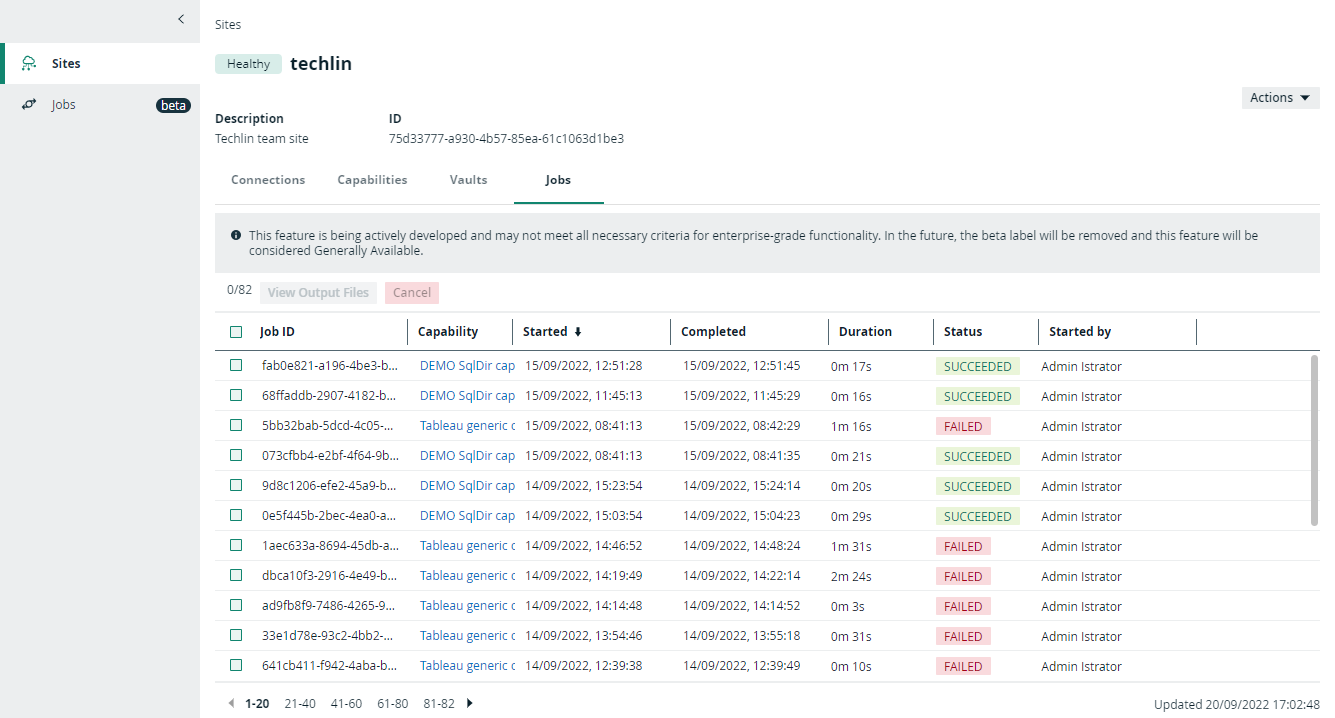
Edge Jobs dashboard
The Edge Jobs dashboard gives you an overview of all jobs that are executed by an Edge site.
When you enable the Edge Jobs feature (beta) in Collibra Console, the Edge Jobs dashboard becomes available in the Collibra Data Intelligence Cloud settings.
Note Only users with the Admin role can enable this feature.
Important This is a beta feature.
On the Edge Jobs dashboard, you find an overview of all jobs that have either been scheduled or completed in your Edge sites. Each job is a row in the table and contains basic information such as start and completion date, status, Edge site, capability and so on. You can also open the log files of a job and cancel a scheduled job from this dashboard.
.png "Edge jobs overview")
You can also view the jobs associated to a specific Edge site by going to the Jobs tab of that site.
- Click Sites.
- Select your site from the list.
- Click Jobs in the tab menu.