Cancel jobs
You can cancel an Edge site job which is either running or queued to run.
Prerequisites
- You have a global role that has the Manage connections and capabilities global permission.
- You have jobs currently running or queued .
Steps
- Open an Edge site.
-
On the main menu, click
 , and then click
 Settings.
The Collibra settings page opens. -
In the tab pane, click Edge.
The Edge sites overview appears. - In the Edge site overview, click the name of an Edge site with the status Healthy.
The Edge site page appears.
-
On the main menu, click
- Click Jobs.
- Select the checkbox next to the job you would like to cancel.
Tip You can select more than one job at a time.
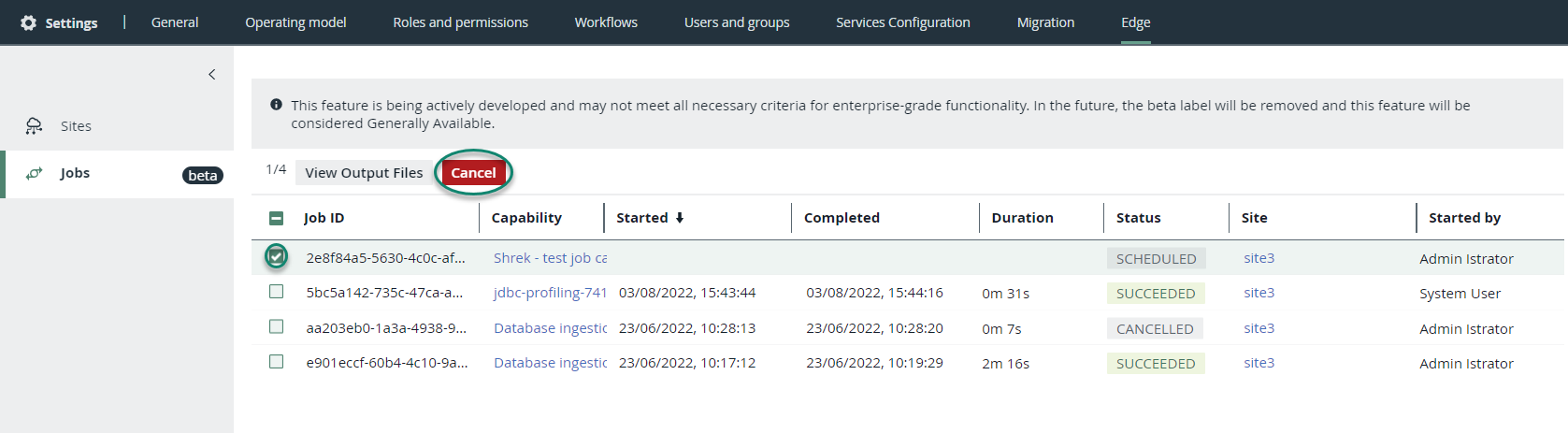
- In the action toolbar, click Cancel.
The job is canceled, and the status of this job is CANCELED.