In the User Retention section, the 3 categories of user retention are based on the sign-in history of users in relation to the previous intervals.
- An interval is a segmented date range that is based on the duration of the usage period you selected.
- A preceding interval is the interval that immediately precedes the current interval, within the usage period you selected.
- A past interval is any interval before the preceding interval, within the usage period you selected.
The user retention categories are as follows:
- Retained: Number of users who signed in within the current interval and also the preceding interval.
- Returning: Number of users who signed in within the current interval and also a past interval, but not within the preceding interval.
- Acquired: Number of users who signed in within the current interval for the first time, having never signed in before.
The user retention for each category is determined by counting the number of users falling into each category within an interval, and expressing it as a percentage of the total number of users within that interval. This provides insights into user engagement levels based on their sign-in history within a specific interval.
Note Collibra now uses the New app experience, which is enabled by default. This feature moves the navigation tabs from the top of the page to the left sidebar. The screenshots and steps in this topic might not reflect the new experience.
Example
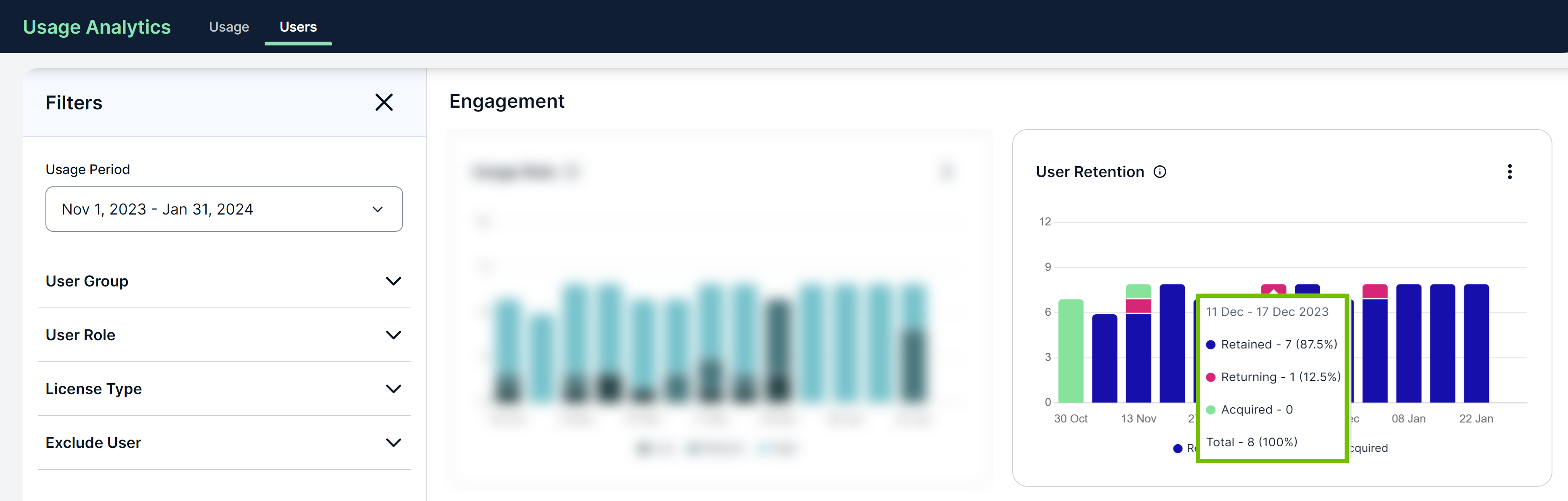
To understand the data shown in the User Retention section, consider the following chart shown for a usage period of Nov 1, 2023 - Jan 31, 2024. On the x-axis of the chart, the usage period is divided into weekly intervals, where each interval constitutes 7 days.
- 30% of 7 days = 2.1 days (rounded to 2 days when calculating the metrics)
- 50% of 7 days = 3.5 days (rounded to 3 days when calculating the metrics)
How to read and interpret the data
According to the highlighted data point in the chart:
- 11 Dec - 17 Dec 2023: The interval for which the data is shown is Dec 11-17, 2023, which constitutes 7 days.
- Total - 8 (100%): A total of 8 users signed in during the current interval.
- Retained - 7 (87.5%): 7 out of the 8 users signed in within Dec 11-17, 2023, and Dec 4-10, 2023. This constitutes 87.5% of users.
- Returning - 1 (12.5%): 1 out of the 8 users signed in within Dec 11-17, 2023, and a past interval (for example, Nov 1-5, 2023), but not within Dec 4-10, 2023. This constitutes 12.5% of users.
- Acquired: 0 out of the 8 users signed in for the first time within Dec 11-17, 2023. If this number were, for example, 5 instead of 0, it would mean that 5 users had never signed in before Dec 11-17, 2023.
Tip You can view the chart in full screen or as a table, and also download the chart as an image or a CSV file using  .
.