|
Asset
|
- Name
- ID
-
-
-
Asset type
- ID
- Name
- Description
- Parent asset types, up to the root asset type (for example Business asset)
-
- displayNameEnabled
- ratingsEnabled
- Asset type groups and their assignment
|
|
Asset type
|
- ID
- Name
- Description
- Parent asset types, up to the root asset type (for example Business asset)
-
- displayNameEnabled
- ratingsEnabled
- Asset type groups and their assignment
|
|
Assignment
|
- ID
-
Asset types referenced in the assignment
- ID
- Name
- Description
- Parent asset types, up to the root asset type (for example Business asset)
-
- displayNameEnabled
- ratingsEnabled
- Asset type groups and their assignment
- Articulation rules
-
Fields referenced in the assignment
-
Attribute types
- ID
- Name
- Description
-
Attribute type kind and its properties
|
Date
|
None
|
|
Multiple selection
(Multi value list)
|
Allowed values
Warning The list of allowed values is overwritten in the target environment, so it may remove values.
|
|
Numeric
|
|
|
Script
|
Language.
Note This field is only used for validation rule assets.
|
|
Selection
(single value list)
|
Allowed values (adding values, AND removals)
|
|
Text
|
Plain text
|
|
True/False
(boolean)
|
Metric
|
-
Relation types
- ID
- Description
- Role
- Co-role
-
Head asset type
- ID
- Name
- Description
- Parent asset types, up to the root asset type (for example Business asset)
-
- displayNameEnabled
- ratingsEnabled
- Asset type groups and their assignment
-
Tail asset type
- ID
- Name
- Description
- Parent asset types, up to the root asset type (for example Business asset)
-
- displayNameEnabled
- ratingsEnabled
- Asset type groups and their assignment
-
Complex relation types
- ID
- Name
- Description
-
-
Attribute types
- ID
- Name
- Description
-
Attribute type kind and its properties
|
Date
|
None
|
|
Multiple selection
(Multi value list)
|
Allowed values
Warning The list of allowed values is overwritten in the target environment, so it may remove values.
|
|
Numeric
|
|
|
Script
|
Language.
Note This field is only used for validation rule assets.
|
|
Selection
(single value list)
|
Allowed values (adding values, AND removals)
|
|
Text
|
Plain text
|
|
True/False
(boolean)
|
Metric
|
- Minimum cardinality
- Maximum cardinality
-
-
-
-
If it is a scoped assignment: the scope of the assignment
- ID
- Name
- Description
-
Communities
Note
- If the scope contains an entire community that contains subcommunities and domains, the subcommunities and domains are not included.
- If domains or communities are included in the scope, their parent communities will be included too. Other children of its parent community will not be included, unless they are also in the scope.
- The domain type of the included domains are also included.
-
Domains
- ID
- Name
- Description
- Exclude from Autohyperlinking
-
-
- If it is a scoped assignment: the global assignment
-
-
Validation rules referenced in the assignment
-
Characteristic types that are referenced in the validation script
-
Attribute types
- ID
- Name
- Description
-
Attribute type kind and its properties
|
Date
|
None
|
|
Multiple selection
(Multi value list)
|
Allowed values
Warning The list of allowed values is overwritten in the target environment, so it may remove values.
|
|
Numeric
|
|
|
Script
|
Language.
Note This field is only used for validation rule assets.
|
|
Selection
(single value list)
|
Allowed values (adding values, AND removals)
|
|
Text
|
Plain text
|
|
True/False
(boolean)
|
Metric
|
-
Relation types
- ID
- Description
- Role
- Co-role
-
Head asset type
- ID
- Name
- Description
- Parent asset types, up to the root asset type (for example Business asset)
-
- displayNameEnabled
- ratingsEnabled
- Asset type groups and their assignment
-
Tail asset type
- ID
- Name
- Description
- Parent asset types, up to the root asset type (for example Business asset)
-
- displayNameEnabled
- ratingsEnabled
- Asset type groups and their assignment
-
Complex relation types
- ID
- Name
- Description
-
-
Attribute types
- ID
- Name
- Description
-
Attribute type kind and its properties
|
Date
|
None
|
|
Multiple selection
(Multi value list)
|
Allowed values
Warning The list of allowed values is overwritten in the target environment, so it may remove values.
|
|
Numeric
|
|
|
Script
|
Language.
Note This field is only used for validation rule assets.
|
|
Selection
(single value list)
|
Allowed values (adding values, AND removals)
|
|
Text
|
Plain text
|
|
True/False
(boolean)
|
Metric
|
- Minimum cardinality
- Maximum cardinality
-
-
-
-
-
- Published asset page layout configurations
|
| Attribute |
- ID
-
Parent asset
- Name
- ID
-
-
-
Asset type
- ID
- Name
- Description
- Parent asset types, up to the root asset type (for example Business asset)
-
- displayNameEnabled
- ratingsEnabled
- Asset type groups and their assignment
-
Attribute type
- ID
- Name
- Description
-
Attribute type kind and its properties
|
Date
|
None
|
|
Multiple selection
(Multi value list)
|
Allowed values
Warning The list of allowed values is overwritten in the target environment, so it may remove values.
|
|
Numeric
|
|
|
Script
|
Language.
Note This field is only used for validation rule assets.
|
|
Selection
(single value list)
|
Allowed values (adding values, AND removals)
|
|
Text
|
Plain text
|
|
True/False
(boolean)
|
Metric
|
- Value(s)
|
|
Attribute type
|
- ID
- Name
- Description
-
Attribute type kind and its properties
|
Date
|
None
|
|
Multiple selection
(Multi value list)
|
Allowed values
Warning The list of allowed values is overwritten in the target environment, so it may remove values.
|
|
Numeric
|
|
|
Script
|
Language.
Note This field is only used for validation rule assets.
|
|
Selection
(single value list)
|
Allowed values (adding values, AND removals)
|
|
Text
|
Plain text
|
|
True/False
(boolean)
|
Metric
|
|
| Community |
|
|
Complex relation type
|
- ID
- Name
- Description
-
-
Attribute types
- ID
- Name
- Description
-
Attribute type kind and its properties
|
Date
|
None
|
|
Multiple selection
(Multi value list)
|
Allowed values
Warning The list of allowed values is overwritten in the target environment, so it may remove values.
|
|
Numeric
|
|
|
Script
|
Language.
Note This field is only used for validation rule assets.
|
|
Selection
(single value list)
|
Allowed values (adding values, AND removals)
|
|
Text
|
Plain text
|
|
True/False
(boolean)
|
Metric
|
- Minimum cardinality
- Maximum cardinality
-
|
|
Data quality rule
|
- ID
- Name
- Description
- Aggregation path
Categorization relation types- ID
- Description
- Role
- Co-role
Head asset type- ID
- Name
- Description
- Parent asset types, up to the root asset type (for example Business asset)
- displayNameEnabled
- ratingsEnabled
- Asset type groups and their assignment
Tail asset type- ID
- Name
- Description
- Parent asset types, up to the root asset type (for example Business asset)
- displayNameEnabled
- ratingsEnabled
- Asset type groups and their assignment
-
|
|
Domain
|
- ID
- Name
- Description
- Exclude from Autohyperlinking
-
-
|
|
Domain type
|
|
|
Relation type
|
- ID
- Description
- Role
- Co-role
-
Head asset type
- ID
- Name
- Description
- Parent asset types, up to the root asset type (for example Business asset)
-
- displayNameEnabled
- ratingsEnabled
- Asset type groups and their assignment
-
Tail asset type
- ID
- Name
- Description
- Parent asset types, up to the root asset type (for example Business asset)
-
- displayNameEnabled
- ratingsEnabled
- Asset type groups and their assignment
|
|
Roles
|
- No secondary objects
- ID
- Name
- Description
- Global
- Permissions
|
|
Scope
|
- ID
- Name
- Description
-
Communities
Note
- If the scope contains an entire community that contains subcommunities and domains, the subcommunities and domains are not included.
- If domains or communities are included in the scope, their parent communities will be included too. Other children of its parent community will not be included, unless they are also in the scope.
- The domain type of the included domains are also included.
-
Domains
- ID
- Name
- Description
- Exclude from Autohyperlinking
-
-
|
|
Status
|
|
|
Validation rule
|
- Name
- ID
-
Characteristic types that are referenced in the validation script
-
Attribute types
- ID
- Name
- Description
-
Attribute type kind and its properties
|
Date
|
None
|
|
Multiple selection
(Multi value list)
|
Allowed values
Warning The list of allowed values is overwritten in the target environment, so it may remove values.
|
|
Numeric
|
|
|
Script
|
Language.
Note This field is only used for validation rule assets.
|
|
Selection
(single value list)
|
Allowed values (adding values, AND removals)
|
|
Text
|
Plain text
|
|
True/False
(boolean)
|
Metric
|
-
Relation types
- ID
- Description
- Role
- Co-role
-
Head asset type
- ID
- Name
- Description
- Parent asset types, up to the root asset type (for example Business asset)
-
- displayNameEnabled
- ratingsEnabled
- Asset type groups and their assignment
-
Tail asset type
- ID
- Name
- Description
- Parent asset types, up to the root asset type (for example Business asset)
-
- displayNameEnabled
- ratingsEnabled
- Asset type groups and their assignment
-
Complex relation types
- ID
- Name
- Description
-
-
Attribute types
- ID
- Name
- Description
-
Attribute type kind and its properties
|
Date
|
None
|
|
Multiple selection
(Multi value list)
|
Allowed values
Warning The list of allowed values is overwritten in the target environment, so it may remove values.
|
|
Numeric
|
|
|
Script
|
Language.
Note This field is only used for validation rule assets.
|
|
Selection
(single value list)
|
Allowed values (adding values, AND removals)
|
|
Text
|
Plain text
|
|
True/False
(boolean)
|
Metric
|
- Minimum cardinality
- Maximum cardinality
-
-
-
-
-
|
| Workflow |
- Name
- Description
- Status
- Assignment rules (Applies To section)
Asset types- ID
- Name
- Description
- Parent asset types, up to the root asset type (for example Business asset)
- displayNameEnabled
- ratingsEnabled
- Asset type groups and their assignment
Domains- ID
- Name
- Description
- Exclude from Autohyperlinking
- Is Global Create
- Start label
- Configuration variables
Asset types- ID
- Name
- Description
- Parent asset types, up to the root asset type (for example Business asset)
- displayNameEnabled
- ratingsEnabled
- Asset type groups and their assignment
Characteristic typesAttribute types- ID
- Name
- Description
Attribute type kind and its propertiesDate | None | Multiple selection (Multi value list) | Allowed values Warning The list of allowed values is overwritten in the target environment, so it may remove values. | Numeric | | Script | Language. Note This field is only used for validation rule assets. | Selection (single value list) | Allowed values (adding values, AND removals)
| Text | Plain text | True/False (boolean) | Metric |
Relation types- ID
- Description
- Role
- Co-role
Head asset type- ID
- Name
- Description
- Parent asset types, up to the root asset type (for example Business asset)
- displayNameEnabled
- ratingsEnabled
- Asset type groups and their assignment
Tail asset type- ID
- Name
- Description
- Parent asset types, up to the root asset type (for example Business asset)
- displayNameEnabled
- ratingsEnabled
- Asset type groups and their assignment
Complex relation types- ID
- Name
- Description
Attribute types- ID
- Name
- Description
Attribute type kind and its propertiesDate | None | Multiple selection (Multi value list) | Allowed values Warning The list of allowed values is overwritten in the target environment, so it may remove values. | Numeric | | Script | Language. Note This field is only used for validation rule assets. | Selection (single value list) | Allowed values (adding values, AND removals)
| Text | Plain text | True/False (boolean) | Metric |
- Minimum cardinality
- Maximum cardinality
Domains- ID
- Name
- Description
- Exclude from Autohyperlinking
- Roles
- Business Item object type (i.e. Global vs Asset)
- Roles allowed to start
- Roles allowed to stop
- Roles allowed to reassign
- Start events
- Exclusivity
- Candidate user check disabled
- Guest user accessibility
- Registered user accessibility
- Process ID
- Workflow XML
- Flowable forms

|
|
Navigation objects
|
|
|
Asset view
|
- ID
- Name
- Description
- Configuration
- Is preferred
- Is default
- Sharing rules
- Assignment rules
-
Attribute types
- ID
- Name
- Description
-
Attribute type kind and its properties
|
Date
|
None
|
|
Multiple selection
(Multi value list)
|
Allowed values
Warning The list of allowed values is overwritten in the target environment, so it may remove values.
|
|
Numeric
|
|
|
Script
|
Language.
Note This field is only used for validation rule assets.
|
|
Selection
(single value list)
|
Allowed values (adding values, AND removals)
|
|
Text
|
Plain text
|
|
True/False
(boolean)
|
Metric
|
-
Relation types
- ID
- Description
- Role
- Co-role
-
Head asset type
- ID
- Name
- Description
- Parent asset types, up to the root asset type (for example Business asset)
-
- displayNameEnabled
- ratingsEnabled
- Asset type groups and their assignment
-
Tail asset type
- ID
- Name
- Description
- Parent asset types, up to the root asset type (for example Business asset)
-
- displayNameEnabled
- ratingsEnabled
- Asset type groups and their assignment
-
-
-
Asset types used as filters
- ID
- Name
- Description
- Parent asset types, up to the root asset type (for example Business asset)
-
- displayNameEnabled
- ratingsEnabled
- Asset type groups and their assignment
-
-
-
-
|
|
Dashboard
|
Any field referenced in a template of a widget:
- ID
- Name
-
Asset types
- ID
- Name
- Description
- Parent asset types, up to the root asset type (for example Business asset)
-
- displayNameEnabled
- ratingsEnabled
- Asset type groups and their assignment
-
-
Domains
- ID
- Name
- Description
- Exclude from Autohyperlinking
-
-
-
Roles
- No secondary objects
- ID
- Name
- Description
- Global
- Permissions
- Status

|
|
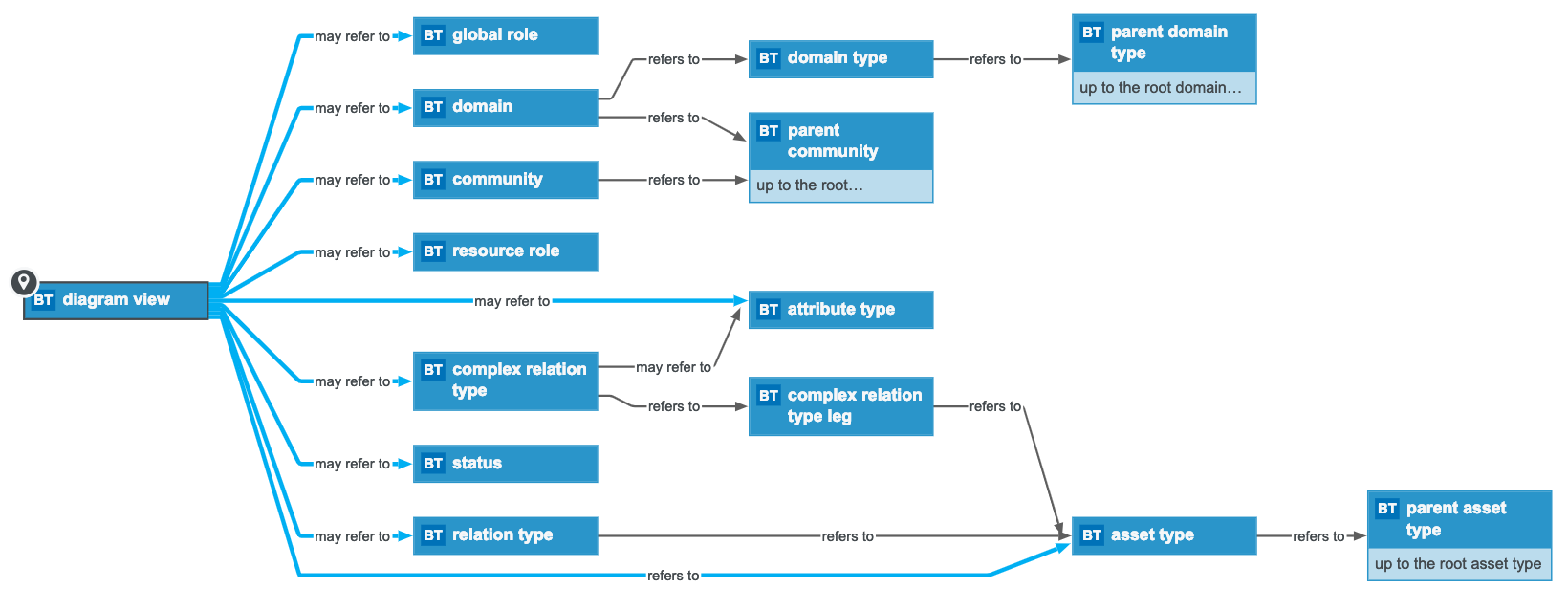
Diagram view
|
Any object referenced in the diagram view or its filter:
- ID
- Name
-
Asset types
- ID
- Name
- Description
- Parent asset types, up to the root asset type (for example Business asset)
-
- displayNameEnabled
- ratingsEnabled
- Asset type groups and their assignment
-
Characteristic types , for example in an overlay.
-
Attribute types
- ID
- Name
- Description
-
Attribute type kind and its properties
|
Date
|
None
|
|
Multiple selection
(Multi value list)
|
Allowed values
Warning The list of allowed values is overwritten in the target environment, so it may remove values.
|
|
Numeric
|
|
|
Script
|
Language.
Note This field is only used for validation rule assets.
|
|
Selection
(single value list)
|
Allowed values (adding values, AND removals)
|
|
Text
|
Plain text
|
|
True/False
(boolean)
|
Metric
|
-
Relation types
- ID
- Description
- Role
- Co-role
-
Head asset type
- ID
- Name
- Description
- Parent asset types, up to the root asset type (for example Business asset)
-
- displayNameEnabled
- ratingsEnabled
- Asset type groups and their assignment
-
Tail asset type
- ID
- Name
- Description
- Parent asset types, up to the root asset type (for example Business asset)
-
- displayNameEnabled
- ratingsEnabled
- Asset type groups and their assignment
-
Complex relation types
- ID
- Name
- Description
-
-
Attribute types
- ID
- Name
- Description
-
Attribute type kind and its properties
|
Date
|
None
|
|
Multiple selection
(Multi value list)
|
Allowed values
Warning The list of allowed values is overwritten in the target environment, so it may remove values.
|
|
Numeric
|
|
|
Script
|
Language.
Note This field is only used for validation rule assets.
|
|
Selection
(single value list)
|
Allowed values (adding values, AND removals)
|
|
Text
|
Plain text
|
|
True/False
(boolean)
|
Metric
|
- Minimum cardinality
- Maximum cardinality
-
-
-
Domains
- ID
- Name
- Description
- Exclude from Autohyperlinking
-
-
- Roles
|
|
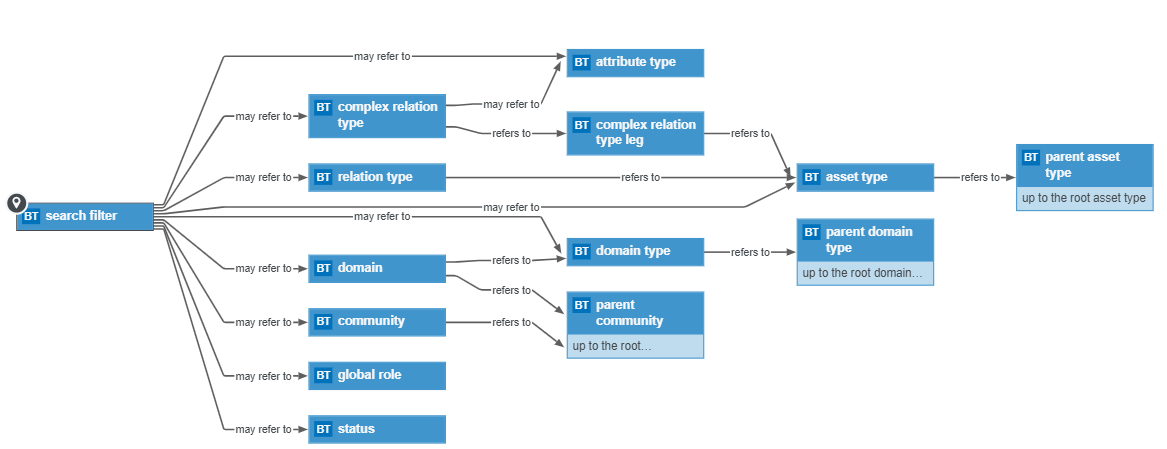
Search filter
|
Any object referenced in the search filter:
-
Asset types
- ID
- Name
- Description
- Parent asset types, up to the root asset type (for example Business asset)
-
- displayNameEnabled
- ratingsEnabled
- Asset type groups and their assignment
-
Characteristic types
-
Attribute types
- ID
- Name
- Description
-
Attribute type kind and its properties
|
Date
|
None
|
|
Multiple selection
(Multi value list)
|
Allowed values
Warning The list of allowed values is overwritten in the target environment, so it may remove values.
|
|
Numeric
|
|
|
Script
|
Language.
Note This field is only used for validation rule assets.
|
|
Selection
(single value list)
|
Allowed values (adding values, AND removals)
|
|
Text
|
Plain text
|
|
True/False
(boolean)
|
Metric
|
-
Relation types
- ID
- Description
- Role
- Co-role
-
Head asset type
- ID
- Name
- Description
- Parent asset types, up to the root asset type (for example Business asset)
-
- displayNameEnabled
- ratingsEnabled
- Asset type groups and their assignment
-
Tail asset type
- ID
- Name
- Description
- Parent asset types, up to the root asset type (for example Business asset)
-
- displayNameEnabled
- ratingsEnabled
- Asset type groups and their assignment
-
Complex relation types
- ID
- Name
- Description
-
-
Attribute types
- ID
- Name
- Description
-
Attribute type kind and its properties
|
Date
|
None
|
|
Multiple selection
(Multi value list)
|
Allowed values
Warning The list of allowed values is overwritten in the target environment, so it may remove values.
|
|
Numeric
|
|
|
Script
|
Language.
Note This field is only used for validation rule assets.
|
|
Selection
(single value list)
|
Allowed values (adding values, AND removals)
|
|
Text
|
Plain text
|
|
True/False
(boolean)
|
Metric
|
- Minimum cardinality
- Maximum cardinality
-
- Comments
-
-
Domains
- ID
- Name
- Description
- Exclude from Autohyperlinking
-
-
- Roles
-
|