The Notification Center allows you to view and manage notifications in your Collibra Platform. From the Notification Center, you can:
- Review notifications that require your attention.
- Quickly access relevant information, such as asset pages or assessments.
- Flag important notifications.
- Mark notifications as read or unread.
For a list of the notifications available in the Notification Center, go to About notifications
Navigate the Notification Center
You can navigate to the Notification Center by following steps below:
- Click
 in the navigation bar at the top of your screen. Your last 20 notifications are shown.
 -
Click View All Notifications.
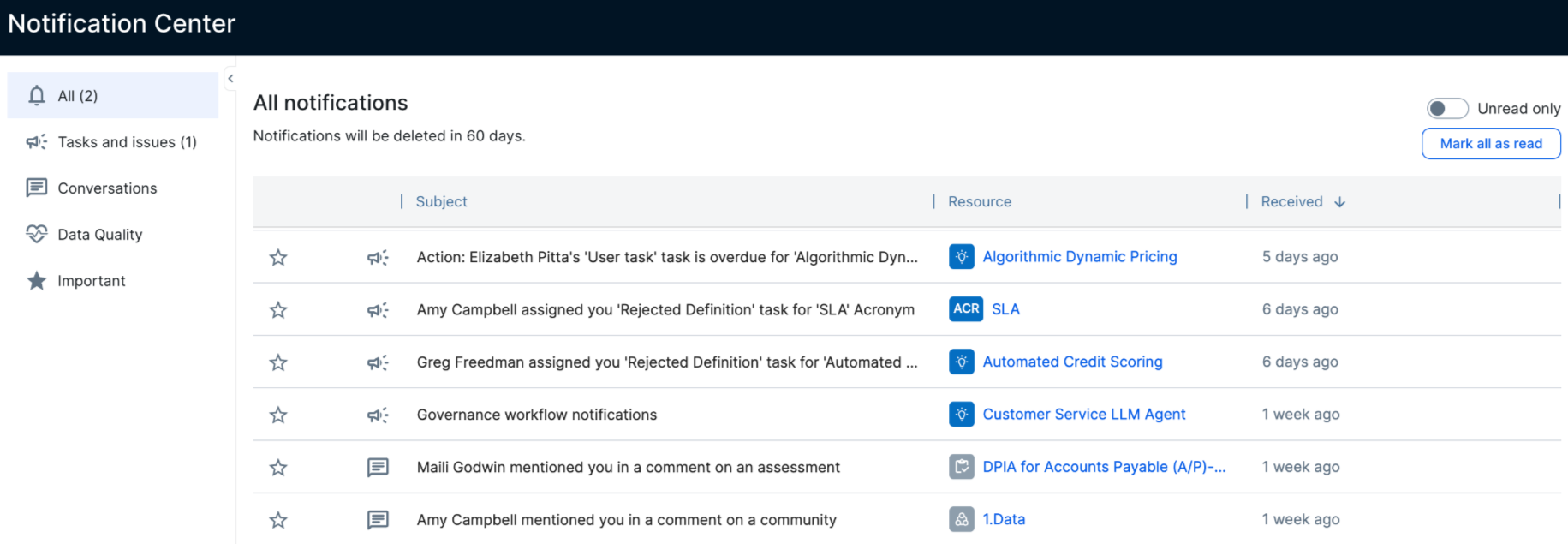
The Notification Center is comprised of 5 tabs:
| Tab | Description |
|---|---|
| All |
All of your Collibra notifications in the last 60 days. |
| Tasks and issues |
Tasks that have been assigned to you in Collibra within the last 60 days. These tasks include assessment assignments and sign-on/off activities for AI use cases. Note Workflow task notifications are disabled by default. Update the Customizable email notifications flag to False in Console to receive notifications for out-of-the-box workflows. However, enabling this feature removes access to custom workflow email templates and email batch scheduling. You must add the Notification API to your workflows that use custom email templates to continue using them.
|
| Conversations | All comments made in Collibra that you have been mentioned (@) in or responses in threads that you participated in within the last 60 days. |
| Data Quality | Data Quality & Observability notifications about job status, rule violations, and the success or failure of both custom and adaptive monitoring rules. |
| Important |
All of the notifications that you have marked as Important. Note These notifications remain in the Notification Center as long as they are marked as Important. If you remove the Important star, they will be deleted when or if they are older than 60 days. |
When you click on a Notification Center tab, you can perform any of the following actions:
- Use the toggle at the top of the tab to filter notifications by All or Unread only.
- Click the circle next to each notification to mark a notification as Read or Unread.
- Click on a row to view the notification details. You can then click the View button or the Resource link to go to the resource or task you were assigned.
Note If a task has already been completed, canceled, or reassigned, either by you or another user:
- The task is automatically marked as Read.
- When you click on a task row, the status of the task is shown in the side panel.
- Click
 to mark a notification as Important.
What's next
While you always receive notifications in the Notification Center, you can control what kind of email notifications you want to receive in your profile settings.