Collibra DQ Integrations allow DQ admin users to synchronize metadata from Data Quality & Observability Classic into Collibra Platform. You can use the Integration Configuration wizard for a guided mapping of objects between Collibra DQ and Collibra Platform in only a few clicks. When you integrate Collibra DQ metadata into Collibra Platform, relations between your DQ rules and the tables and columns they govern are automatically established.
By using the Integrations page, you can achieve the following benefits:
- Broader data sharing between platforms to include not only user defined rules but also adaptive rules, shapes, schema, source, record, pattern, outlier, and duplicate findings along with their scores.
- Automated synchronization between integrated platforms based on job execution and job scheduling.
- Simplified configuration and maintenance of the integration.
Prerequisites
- Your Data Quality & Observability Classic and Collibra Platform versions are 2025.02 or newer.
- You have an Admin role in Data Quality & Observability Classic to use the configuration wizard.
- You have an Admin or Dataset Manager role in Data Quality & Observability Classic to enable or disable individual datasets for integration.
- Your Collibra Platform profile must have Sysadmin and DataSteward global roles to manage all assets and objects of the integration.
- You have an aggregation path set for your Data Quality Rule in Collibra Platform
 Settings Operating model Data quality rules.
Version compatibility
The following table shows the compatibility of Collibra Platform and Data Quality & Observability Classic versions, including the available features when the minimum version requirements between the two platforms are met.
| Available features and additional details | Collibra Platform minimum version | Data Quality & Observability Classic minimum version |
|---|---|---|
| When you delete a dataset from Data Quality & Observability Classic, the system now automatically removes the corresponding integration assets (job asset, score domain, and rules domain) from Collibra Platform instances. | 2026.04 | 2026.04 |
| When you delete a rule in Data Quality & Observability Classic, it is marked as "Deleted" in Collibra Platform instead of "Suppressed." | 2026.03 | 2026.03 |
| Support for the definition of custom aggregation paths in the Collibra Platform operating model to allow you to view data quality scores for assets other than databases, schemas, tables, and columns. | 2024.10 | 2024.07 |
Note This table is not intended to provide an exhaustive list of available features. Rather, it is meant to highlight the required versions to be able to use some of the most important features. For bug fixes and other feature enhancements, see the release notes.
Integrations
From the Integrations page in the Admin Console, you can add and manage integrations between Data Quality & Observability Classic and Collibra Platform. You can conveniently switch integrations between Collibra DQ and Collibra Platform instances on and off, and find an overview of the status of all datasets with an attempted or completed integration.
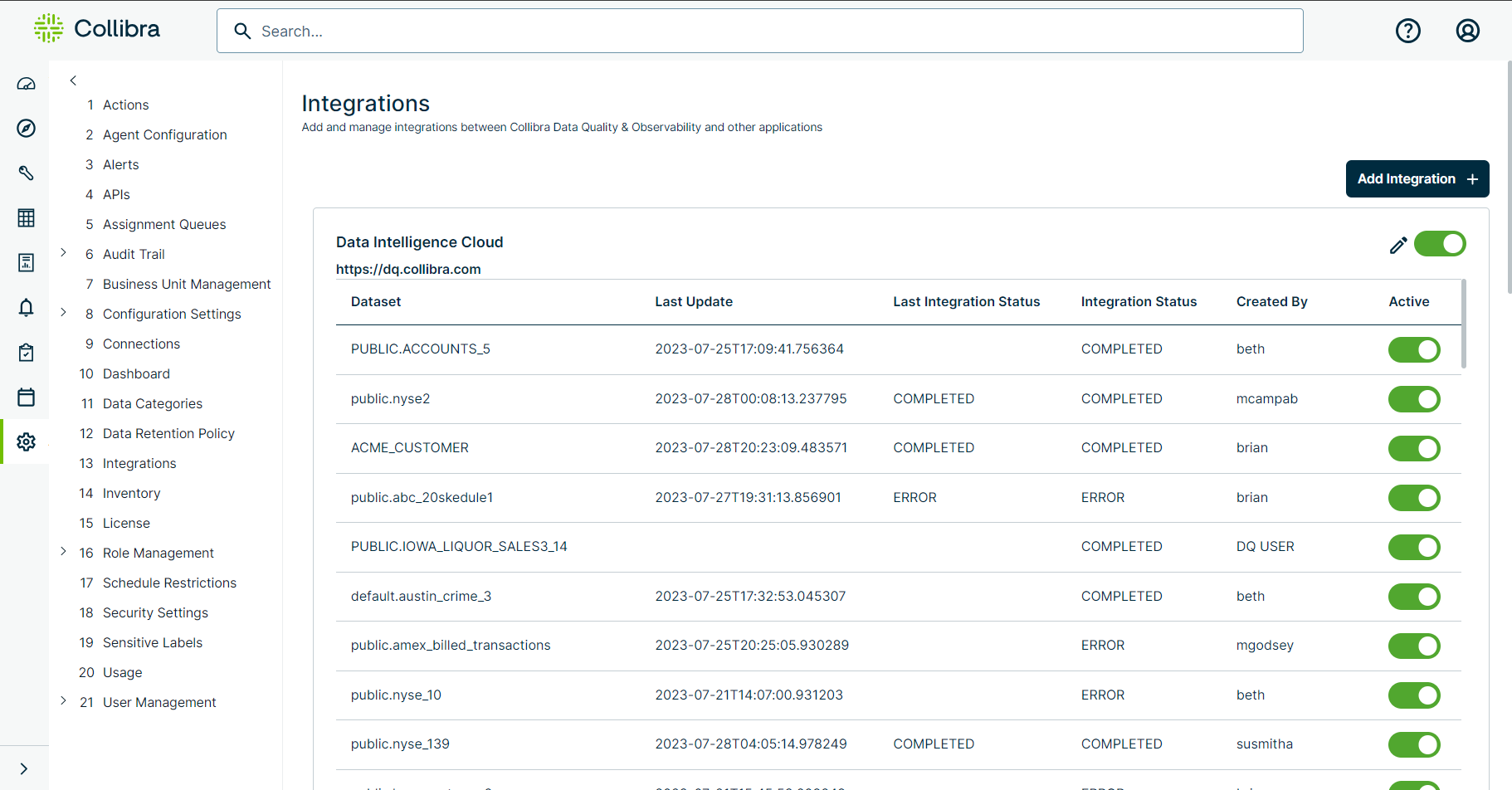
The following table describes each column of the dataset integration status table on the Integrations page.
| Column | Description |
|---|---|
| Dataset | The name of the Collibra DQ dataset whose metadata integrated into Collibra Platform. |
| Last Update | The timestamp of the most recent integration of a given dataset in date-time format. For example, 2023-07-24T11:12:35.461612. |
| Last Run Status | Indicator of whether the last run passed the threshold for quality dataset global score. |
| Last Integration Status | The status of the last attempt to send metadata to Collibra Platform. |
| Integration Status | The current status of the integration of your dataset. |
| Created By | The username of the user who integrated a dataset. |
| Active | Shows whether a dataset can actively integrate into Collibra Platform. |
Known limitations
- Because data quality for Table assets in Collibra Platform is calculated based on the Data Quality Job asset, the data quality dimension cards are not visible on the Quality tab because the relation to DQ dimensions does not exist on DQ Job assets.
- Rows Passed/Rows Failed do not populate on the integration.
- Rules nested under the Data Quality Job are not visible on the Table asset.