You can open a dashboard from multiple locations in the platform, depending on your configurations.
Ways to open a dashboard
- Main menu or browse pane: These locations are available regardless of platform configurations. You can only see dashboards in the browse pane if you have permission to view any dashboards.
- Homepage: You can open a dashboard directly from a dashboard card on the homepage if the Homepage setting enabled and you have Dashboard card on the homepage. If the homepage is disabled, Collibra automatically opens your last visited dashboard or a default dashboard if you haven't visited any.
- Navigation pane: Use the navigation pane on the left to switch between dashboards.
Open a dashboard from the main menu
Prerequisites
- You have a global role that has the View Dashboards global permission.
Steps
-
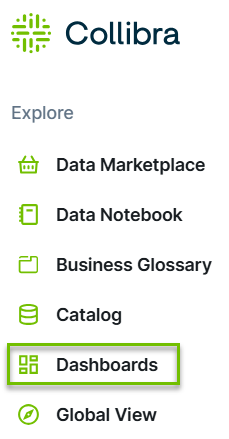
On the main toolbar, click
 →
Dashboards.
→
Dashboards. - Click the name of the dashboard you want to open.
Open a dashboard from the Browse pane
Prerequisites
- You have a global role that has the View Dashboards global permission.
Steps
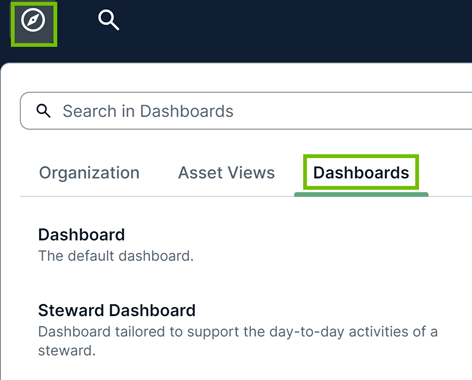
- On the main toolbar, click
 .
.
The browse pane appears. - On the Dashboard tab, click the name of the dashboard you want to open.Tip You can search for the Dashboard using the search box within the browse pane.
Open a dashboard from the homepage
Prerequisites
- You have a global role that has the View Dashboards global permission.
- To open a dashboard from the homepage, you must have the Homepage setting enabled and the Dashboard card on the homepage.
Steps
- Sign in to Collibra Platform.
- On the homepage, click the name of the dashboard you want to open.

Open a dashboard with the homepage disabled
Prerequisites
- You have a global role that has the View Dashboards global permission.
Steps
If the homepage is disabled, Collibra automatically opens a dashboard when you sign in or when you click the application logo. Alternatively, you can open a dashboard from the Dashboards tab in the browse pane.
In this view, you can open other dashboards through the following methods:
- The dashboard tab bar: Shows up to 5 dashboards. Pinned dashboards appear first and are in alphabetical order, followed by unpinned dashboards. If the active dashboard isn't among the first 4 dashboards, it replaces the fifth dashboard.

- The More menu: Shows all the remaining dashboards.
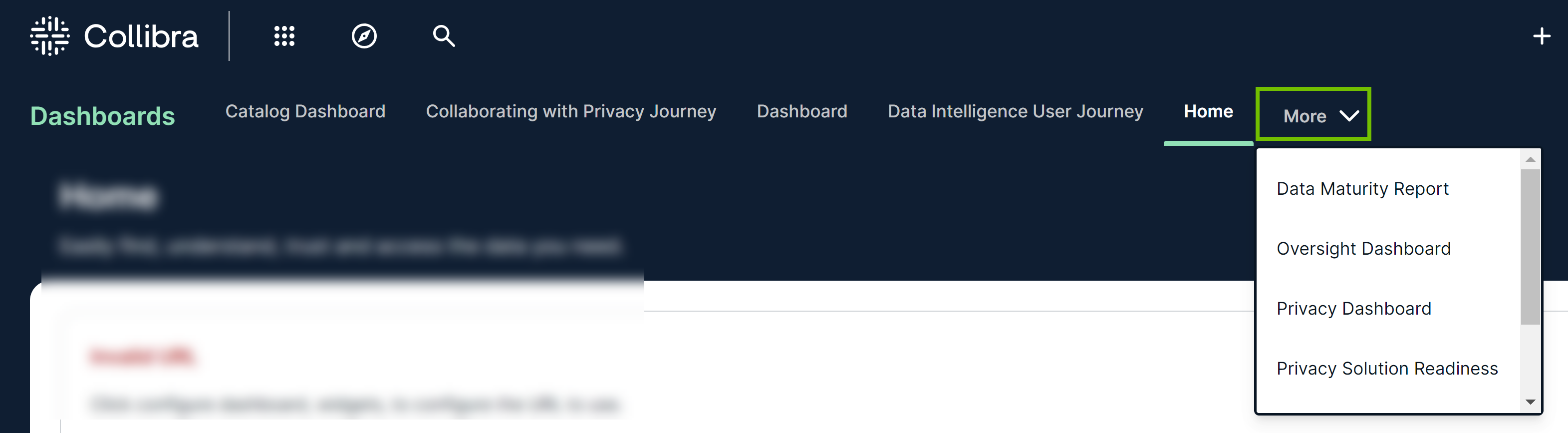
Note If you never visited a dashboard, the default dashboard is opened by default. Otherwise, the dashboard you last visited is opened.
Open a dashboard with the dashboard navigation pane enabled
Prerequisites
- You have a global role that has the View Dashboards global permission.
- To open a dashboard from the navigation pane, you must have the Dashboard Ordering setting enabled.
Steps
- Open the navigation pane on the left.
- Click the name of the dashboard you want to open.

Bookmarks
You can bookmark dashboards to the Favorites section of the navigation pane for quicker access. Bookmarked dashboards are saved to your private account. No special permissions are required to bookmark dashboards.
- To bookmark a dashboard, click
 next to the dashboard in the dashboard navigation pane, or click on the dashboard. The dashboard moves to the Favorites section, above the Dashboards section in the dashboard navigation pane.
 - To reorder your bookmarked dashboards, drag and drop them in the Favorites section.
- To remove a bookmark from a dashboard, click next to the dashboard again in the dashboard navigation pane or on the dashboard.
Depending on your permissions, you can modify a dashboard by using the toolbar on the dashboard or modify multiple dashboards by using the Manage Dashboards page in the dashboard navigation pane. For more information, go to Edit a dashboard.