Transformation logic shows you the exact source code used to move or change your data. You can use this feature to trace data flows and find specific code fragments quickly. Collibra Data Lineage supports the most commonly used transformations.
To view the code for any table or column, right-click on a table or column in your lineage diagram, and then select Transformations (IN) to see code coming into the object, or Transformations (OUT) to see code going out.
The
- The name of the source code fragment. On the Sources tab page, you can see the analysis log files of this source code fragment.
- If a table or column has more than one transformation, there are tabs for each source code fragment.
- The source code of the fragment. The source code that is relevant for the selected column or table is highlighted.
For example, you want to see the outgoing transformations of column A to columns B and C. When you right-click column A and then click Transformations (OUT), you see that there are two tabs containing source code. The first tab shows the outgoing source code from column A to column B. The second tab shows the source code from column A to column C.
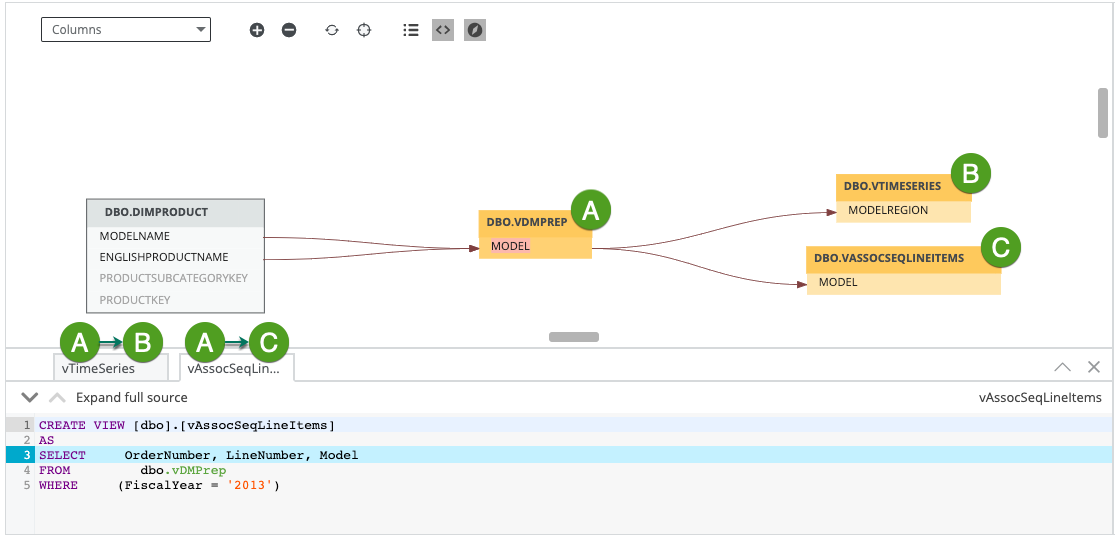
Note For Collibra Data Lineage to correctly highlight the transformation logic, as indicated by the blue highlighting in the previous image, we strongly recommend that your SQL files have Unix line endings. Non-Unix line endings, for example Carriage Return (CR) and Line Feed (LF) line breaks, do not influence the extracted lineage and can result in incorrect highlighting.