Overview and diagram view
The lineage harvester collects Power BI metadata and sends it to the Collibra Data Lineage service instances. Collibra processes the metadata and creates new Power BI assets and relations in Data Catalog. You can see them on the asset page overview or visualize them in a diagram or in a technical lineage.
- The assets have the same names as their counterparts in Power BI. Full names and Display names cannot be changed in Data Catalog.
- Asset types are only created if you have all specific Power BI and Data Catalog permissions.
- The Power BI assets are created in the domain (or domains) that you specify in the lineage harvester configuration file.
- Relations that were created between Power BI assets and other assets via a relation type in the Power BI operating model, are deleted upon synchronization. The same is true of any attribute types in the operating model that you add to Power BI assets. To ensure that the characteristics you add to Power BI assets are not deleted upon synchronization, be sure to use characteristics that are not part of the Power BI operating model.
The following image shows the relations between Power BI asset types.
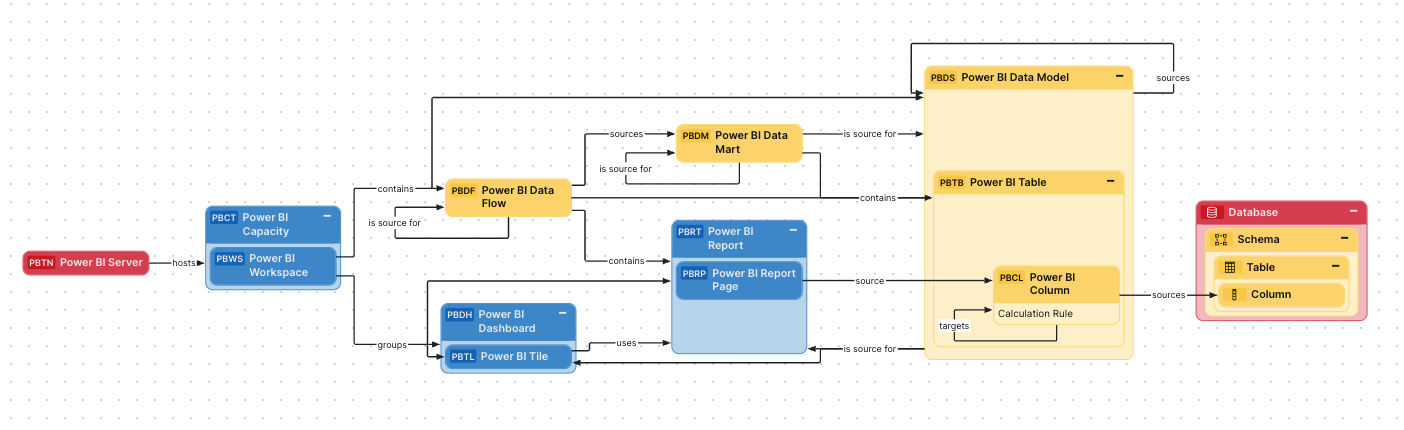
Harvested metadata per asset type
This table shows the harvested Power BI metadata for each Power BI asset type.
Note The metadata that is shown on the assets' pages depends on the asset type's assignment. As a result, you might not see all harvested metadata on the asset's page by default.
Additional information
For the Owner in source attribute, the following rules apply:
- If the system creates a
- If the user who created a
URLs to reports and dashboards that can't be found in Power BI
If you add a report or dashboard to an app in Power BI, what actually happens is that a copy of the original report or dashboard is created in the app. The original report or dashboard still exists outside of the app. The URL on the corresponding asset page in Collibra links directly to the copied report or dashboard in the app. However, if the name of the original report or dashboard changes, or if it has been deleted in Power BI, the copies in the app remain unchanged. Therefore, to remedy what would otherwise be links to outdated copies of reports or dashboards in Power BI, the URLs on the asset pages instead link to the Power BI app.
Example of ingested Power BI metadata
The following image shows an example structure after Power BI ingestion.
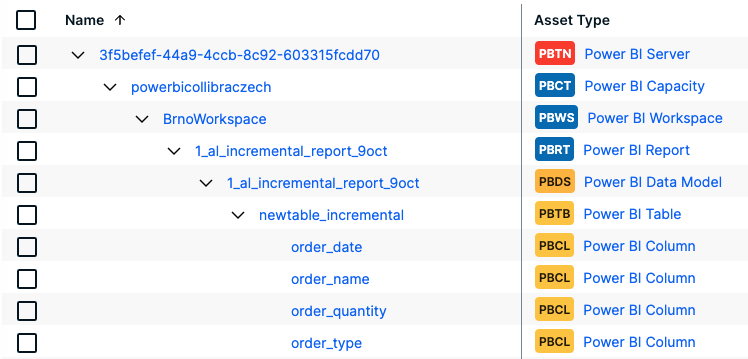
Recommended hierarchy within a domain
You can enable hierarchies for the domain (or domains) in which your Power BI assets are ingested. Doing so makes it easier to understand the relation between your Power BI assets, when viewing the assets on the domain page.
Follow these steps to enable and configure the recommended hierarchy.
Steps
- Open the domain page of the relevant BI Catalog domain.
- On the content toolbar, click
 .
.
The Configure Hierarchy dialog box appears. - Select Enable Hierarchy.
- Select Multipath.
- Start typing and select each of the following relation types:
- Server hosts Business Dimension
- BI Folder assembles BI Folder
- BI Folder contains Data Asset
- Business Dimension groups Report
- BI Report source Data Asset
- Data Model contains Data Entity
- BI Data Model is source for BI Data Model
- Data Entity contains Data Attribute
- Report groups Report
- Click Apply.
- In an asset view, if any asset is deleted, for example via synchronization or manual deletion, the view is recreated and the hierarchy is lost. In this case, you can again enable and configure the recommended hierarchy.
- When viewing the hierarchy for a community or domain, if the parent of a node that is in the community or domain belongs to a different community or domain, that node is not shown in the hierarchy.
Create a Power BI operating model diagram view
You can create a Power BI-specific diagram view, to visualize the operating model. The following procedure provides instruction on how to quickly create a new diagram view by copying and pasting the JSON code in the diagram view text editor.
Steps
- Open the asset page.
- Click the
Diagram tab.
The diagram is shown in the default diagram view. - Click
 to add a new view.
 - Select the Text option below the diagram view name.
The diagram view text editor is shown. - Copy the code from the Show JSON code section below and paste it in the diagram view text editor.
- Click Save.
- Edit the name and description of the diagram view as needed.
{
  "nodes": [
    {
      "id": "Power BI Server",
      "type": {
        "id": "00000000-0000-0000-0000-100000000001"
      },
      "fields": []
    },
    {
      "id": "Power BI Capacity",
      "type": {
        "id": "00000000-0000-0000-0000-100000000002"
      }
    },
    {
      "id": "Power BI Workspace",
      "type": {
        "id": "00000000-0000-0000-0000-100000000003"
      }
    },
    {
      "id": "Power BI Dashboard",
      "type": {
        "id": "00000000-0000-0000-0000-100000000004"
      }
    },
    {
      "id": "Power BI Report",
      "type": {
        "id": "00000000-0000-0000-0000-100000000006"
      }
    },
    {
      "id": "Power BI Tile",
      "type": {
        "id": "00000000-0000-0000-0000-100000000005"
      }
    },
    {
      "id": "Power BI Data Model",
      "type": {
        "id": "00000000-0000-0000-0000-100000000007"
      }
    },
    {
      "id": "Power BI Data Flow",
      "type": {
        "id": "00000000-0000-0000-0000-100000000010"
      }
    },
    {
      "id": "Power BI Table",
      "type": {
        "id": "00000000-0000-0000-0000-100000000009"
      }
    },
    {
      "id": "Power BI Column",
      "type": {
        "id": "00000000-0000-0000-0000-100000000008"
      },
      "fields": [
        {
          "key": "stringAttribute_00000000-0000-0000-0000-000000003117",
          "label": "Calculation Rule"
        }
      ]
    },
    {
      "id": "Column",
      "type": {
        "id": "00000000-0000-0000-0000-000000031008"
      }
    },
    {
      "id": "Table",
      "type": {
        "id": "00000000-0000-0000-0000-000000031007"
      }
    },
    {
      "id": "Schema",
      "type": {
        "id": "00000000-0000-0000-0001-000400000002"
      }
    },
    {
      "id": "Database",
      "type": {
        "id": "00000000-0000-0000-0000-000000031006"
      }
    },
    {
      "id": "Power BI Data Mart",
      "type": {
        "id": "00000000-0000-0000-0000-100000000052"
      }
    },
    {
      "id": "Power BI Report Page",
      "type": {
        "id": "00000000-0000-0000-0000-100000000053"
      }
    }
  ],
  "edges": [
    {
      "from": "Power BI Server",
      "to": "Power BI Capacity",
      "label": "",
      "style": "arrow",
      "type": {
        "id": "00000000-0000-0000-0000-120000000000"
      },
      "roleDirection": true
    },
    {
      "from": "Power BI Capacity",
      "to": "Power BI Workspace",
      "label": "",
      "style": "boxing",
      "type": {
        "id": "00000000-0000-0000-0000-120000000001"
      },
      "roleDirection": true
    },
    {
      "from": "Power BI Workspace",
      "to": "Power BI Dashboard",
      "label": "",
      "style": "arrow",
      "type": {
        "id": "00000000-0000-0000-0000-120000000002"
      },
      "roleDirection": true
    },
    {
      "from": "Power BI Workspace",
      "to": "Power BI Report",
      "label": "",
      "style": "arrow",
      "type": {
        "id": "00000000-0000-0000-0000-120000000002"
      },
      "roleDirection": true
    },
    {
      "from": "Power BI Workspace",
      "to": "Power BI Tile",
      "label": "",
      "style": "arrow",
      "type": {
        "id": "00000000-0000-0000-0000-120000000002"
      },
      "roleDirection": true
    },
    {
      "from": "Power BI Workspace",
      "to": "Power BI Data Model",
      "label": "",
      "style": "arrow",
      "type": {
        "id": "00000000-0000-0000-0000-120000000014"
      },
      "roleDirection": true
    },
    {
      "from": "Power BI Workspace",
      "to": "Power BI Data Flow",
      "label": "",
      "style": "arrow",
      "type": {
        "id": "00000000-0000-0000-0000-120000000014"
      },
      "roleDirection": true
    },
    {
      "from": "Power BI Dashboard",
      "to": "Power BI Tile",
      "label": "",
      "style": "boxing",
      "type": {
        "id": "00000000-0000-0000-0000-120000000007"
      },
      "roleDirection": true
    },
    {
      "from": "Power BI Data Model",
      "to": "Power BI Tile",
      "label": "",
      "style": "arrow",
      "type": {
        "id": "00000000-0000-0000-0000-120000000013"
      },
      "roleDirection": true
    },
    {
      "from": "Power BI Data Model",
      "to": "Power BI Report",
      "label": "",
      "style": "arrow",
      "type": {
        "id": "00000000-0000-0000-0000-120000000013"
      },
      "roleDirection": true
    },
    {
      "from": "Power BI Data Flow",
      "to": "Power BI Report",
      "label": "",
      "style": "arrow",
      "type": {
        "id": "00000000-0000-0000-0000-000000007196"
      },
      "roleDirection": true
    },
    {
      "from": "Power BI Data Flow",
      "to": "Power BI Table",
      "label": "",
      "style": "arrow",
      "type": {
        "id": "00000000-0000-0000-0000-120000000014"
      },
      "roleDirection": true
    },
    {
      "from": "Power BI Tile",
      "to": "Power BI Report",
      "label": "",
      "style": "arrow",
      "type": {
        "id": "00000000-0000-0000-0000-120000000007"
      },
      "roleDirection": true
    },
    {
      "from": "Power BI Data Flow",
      "to": "Power BI Data Flow",
      "label": "",
      "style": "arrow",
      "type": {
        "id": "00000000-0000-0000-0000-120000000022"
      },
      "roleDirection": true
    },
    {
      "from": "Power BI Column",
      "to": "Column",
      "label": "",
      "style": "arrow",
      "type": {
        "id": "00000000-0000-0000-0000-000000007069"
      },
      "roleDirection": false
    },
    {
      "from": "Column",
      "to": "Table",
      "label": "",
      "style": "boxed",
      "type": {
        "id": "00000000-0000-0000-0000-000000007042"
      },
      "roleDirection": true
    },
    {
      "from": "Table",
      "to": "Schema",
      "label": "",
      "style": "boxed",
      "type": {
        "id": "00000000-0000-0000-0000-000000007043"
      },
      "roleDirection": false
    },
    {
      "from": "Schema",
      "to": "Database",
      "label": "",
      "style": "boxed",
      "type": {
        "id": "00000000-0000-0000-0000-000000007024"
      },
      "roleDirection": false
    },
    {
      "from": "Power BI Data Flow",
      "to": "Power BI Data Mart",
      "label": "",
      "style": "arrow",
      "type": {
        "id": "00000000-0000-0000-0000-120000000022"
      },
      "roleDirection": false
    },
    {
      "from": "Power BI Data Mart",
      "to": "Power BI Data Mart",
      "label": "",
      "style": "arrow",
      "type": {
        "id": "00000000-0000-0000-0000-120000000022"
      },
      "roleDirection": true
    },
    {
      "from": "Power BI Data Mart",
      "to": "Power BI Table",
      "label": "",
      "style": "arrow",
      "type": {
        "id": "00000000-0000-0000-0000-120000000014"
      },
      "roleDirection": true
    },
    {
      "from": "Power BI Data Mart",
      "to": "Power BI Data Model",
      "label": "",
      "style": "arrow",
      "type": {
        "id": "00000000-0000-0000-0000-120000000022"
      },
      "roleDirection": true
    },
    {
      "from": "Power BI Data Model",
      "to": "Power BI Data Model",
      "label": "",
      "style": "arrow",
      "type": {
        "id": "00000000-0000-0000-0000-120000000022"
      },
      "roleDirection": false
    },
    {
      "from": "Power BI Table",
      "to": "Power BI Data Model",
      "label": "",
      "style": "boxed",
      "type": {
        "id": "00000000-0000-0000-0000-000000007046"
      },
      "roleDirection": true
    },
    {
      "from": "Power BI Column",
      "to": "Power BI Table",
      "label": "",
      "style": "boxed",
      "type": {
        "id": "00000000-0000-0000-0000-000000007047"
      },
      "roleDirection": false
    },
    {
      "from": "Power BI Column",
      "to": "Power BI Column",
      "label": "",
      "style": "arrow",
      "type": {
        "id": "00000000-0000-0000-0000-000000007069"
      },
      "roleDirection": true
    },
    {
      "from": "Power BI Report",
      "to": "Power BI Report Page",
      "label": "",
      "style": "boxing",
      "type": {
        "id": "00000000-0000-0000-0000-120000000004"
      },
      "roleDirection": true
    },
    {
      "from": "Power BI Report Page",
      "to": "Power BI Column",
      "label": "",
      "style": "arrow",
      "type": {
        "id": "00000000-0000-0000-0000-120000000013"
      },
      "roleDirection": false
    }
  ],
  "showOverview": false,
  "enableFilters": true,
  "showLabels": true,
  "showFields": true,
  "showLegend": false,
  "showPreview": true,
  "visitStrategy": "directed",
  "layout": "HierarchyLeftRight",
  "maxNodeLabelLength": 50,
  "maxEdgeLabelLength": 30,
  "layoutOptions": {
    "compactGroups": false,
    "componentArrangementPolicy": "topmost",
    "edgeBends": true,
    "edgeBundling": true,
    "edgeToEdgeDistance": 5,
    "minimumLayerDistance": "auto",
    "nodeToEdgeDistance": 5,
    "orthogonalRouting": true,
    "preciseNodeHeightCalculation": true,
    "recursiveGroupLayering": true,
    "separateLayers": true,
    "webWorkers": true,
    "nodePlacer": {
      "barycenterMode": true,
      "breakLongSegments": true,
      "groupCompactionStrategy": "none",
      "nodeCompaction": false,
      "straightenEdges": true
    }
  }
}