Nodes and edges are the fundamental building blocks of diagrams and diagram views:
- In diagrams, nodes are rectangles or circles that represent, respectively, assets or complex relations. Edges represent relations between assets or between assets and complex relations.
- In diagram views, nodes are rectangles or circles that represent, respectively, asset types or complex relation types. Edges represent relation types between asset types or between asset types and complex relation types.
Both nodes and edges can be represented in different ways in diagrams and diagram views.
Relations connect assets, or assets and complex relations. In diagrams, this is represented by edges that connect nodes. Each node can have incoming and outgoing edges:
- An edge of a node is incoming if that node is the "to" node of the edge. This depends on the relation type and the direction of the edge:
- The node is the tail side of the relation type, and the edge has the role direction.
- The node is the head side of the relation type, and the edge has the co-role direction.
- An edge of a node is outgoing if that node is the "from" node of the edge. This depends on the relation type and the direction of the edge:
- The node is the head side of the relation type, and the edge has the role direction.
- The node is the tail side of the relation type, and the edge has the co-role direction.
Consider the diagram below:

- The red node represents a Tableau Data Source asset.
- The blue node represents a Tableau Workbook asset.
- The arrow edge between the nodes represents a relation of the type "Tableau Data Source is source of / is source for Tableau Workbook".
- The edge is outgoing for the Tableau Data Source node.
- The edge is incoming for the Tableau Workbook node.
Node and edge styles
Edges represent relations, which in turn describe a link between assets. To represent the meaning of those links in a diagram, edges can be represented in different ways. Depending on the meaning of the relation, you can choose which edge style suits best.
- Arrow: The most basic way to represent an edge is by means of an arrow. This representation is ideal for visualizing flows and causal relations.Example
-
Boxed and boxing: Many relation types are used to describe a part-whole relation, such as "Tableau Project groups / is grouped by Report". For that reason, you can also represent the relation between those assets as boxing nodes and boxed nodes.
A node that has an outgoing edge of the boxing style, becomes a boxing node. For the boxed node, the same edge is an incoming edge of the boxed style. Additionally, one boxing node could contain several boxed nodes, which have edges of their own.
Boxing nodes can be expanded or collapsed:
- An expanded boxing node shows its boxed nodes.
You can collapse them by clicking in the upper right corner of the node.
 - A collapsed boxing node does not show its boxed nodes. As a consequence, if the hidden boxed nodes have arrow edges to nodes that are not contained by the boxing nodes, the diagram shows them as arrow edges of the boxing node.
You can expand them by clicking in the upper right corner of the node.
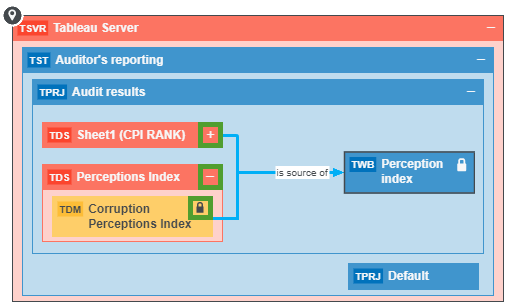
 - A locked node is a collapsed node that cannot be expanded.
You can recognize locked boxing nodes by the in the upper right corner. You can still explore the nodes to see the edges.
- An expanded boxing node shows its boxed nodes.
Duplicate nodes
In some cases, the same asset might be represented by more than one node. In other words, there are two nodes representing the same asset, on the same diagram. This can be caused by several of reasons, but the most common reason is that an asset matches more than one node of the diagram view.
A node in a diagram view represents an asset type or a complex relation type. In the result diagram, this node represents an asset of that asset type or an asset of a child asset type. As a result, if a diagram view contains a node for an asset type and a node for its child asset types, the result diagram may contain an asset of the child asset type that matches both nodes of the diagram view. Therefore, the asset node is duplicated.
Suppose the following situation:
- The Business Process asset type has two child asset types: Business Phase and Milestone.
- You have the following assets:
- Business Process asset: Define Strategy
- Business Phase asset: Plan
- Milestone asset: Validate Strategy
- Your assets have the following relations:
- Plan Business Phase has subprocess Define Strategy Business Process
- Plan Business Phase has Milestone: Validate Strategy Milestone
- Define Strategy Business Process Next: Validate Strategy Milestone
- The diagram view configuration is the following:
- The Business Process node has a boxing edge: Business Process has subprocess Business Phase.
- The Business Phase node has two boxing edges:
- Business Phase has subprocess Business Process 2
- Business Phase has Milestone
- Business Process 2 node has an arrow edge: Business Process 2 Next Business Process 2.
This leads to the following diagram view:
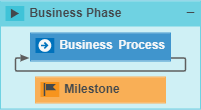
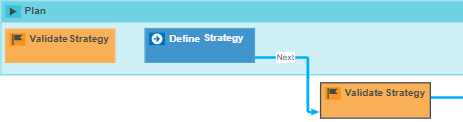
Because the Business Process asset type has two child asset types that are also on the diagram view, the result diagram can have duplicate nodes. In the example below, the Validate Strategy asset, of the Milestone asset type, is represented by two separate nodes.
Because Milestone is a child asset type of Business Process, Milestone assets can match both Milestone nodes and Business Process nodes. Furthermore, the Validate Strategy Milestone asset has two separate incoming edges:
- The Plan Business Phase has Validate Strategy Milestone, with the boxing style.
- The Define Strategy Business Phase asset Next Validate Strategy, with the arrow style.
Therefore, the Validate Release Strategy Milestone node is duplicated:
Data quality scores
Diagrams show user-defined quality scores for assets that have quality measurements configured. The score and a trend indicator appear on the diagram node of the relevant asset.
The trend indicator shows the direction of quality change based on recent measurements:
- Improving: The quality score has increased.
- Declining: The quality score has decreased.
- Stable: The quality score has not changed significantly.
Note Quality scores are only shown for assets that have user-defined quality measurements configured. For more information, go to Data quality scores.
To show a data quality score on a diagram node:
-
Open the diagram for editing.
-
Select the node on which you want to show the data quality score.
-
In the Overlays section, add the quality aggregation path for the asset.
Note The aggregation path you select must match the aggregation path assigned to the asset type under Quality score aggregations in the operating model settings. The path can be for Collibra DQ or External DQ. For more information, go to About quality score aggregations.
Note The images in this topic are for illustration purposes only and may not reflect the current user interface.