Important
- This feature is available only in the latest UI.
- This feature is available only when you have an active integration with Data Quality & Observability (self-hosted).
You can re-run data quality jobs on Table assets when they are configured in Data Quality & Observability (self-hosted) to run on a schedule.
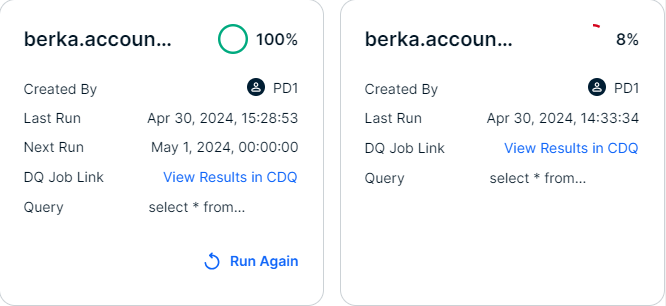
The following screenshot shows two data quality job tiles. The job represented in the tile on the left is configured in Data Quality & Observability (self-hosted) to run on a schedule, showing when the job will run next and allowing users to re-run it directly from the Data Quality Jobs modal. Since the job in the tile on the right is not scheduled, it only shows information from the previous run. The steps outlined in this guide only apply to scheduled jobs, such as the one on the left side of the screenshot.
Prerequisites
- You have a data quality job configured in Data Quality & Observability (self-hosted) to run on a schedule.
- You have a global role with the Product Rights > System administration global permission.
Steps
- In the global search box, enter the name of your Table asset, and then click it to open it. The Table asset page opens.
- In the At a glance sidebar, click View Monitoring. If the At a glance sidebar is hidden, click
 . The Data Quality Jobs modal appears.
- From a data quality job configured to run on a schedule, click Run Again. A success message appears.
- Click View Results in CDQ to navigate to the Findings page in Data Quality & Observability (self-hosted) to view the results of the job run. The Findings page in Data Quality & Observability (self-hosted) opens in a new tab.