Important Guardian Agents are available in private preview. Details in this topic are based on pre-release designs and an early build, and are subject to change before general availability.
A Guardian Agent is a runtime system that monitors an AI agent's actions against its Agent Contract, the combined set of rules that currently apply to that agent. Guardian evaluates each action the agent takes against the Agent Contract and records a verdict.
Guardian agents page
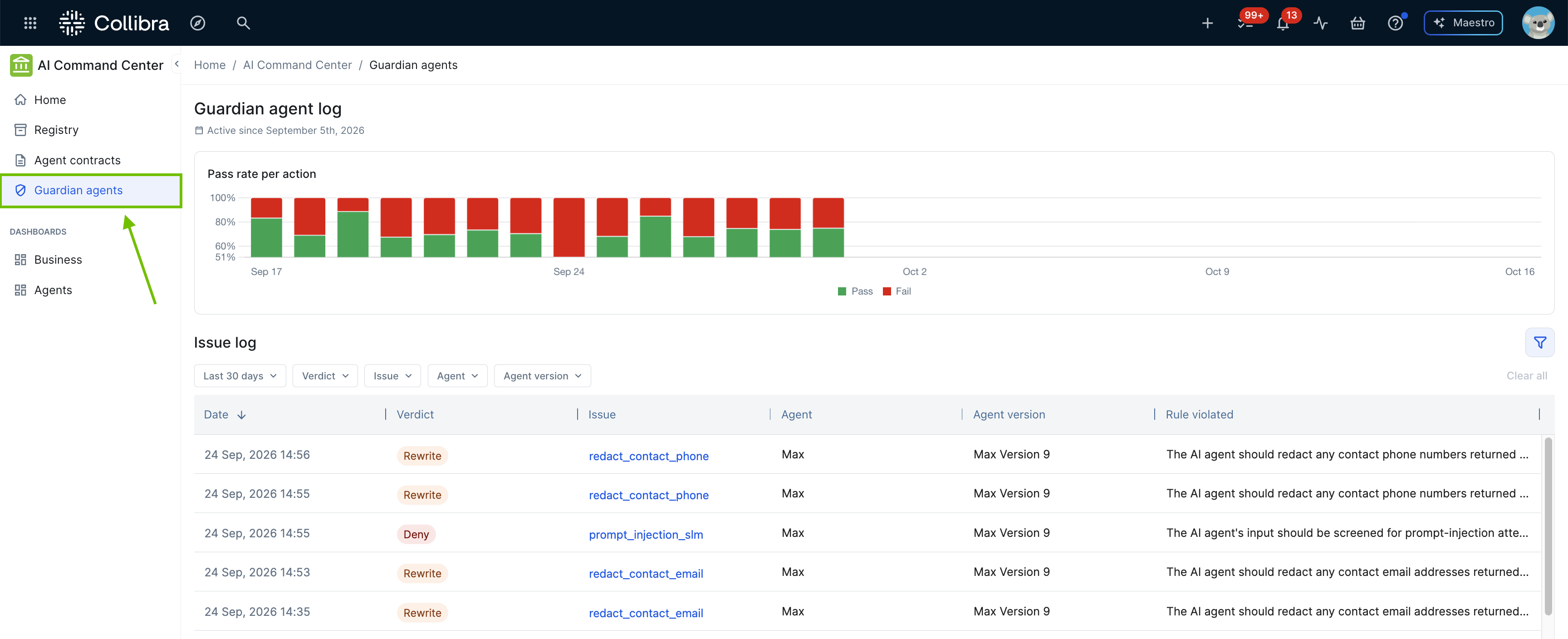
The Guardian agents page shows the Guardian agent log for your environment: a chart of the pass rate per action and an issue log of the verdicts Guardian has recorded.
Verdicts
Guardian records one of the following verdicts for each action it evaluates:
- Allow: The action doesn't violate the Agent Contract and executes normally. Allowed actions aren't shown in the issue log.
- Deny: The action is blocked and does not execute. The agent receives the message "Blocked by Guardian" followed by the reason, and its run continues.
- Escalate: The action is blocked, in the same way as Deny, because it needs human approval. The agent receives the message "Escalated by Guardian (pending approval)" followed by the reason. In this private preview, there's no approval step yet.
- Flag: The action executes, but is logged as a violation for review.
- Rewrite: The action's content is modified, for example to redact sensitive data, before it proceeds. If a Flag and a Rewrite both apply to the same action, the rewrite is applied and the flag is still recorded.
Guardian evaluates the rules at four points: the prompt going to the model, a tool call before it runs, a tool result coming back, and the final answer going to the user. A Deny or Escalate verdict has the following effect at each point:
- Prompt: The model isn't called.
- Tool call: The tool doesn't run, and the model receives an error message.
- Tool result: The tool has already run, but its result doesn't reach the model.
- Final answer: The answer is replaced.
The first matching Deny or Escalate rule decides the outcome, and Guardian stops evaluating further rules. If rules from different Agent Contracts conflict, the global Agent Contract takes precedence over a specialized one. Among rules at the same level, Deny takes precedence over Escalate, which takes precedence over Flag.
Enforce and monitor modes
Guardian runs in one of two enforcement modes. The person who runs the agent sets the mode for the agent's process, not an administrator in AI Command Center:
- Enforce: The default. Guardian applies its verdicts.
- Monitor: Guardian evaluates every action and records every decision, but doesn't apply Deny, Escalate, or Rewrite. The agent behaves as if it isn't guarded. In the issue log, a stopped action means that the action would have been stopped.
You set the mode in the enforcement_mode setting in the collibra-guardian.toml file in the agent's working directory, or in the COLLIBRA_GUARDIAN_ENFORCEMENT_MODE environment variable, which takes precedence over the file. The agent can't change its own mode. There's no per-rule mode. To roll out a rule gradually, set it to Flag first, and then change it to Deny. Each change creates a new version of the compiled rules.
Note The verdict names and their exact behavior are based on an early build and may change before general availability. A dedicated review surface for Escalate verdicts and an approval step, and a suggested-rule-change loop based on patterns across escalations, are both still being designed and aren't available in this private preview.
Note TBC - this section follows the Guardian code (Groundwork, 2026-10-22), which differs from earlier product messaging: Escalate blocks like Deny instead of only logging for review, and "block mode" is the enforce or monitor mode set by the agent's operator, not a setting in the product. Confirm both with dev, and confirm whether anyone is notified of an Escalate verdict, and whether the Guardian tab labels it.
Enabling Guardian for an agent
Switching Guardian on for your environment doesn't, by itself, start monitoring any particular agent. An agent only becomes actively guarded once all of the following are true:
- Guardian is switched on for the environment. In
 Settings, under AI Command Center, click the Guardian and contract tab, and switch on Guardian. For complete steps, go to Set up AI Command Center. This is an environment-wide switch: it makes Guardian available, but doesn't connect any agent to it. Because Guardian depends on Agent Contracts, switching on Guardian also switches on AI Agent contracts. Switching off Guardian hides the Guardian user interface, but doesn't stop Guardian from running. To stop it, remove the SDK from the agent's code.
 - The agent itself is connected to Guardian. This is a separate, per-agent step, done in the agent's own code or deployment, not from a setting in AI Command Center. It's either an SDK installed directly in the agent's code, or a Gateway proxy placed in front of an agent you can't modify directly. Either path extracts the agent's agent fingerprint, the technical profile of its tools, models, and prompts that Guardian needs in order to evaluate its actions. For more information, go to About Guardian Agents and Agent Contracts.
- An Agent Contract applies to the agent. The global agent contract applies automatically to every AI Agent asset, so this is usually already true. An agent can also have one or more specialized Agent Contracts related to it. For more information, go to About Agent Contracts.
- Guardian has compiled that Agent Contract into an enforcement bundle that's actively guarding the agent. This compilation happens automatically once the first two conditions are met, but it isn't instant. To compile the latest rules yourself, use Contract status on the Contract tab on AI Agent asset pages.
Because of this, the number of agents actually being monitored (Agents using Guardian on the Agent contracts page) can be much lower than the total number of AI Agent assets in your environment, even with Guardian switched on environment-wide. In a fresh private preview environment, expect most agents to still be in an earlier stage, not yet connected, not yet compiled, until they're individually onboarded.
Guardian tab
For an AI Agent asset with Guardian enabled, the asset page's Guardian tab shows the agent's action pass rate over time and a log of every action Guardian intervened on. For details, go to Guardian tab on AI Agent asset pages.
The same pass rate chart and issue log are also summarized across every agent with Guardian enabled, on the dedicated Guardian agents page, and its own summary cards for pass rate, open issues, and the number of agents using Guardian appear on the Agent contracts page.
Note TBC - an ROI dashboard for Guardian Agents is planned alongside the pass rate and issue log views, but isn't yet designed in detail. It may also be feature-flagged off during this private preview. Confirm before documenting it.
- Learn about the Guardian tab on AI Agent asset pages.
- Learn about the Contract tab on AI Agent asset pages.
- Learn more about the Agent Contract model.