If you have defined the semantic layer, you can map it to the physical layer using the Assistant page. There, you canmanually link the Column assets and Data Attribute assets.
Note If the New app experience setting is disabled, the menu item is called Semantic Assistant.
Manually map the physical layer
Prerequisites
- A semantic data model with Data Attribute assets has been defined.
- You have the required permissions.
- Ensure that your environment uses the latest user interface.
Steps
-
On the main toolbar, click
 →
Stewardship.
→
Stewardship. - Go to Semantic layer → Assistant.
If the New app experience setting is disabled, the menu item is called Semantic Assistant.
A page opens showing a data explorer on the left-hand side. The panel shows all available data sources in CPSH. - In the data explorer, complete the following steps to find the columns you want to link to Data Attribute assets.
- Expand the database and then the schema to show the available tables and views.
- Click the table or view to show the columns on the right-hand side.
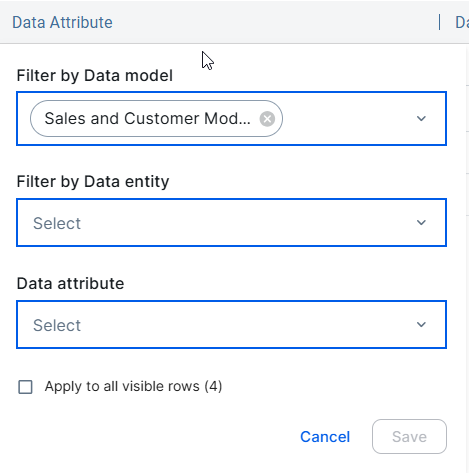
- For the column you want to map, double-click the Data Attribute cell.
A dialog box appears.When you ran the semantic mapping before, the same data model and entities used during the automatic mapping are already selected in the dialog box. If both a data model and data entities were selected, only the data entities are selected because the data model acts only as a filter in this case.
- Select one or more Data Attribute assets from the Data attribute drop-down list.
You can limit the available data attributes by filtering by data models or data entities. - Optionally, select the checkbox Apply to all visible rows to automatically map all columns to the selected Data Attributes.
- Click Save.
- The columns are linked to the data attributes with the Data Attribute represents / represented by Column relation.
- You can also see the connected Table and Column assets through the Semantic layer widget in the asset page and in the Semantic Models overview.
You can see the connected assets for Tables and Columns through the Semantic layer widget in the asset page and in the Data models overview.