Collibra Browser Extension is an extension for Chromium-based browsers such as Google Chrome and Microsoft Edge. It enables you to access the information in your Collibra Platform Self-Hosted via a context menu within Power BI, SAP Analytics Cloud, Tableau, and other web applications.
Note The current version of Collibra Browser Extension is 1.6.1.
About the Browser Extension
Collibra Browser Extension allows you to quickly search for definitions of business terms and acronyms and information about column and product names from any web page in your CPSH environment. This means that when you browse a page, you can easily find additional information about any text that is shown on the current page from your CPSH environment, without having to open the CPSH interface.
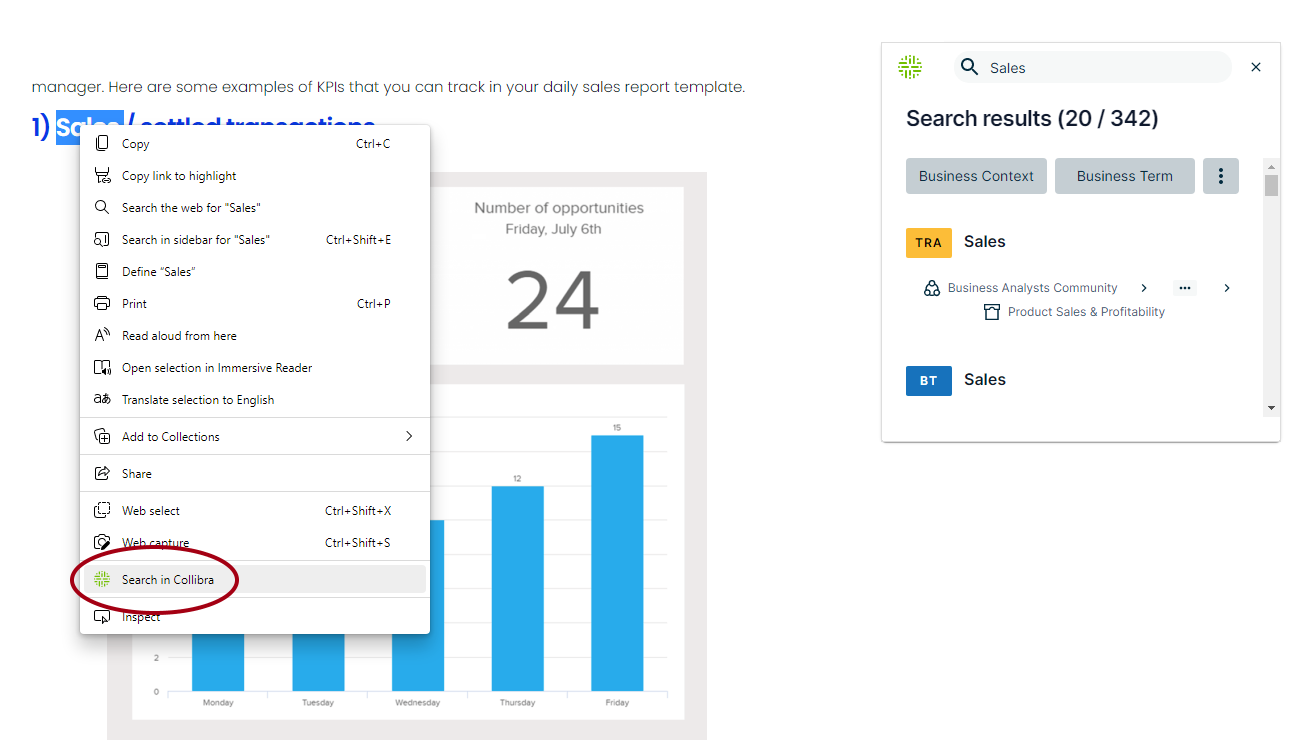
The Browser Extension also bridges the gap between your business intelligence (BI) tools and CPSH via auto-matching. This allows you to access relevant resource information directly from your browser.
Note The Browser Extension works on any page. However, if you want the Collibra Browser Extension overlay to appear on a page, you need to add a web domain. Clicking the overlay shows the resource information from CPSH that corresponds to the data you are viewing on the page.
How the Browser Extension communicates with CPSH
Collibra Browser Extension uses REST API to communicate with Collibra Platform Self-Hosted. When you sign in to CPSH using your web browser, a cookie is created and stored in your browser. The Browser Extension uses this cookie to identify and authenticate you when making requests to CPSH's REST API.
The Browser Extension itself doesn't handle the authentication process. Instead, it relies on the browser to provide one of the specific cookies ('JSESSIONID', '__Secure-Session-ID', or '__Host-Session-ID') from the configured Collibra Platform Self-Hosted URL. These cookies serve as proof of your authentication, allowing the Browser Extension to access the appropriate information and perform actions within CPSH.
All communication between the Browser Extension and CPSH's API occurs over HTTPS, using the Transport Layer Security (TLS) protocol.